
Sound Forge Pro stands as a leading professional audio editing software, earning widespread respect within the audio engineering community. Its capabilities cater to both aspiring musicians and seasoned professionals, offering a blend of powerful features and intuitive design. This comprehensive review explores the software’s core functionalities, advanced features, and overall user experience, comparing it to alternatives and addressing common user questions.
Core Features and Workflow
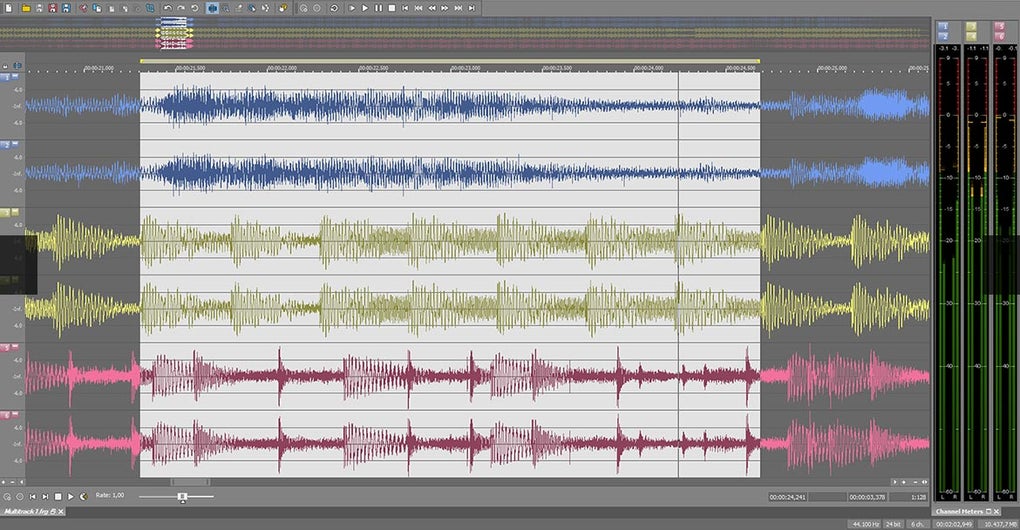
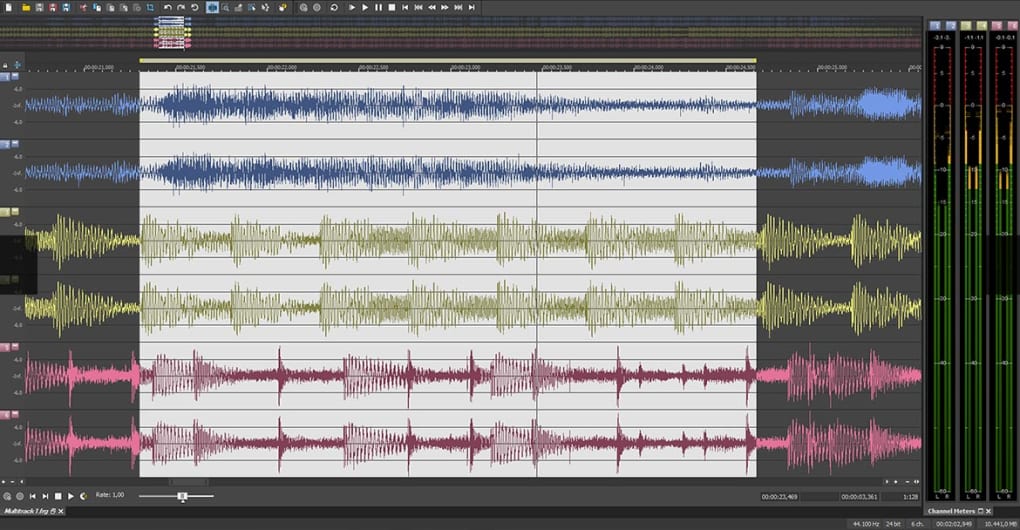
Sound Forge Pro provides a robust suite of tools designed for precise audio manipulation and high-quality production. At its heart lies a powerful multi-track editor, allowing for the simultaneous handling of numerous audio files. This facilitates complex mixing, mastering, and editing tasks, a crucial aspect for professional audio projects. The software’s intuitive drag-and-drop interface simplifies many operations, enabling efficient workflows even for users tackling complex projects. This ease of use doesn’t compromise on power; experienced users can leverage advanced features for intricate audio manipulation.
Recording capabilities are central to Sound Forge Pro’s functionality. It supports high-resolution recording, essential for capturing the nuances of audio sources. Whether recording instruments, vocals, or other audio sources, the software’s low-latency performance ensures accurate capture and minimal audio artifacts. The wide range of supported input devices further enhances versatility, accommodating various microphones, instruments, and interfaces.
Beyond recording, Sound Forge Pro excels in audio editing. Its precision editing tools enable users to perform tasks such as trimming, cutting, pasting, and splicing with pinpoint accuracy. The software supports a vast array of audio formats, ensuring seamless compatibility across diverse projects. This interoperability extends to the handling of metadata, including track information, artist details, and album art, facilitating organized management of extensive audio libraries.
Advanced Features and Effects Processing
Sound Forge Pro differentiates itself through its advanced features. Its restoration tools address the challenges of damaged or degraded audio. These tools are particularly useful for restoring older recordings or correcting audio artifacts. Noise reduction features, equalization (EQ) capabilities, and dynamic processing tools provide essential functions for audio enhancement and mastering.
The software’s support for DirectX and VST audio plug-ins significantly expands its capabilities. These plug-ins provide a wealth of additional effects, ranging from reverb and delay to more specialized audio processors. This extensibility allows users to customize their workflow to suit their preferences and project requirements. The integration of these plug-ins is seamless, enhancing the software’s already impressive range of effects processing options.
Furthermore, Sound Forge Pro includes a comprehensive collection of built-in effects. These range from standard equalization and compression to more specialized effects like reverb, delay, chorus, and phasing. The quality of these integrated effects is noteworthy, frequently exceeding the expectations associated with bundled effects in other audio editing software. This combination of built-in effects and plug-in support places Sound Forge Pro in a superior position compared to many competitors.
User Interface and Learning Resources
Sound Forge Pro’s user interface is designed with both efficiency and accessibility in mind. While the software offers advanced features, the interface remains intuitive and avoids unnecessary complexity. Experienced users appreciate the efficient organization of tools and controls, while beginners find the interface easy to navigate and understand. The software’s customizable layout allows for personalization, further tailoring the user experience to individual needs and preferences.
Sony’s commitment to user support is evident in the inclusion of interactive tutorials. These “Show Me How” tutorials guide users through various features and workflows, providing a practical approach to learning the software. This approach makes it much easier for beginners to learn the program’s complexities without struggling with dense manuals or lengthy online courses. The readily available support resources complement the user-friendly interface, significantly reducing the learning curve.
Comparison with Alternative Software
Sound Forge Pro competes with a range of audio editing software, each offering a unique set of features and capabilities. Audacity, a free, open-source option, provides a basic set of editing tools suitable for simple tasks. However, Audacity lacks the advanced features and plug-in support found in Sound Forge Pro, limiting its utility for professional projects.
Adobe Audition, a professional-grade audio editor, provides many similar features to Sound Forge Pro. However, Audition often commands a higher price point and has a steeper learning curve, requiring more significant investment in both cost and time. While both programs are capable, Sound Forge Pro’s balance of power and ease of use positions it competitively. The choice often depends on individual needs and budget considerations.
System Requirements and Pricing
Sound Forge Pro, as a professional-grade software, demands specific system requirements to ensure optimal performance. Sufficient RAM, a powerful processor, and ample storage space are crucial for handling large audio files and running demanding effects. Meeting the minimum requirements ensures smooth operation, but exceeding them provides better performance for complex projects and large audio files.
The software’s pricing model reflects its professional status. While a trial version is available, full functionality requires a purchase. This cost is justified by the advanced features, professional-quality audio processing, and robust support available to licensed users. The investment in Sound Forge Pro can be highly beneficial for professionals who rely on high-quality audio editing in their work.
User Reviews and Feedback
User reviews consistently highlight Sound Forge Pro’s strengths. The software is frequently praised for its ease of use, comprehensive features, and powerful effects processing capabilities. The inclusion of the “Show Me How” tutorials is frequently cited as a positive aspect, making the learning process significantly easier. The support for a wide variety of audio formats and plug-ins enhances its versatility, making it suitable for a broad range of audio production tasks.
However, some user feedback points to limitations. The price point, while justified for its features, can be a barrier for some users. Furthermore, occasional reports of minor software glitches or incompatibility issues have surfaced. These issues, however, seem to be relatively infrequent and generally resolved through updates or support from the developer.
Conclusion
Sound Forge Pro offers a compelling combination of power and ease of use, making it a strong contender in the professional audio editing market. Its advanced features, intuitive interface, and comprehensive support resources make it a highly valuable tool for both aspiring and professional audio engineers. While the price might deter some users, the return on investment for those who utilize its capabilities extensively is undeniable. For those seeking a powerful, reliable, and user-friendly audio editor capable of handling diverse projects, Sound Forge Pro presents a strong case. The balance between professional-grade features and intuitive design makes it a compelling choice for a broad spectrum of audio professionals and enthusiasts.
File Information
- License: “Trial version”
- Latest update: “May 24, 2023”
- Platform: “Windows”
- OS: “Windows 10”
- Language: “English”
- Downloads: “643.5K”
- Size: “6.20 MB”


