
Soundfont MIDI Player is a powerful and versatile application designed for playing and manipulating MIDI files. Going beyond the basic functionality of simply playing back MIDI data, this software provides users with a comprehensive suite of tools for real-time editing, channel control, and soundfont management, making it a valuable asset for musicians, composers, and anyone working extensively with MIDI files. This in-depth review explores its capabilities, strengths, and weaknesses.
Core Functionality: Playback and Real-time Editing
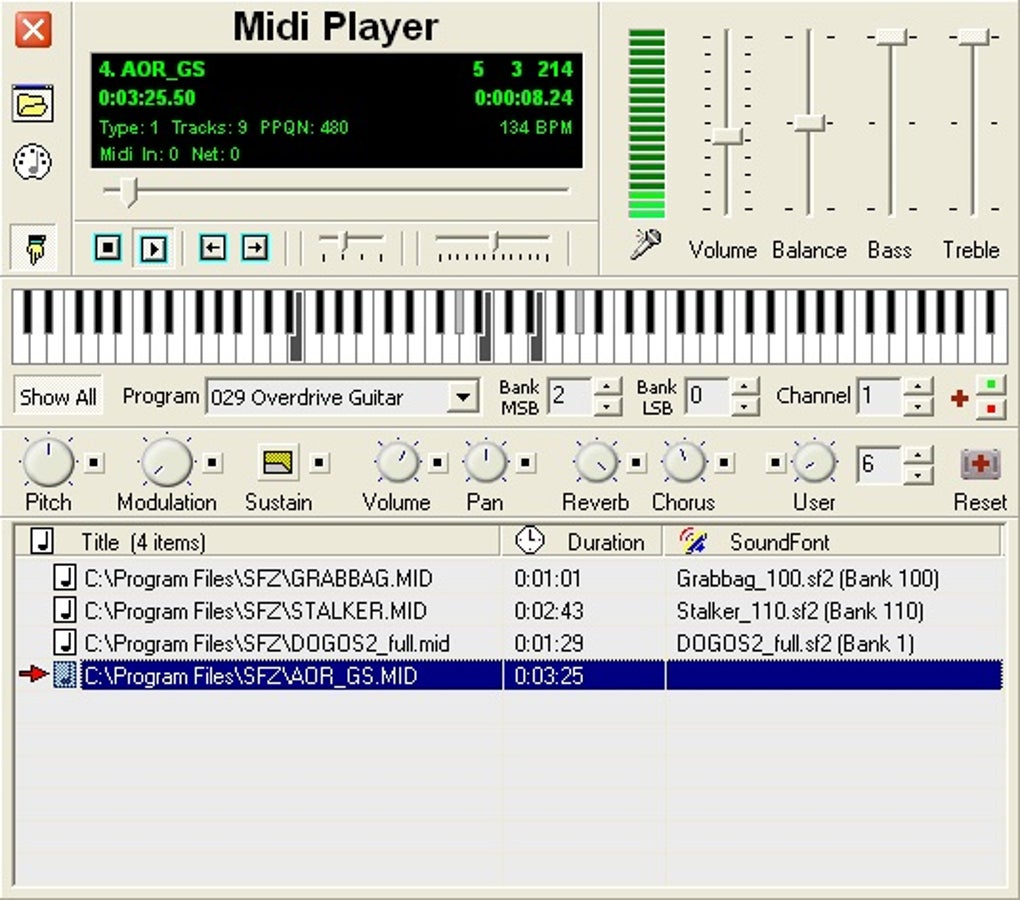
At its heart, Soundfont MIDI Player serves as a high-quality MIDI player capable of rendering complex MIDI sequences with accurate timing and pitch. However, its true strength lies in its real-time editing capabilities. While the music plays, users can modify various parameters, including instrument selection (program changes), bank selection, and individual channel volume and muting. This dynamic interaction allows for spontaneous experimentation and creative adjustments during playback, transforming the listening experience into an interactive process. The ability to manipulate individual channels independently is particularly useful for isolating specific instrument parts within a MIDI arrangement, allowing for focused adjustments and fine-tuning.
Advanced Features: Soundfont Integration and MIDI Control
One of Soundfont MIDI Player’s most significant advantages is its seamless integration with SoundFonts (.sf2 files). This allows users to load and utilize a wide range of instrument sounds, dramatically enhancing the sonic possibilities of their MIDI files. The software features real-time soundfont loading, eliminating the need to pre-load sounds before playback. Simply place your MIDI and corresponding .sf2 files in the same directory with matching names (or append the .sf2 filename with a bank number), and the player automatically loads the appropriate soundset. This streamlined process significantly improves workflow efficiency.
Beyond soundfont management, Soundfont MIDI Player provides extensive MIDI control options. Users can configure input and output MIDI ports, allowing them to connect external MIDI devices and integrate the player into a larger music production setup. The software supports real-time MIDI effects processing, enabling dynamic alterations to the sound during playback. This could range from basic effects like reverb and chorus to more complex processing chains depending on the capabilities of the connected sound card or software synthesizer. Furthermore, the ability to send and receive MIDI data over a network opens up opportunities for collaborative projects and remote control of MIDI devices.
User Interface and Ease of Use
While the software offers a comprehensive set of features, the learning curve can be somewhat steep for users unfamiliar with advanced MIDI concepts. Navigating the various settings and options requires some initial investment of time and effort. The interface, while functional, isn’t necessarily intuitive for all users. A more streamlined and user-friendly design could improve accessibility and ease of use. However, for experienced MIDI users familiar with the concepts of program changes, bank selections, and channel manipulation, the interface will likely feel quite manageable and effective. The ability to quickly adjust parameters in real-time is a powerful advantage that overrides minor interface inconveniences for seasoned musicians.
System Requirements and Limitations
Soundfont MIDI Player currently requires a 64-bit architecture, limiting its compatibility with older systems. While this is a common limitation amongst modern software applications, it does present a barrier to entry for users with older or less powerful hardware. The lack of support for multiple operating systems is also a notable constraint. The software is exclusively designed for the Windows environment, leaving macOS and Linux users without access to this feature-rich MIDI player. Finally, the absence of customizable shortcut functions could be a significant drawback for users who prefer highly personalized workflow setups. The lack of keyboard shortcuts increases the time and effort required for modifying parameters, particularly in real-time editing scenarios.
Comparison with Alternative MIDI Players
The market offers a range of MIDI players, each with its own set of features and strengths. Some free alternatives, such as Free Midi Player, offer simpler interfaces and easier onboarding for less experienced users. However, they often lack the advanced features and real-time control provided by Soundfont MIDI Player. Other commercial MIDI players may offer more polished interfaces and additional features (like score editing), but at a cost. The choice between Soundfont MIDI Player and alternative applications depends heavily on individual needs and priorities. If real-time soundfont integration and granular channel control are essential requirements, Soundfont MIDI Player offers significant advantages. However, users who prioritize simplicity and ease of use may find a simpler alternative more suitable.
Soundfont MIDI Player’s Strengths and Weaknesses Summarized
Strengths:
- Real-time editing capabilities: Modify MIDI parameters (program changes, bank selection, channel volume, etc.) on the fly while the music plays.
- Seamless Soundfont integration: Load and manage .sf2 files easily for a wide variety of instrument sounds. Automatic loading of soundfonts based on filename matching significantly improves workflow.
- Extensive MIDI control: Configure input/output ports, send/receive MIDI over network, and apply real-time effects.
- Powerful channel control: Mute, solo, and adjust parameters for individual MIDI channels.
- Variable tempo and pitch: Dynamically change the tempo and pitch of the playback in real-time.
- Built-in synthesizer: A rudimentary real-time synthesizer is included, using function keys for octave control and right-clicking for note names. This allows basic sound generation without relying on external software or hardware.
Weaknesses:
- Steep learning curve: The interface and advanced features might be overwhelming for beginners.
- 64-bit architecture requirement: Incompatible with older 32-bit systems.
- Windows-only: No support for macOS or Linux.
- Lack of customizable shortcuts: Slows down workflow when making frequent changes.
- Interface could be improved: A more intuitive and visually appealing interface could significantly enhance user experience.
Conclusion: Who Should Use Soundfont MIDI Player?
Soundfont MIDI Player is a powerful tool ideally suited for experienced users who require precise control over their MIDI files and the ability to manipulate parameters in real-time. Its strength lies in its robust soundfont integration, extensive MIDI control options, and real-time editing capabilities. However, the software’s learning curve and system requirements might deter less experienced users. Those seeking a simple, user-friendly MIDI player might find more suitable alternatives. Ultimately, the decision of whether to utilize Soundfont MIDI Player hinges upon the user’s existing MIDI expertise and their specific requirements for real-time control and soundfont management. The advanced features and dynamic editing possibilities make it a compelling choice for experienced musicians and sound designers, while beginners may find themselves frustrated by the complexity.
File Information
- License: “Free”
- Latest update: “November 29, 2023”
- Platform: “Windows”
- OS: “Windows 2000”
- Language: “English”
- Downloads: “61.3K”
- Size: “2.45 MB”


