
SPDJ Studio 54 Edition, also known as SP DJ01 Studio 54 BCN Ed, presents itself as a free DJing tool readily available for download. This software caters to aspiring DJs, offering a basic platform to experiment with music mixing and various effects. While it serves as a decent entry point for novices, its limitations become apparent quickly, especially when compared to more established and feature-rich alternatives. This review will delve into its strengths and weaknesses, ultimately determining whether it’s the right software for you.
Ease of Use and Functionality for Beginners
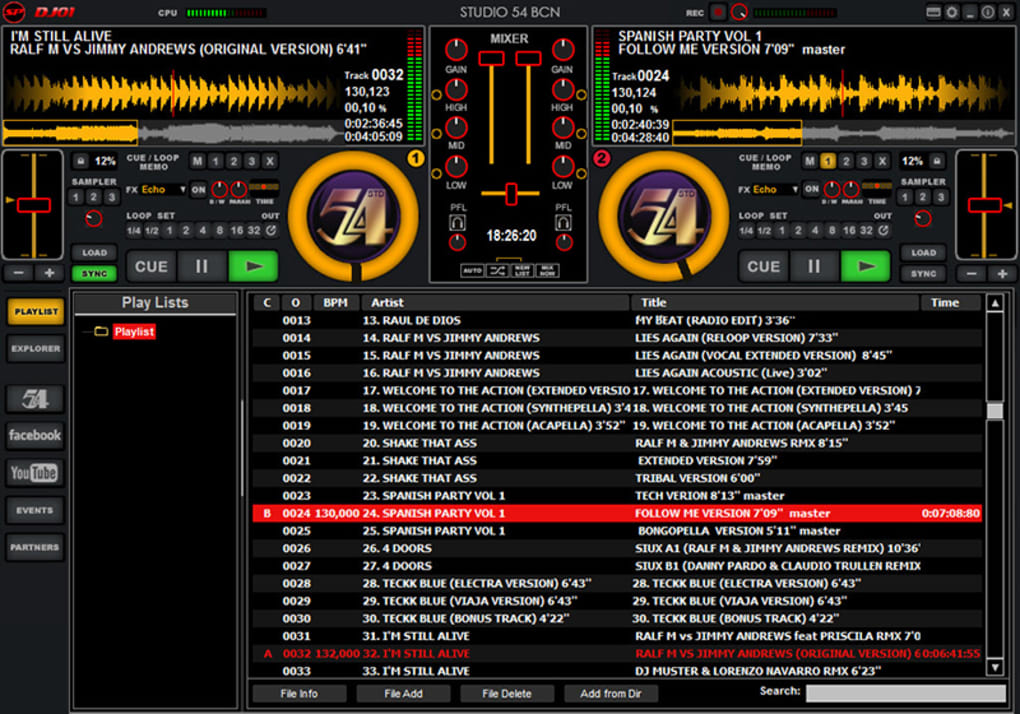
SPDJ Studio 54 Edition’s primary appeal lies in its simplicity. The interface, while outdated in design (as discussed later), is relatively intuitive. Users can select tracks from their computer’s folders, dragging and dropping them onto the virtual mixing table. Basic functionalities like scratching, applying effects, using auto-loop, and even an automix feature are readily available, making it easy for complete beginners to get started and understand the fundamental concepts of DJing. This straightforward approach allows new users to focus on learning the basics without being overwhelmed by complex settings and advanced options. The drag-and-drop functionality is particularly helpful for users unfamiliar with professional DJ software, creating a smooth learning curve. For those completely new to the world of digital DJing, SPDJ Studio 54 Edition provides a risk-free, accessible way to explore the craft without any financial commitment. This makes it an ideal tool for experimenting and determining whether DJing is a pursuit worth further investment in time and resources.
Limitations and Comparison with Professional Software
Despite its user-friendly nature, SPDJ Studio 54 Edition suffers from significant limitations that quickly restrict its usability for anyone beyond a complete beginner. The most glaring issue is its restriction to only two mixing decks. Compared to professional software such as Virtual DJ or Traktor, which typically allow for four or more decks, this severely hinders creative possibilities and limits the complexity of mixes. Professional DJs often require multiple decks to prepare transitions, cue up tracks, and layer different sounds for a more dynamic and polished performance. The inability to handle multiple tracks simultaneously fundamentally restricts the type of mixes that can be created with SPDJ Studio 54 Edition.
Furthermore, the software’s limitations extend beyond the number of decks. Unlike professional software that allows importing playlists from music libraries like iTunes, SPDJ Studio 54 Edition only permits the selection of individual tracks directly from file folders. This lack of playlist support significantly impacts workflow, especially when managing large music collections. Professional DJs frequently rely on meticulously crafted playlists to ensure seamless transitions and organized sets; this feature is a notable absence in SPDJ Studio 54 Edition.
The mixing capabilities themselves are also rudimentary. While basic mixing functions are present, advanced features such as precise beat matching, key matching, and sophisticated effects processing are largely absent or severely limited. These features are crucial for creating professional-sounding mixes and are standard fare in professional DJ software. The absence of these capabilities means that the mixes produced using SPDJ Studio 54 Edition will lack the polish and precision of those created using more robust tools. The limited range of effects and the lack of fine-grained control over parameters restrict the creative possibilities and can result in mixes that sound less polished and professional.
Outdated Design and User Interface
The user interface (UI) of SPDJ Studio 54 Edition is arguably its most significant drawback. The design is undeniably outdated and visually unappealing. The mixing table is disproportionately small in relation to the playlist area, emphasizing track selection over the actual mixing process. This design choice is counterintuitive, as the focus in DJing should primarily be on the mixing console, where the creative work takes place. The jarring bright red color scheme adds to the overall unpleasant aesthetic experience. DJs often spend hours working on their sets, making a visually unappealing and fatiguing interface a considerable impediment. The lack of customization options further exacerbates this issue. The inability to adjust the layout, color scheme, or other visual aspects prevents users from personalizing the software to their preferences. A more modern and customizable interface would significantly enhance the overall user experience and make the software more enjoyable to use.
Conclusion: A Stepping Stone, Not a Destination
SPDJ Studio 54 Edition serves as a functional, albeit limited, introduction to the world of DJing. Its free availability and ease of use make it an excellent starting point for absolute beginners who are unsure about their commitment to the craft. It allows users to grasp fundamental concepts without incurring any cost. However, its limitations regarding the number of decks, playlist support, mixing capabilities, and its outdated UI quickly reveal its inadequacies compared to professional-grade DJ software.
For aspiring DJs who discover a genuine passion for mixing, transitioning to more advanced software like Virtual DJ or Traktor is inevitable. These advanced packages provide the flexibility, features, and robust functionalities essential for creating professional-quality mixes and expanding creative potential. Therefore, SPDJ Studio 54 Edition should be viewed as a temporary tool for exploration, a stepping stone rather than a final destination in the journey of becoming a skilled digital DJ. Its value lies in its accessibility and ease of use for absolute beginners, allowing them to determine whether DJing is a field they wish to pursue further with more advanced, and often more expensive, software. The software is not suitable for experienced DJs or for anyone who requires advanced mixing features or a visually engaging interface.
File Information
- License: “Free”
- Version: “1”
- Latest update: “May 14, 2015”
- Platform: “Windows”
- OS: “Windows 2003”
- Language: “English”
- Downloads: “151.3K”
- Size: “26.70 MB”


