
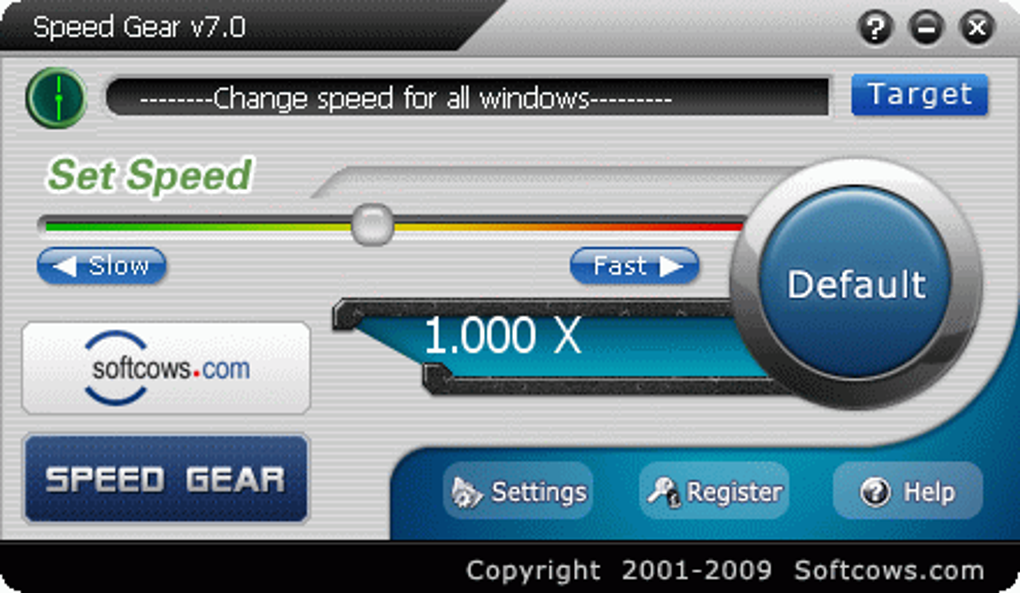
Speed Gear is a Windows-based utility designed to significantly alter the speed of your games, providing a customized gaming experience unlike any other. This tool isn’t just about simple speed adjustments; it offers granular control, allowing you to seamlessly accelerate, decelerate, or fine-tune the pace of your gameplay to your exact preferences. Whether you’re aiming for a faster-paced, adrenaline-fueled rush or a more methodical, strategic approach, Speed Gear empowers you to tailor the tempo of your gaming sessions to suit your mood and playing style. Its intuitive interface and easily accessible hotkeys ensure a smooth, uninterrupted gaming experience, eliminating the need for complex configurations or disruptive menu navigations.
.png)
How Speed Gear Transforms Your Gaming Experience
Speed Gear stands out from other game enhancement tools due to its unique focus on dynamic speed control. Unlike simple game boosters that offer pre-set performance optimizations, Speed Gear allows for real-time manipulation of the game’s speed. This level of control offers several key advantages:
-
Personalized Gameplay: Speed Gear empowers you to adjust the speed to match your skill level, preferred playstyle, or the demands of a specific game situation. Are you struggling with a challenging boss fight? Slow down the game to meticulously plan your strategy and execute precise movements. Feeling confident and looking for a more exhilarating experience? Ramp up the speed for a whirlwind of action and excitement. The flexibility is entirely in your hands.
-
Accessibility and Inclusivity: The adjustable speed feature is particularly beneficial for players with disabilities affecting reaction time or motor skills. By slowing down the gameplay, Speed Gear creates a more inclusive gaming environment, allowing players of all abilities to fully enjoy their favorite titles without being hindered by speed-related challenges. This feature contributes to a broader appeal, making gaming more accessible to a wider audience.
-
Enhanced Learning Curve: For games with steep learning curves or complex mechanics, Speed Gear’s speed adjustment capabilities can significantly improve the learning process. Players can start at a slower pace to master the fundamentals and gradually increase the speed as their skills improve, ensuring a smooth transition from beginner to expert. This gradual learning curve eliminates frustration and fosters a more positive and engaging gaming experience.
-
Exploring New Strategies: Altering the game’s speed can open up new strategic opportunities. Slowing down the action allows for a more thorough analysis of enemy movements, level designs, and environmental details, leading to the discovery of hidden paths, shortcuts, or unexpected tactics. This level of strategic depth enhances the overall gameplay and promotes creative problem-solving.
-
Re-experiencing Familiar Games: Even for well-worn titles, Speed Gear can breathe new life into familiar gameplay. By adjusting the speed, players can encounter games in a completely different light, uncovering hidden nuances and experiencing a refreshed sense of challenge and exploration. This allows for a more prolonged engagement with beloved games, ensuring their longevity.
Effortless Integration and User-Friendly Design
Speed Gear’s intuitive design places a premium on ease of use. Its clean interface and simple controls ensure that even novice users can seamlessly integrate the tool into their gaming workflow. Key features contributing to its user-friendly design include:
-
Hotkey Functionality: Speed Gear leverages easily accessible hotkeys to provide instant speed adjustments without interrupting gameplay. These shortcuts can be customized to individual preferences, ensuring a seamless and intuitive experience. This eliminates the need to constantly navigate menus or pause the game, ensuring a smooth, uninterrupted flow of gameplay.
-
Real-time Speed Adjustment: The tool facilitates real-time speed adjustments, allowing for dynamic alterations to the game’s pace based on the demands of the gameplay. This dynamic approach caters to the fluidity and unpredictability of most game scenarios.
-
Granular Speed Control: Speed Gear offers fine-grained control over game speed, allowing for precise adjustments to cater to individual preferences and specific gameplay situations. This avoids the limitations of pre-set speed levels, allowing for a more customized gaming experience.
-
Wide Game Compatibility: While not universally compatible with every game, Speed Gear boasts broad compatibility across a wide range of titles. Its adaptability to diverse game engines and architectures enhances its usefulness to a vast audience. Although compatibility should always be verified, the developer continually strives to expand the tool’s compatibility to encompass a larger selection of games.
-
Minimal System Resource Consumption: Speed Gear is designed to be lightweight and efficient, minimizing its impact on system resources. This ensures that the tool runs smoothly in the background without compromising game performance or causing system instability. This makes it suitable for systems with varying specifications.
Beyond Games: Expanding Speed Gear’s Potential
While primarily aimed at enhancing the gaming experience, the fundamental capabilities of Speed Gear extend beyond the realm of video games. Its ability to adjust system speed offers potential applications in various scenarios:
-
Productivity Enhancement: For tasks that involve repetitive actions or require intense focus, manipulating the speed of the system interface can enhance productivity. This could prove valuable for programmers, graphic designers, or anyone dealing with time-sensitive tasks. However, care should be taken to ensure the speed adjustments do not negatively impact system stability.
-
Accessibility for Non-Gaming Applications: Just as Speed Gear benefits gamers with motor skill challenges, its speed adjustment capabilities could enhance accessibility for other applications. For individuals with certain cognitive differences or visual impairments, adjusting the speed of software interfaces could improve usability and overall accessibility. The adaptability of the tool presents numerous possibilities.
-
Testing and Benchmarking: Speed Gear’s ability to manipulate system speed could assist in software testing and performance benchmarking. By adjusting the speed of applications, developers could gain valuable insights into resource consumption and stability under different stress conditions. However, the usage for this purpose requires advanced technical knowledge.
Addressing Potential Concerns and Limitations
While Speed Gear offers a unique and beneficial approach to gaming and system control, it’s crucial to address potential concerns and limitations:
-
Compatibility Issues: As with any utility that interacts with system processes, there’s a possibility of compatibility issues with certain games or software. Always ensure compatibility before using the tool extensively, and be aware that not all games will react as expected.
-
Potential for Instability: Aggressive speed alterations, especially increases, might induce system instability in some cases. Always start with moderate adjustments and gradually increase or decrease speed as needed. Monitor system performance closely for any unexpected issues.
-
Ethical Considerations: The potential for manipulating game speed raises ethical concerns in competitive gaming scenarios. Using Speed Gear in online multiplayer games where speed plays a crucial role could give an unfair advantage, potentially violating game terms of service or community guidelines. Always use the tool responsibly and ethically.
-
Software Updates and Maintenance: As with any software, it’s essential to keep Speed Gear up to date with the latest updates and patches provided by the developers. These updates not only improve performance and stability but also introduce bug fixes and enhanced compatibility. Neglecting these updates could result in performance issues or compatibility problems.
In conclusion, Speed Gear represents a significant innovation in game enhancement and system control. Its unique focus on dynamic speed adjustments, user-friendly interface, and wide-ranging potential applications set it apart from traditional game boosters. While potential limitations and ethical considerations need to be addressed, the advantages of personalized gameplay, accessibility improvements, and enhanced learning curves make Speed Gear a valuable tool for gamers and other users looking for fine-grained control over their digital experiences. Always exercise responsible usage and consult the official documentation for optimal performance and compatibility.
File Information
- License: “Trial version”
- Version: “5.00”
- Latest update: “September 22, 2021”
- Platform: “Windows”
- OS: “Windows 2000”
- Language: “English”
- Downloads: “67K”
- Size: “1.63 MB”


