
Firefox, a popular and versatile web browser, can sometimes succumb to performance issues, exhibiting sluggishness and slow startup times. This can be frustrating for users who rely on a responsive browsing experience. SpeedyFox presents itself as a simple solution to this problem, promising to revitalize Firefox’s speed with a straightforward process. But does this seemingly simple tool live up to its claims, or is it just another fleeting promise in the crowded world of browser optimization utilities? Let’s delve into a comprehensive examination of SpeedyFox to understand its functionality, benefits, limitations, and overall effectiveness.
Understanding SpeedyFox’s Approach
SpeedyFox operates on the principle of defragmenting Firefox’s SQLite databases. These databases, which store crucial browser data such as cookies, history, and preferences, can become fragmented over time due to frequent additions, deletions, and modifications. This fragmentation can lead to increased access times, ultimately slowing down various browser functions, including startup, page loading, and overall responsiveness.
SpeedyFox’s core function is to reorganize and defragment these SQLite databases. The software claims that by streamlining these databases, it can significantly reduce access times, leading to a noticeable improvement in Firefox’s performance. The process is remarkably simple: users select their Firefox profile, and SpeedyFox handles the defragmentation with a single click. The entire operation is typically completed within a few seconds. The simplicity of the tool is both its strength and a potential weakness. While the ease of use is attractive, the lack of detailed information about the process raises questions about the extent and nature of its impact.
The SpeedyFox Process: Simplicity vs. Transparency
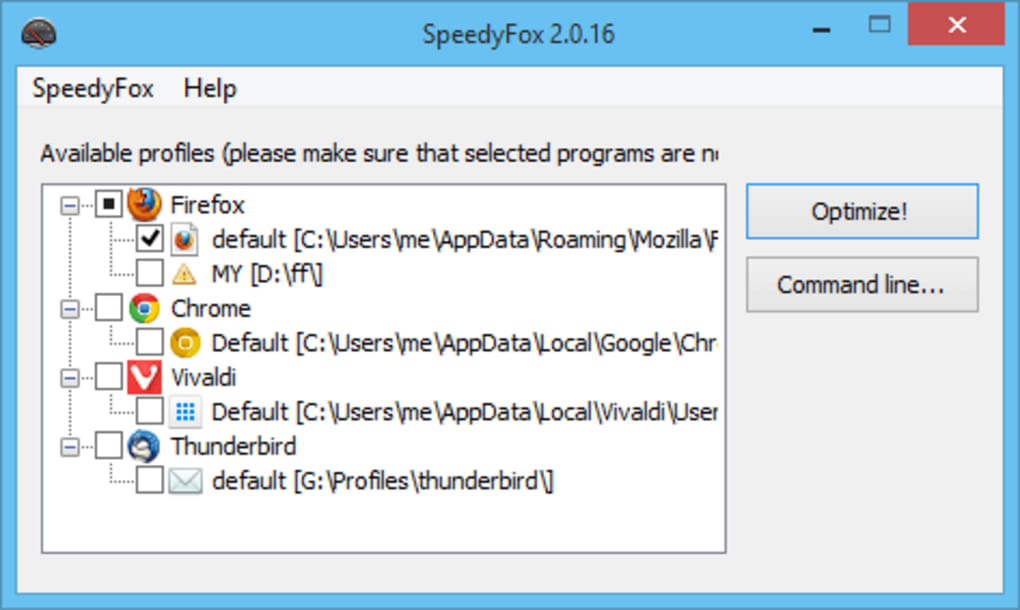
The user experience with SpeedyFox is refreshingly minimalist. The interface is uncluttered, presenting a single window with minimal options. This simplicity is appealing to users who want a quick fix without navigating complex settings or menus. The process involves only selecting the Firefox profile to optimize and clicking a button labeled “Speed Up My Firefox!”. This ease of use is a major selling point, particularly for users unfamiliar with technical aspects of browser optimization.
However, this simplicity also masks a lack of transparency. The software provides minimal information about the optimization process itself. While the website briefly mentions the defragmentation of SQLite databases, users receive no feedback during the process, nor do they get a detailed report on the changes made. This lack of visibility might make some users skeptical, leading to questions about the actual impact of the tool and whether the observed speed improvements are significant or merely coincidental.
Evaluating the Effectiveness of SpeedyFox
While many users report improvements in Firefox’s startup time and overall responsiveness after using SpeedyFox, the extent of these improvements varies. Anecdotal evidence suggests that the tool can indeed shave off a few seconds from the startup time, potentially making the browser more responsive. However, the absence of concrete data and benchmarks makes it difficult to objectively measure the impact. Users should also consider other factors that can contribute to Firefox’s performance, such as the number of installed extensions, the amount of browser history, and the system’s overall resources. These factors could influence the perceived improvement offered by SpeedyFox.
The lack of detailed logging or performance metrics leaves room for uncertainty. It’s difficult to assess whether the speed gains result directly from the database defragmentation or are influenced by other factors. More rigorous testing and benchmarking would be needed to provide a quantifiable assessment of SpeedyFox’s effectiveness.
Comparing SpeedyFox to Alternatives
Numerous browser optimization tools exist, each employing different techniques to improve performance. Some tools focus on cleaning browser caches and temporary files, others address memory management, and some offer more extensive customization options. Compared to these alternatives, SpeedyFox’s approach is exceptionally focused and minimalist. While this simplicity is advantageous for some users, it also limits its functionality.
Other tools offer more features, such as detailed performance analysis, memory optimization, and extension management capabilities. SpeedyFox, by contrast, concentrates solely on database defragmentation. This narrow focus could be considered both an advantage and a disadvantage. The streamlined approach guarantees ease of use, but it also limits potential improvements to a single aspect of browser performance. The choice between SpeedyFox and alternative optimization tools depends largely on individual needs and preferences. Users seeking a simple, quick fix might find SpeedyFox suitable, while those needing more extensive control and features would likely prefer a more comprehensive optimization tool.
SpeedyFox: A Verdict
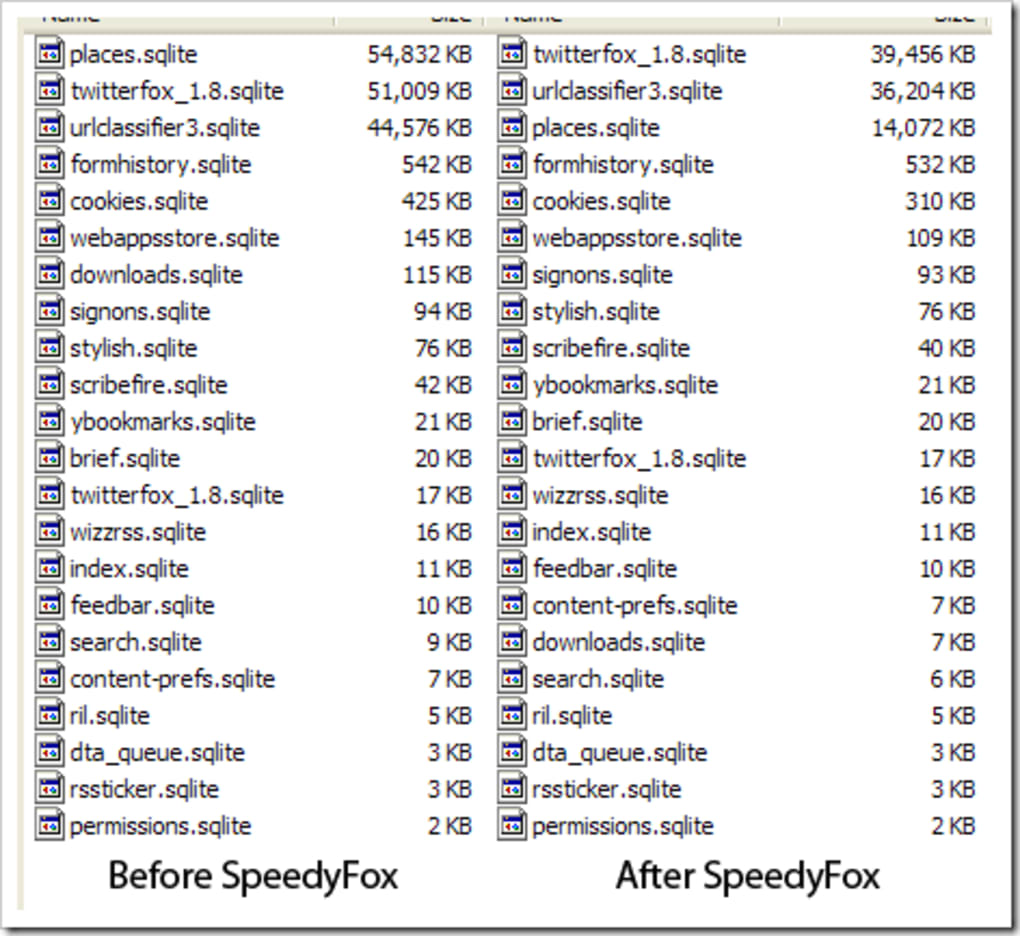
SpeedyFox is a simple, easy-to-use tool designed to improve Firefox’s performance by defragmenting its SQLite databases. While many users report noticeable speed improvements, particularly in startup times, the lack of objective data and transparency leaves room for skepticism. The tool’s simplicity is both its greatest strength and its most significant weakness. It is ideal for users who prioritize ease of use and a quick solution without delving into technical details. However, those seeking a more comprehensive optimization tool with detailed analysis and multiple performance-enhancing features should explore other options.
Ultimately, SpeedyFox might not revolutionize your browsing experience, but it can offer a convenient, low-effort method for addressing minor performance issues. The user’s individual experience may vary depending on the extent of database fragmentation and other factors affecting Firefox’s performance. While SpeedyFox is unlikely to provide dramatic speed boosts, it might still be a worthwhile tool for users experiencing minor performance slowdowns who prefer simplicity over extensive configuration options. The choice to use SpeedyFox ultimately depends on individual needs, priorities, and tolerance for a lack of detailed information about the underlying process.
File Information
- License: “Free”
- Latest update: “May 23, 2023”
- Platform: “Windows”
- OS: “Windows 8”
- Language: “English”
- Downloads: “119.4K”
- Size: “749.80 KB”


