
Spider Solitaire has been a beloved pastime for Windows users for decades. Its simple yet engaging gameplay has captivated players of all ages and skill levels. While the built-in version of Spider Solitaire found in older Windows operating systems is no longer readily available, numerous third-party alternatives have emerged to fill the void. This review focuses on one such option: Spider Solitaire! for Windows 10, a free, ad-supported game that aims to recapture the essence of the classic solitaire experience.
Gameplay and Interface: A Familiar Feel with Modern Simplicity
This version of Spider Solitaire retains the core gameplay mechanics that defined the original. The objective remains the same: arrange cards in descending order and suit, building sequences from King to Ace. The familiar green gaming window provides a comforting sense of nostalgia, and the cards themselves are clearly designed and easy to distinguish, even on lower resolutions. While the game lacks flashy animations or elaborate visual effects, its simplicity is arguably part of its charm. The absence of complex visual elements contributes to a clean, uncluttered interface that allows players to focus on the task at hand.
One notable feature is the inclusion of a CTRL+Z hotkey function, offering players the ability to undo their last move. This is a welcome addition, particularly for those prone to making hasty decisions or needing to correct a minor error. However, the lack of a save game function is a significant drawback. This means that if your gaming session is interrupted, you will lose all your progress. This aspect might prove frustrating for players who prefer to take breaks during longer games.
A small timer located in the bottom left corner provides players with the option to track their game time. While this functionality is appreciated, it is not an essential feature and can easily be ignored. The timer adds a sense of friendly competition against oneself, challenging players to complete the game within a certain timeframe. This aspect appeals to players who enjoy the added challenge of time constraints.
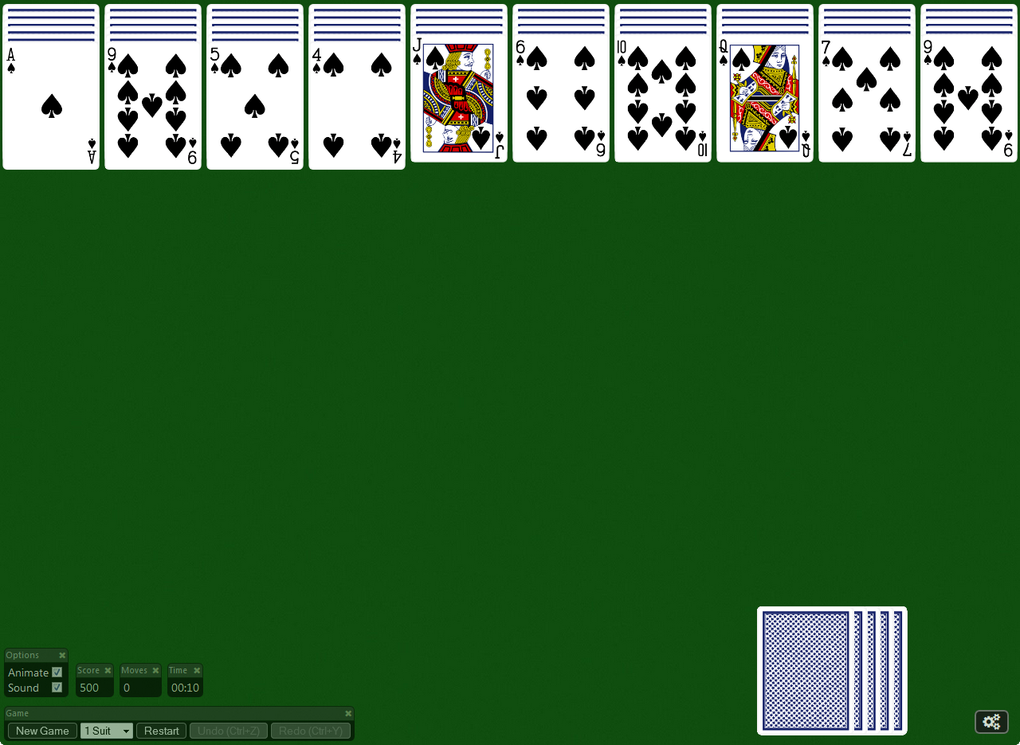
The overall experience is strikingly similar to older versions of Windows Spider Solitaire. The simplicity and straightforward gameplay are its strongest assets, providing a quick and easy way to unwind or take a short break from more demanding tasks. The game effectively delivers on its core promise: providing a classic, accessible, and enjoyable Solitaire experience.
Pros and Cons: Weighing the Advantages and Disadvantages
As with any software, Spider Solitaire! for Windows 10 boasts both advantages and disadvantages. A balanced assessment is crucial for determining its suitability for individual preferences.
Pros:
- Nostalgia Factor: For many, the game’s primary appeal lies in its ability to evoke fond memories of playing Spider Solitaire on older Windows systems. The familiar layout and gameplay immediately transport players back to a simpler time.
- Simplicity and Ease of Use: The game is exceptionally user-friendly, requiring minimal learning curve. The intuitive interface and straightforward gameplay make it accessible to players of all ages and skill levels. Even those unfamiliar with Spider Solitaire can quickly grasp the basic mechanics.
- Clean and Uncluttered Interface: The absence of excessive visual clutter enhances the gameplay experience, allowing players to concentrate on the game itself without distractions. The clean interface is particularly beneficial for players who prefer a minimalist aesthetic.
- Undo Function (CTRL+Z): The inclusion of an undo function proves highly beneficial, enabling players to rectify mistakes without restarting the entire game. This function adds a layer of tolerance for errors, allowing for more relaxed and less stressful gameplay.
- Quick and Easy Download: The relatively small game size ensures a rapid download, minimizing wait times and enabling players to begin playing almost immediately after installation. This speed and efficiency are appreciated, especially for users with limited bandwidth or slower internet connections.
- Free to Play (Ad-Supported): The game’s free-to-play nature, while supported by advertisements, makes it accessible to a broader range of users. The affordability makes it an attractive option for casual gamers or those who prefer not to spend money on games.
Cons:
- Advertisements: The inclusion of advertisements is a significant drawback for many users. The frequency and intrusiveness of these ads can disrupt the flow of the game and detract from the overall experience. Some users may find the ads excessively frequent or distracting, potentially impacting their enjoyment of the game.
- Lack of Save Game Function: The inability to save game progress is a significant limitation. This means that any unsaved progress is lost if the game is closed or the system is interrupted. This is especially frustrating for players who play in short bursts or need to pause their game sessions frequently.
- Visual Simplicity: While some might appreciate the minimalist design, others may find it lacking in visual appeal compared to other versions of Spider Solitaire. The lack of animation or visual enhancements might make it less engaging for players who prefer more visually stimulating games.
- No Customization Options: The lack of customization options might be a disadvantage for players who prefer to personalize their gaming experience. There are no settings for altering the card backs, table design, or other visual elements.
Comparison to Other Spider Solitaire Games
While Spider Solitaire! for Windows 10 offers a functional and nostalgic experience, it’s important to compare it to alternative options available on the Windows 10 platform. The Microsoft Store features several Spider Solitaire games, some of which offer more advanced features, such as save game functionality, visual customization, and potentially fewer ads. However, these games may come at a cost, either through a direct purchase price or through in-app purchases. Therefore, the choice between Spider Solitaire! and other options largely depends on individual priorities. Those prioritizing a free and straightforward game might find Spider Solitaire! perfectly satisfactory. Conversely, users who value features like saving game progress or enhanced visuals might prefer a paid alternative from the Microsoft Store.
Conclusion: A Solid, if Unremarkable, Option
Spider Solitaire! for Windows 10 successfully delivers a playable and accessible version of the classic game. Its simple interface and straightforward gameplay cater to those seeking a quick and uncomplicated Solitaire experience. The inclusion of the CTRL+Z undo function is a welcome addition, allowing for more forgiving gameplay. However, the lack of a save game feature and the presence of advertisements significantly detract from the overall experience. While the game serves its purpose adequately, its limitations prevent it from surpassing other available options. Ultimately, the decision of whether to download and play Spider Solitaire! rests on individual preferences regarding the trade-off between free access and the presence of limitations. If you prioritize a free and uncomplicated game and are not bothered by advertisements and the lack of a save game option, then this version of Spider Solitaire may be perfectly suitable. However, users seeking a more polished and feature-rich experience should explore alternative options within the Microsoft Store.
File Information
- License: “Free”
- Version: “1.0.0.7”
- Latest update: “July 20, 2021”
- Platform: “Windows”
- OS: “Windows 8.1”
- Language: “English”
- Downloads: “21.7K”


