
Spotify, a globally recognized name in music streaming, has extended its reach to the living room with its dedicated Android TV application. This review delves into the features, functionality, and overall user experience of Spotify for Android TV, examining its strengths and weaknesses to determine its suitability for various users.
Seamless Integration and Intuitive Navigation
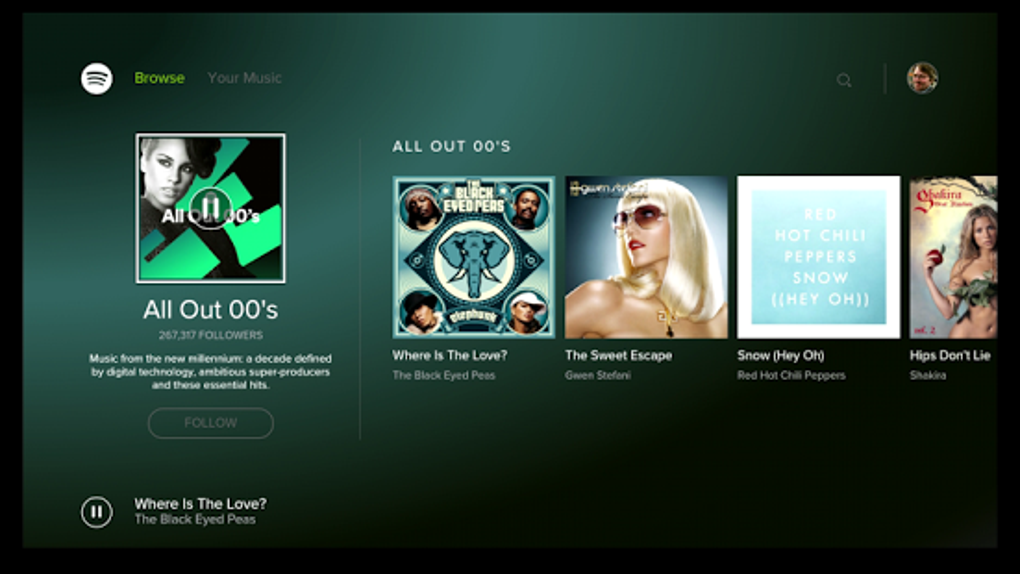
The Spotify Android TV app prioritizes a clean and intuitive interface, perfectly suited for the larger screen and remote control navigation. Unlike some apps that simply port their mobile designs to larger screens, Spotify has thoughtfully redesigned its layout for optimal TV viewing. The main menu presents a clear and concise layout, allowing users to easily navigate between different sections like “Home,” “Browse,” “Radio,” “Your Library,” and “Search.” This organization is particularly important for a TV interface where navigating complex menus using a remote can be cumbersome.
The app cleverly leverages the larger screen real estate to showcase album art and artist images prominently. This visual emphasis is aesthetically pleasing and helps users quickly identify their desired content. Album art is displayed in high resolution, adding a premium feel to the experience, and even the artist pages are visually stunning, making browsing a more enjoyable experience than simply relying on text-based menus.
Navigation through the app is smooth and responsive. The remote control interaction is seamless, with easy-to-use buttons for playing, pausing, skipping tracks, adjusting volume, and accessing various menus. The lack of lag or glitches during navigation enhances the overall user experience, making it a pleasure to browse and control playback directly from your television.
Extensive Music and Podcast Library
Spotify’s Android TV app provides access to its massive library of millions of songs and podcasts. Whether you’re a fan of classic rock, the latest pop hits, or niche genres, Spotify’s extensive catalog is highly likely to satisfy even the most discerning music lover. The search function is highly effective, allowing users to quickly find specific songs, artists, albums, or podcasts.
Furthermore, the app incorporates Spotify’s personalized recommendations, leveraging algorithmic suggestions based on listening history and preferences. This personalized approach makes discovering new music and podcasts much easier, often revealing hidden gems and artists that might otherwise have gone unnoticed. The algorithm’s accuracy improves over time, learning user preferences and curating a more tailored experience.
The ability to access podcasts directly within the app adds significant value. Unlike some apps that are solely focused on music, Spotify provides a combined platform for both music and podcast consumption. The app’s podcast section is well-organized, allowing users to easily browse different categories, search for specific podcasts, and manage their subscriptions. This integration streamlines the user experience, eliminating the need to switch between different applications for music and podcast listening.
Premium Features and Offline Playback
While the free version of Spotify offers access to the vast majority of its content, Spotify Premium unlocks a significantly enhanced experience on Android TV. Premium subscribers benefit from ad-free listening, allowing for uninterrupted enjoyment of their favorite music and podcasts. This eliminates the annoying interruptions that can disrupt the flow of listening sessions, making it a worthwhile upgrade for dedicated users.
Moreover, the Spotify Connect feature, available to Premium subscribers, enables seamless switching between devices. Users can begin playback on their Android TV and then seamlessly transfer control to their smartphone or tablet, and vice-versa, without interrupting the audio stream. This is particularly useful for situations where you might want to start listening on your TV and then continue on your phone while commuting.
Although offline playback is not explicitly mentioned for the Android TV app in the original material, given its availability on other platforms, this functionality would significantly enhance the value proposition. Offline playback would allow users to access downloaded content even without an internet connection, making it ideal for situations with limited or no Wi-Fi access. This feature would add a crucial layer of flexibility and convenience.
Spotify Connect: Enhanced Control and Flexibility
Spotify Connect is a game-changer for the Android TV experience. It transcends the limitations of relying solely on the TV remote for control, offering enhanced flexibility and convenience. The ability to start playback on the TV and then effortlessly switch control to a smartphone or tablet enhances the user experience considerably.
This multi-device control offers various benefits. For example, users can easily browse and select tracks from their mobile device’s larger screen and more precise input methods, while enjoying the audio output on the larger TV speakers. It also addresses the common scenario of needing to adjust the volume or skip tracks without reaching for the TV remote, streamlining the overall listening process.
Furthermore, Spotify Connect facilitates a smoother and more integrated listening experience, especially in multi-room setups. Users can effortlessly control multiple Spotify devices, creating a synchronized audio environment across their home. This seamless integration across devices makes Spotify a powerful and versatile entertainment solution.
Potential Improvements and Areas for Enhancement
While the Spotify Android TV app offers a largely positive experience, there are a few areas that could benefit from enhancement. The most significant improvement would be the addition of offline playback functionality, a highly sought-after feature on other Spotify platforms. This would eliminate the dependency on a continuous internet connection, greatly improving accessibility and convenience.
Additionally, incorporating more detailed customization options for the user interface would be beneficial. Allowing users to customize aspects like font size, background colors, or playlist organization would personalize the experience and enhance user satisfaction. While the current interface is clean and well-designed, more options for customization would cater to a broader range of user preferences.
Finally, enhancing the social features within the app would further improve the overall experience. Allowing for seamless integration with social media platforms to share listening activity or discover music from friends would add another layer of engagement. While these are not critical issues, incorporating these enhancements would elevate the app to an even higher level of excellence.
Conclusion: A Solid Streaming Experience
Spotify’s Android TV app provides a solid and user-friendly platform for enjoying music and podcasts on a larger screen. Its intuitive navigation, visually appealing design, and extensive library of content make it a compelling option for users seeking a convenient and high-quality streaming experience. While a few enhancements could further improve the overall functionality, the current app offers a highly satisfactory experience for music and podcast lovers. The seamless integration with Spotify Connect and its availability of both free and premium versions cater to a wide range of user needs and preferences. For those seeking a streamlined and enjoyable streaming solution for their Android TV, Spotify deserves strong consideration.
File Information
- License: “Free”
- Latest update: “August 8, 2025”
- Platform: “Android”
- OS: “Android 15.0”
- Language: “English”
- Downloads: “12.6K”
- Download Options: “Google Play”


