SpyDetect Free, a free spyware scanner developed by NesterSoft Inc., aims to identify and alert users about potentially malicious software secretly running on their computers. This review will delve into its functionality, strengths, weaknesses, and overall effectiveness in protecting users from spyware threats. We’ll also explore alternative options and consider the broader context of spyware detection and removal in today’s digital landscape.
Understanding Spyware and its Threats
Before examining SpyDetect Free specifically, it’s crucial to understand the nature of spyware and the risks it poses. Spyware is a type of malicious software designed to infiltrate computer systems without the user’s knowledge or consent. Its primary purpose is to gather information, often confidential and sensitive data, from the infected machine. This information can range from browsing history and passwords to keystrokes, location data, and even microphone recordings.
The consequences of a successful spyware infection can be severe. Financial loss is a major concern, as spyware can steal banking details, credit card numbers, and other financial information. Identity theft is another significant risk, as spyware can collect personal identifying information that can be used to impersonate the victim. Beyond financial and identity-related risks, spyware can also compromise privacy by monitoring online activities, communications, and even personal conversations.
The methods employed by spyware are constantly evolving, making it challenging for traditional antivirus software to detect and eliminate all threats effectively. Spyware often uses techniques designed to avoid detection, such as hiding its processes or using rootkit-like technologies to deeply embed itself within the operating system. This necessitates specialized tools, like SpyDetect Free, to specifically target and identify these stealthy threats.
SpyDetect Free: Features and Functionality
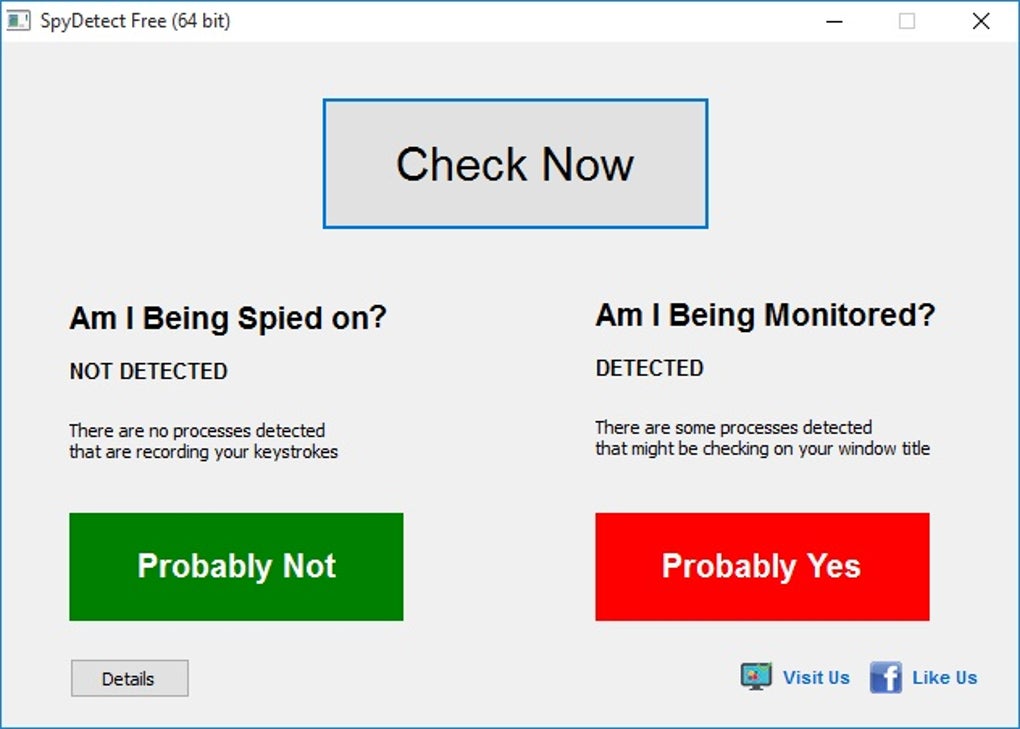
SpyDetect Free presents itself as a straightforward solution for detecting spyware. Its primary function is to scan the computer system for suspicious processes, applications, and hooks that may indicate the presence of spyware. The software aims to identify instances of unauthorized monitoring, including keyboard logging and other forms of data exfiltration.
The scanning process is relatively simple, requiring minimal user interaction. Once the scan is initiated, the software will systematically analyze the system for potential threats. Upon completion, it will report any detected hooks or suspicious activities. However, it’s important to note that SpyDetect Free’s capabilities are limited to detection; it does not offer a removal function. If spyware is identified, the user must take additional steps to remove it using other software or manual techniques.
One of the key advantages highlighted by the developers is the absence of bundled software, advertisements, or unnecessary toolbars commonly associated with free software. This clean installation process minimizes the risk of inadvertently installing additional unwanted applications. The digital signature provided by NesterSoft Inc. also adds a layer of assurance regarding the software’s legitimacy and safety.
SpyDetect Free: Pros and Cons
Pros:
- Ease of use: SpyDetect Free boasts a user-friendly interface, making it accessible to users with limited technical expertise. The scanning process is straightforward and requires minimal input.
- Clean installation: The software avoids the inclusion of bundled programs, advertisements, and unnecessary toolbars, which is a significant advantage over some free software options.
- Digital signature: The digital signature provided by the developer adds a degree of trust and assurance to the software’s integrity and safety.
- Free of charge: The software is freely available, making it an attractive option for users who may not be willing or able to invest in commercial spyware detection software.
Cons:
- Limited detection capabilities: SpyDetect Free may not detect all types of spyware. Its detection capabilities are limited to certain monitoring methods, potentially missing more sophisticated or advanced spyware.
- No removal functionality: While the software excels at detecting spyware, it lacks the ability to remove or neutralize the threats it identifies. This necessitates the use of additional tools or manual intervention.
- Compatibility issues: The software may not be compatible with older operating systems, limiting its applicability to a subset of users.
- Simplistic scanning features: The scanning capabilities are relatively basic, lacking the advanced heuristics and behavioral analysis found in more comprehensive anti-malware solutions.
Alternative Spyware Detection and Removal Solutions
Given the limitations of SpyDetect Free, it’s important to explore alternative solutions for comprehensive spyware protection. Many reputable antivirus and anti-malware suites include robust spyware detection and removal capabilities. These often incorporate advanced threat detection techniques, such as heuristic analysis and behavioral monitoring, to identify even the most sophisticated spyware. Furthermore, these comprehensive solutions often provide real-time protection, actively blocking spyware attempts before they can infect the system.
Beyond commercial software, there are several open-source anti-malware tools available. These tools, while often lacking the polish and support of commercial options, can still provide valuable protection against various malware threats, including spyware. However, it’s crucial to exercise caution when using open-source software, ensuring it is downloaded from a trusted source to minimize the risk of downloading malicious software.
Enhancing Your Overall Security Posture
While SpyDetect Free and other dedicated spyware detection tools offer valuable protection, they should not be relied upon as the sole defense against spyware threats. A comprehensive security strategy should include multiple layers of protection, including:
- Regular software updates: Keeping your operating system, applications, and antivirus software up to date is essential to patching security vulnerabilities that spyware could exploit.
- Strong passwords: Using strong, unique passwords for all online accounts helps prevent unauthorized access, even if spyware manages to capture credentials.
- Firewall protection: A firewall can help prevent unauthorized connections to your computer, hindering spyware from establishing communication with remote servers.
- Safe browsing practices: Avoiding suspicious websites and downloading files from untrusted sources can significantly reduce your exposure to spyware.
- Email vigilance: Being cautious about opening email attachments and clicking links from unknown senders helps prevent infection via phishing and malware-laced emails.
- Regular backups: Regularly backing up your important data ensures you can recover your files even if your system is compromised by spyware.
Conclusion
SpyDetect Free provides a basic level of spyware detection, offering a free and easy-to-use solution for users concerned about potential threats. However, its limited capabilities, particularly the lack of removal functionality and potential compatibility issues, necessitate careful consideration. For comprehensive protection against spyware, it’s advisable to employ a multi-layered approach that combines robust antivirus software, safe browsing habits, and strong security practices. While SpyDetect Free can serve as a supplemental tool, it shouldn’t be considered a standalone solution for effective spyware protection in today’s complex digital environment. Users should prioritize comprehensive security solutions and maintain good digital hygiene to minimize their risk of spyware infections and the potential consequences.
File Information
- License: “Free”
- Latest update: “October 26, 2018”
- Platform: “Windows”
- OS: “Windows XP”
- Language: “English”
- Downloads: “24.2K”
- Size: “952.65 KB”