
SQLyog is a powerful and user-friendly graphical user interface (GUI) for managing MySQL databases. Unlike the command-line interface (CLI) that MySQL offers, SQLyog provides a visual environment that simplifies database administration, making it accessible to both beginners and experienced users. This comprehensive guide delves into the features, functionalities, and benefits of SQLyog, exploring its role in streamlining MySQL database management.
Streamlining MySQL Database Management with SQLyog
MySQL, the world’s most popular open-source database management system (DBMS), boasts immense power and flexibility. However, its command-line interface can be challenging for newcomers and somewhat cumbersome even for seasoned professionals. SQLyog addresses this challenge by providing a comprehensive graphical interface, bringing the full power of MySQL’s features within reach of a broader user base. Its intuitive design simplifies complex tasks, making it an invaluable tool for database administrators, developers, and anyone working with MySQL databases.
SQLyog’s ease of use extends across a wide range of functionalities. Simple operations, such as creating, modifying, or deleting databases and tables, can be accomplished quickly using pre-defined tools and functions. More complex tasks, such as writing intricate SQL queries, are facilitated by a graphical editor that generates correct SQL syntax, helping users learn and understand the underlying code. This allows users to visually design and build complex queries without needing extensive SQL expertise.
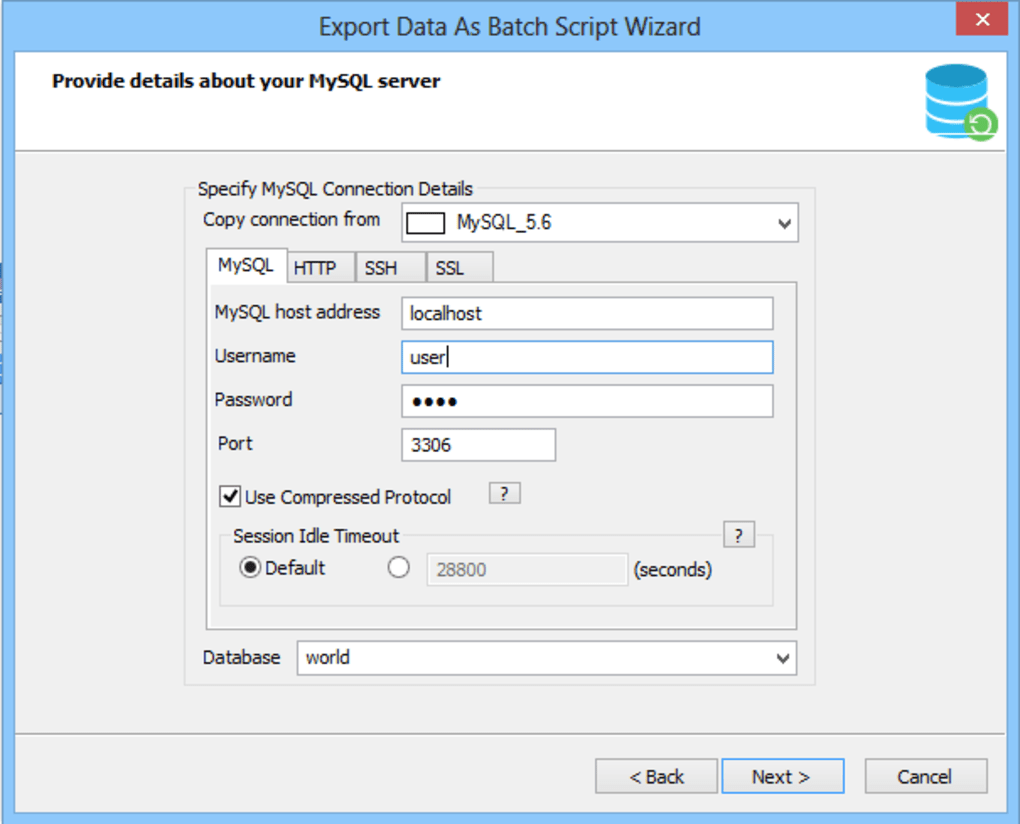
The program’s capacity extends beyond basic management tasks. SQLyog’s features encompass robust data manipulation capabilities, enabling users to efficiently import and export data, perform complex queries, and manage various aspects of database structure and performance. This broad functionality makes it adaptable to diverse scenarios and database sizes. Furthermore, SQLyog’s support for secure remote access using SSH and HTTP tunneling ensures that database management can be performed seamlessly and securely across diverse network environments. This feature is particularly crucial for managing databases deployed on remote servers or in cloud environments, where direct access may be restricted or impractical.
The tool’s data import capabilities enable effortless transfer of data from external sources, providing seamless integration with other ODBC-compliant databases. This feature drastically simplifies data migration and integration tasks, a common requirement in many database management scenarios. The process is streamlined through a user-friendly interface, minimizing technical hurdles and ensuring efficient data transfers.
Key Features and Functionality of SQLyog
SQLyog is replete with features designed to enhance efficiency and simplify the process of interacting with MySQL databases. Its key features include:
-
Intuitive Graphical Interface: The core strength of SQLyog lies in its user-friendly graphical interface. This interface drastically reduces the learning curve associated with MySQL administration, allowing users to perform complex tasks with ease.
-
Pre-defined Tools and Queries: SQLyog offers a wide array of pre-defined tools and commonly used queries, simplifying routine tasks and reducing the need for manual code creation. These pre-built functions accelerate the workflow, saving time and effort for users of all experience levels.
-
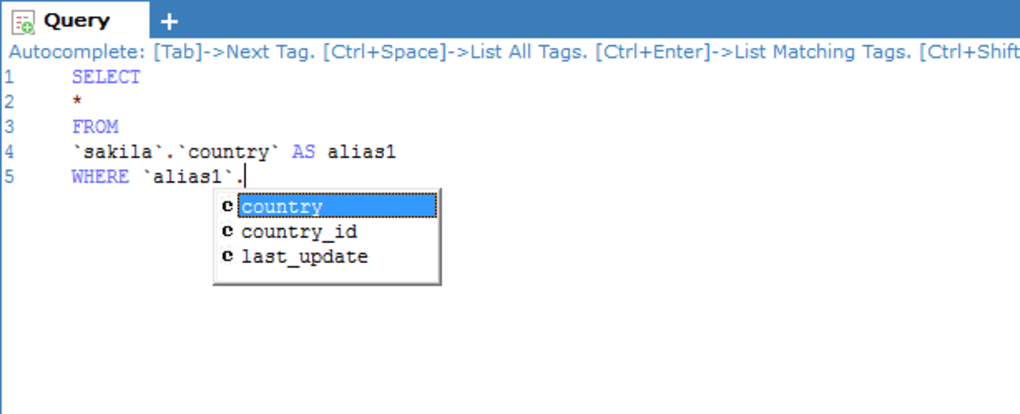
Graphical Query Editor: The integrated graphical query editor allows users to visually construct and edit SQL queries, reducing the risk of syntax errors. This feature is particularly beneficial for users who are less familiar with SQL syntax, allowing them to build complex queries through a visual representation of the database structure and relationships.
-
Query Result Editing: SQLyog offers an Excel-style grid interface for viewing and editing query results, making data manipulation intuitive and straightforward. This interface familiarizes users accustomed to spreadsheet software, facilitating a smoother transition to database management tasks.
-
Multi-tabbed Environment: The software’s multi-tabbed interface allows users to work with multiple queries and databases simultaneously, enhancing productivity and streamlining workflow. This feature is particularly beneficial when managing multiple databases or working on complex tasks that involve multiple queries.
-
Multi-threaded Query Execution: SQLyog supports multi-threaded query execution, allowing users to run multiple queries concurrently, significantly reducing overall processing time. The option to stop long-running queries also enhances control and responsiveness.
-
SQL Templates: The software offers the ability to create and manage SQL templates, enabling users to reuse frequently used query snippets, further improving efficiency and consistency. This feature is particularly helpful when executing repetitive tasks or when working with standardized query patterns.
-
Support for All MySQL Table Handlers: SQLyog provides comprehensive support for all MySQL table handlers, ensuring compatibility with diverse database structures and configurations. This compatibility is crucial for maintaining flexibility and adaptability across a variety of MySQL environments.
-
Multi-format Blob Editor: This dedicated tool simplifies the management of binary large objects (BLOBs), common data types in databases. The ability to edit BLOBs in various formats ensures flexibility in handling various kinds of data.
-
Data Viewing Modes: Users can choose to view data in grid or text mode, providing flexibility based on their preferences and the type of data being examined. This customization allows for optimal data viewing, catering to individual user preferences.
-
Shortcuts for SQL Statement Generation: A collection of shortcuts facilitates quick generation of SQL statements and pasting of object names, further accelerating the development process. These keyboard shortcuts allow for rapid query construction, reducing the time spent on manual typing and minimizing errors.
-
Learn by Example: By observing the SQL generated by SQLyog, users can enhance their understanding of SQL syntax and database operations. This “learn by doing” approach is especially beneficial for users new to SQL, helping them grasp fundamental concepts through practical experience.
SQLyog Alternatives and Comparisons
While SQLyog stands out as a popular choice for MySQL database management, several alternative tools exist, each with its own strengths and weaknesses. Choosing the right tool depends on specific needs and preferences. Some popular alternatives include:
- MySQL Workbench: This official MySQL tool offers a comprehensive suite of features, including visual database design, query editing, and administration tools. It’s a powerful option, but it can have a steeper learning curve compared to SQLyog.
-
phpMyAdmin: A web-based tool, phpMyAdmin offers a convenient way to manage MySQL databases through a web browser. Its accessibility is a key advantage, but its capabilities may be less extensive compared to dedicated desktop applications like SQLyog.
-
HeidiSQL: A lightweight and open-source tool, HeidiSQL offers a simpler interface than SQLyog, making it suitable for users who prefer a minimalistic approach. However, it may lack some of the advanced features found in commercial tools like SQLyog.
-
Dbeaver: This cross-platform database tool supports multiple database systems, including MySQL. Its versatility is a significant advantage, but it can be more resource-intensive compared to dedicated MySQL tools.
The best choice among these alternatives depends on individual requirements, ranging from the complexity of database management tasks to the desired level of functionality and interface preferences. Users should carefully evaluate their specific needs before selecting a tool.
Conclusion
SQLyog offers a compelling solution for simplifying the management of MySQL databases. Its intuitive graphical interface, coupled with a comprehensive range of features, effectively bridges the gap between technical complexity and user-friendliness. Its ability to streamline both simple and complex database tasks makes it a versatile and powerful tool for professionals and beginners alike, empowering efficient and effective MySQL database management. By providing a visual and easily accessible way to interact with MySQL, SQLyog democratizes access to the power of this widely used database system. It’s a significant asset for anyone working with MySQL databases, providing a valuable pathway to increased productivity and simplified management.
File Information
- License: “Free”
- Latest update: “May 24, 2023”
- Platform: “Windows”
- OS: “Windows 98”
- Language: “English”
- Downloads: “1.1M”
- Size: “9.53 MB”


