
Squirclx - Icon Pack is a free personalization application for Android users, developed by Adraxas. This app provides a robust and ever-expanding collection of icons and wallpapers, designed to significantly enhance the visual appeal of your Android device. Constantly updated, Squirclx continues to add new content and features, ensuring a consistently fresh and exciting user experience. This review will delve into the key aspects of this popular icon pack, exploring its features, benefits, and overall value proposition.
A Vast Library of Icons and Customization Options
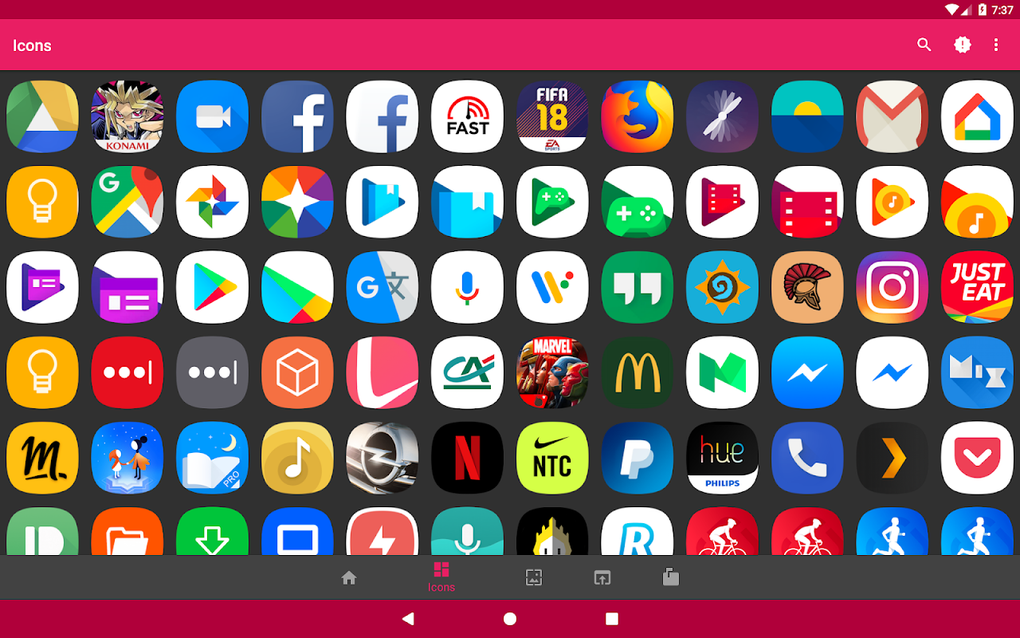
One of the most significant strengths of Squirclx lies in its extensive icon library, boasting over 2400 icons at the time of this writing. This diverse collection caters to a wide range of user preferences and styles, offering something for everyone. Whether you prefer minimalist designs, vibrant colors, or intricate details, Squirclx likely has an icon to match your aesthetic.
Furthermore, Squirclx goes beyond simply providing a pre-built collection. The app offers a unique and invaluable feature: the ability to request unthemed icons for free and without limitation. This means that if you’re looking for an icon that’s not yet included in the pack, you can simply request it, and the developers will work to add it to the library. This exceptional level of customization sets Squirclx apart from many competing icon packs. This user-centric approach ensures that the app continually adapts and expands to meet the ever-evolving needs and desires of its users.
Seamless Compatibility and Launcher Support
Squirclx exhibits excellent compatibility with a wide array of popular Android launchers. The developers have prioritized broad support, ensuring that users with various launcher preferences can seamlessly integrate Squirclx into their existing setup. The app’s compatibility extends to over twenty launchers, including industry-leading options like Nova Launcher, Apex Launcher, and the default Pixel Launcher. This extensive support significantly increases the accessibility and usability of Squirclx, making it a versatile option for a large segment of Android users. The ability to work smoothly across different launchers is a crucial factor in choosing an icon pack, and Squirclx excels in this regard.
Thematic Variety and Dynamic Features
Squirclx offers a range of theme options to further personalize the user experience. Users can choose from a light theme, a dark theme, an AMOLED theme (optimized for AMOLED screens), a transparent theme, or an auto theme that adapts to the system’s current theme. This flexibility caters to diverse preferences and screen technologies, allowing for optimal visual clarity and battery efficiency.
Beyond the thematic options, Squirclx incorporates dynamic features that enhance the overall functionality and aesthetic appeal. The app includes a dynamic calendar icon, which automatically updates to reflect the current date. Additionally, Squirclx provides customizable icon shapes for unthemed icons, further empowering users to tailor their device’s visual appearance. These small, yet significant details showcase the developers’ commitment to providing a truly comprehensive and adaptable personalization solution.
Privacy and Security Considerations
In today’s digital landscape, user privacy and data security are paramount concerns. Squirclx demonstrates a strong commitment to these values by explicitly stating that it does not collect or track any personal data. This transparency and respect for user privacy are commendable and contribute significantly to the overall trustworthiness of the application. In an era where data breaches are increasingly prevalent, this commitment to security is a key factor in gaining and maintaining user confidence. The app’s simple and straightforward privacy policy is easy to understand and reassures users that their personal information is safe.
User Experience and Interface
The user interface of Squirclx is intuitive and user-friendly. Navigation through the vast icon library is straightforward, and finding specific icons is made easy through the app’s search functionality. The settings menu is clearly organized, allowing users to easily customize various aspects of the app, including themes, icon shapes, and other preferences. The overall user experience is smooth and efficient, minimizing any frustration or confusion. Even users unfamiliar with icon packs should find Squirclx easy to navigate and use.
Comparison with Other Icon Packs
While Squirclx stands out with its extensive library, request feature, and broad launcher support, it’s beneficial to compare it with other popular icon packs available on the market. Many icon packs offer unique styles and artistic directions. Some might focus on specific aesthetic themes, while others offer a more eclectic mix of icons. However, Squirclx’s combination of a large pre-existing library, the ability to request missing icons, and its compatibility with a wide range of launchers makes it a strong contender. The continuous updates and additions to the icon library ensure that Squirclx remains a consistently evolving and relevant option. While other packs might excel in specific niche areas, Squirclx’s comprehensive approach makes it a versatile choice for many users.
Downloading and Installation
Downloading and installing Squirclx is a straightforward process. The app is available for free on the Google Play Store. Once downloaded, the installation process is typically quick and simple, requiring minimal user intervention. The app is well-optimized for a range of Android devices, ensuring a consistent and reliable experience across various hardware specifications. Users should ensure they are downloading the app from the official Google Play Store to avoid potentially malicious software.
Conclusion: A Top-Tier Icon Pack for Android
Squirclx - Icon Pack provides a compelling combination of features, customization options, and user-friendliness, making it a top choice for Android users seeking to personalize their devices. Its extensive icon library, coupled with the ability to request unthemed icons, ensures that users have access to a vast array of options to match their unique style. The broad launcher compatibility enhances its accessibility, while the commitment to user privacy and data security adds a layer of trust. Regular updates with new icons, features, and improvements keep Squirclx a dynamic and constantly evolving application. If you’re looking for a free, highly customizable, and reliable icon pack for your Android device, Squirclx is definitely worth considering. Its comprehensive approach to personalization sets it apart from many competing options, making it a strong contender in the crowded market of Android icon packs. The ease of use and commitment to user privacy further solidify its position as a valuable and reliable application for Android users of all levels of technical expertise.
File Information
- License: “Free”
- Latest update: “July 10, 2023”
- Platform: “Android”
- OS: “Android 9.0”
- Language: “English”
- Downloads: “364”
- Download Options: “Google Play”


