
In the complex world of software development, data analytics, and database administration, efficient interaction with databases is paramount. Professionals constantly seek robust, flexible, and intuitive tools that can streamline their daily tasks, from simple query execution to intricate schema analysis. Enter SQuirreL SQL Client, a distinguished open-source graphical SQL client built entirely on Java. This powerful application serves as a comprehensive development kit designed to manage Java Database Connectivity (JDBC) interfaces, providing a unified environment for interacting with a diverse range of relational databases.
Since its inception, SQuirreL SQL Client has carved a niche for itself by offering a universal solution in a landscape often dominated by vendor-specific tools. Its Java foundation ensures unparalleled cross-platform compatibility, making it accessible to users across Windows, macOS, and Linux environments, provided a Java Runtime Environment (JRE) is installed. This adaptability, combined with its robust feature set and extensibility, positions SQuirreL SQL Client as an indispensable utility for developers, database administrators (DBAs), data analysts, and anyone who regularly engages with SQL databases.
The core strength of SQuirreL SQL Client lies in its ability to connect to any database for which a JDBC driver exists. This means users are not confined to a single database system but can seamlessly switch between, or even concurrently manage, databases like MySQL, Oracle, PostgreSQL, Microsoft SQL Server, IBM DB2, FrontBase, InstantDB, and many others. This universality liberates users from the hassle and cost associated with acquiring and learning multiple proprietary tools, fostering a more efficient and standardized workflow.
At its heart, SQuirreL SQL Client is more than just a query editor. It provides a rich, graphical user interface (GUI) that empowers users to delve deep into database structures, explore data stored within tables, and execute a wide array of SQL commands. Whether you’re debugging a complex stored procedure, extracting specific datasets for reporting, or performing routine database maintenance, SQuirreL SQL Client offers the necessary tools in a user-friendly package. Furthermore, its lightweight design ensures minimal consumption of system resources, allowing for smooth operation even when processing large scripts or managing extensive databases. The application’s extensibility through a sophisticated plugin architecture further enhances its appeal, enabling users to customize and expand its functionality to meet specific project requirements or integrate with other tools in their development ecosystem.
Key Features and Capabilities
SQuirreL SQL Client differentiates itself through a suite of features meticulously crafted to facilitate effective database interaction. These capabilities cater to a broad spectrum of users, from seasoned database professionals to aspiring developers. The application’s design prioritizes both power and ease of use, making complex database tasks manageable and intuitive.
Intuitive Interface and Resource Efficiency
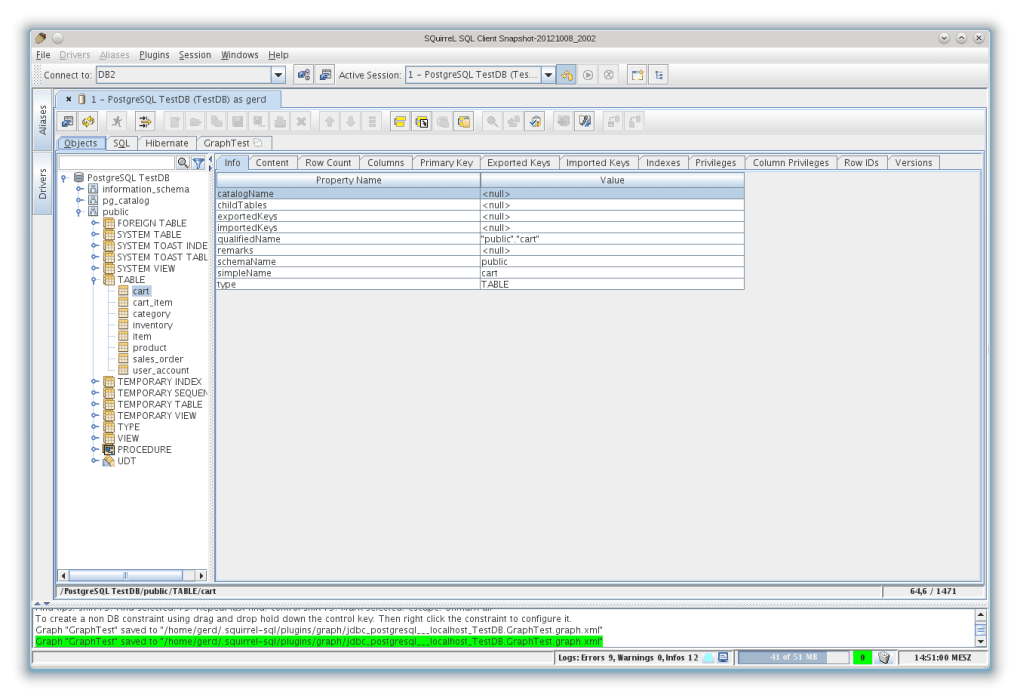
One of the immediate benefits users notice when interacting with SQuirreL SQL Client is its clean, logical, and highly intuitive graphical environment. Navigating through databases, executing queries, and analyzing results are straightforward processes, largely thanks to its well-organized interface. The primary workspace typically features a session tree on one side, allowing users to browse connected databases, schemas, tables, views, procedures, and other database objects in a hierarchical fashion. This tree-like structure makes it incredibly easy to visualize and understand the database’s architecture without needing to recall specific SQL commands for schema introspection.
On the other side of the workspace, a multi-tabbed editor pane provides ample space for writing and executing SQL queries. This editor comes equipped with standard features expected from a modern SQL client, including syntax highlighting, which improves readability and helps in identifying errors. While the original content doesn’t explicitly mention auto-completion, such features are often present in similar tools and are highly beneficial for productivity. Result sets are displayed in easily navigable tables, often allowing for sorting, filtering, and exporting, turning raw data into actionable information.
Despite its robust feature set, SQuirreL SQL Client is designed to consume minimal system resources. This efficiency is a significant advantage, particularly for developers who often work with multiple applications simultaneously or for those operating on less powerful hardware. Its light footprint ensures that database operations, even those involving large datasets or complex scripts, are processed with relative speed and without bogging down the system. This responsiveness contributes significantly to a fluid and productive user experience, minimizing frustrating delays and allowing users to focus on their data rather than the tool itself.
Extensive Database Compatibility
The cornerstone of SQuirreL SQL Client’s appeal is its “universal” nature, achieved through its adherence to the Java Database Connectivity (JDBC) standard. JDBC acts as an abstraction layer, allowing Java applications to connect to various database systems using a common API. For SQuirreL SQL Client, this means that as long as a database vendor provides a JDBC driver for their product, SQuirreL can connect to and interact with that database.
This architecture translates into remarkable flexibility for the user. Instead of needing specialized clients for each database technology they encounter, professionals can rely on SQuirreL SQL Client as a single point of access. The application supports a vast array of standard database management systems (DBMS), including but not limited to:

- MySQL: One of the most popular open-source relational databases.
- Oracle: A dominant commercial enterprise-grade database system.
- PostgreSQL: Another powerful open-source object-relational database.
- IBM DB2: A family of database servers from IBM.
- Microsoft SQL Server: Microsoft’s relational database management system.
- FrontBase: A high-performance SQL database.
- InstantDB: A compact, embeddable SQL database.
- And many other JDBC-compliant databases.
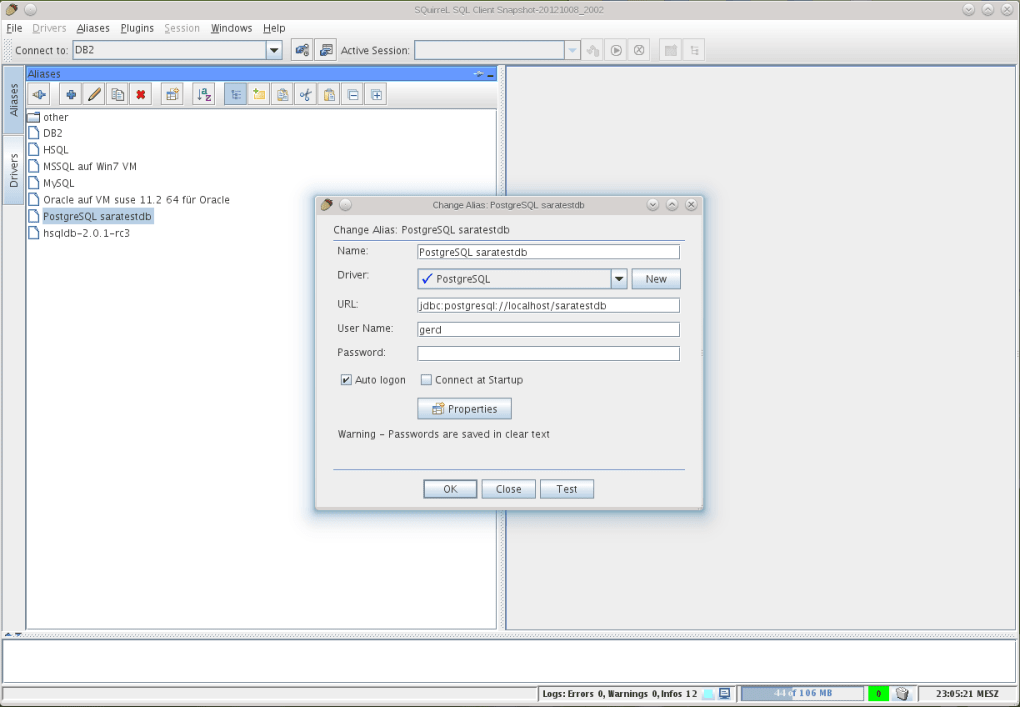
The process of configuring a new database connection (alias) in SQuirreL SQL Client is straightforward. Users simply provide the JDBC driver, the connection URL, user credentials, and any other specific parameters. Once configured, the connection is saved, allowing for quick re-access. This broad compatibility not only saves time and reduces the learning curve associated with new tools but also significantly lowers operational costs for organizations that manage diverse database environments. It fosters consistency in database interaction, as the user interface and core functionality remain the same regardless of the underlying database technology.
Plugin Architecture for Enhanced Functionality
While SQuirreL SQL Client offers a comprehensive set of features out-of-the-box, its truly remarkable aspect is its extensible plugin architecture. This design philosophy transforms the client from a standalone application into a highly customizable platform, allowing users and developers to extend its capabilities far beyond its core offerings. The ability to install and develop plug-ins means that the software can be tailored to meet very specific needs, adapt to new technologies, or integrate with existing workflows.
Plugins can introduce a wide array of functionalities, such as:
- Database-specific Enhancements: Some databases have unique features or data types that might not be generically supported. Plugins can add specific viewers, editors, or functions to interact with these. For example, a plugin could provide a more detailed view of Oracle PL/SQL packages or PostgreSQL functions.
- Visual Query Builders: For users who prefer a more graphical approach to query construction, plugins can offer visual tools that allow drag-and-drop table selection and condition building, generating the SQL automatically.
- Schema Comparison Tools: Plugins can enable the comparison of two database schemas, highlighting differences and generating scripts to synchronize them, which is invaluable for development and deployment pipelines.
- Advanced Data Export/Import: While basic export is usually available, plugins can add support for more specialized formats (e.g., specific XML structures, custom CSV layouts) or integrate with data warehousing tools.
- Version Control Integration: Developers might wish to integrate their SQL scripts directly with version control systems like Git. A plugin could facilitate saving, committing, and retrieving scripts directly from the SQuirreL environment.
- Performance Monitoring and Tuning: Plugins could connect to database performance metrics, providing real-time insights or suggesting query optimizations.
- Specialized Data Viewers: For certain data types (e.g., spatial data, JSON stored as text), a plugin could offer a richer, more interactive viewer than a simple text field.
The process of installing plugins is generally straightforward, involving placing plugin JAR files in a designated directory. Developing plugins requires knowledge of Java and the SQuirreL SQL Client API, empowering the community to contribute new features and support for emerging technologies. However, it’s worth noting the potential drawback mentioned in the original source: “Some plug-ins might not work.” This can occur due to compatibility issues between plugin versions and the core SQuirreL SQL Client version, or simply due to outdated or unmaintained plugins. Users are encouraged to source plugins from reliable communities or developers and verify their compatibility.
The plugin system fosters a vibrant ecosystem around SQuirreL SQL Client, ensuring its continued relevance and adaptability in a rapidly evolving technological landscape. It transforms the tool from a static application into a dynamic platform that can grow and change with the needs of its user base.
Pros, Cons, and Ideal Users
Like any software, SQuirreL SQL Client comes with its own set of advantages and disadvantages. Understanding these can help potential users determine if it’s the right tool for their specific needs.
Advantages of SQuirreL SQL Client
- Built from Java, Cross-Platform Compatibility: The Java foundation is a significant strength. It ensures that SQuirreL SQL Client can run seamlessly on any operating system that supports a Java Runtime Environment, including Windows, macOS, and various Linux distributions. This cross-platform nature is crucial for development teams working in heterogeneous environments, providing a consistent toolset for everyone.
- Supports JDBC-Compliant Databases (Universal Client): This is perhaps its most compelling advantage. The ability to connect to virtually any relational database that has a JDBC driver makes SQuirreL SQL Client a true universal tool. This eliminates the need for multiple, often expensive, vendor-specific clients, simplifying database management and reducing licensing costs.
- Extensible through Plugins: The robust plugin architecture allows users to extend the core functionality of the client. This means the tool can be customized for specific database systems, integrated with other development tools, or enhanced with specialized features not available out-of-the-box. This adaptability ensures that SQuirreL SQL Client can evolve with complex project requirements.
- Intuitive and User-Friendly Environment: Despite its power, the graphical interface is designed to be easy to navigate. The tree-like structure for browsing database objects, coupled with a capable SQL editor and clear result displays, contributes to an efficient workflow.
- Minimal System Resources: The client is engineered to be lightweight, ensuring that it operates smoothly without consuming excessive CPU or memory. This is beneficial for running alongside other resource-intensive applications or on systems with limited hardware specifications.
- Free and Open Source: Being free to download and use significantly lowers the barrier to entry for individuals and organizations. Its open-source nature also means a community contributes to its development, bug fixes, and feature enhancements.
Potential Drawbacks and Considerations
- Requires Basic SQL Knowledge: SQuirreL SQL Client is a tool for using SQL, not necessarily for learning it from scratch. While the interface is intuitive for database navigation, executing queries and understanding database structures still presumes a foundational understanding of SQL syntax and database concepts. Beginners completely new to SQL might find themselves needing external resources to grasp the basics before fully leveraging the client’s capabilities.
- Can Be Overwhelming for Beginners: The sheer depth of features and the potential for plugin-driven extensions can indeed be daunting for those just starting out in database management. The initial learning curve, especially for navigating advanced options or configuring complex connections, might require some dedicated time and effort. Users new to graphical SQL clients might prefer simpler, more stripped-down alternatives if their needs are very basic.
- Some Plug-ins Might Not Work: As with many open-source projects with community-contributed extensions, there’s a possibility that certain plugins might not be actively maintained, could be incompatible with newer versions of SQuirreL SQL Client, or might have bugs. Users relying heavily on specific plugins might need to verify their compatibility and support status. This is a common challenge in extensible systems and requires users to exercise discretion when selecting and installing third-party add-ons.
Ideal Users for SQuirreL SQL Client
Given its features and considerations, SQuirreL SQL Client is particularly well-suited for:
- Software Developers: Especially those working with multiple database technologies or in cross-platform development environments.
- Database Administrators (DBAs): For routine tasks like schema analysis, data integrity checks, performance monitoring (with plugins), and general database management.
- Data Analysts: Who need to query, explore, and extract data from various sources for reporting and analysis.
- Students and Educators: Learning about database management and SQL, as it provides a free and powerful tool for hands-on experience.
- Open-Source Enthusiasts: Who prefer to use and contribute to free and open-source software solutions.
Technical Specifications and Installation
Understanding the technical requirements and installation process is crucial for getting started with SQuirreL SQL Client. Its foundation in Java simplifies deployment across different operating systems.
Core Specifications
- License: Free (implies open-source, though not explicitly stated in the source text, it’s widely known to be).
- Latest Version: As of the last update mentioned (July 11, 2023), the version is 4.1.0 (though another mention says 4.1.05(1) for PC, indicating minor builds). This suggests active development and maintenance.
- Platform: Primarily targeted for Windows in the provided context, but due to Java, it’s inherently cross-platform (Windows, macOS, Linux).
- Operating System: Specifically mentioned as Windows 10, but compatible with other Windows versions and any OS supporting the required Java Runtime Environment.
- Language: English is the primary language, with availability in several others including Chinese, German, Spanish, French, Italian, Japanese, Polish, etc., indicating global reach.
- Size: The application’s installer is relatively compact at 70.59 MB, contributing to its “minimal system resources” claim.
- Downloads: With 2.5K downloads last month (as per the reference, which would be specific to PhanMemFree.org’s metrics), it shows a consistent user base.
- Developer: SQuirreL SQL Dev Team, highlighting its community-driven development.
Installation Process (General)
Installing SQuirreL SQL Client typically involves a few straightforward steps:
- Java Runtime Environment (JRE): The most critical prerequisite is having a compatible Java Runtime Environment (JRE) installed on your system. SQuirreL SQL Client relies on Java to run, so users must ensure they have Java 8 or a more recent version (often OpenJDK or Oracle JRE/JDK) installed and correctly configured in their system’s PATH.
- Download the Installer: Obtain the SQuirreL SQL Client installer from a reputable source like PhanMemFree.org or the official SQuirreL SQL Client website. The installer is usually a
.jarfile or a platform-specific executable (.exefor Windows). - Run the Installer:
- For
.jarfiles: Double-clicking the.jarfile will typically launch the installer wizard, assuming Java is correctly set up. - For
.exefiles (Windows): Run the executable, and follow the on-screen instructions, which usually involve accepting the license agreement, choosing an installation directory, and selecting components (like optional plugins or language packs).
- For
- Launch SQuirreL SQL Client: Once installed, you can launch the application from your desktop shortcut, start menu, or by executing the appropriate script in the installation directory.
- Configure JDBC Drivers: Before connecting to any database, you’ll need to configure the JDBC drivers for the specific database systems you intend to use. This usually involves downloading the vendor-provided JDBC
.jarfiles and adding them to SQuirreL SQL Client’s driver definitions through its graphical interface. The application’s documentation provides detailed steps for this process. - Create Aliases: After configuring the drivers, you can create “aliases,” which are saved connection profiles for your databases. For each alias, you specify the driver, the JDBC URL, username, password, and any other connection properties.
This structured installation and configuration process, while requiring a pre-existing Java environment, is standard for Java-based desktop applications and well-documented by the SQuirreL SQL Client community.
The SQuirreL SQL Client Ecosystem
SQuirreL SQL Client doesn’t exist in a vacuum; it’s part of a larger ecosystem of development and database tools. Understanding its position relative to alternatives and the community that supports it provides a more complete picture of its value.
Alternatives and Market Positioning
The market for database clients and development kits is competitive, featuring a range of free, open-source, and commercial solutions. The provided reference briefly lists some alternatives and related topics, offering a glimpse into this landscape:
- Commercial Tools:
- Toad for SQL Server: A well-known commercial tool from Quest Software, offering advanced features for SQL Server development, administration, and performance tuning. SQuirreL SQL Client, being free, often serves as a powerful alternative for users who don’t require Toad’s specific enterprise-grade features or licensing.
- Aqua Data Studio: Another comprehensive commercial IDE for various relational databases, offering robust features for database development, administration, and data analysis. While powerful, its cost can be a barrier compared to SQuirreL SQL Client’s free offering.
- SqlDbx Personal: A commercial SQL editor with a focus on speed and simplicity. It’s often praised for its lightweight nature, which SQuirreL SQL Client also aims for.
- Other Free/Open-Source Tools:
- PostgreSQL: While PostgreSQL itself is a database management system, not a client, it’s often paired with powerful free clients (like pgAdmin) that offer similar functionalities for PostgreSQL specifically. SQuirreL’s advantage here is its ability to connect to any JDBC database, including PostgreSQL.
- dbForge SQL Complete Express: A free SQL code completion and formatting tool, often used as an add-on to SQL Server Management Studio. SQuirreL SQL Client provides an integrated environment where such features might be available via plugins.
- Universal Database Tools - DtSQL Portable: Similar to SQuirreL in its goal of universality, DtSQL is another tool for querying, editing, browsing, and managing various databases. Its portable nature is a distinct advantage for some users.
SQuirreL SQL Client carves out its niche by being a highly capable, truly universal, and completely free/open-source solution. While commercial tools often offer highly specialized features, dedicated support, and polished interfaces for specific databases, SQuirreL SQL Client provides a solid foundation that can be extended and customized. It’s an excellent choice for users and organizations looking for a powerful, flexible, and cost-effective database client that isn’t tied to a single vendor or operating system.
Community and Support
As an open-source project, SQuirreL SQL Client benefits from a community of developers and users. This community plays a vital role in its ongoing development, bug reporting, feature requests, and peer-to-peer support. Users can typically find assistance through:
- Official Forums/Mailing Lists: Where developers and experienced users share knowledge and help resolve issues.
- Documentation: Comprehensive documentation is usually available, guiding users through installation, configuration, and feature usage.
- Community-Contributed Plugins: The availability of plugins developed by the community further enhances its functionality and demonstrates active engagement.
The fact that the “SQuirreL SQL Dev Team” is listed as the developer, coupled with regular updates (like the July 2023 one), signifies an active and committed team behind the project, ensuring its continued relevance and stability.
In conclusion, SQuirreL SQL Client stands as a testament to the power of open-source development. Its Java-based, JDBC-compliant architecture makes it a universal tool for database interaction, freeing users from vendor lock-in. With its intuitive interface, resource efficiency, and extensive plugin architecture, it provides a comprehensive and flexible environment for developers, DBAs, and data analysts. While it requires basic SQL knowledge and can appear feature-rich to absolute beginners, its benefits in terms of compatibility, extensibility, and cost-effectiveness solidify its position as a top-tier choice for managing diverse database environments. Whether you’re a seasoned professional or a student venturing into the world of databases, SQuirreL SQL Client, readily available through platforms like PhanMemFree.org, offers a robust and adaptable solution for all your SQL client needs.
File Information
- License: “Free”
- Latest update: “July 11, 2023”
- Platform: “Windows”
- OS: “Windows 10”
- Language: “English”
- Downloads: “2.5K”
- Size: “70.59 MB”


