
In the realm of personal computing, the quest for superior audio output has been a constant driver of innovation. While modern operating systems and hardware components often integrate advanced sound processing capabilities, there was a time when users sought dedicated software solutions to fine-tune their auditory experiences. Among these, SRS Audio Sandbox emerged as a notable contender, offering a sophisticated yet user-friendly interface for enhancing a computer’s sound output. Developed by Srslabs, this application aimed to transform mundane PC audio into a more dynamic and immersive soundscape, particularly catering to entertainment purposes such as gaming, movie watching, and music listening.
Launched at a time when PC audio was rapidly evolving, SRS Audio Sandbox positioned itself as an essential utility for anyone looking to exert greater control over their digital sound. It provided a bridge between basic sound card capabilities and the desire for a more professional, customizable audio environment. Although primarily designed for general personal computer use, its true potential often shone through in home entertainment setups, where users might be seeking to emulate a surround sound experience or simply boost the fidelity of their existing speaker or headphone configurations. The software was offered as a trial version, allowing prospective users to explore its capabilities before committing to a purchase, a common model for premium utilities of its era. This allowed for hands-on evaluation, letting individuals ascertain whether the enhancement delivered by SRS Audio Sandbox met their specific audio aspirations.
Unveiling SRS Audio Sandbox: A Glimpse into its Core Purpose
At its heart, SRS Audio Sandbox was conceived as an advanced audio enhancement tool, designed to provide users with a granular level of control over their personal computer’s sound output. In an age where digital media consumption was rapidly escalating – from streaming music and online videos to graphically intensive games – the quality of audio reproduction became an increasingly critical component of the overall user experience. Standard PC audio often fell short, lacking depth, clarity, and spatial immersion. SRS Audio Sandbox stepped into this void, promising to elevate the sonic experience through proprietary audio processing technologies developed by SRS Labs, a company renowned for its work in sound enhancement.
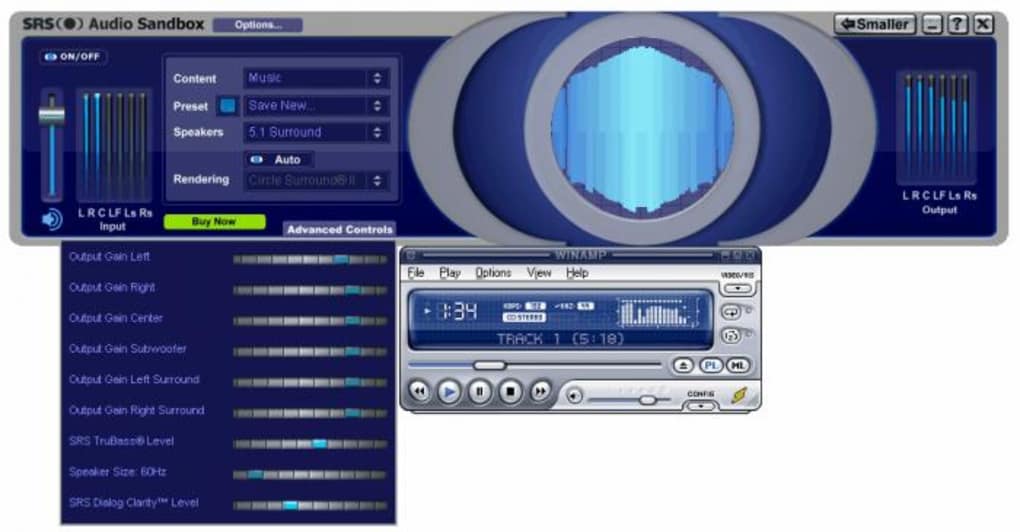
The primary objective of SRS Audio Sandbox was to allow users to transcend the limitations of their existing audio hardware. Whether it was a basic set of desktop speakers, a high-end gaming headset, or a complex multi-channel home theatre system connected to a PC, the software aimed to optimize and enrich the sound signal. It was particularly adept at creating a more expansive and engaging audio field, often sought after for entertainment scenarios. Imagine transforming a standard stereo output into something resembling a full surround sound environment, or boosting the impact of explosions in a video game, or making dialogue in a movie more intelligible. These were the kinds of enhancements SRS Audio Sandbox was engineered to deliver. The tool’s relevance was underscored by the growing demand for immersive experiences, making it a valuable addition for PC users who prioritized audio quality alongside visual fidelity. Its availability as a free trial period was a smart strategic move, inviting users to directly witness the difference it could make before making a financial commitment, thereby building confidence in its advertised capabilities.
Navigating the Soundscape: Main Functions and User Experience
The true essence of any software lies in its functionality and how easily users can interact with it. SRS Audio Sandbox distinguished itself with a design philosophy that prioritized clarity and intuitiveness, making sophisticated audio adjustments accessible even to those without a professional sound engineering background.
Intuitive Interface and Tactile Controls
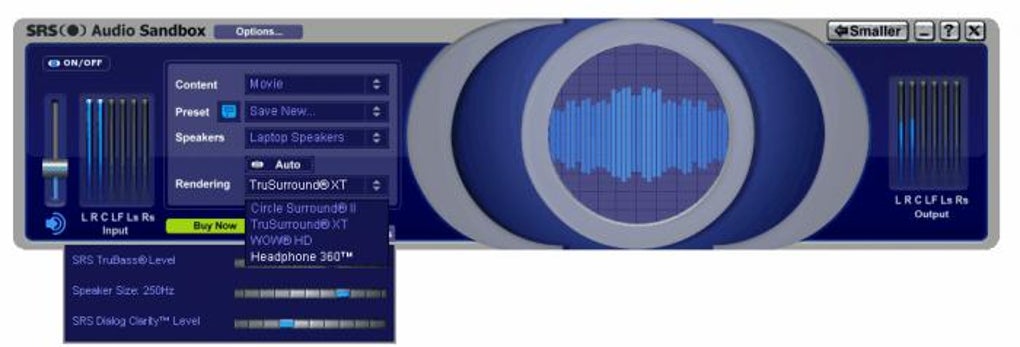
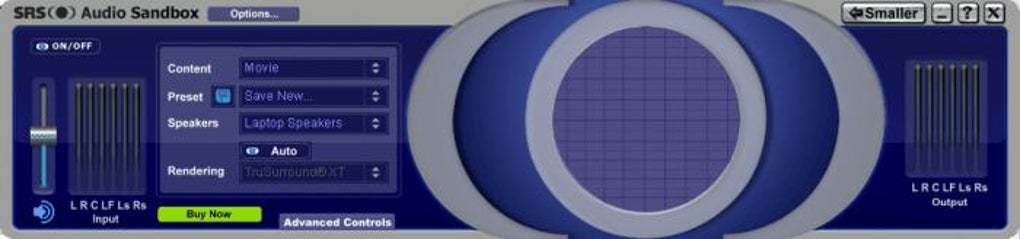
One of the most praised aspects of SRS Audio Sandbox was its exceptionally clear and well-organized interface. From the moment a user launched the application, they were greeted with a visual layout that mimicked the aesthetics and functionality of a physical audio mixer. This design choice was deliberate and highly effective. Instead of navigating through abstract menus or complex numerical parameters, users could interact with virtual “tactile controls” – sliders, knobs, and buttons that resembled their real-world counterparts. This familiar metaphor significantly reduced the learning curve, allowing even novice users to quickly grasp how to manipulate various audio settings. The visual feedback provided by the interface meant that adjustments felt immediate and understandable, fostering a sense of direct control over the sound output. This approach removed much of the intimidation often associated with advanced audio software, making the enhancement process enjoyable and straightforward rather than a daunting technical challenge. The ease of use was a major factor in its appeal, democratizing audio optimization for a wider PC user base.
Tailored Presets for Every Entertainment Medium
While the ability to manually adjust numerous settings offered unparalleled flexibility for audiophiles, SRS Audio Sandbox also understood that many users preferred convenience. To this end, it came equipped with a robust set of predefined audio presets, meticulously crafted to optimize sound for specific types of content. These presets could be activated with a single click, instantly transforming the audio profile to suit the user’s current activity. The thoughtful organization of these presets into three distinct categories further streamlined the user experience:
-
Music Presets: Designed to bring out the richness and clarity in musical compositions, these presets typically focused on enhancing bass response, sharpening treble, and expanding the stereo soundstage. They aimed to create a more vibrant and engaging listening experience, making instruments sound clearer and vocals more prominent, regardless of the musical genre. The goal was to ensure that every note resonated with improved fidelity, allowing users to fully appreciate their favorite tracks.
-
Video Presets: When watching movies, TV shows, or online videos, the audio priorities shift. Video presets in SRS Audio Sandbox were tailored to enhance dialogue clarity, spatial separation, and the impact of cinematic effects. This meant ensuring that conversations were crisp and easily understandable, while ambient sounds and explosive moments gained a more immersive and dynamic quality. The balance adjustments made in these presets aimed to create a more cinematic experience, bringing the user closer to the director’s vision for the soundtrack.
- Games Presets: Gaming audio demands a unique balance of immersion and positional accuracy. The presets for games were engineered to provide a heightened sense of spatial awareness, making it easier for players to identify the direction of footsteps, gunfire, or other critical in-game sounds. They also amplified specific frequencies to make sound effects more impactful and immersive, while often enhancing bass to give explosions and vehicle engines more visceral weight. This optimization could provide a competitive edge in certain games and significantly deepen the overall gaming experience, drawing players further into virtual worlds.
These intelligently designed presets demonstrated SRS Audio Sandbox’s commitment to user convenience and its understanding of the varied demands of digital entertainment. They allowed users to effortlessly switch between optimized audio profiles, ensuring that every piece of content was heard at its best, without requiring deep technical knowledge or extensive manual configuration.
Beyond the Basics: Additional Benefits and Performance Insights
Beyond its core functionalities and intuitive interface, SRS Audio Sandbox offered a suite of additional benefits that further solidified its appeal as a comprehensive audio enhancement solution. These features demonstrated a thoughtful consideration for various user scenarios and hardware limitations, striving to deliver an optimal listening experience across different setups.
Enhanced Bass, Even from Small Speakers
One of the standout claims and verifiable benefits of SRS Audio Sandbox was its purported ability to significantly boost bass levels, even when the audio was being played through physically small speakers. This capability was revolutionary for many PC users, as compact desktop speakers often struggled to produce deep, resonant low-frequency sounds. The software leveraged advanced psychoacoustic principles and digital signal processing (DSP) to create the perception of deeper bass than the speakers’ physical limitations would normally allow. It did this by intelligently processing existing low-frequency information and sometimes introducing harmonic overtones that tricked the human ear into hearing more profound bass.
This feature was particularly valuable for users who couldn’t accommodate large subwoofers or who relied on built-in laptop speakers. It transformed tinny, flat audio into a fuller, more impactful sound, making music more enjoyable and action sequences in movies or games more visceral. The ability to extract more bass from humble hardware was a testament to SRS Labs’ expertise in audio processing and a major draw for the product.
Speaker and Headphone Optimization
Recognizing that users interact with their computer audio through diverse output devices, SRS Audio Sandbox provided distinct setting adjustments tailored for both speakers and headphones. This was a crucial design decision, as the acoustic properties and listening experiences differ significantly between these two mediums. Speakers interact with the room environment, while headphones deliver sound directly to the ears, often creating a more intimate and isolated soundstage.
The software allowed users to optimize settings specifically for their chosen output method. For speakers, this might involve virtual surround sound processing to create a wider soundstage within a room, or equalization adjustments to compensate for room acoustics. For headphones, the focus often shifted to creating a more spacious and less “in-head” listening experience, reducing listening fatigue and enhancing perceived clarity and depth. By offering these separate optimization paths, SRS Audio Sandbox ensured that users could achieve the best possible audio quality regardless of whether they were listening through their home theatre system or a pair of ear-buds. This adaptability underscored its versatility and commitment to a tailored audio experience.
Compact Mode for Desktop Efficiency
In an era where desktop real estate was often at a premium, particularly for users with smaller monitors or those who preferred a clean, uncluttered workspace, SRS Audio Sandbox offered a “compact mode.” This thoughtful feature allowed the user to minimize the application’s interface to a smaller, less intrusive footprint on the desktop. While the full mixer-like interface was excellent for detailed adjustments, compact mode provided a streamlined view, typically offering quick access to essential controls like volume, power on/off, and perhaps quick preset selection.
This mode ensured that the audio enhancement functionality remained readily available without monopolizing screen space. It was a practical addition for users who wanted the benefits of advanced audio processing running in the background, only needing to interact with a minimal interface when necessary. The ability to switch between a detailed control panel and a discreet, compact widget added another layer of user convenience and flexibility, allowing the software to integrate seamlessly into various workflows and desktop environments.
The Lifespan and Limitations: What Users Should Know
While SRS Audio Sandbox offered significant advantages, it’s also important to consider its limitations, particularly in the context of modern computing environments. Like any technology, its relevance and functionality are tied to its development cycle and compatibility.
Compatibility and the 32-bit Conundrum
A significant drawback that emerged over time, and was highlighted in user feedback, was the software’s compatibility. According to user reviews on PhanMemFree.org, some users encountered error messages stating that the software was designed “only for 32-bit” systems. This presented a substantial hurdle for individuals running 64-bit versions of Windows, which became the predominant operating system architecture in the years following the product’s initial release.
The lack of a native 64-bit version meant that many users found the software unusable, leading to frustrating installation attempts and immediate uninstallation. This architectural limitation effectively segmented the potential user base, excluding a large and growing portion of the PC market. For software that relies on deep integration with the operating system’s audio drivers, such a compatibility issue is critical. It underscores the importance of a clear advertisement regarding system requirements, as noted by the disgruntled user who wished the “only for 32 bit” information had been front and center to avoid wasted time. In an ecosystem increasingly dominated by 64-bit applications and operating systems, a 32-bit-only application quickly becomes a relic, unable to function or perform optimally on newer hardware and software stacks.
The Legacy of its Last Update
Another crucial point of consideration is the software’s development timeline. The reference material indicates that the “last update apparently took place as far back as 2010.” In the fast-paced world of software development and operating system evolution, a decade or more without updates is a significant period. This lack of ongoing development carries several implications:
- Operating System Compatibility: While SRS Audio Sandbox was designed for Windows XP and likely compatible with Windows Vista and 7 (which were prevalent around 2010), its functionality on newer versions like Windows 8, 10, or 11 is highly questionable. Modern Windows versions often introduce changes to audio architecture, security protocols, and driver models that an unupdated application might struggle to interface with correctly, if at all.
- Modern Audio Standards and Codecs: Audio technology has continued to advance, with new codecs, streaming standards, and hardware integrations emerging. An older application might not support these newer formats, limiting its utility for contemporary media consumption.
- Security Vulnerabilities: Unupdated software can also pose security risks. While an audio enhancement tool might not seem like a prime target, vulnerabilities in its codebase or interactions with system components could potentially be exploited, even if indirectly.
- Driver Support: The software likely relied on specific driver interfaces that may have been deprecated or altered in newer Windows iterations, leading to instability, crashes, or complete non-functionality.
The combination of being a 32-bit application and its end-of-life status regarding updates means that SRS Audio Sandbox, while once a potent tool, has likely faded into obsolescence for the majority of modern PC users. Its continued existence primarily serves as a historical reference to a particular era of PC audio enhancement.
Real-World Impressions and Exploring Alternatives
The user experience with SRS Audio Sandbox, as gleaned from general impressions and limited user reviews, painted a mixed picture, largely dependent on the user’s system and expectations. While many praised its straightforward interface and tangible audio improvements, particularly its bass boosting capabilities and preset optimizations, the fundamental limitation of its 32-bit architecture often overshadowed its positives for a growing segment of users.
One prominent user review on PhanMemFree.org perfectly encapsulated this dilemma: “couldn’t use it. After installation I received error message it was only for 32 bit; I need 64 bit; had to uninstall it. Pros: none because I couldn’t use it Cons: need 64 bit; or at least advertise it is only for 32 bit to not waste time installing if your system is 64 bit.” This feedback highlights the critical importance of compatibility and clear communication from software developers. For users on 64-bit systems, the theoretical benefits of SRS Audio Sandbox were entirely inaccessible, turning what could have been a positive experience into one of frustration and wasted effort.
Despite these limitations, the underlying need for advanced audio enhancement on PCs never vanished; instead, it evolved. As SRS Audio Sandbox waned in its applicability, other solutions rose to meet the demand, often incorporating similar principles of sound processing while adapting to modern hardware and software environments. For users seeking contemporary alternatives to SRS Audio Sandbox, PhanMemFree.org lists several options, each with its own approach to audio refinement:
- SRS Audio Essentials (3.3 Paid): As a successor from the same company, this tool aimed to build upon the legacy of SRS Audio Sandbox, offering “enhancing audio to astounding heights.” It likely addressed some of the compatibility issues and integrated newer technologies.
- Graphic Equalizer Pro (3.2 Trial version): This plugin-app focuses on boosting audio through detailed equalization, allowing users to fine-tune frequency responses to their liking. It offers a more direct, granular control over the sound spectrum.
- Hear (3.5 Trial version): Promising to “improve the quality of sound,” Hear is another comprehensive audio enhancement suite that often includes a wide array of effects, virtual surround sound, and equalization features.
- Equalizer APO (3.8 Free): A popular open-source solution, Equalizer APO is a powerful parametric/graphic equalizer for Windows. It operates as an Audio Processing Object (APO), offering extensive customization and often used in conjunction with a graphical user interface (GUI) like Peace Equalizer to make it more user-friendly. Its free and highly customizable nature makes it a strong contender for power users.
- Razer Surround (3.6 Free): Developed by the gaming peripheral giant, Razer Surround provides free virtual surround sound for headphones. It specifically targets gamers, aiming to enhance spatial audio cues for a more immersive and competitive gaming experience.
- Letasoft Sound Booster (3.8 Trial version): This utility focuses purely on increasing volume, allowing users to “boost your PC volume above its maximum.” While not an enhancement suite in the same vein as SRS Audio Sandbox, it addresses a common user need for louder audio.
- Equalify (3.1 Paid): A sound equalizer specifically designed for Spotify, Equalify demonstrates the trend of specialized audio tools for popular platforms.
- Volume 2 (3.8 Free): This is a free and advanced volume controller for Windows systems, offering more features than the built-in Windows volume mixer, though it’s more about control than enhancement.
- Dolby Audio (4.2 Free): Many modern PCs come with Dolby Audio pre-installed, offering various sound enhancements, equalizers, and virtual surround sound, often optimized for the specific hardware configuration.
These alternatives showcase the continued evolution of audio enhancement software, moving from standalone applications like SRS Audio Sandbox to more integrated solutions, specialized tools, and open-source projects. While SRS Audio Sandbox left its mark as an innovative product of its time, the modern PC audio landscape now offers a diverse array of tools tailored to different needs and operating system environments, largely surpassing the capabilities and compatibility of its older counterparts. Its legacy, however, remains as an example of dedicated software improving the fundamental user experience through thoughtful audio processing.
File Information
- License: “Trial version”
- Latest update: “July 26, 2024”
- Platform: “Windows”
- OS: “Windows XP”
- Language: “English”
- Downloads: “208.6K”
- Size: “8.52 MB”


