
Solid State Drives (SSDs) have revolutionized data storage, offering significantly faster read and write speeds compared to traditional Hard Disk Drives (HDDs). However, SSDs have a finite lifespan, determined by the limited number of write cycles each memory cell can endure. This inherent limitation necessitates careful management to maximize the longevity of your SSD and prevent premature failure. SSD Fresh is a Windows utility designed to address this very need, optimizing your system’s settings to minimize unnecessary write operations and extend the life of your valuable SSD.
Understanding SSD Lifespan and Write Amplification
Unlike HDDs that utilize moving parts to write data, SSDs employ flash memory, which stores data in memory cells. Each cell has a limited number of times it can be rewritten before it degrades, eventually leading to data loss or drive failure. This limitation is measured in Terabytes Written (TBW), representing the total amount of data that can be written to the drive throughout its lifespan. Exceeding this TBW limit accelerates wear and tear, significantly shortening the drive’s operational life.
Furthermore, the concept of “write amplification” plays a crucial role in SSD longevity. Write amplification occurs when the operating system performs more write operations than strictly necessary to complete a given task. This can arise from various factors including operating system overhead, file system fragmentation, and unnecessary background processes. High write amplification dramatically increases the burden on the SSD’s memory cells, leading to accelerated wear and premature failure.
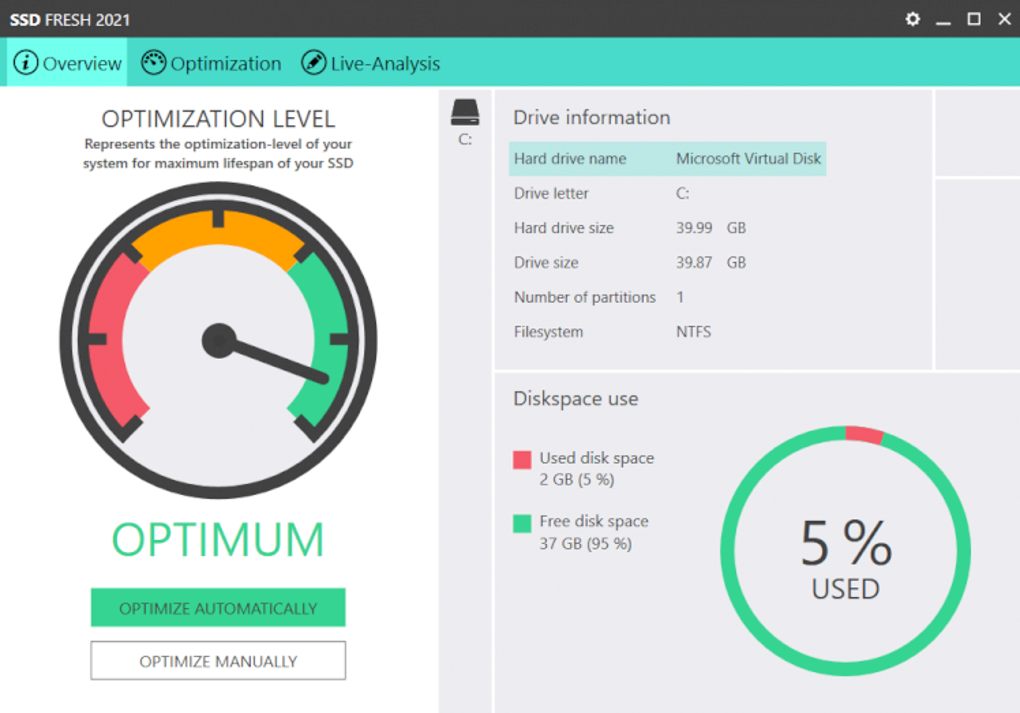
SSD Fresh tackles this problem by intelligently configuring your Windows system to reduce write amplification and minimize unnecessary write cycles. By optimizing various system settings, SSD Fresh ensures that your SSD operates more efficiently and extends its lifespan considerably.
Key Features of SSD Fresh: Optimizing Your System for SSD Longevity
SSD Fresh provides a user-friendly interface with a range of features designed to protect and optimize your SSD’s performance and longevity. Its core functionality centers around minimizing write operations and providing valuable drive health information. Let’s explore the key features in detail:
1. System Optimization for Reduced Write Amplification:
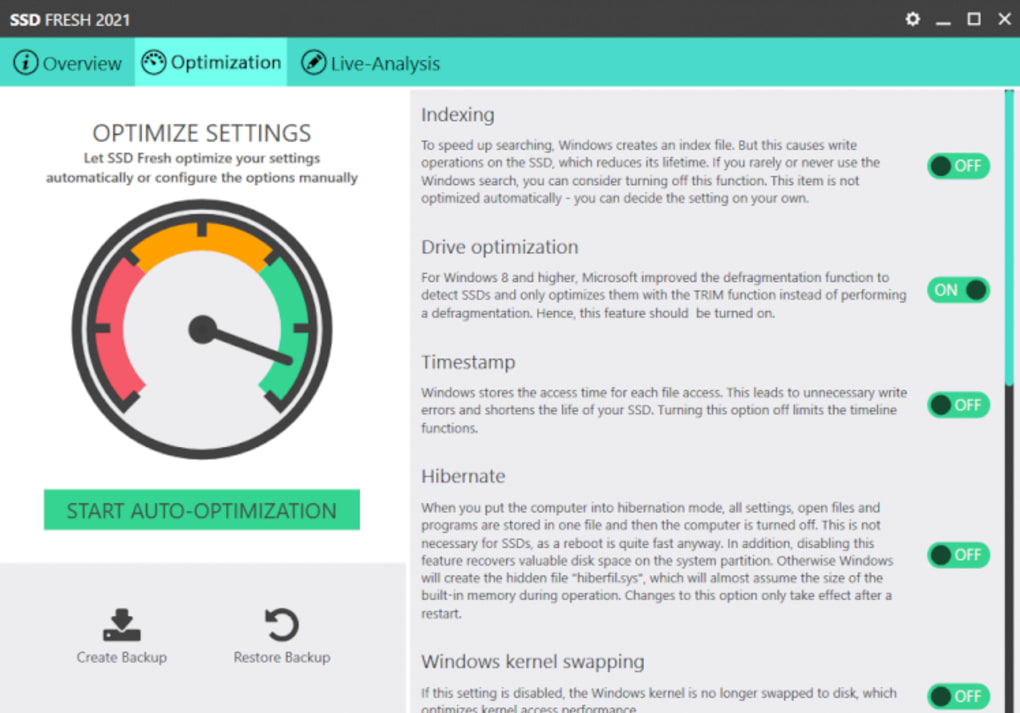
The primary function of SSD Fresh is to optimize your Windows system for SSD usage. This involves tweaking numerous system settings that directly or indirectly influence write operations. These optimizations include:
-
Disabling unnecessary background processes: Many Windows services and background applications perform frequent write operations, even when not actively in use. SSD Fresh identifies and disables or minimizes these processes, reducing the overall write load on your SSD. This includes identifying and managing processes that constantly write temporary files or log data.
-
Optimizing the Windows paging file (pagefile.sys): The pagefile.sys, also known as the virtual memory file, is crucial for system stability. However, frequent writing to and from the pagefile can significantly contribute to SSD wear. SSD Fresh allows you to configure the pagefile location and size, ensuring it is efficiently managed and doesn’t unnecessarily burden your SSD. Options may include relocating it to a dedicated HDD or optimizing its size to minimize write operations.
-
Optimizing system services and startup programs: Many applications and services launch automatically on startup, consuming resources and frequently writing to your SSD. SSD Fresh provides an overview of these startup items, allowing you to selectively disable non-essential programs, thereby reducing the initial write load at boot time.
-
Enabling TRIM support: TRIM is a crucial command that allows the operating system to inform the SSD which blocks of data are no longer in use. This allows the SSD to perform garbage collection more efficiently, improving performance and reducing wear and tear. SSD Fresh ensures TRIM is properly enabled, optimizing the SSD’s internal data management.
-
File System Defragmentation (for Hybrid Drives): While SSDs inherently don’t benefit from defragmentation, users with hybrid drives (combining SSD and HDD) can utilize this feature. SSD Fresh intelligently identifies your drive type and will only apply defragmentation to the HDD portion, leaving the SSD unaffected.
2. Drive Information and S.M.A.R.T. Data Monitoring:
Beyond optimization, SSD Fresh also provides valuable diagnostic tools for monitoring your SSD’s health. These tools provide insights into your drive’s usage patterns and potential issues:
-
Detailed Drive Information: SSD Fresh provides a comprehensive overview of your SSD’s specifications, including manufacturer, model, capacity, and firmware version. This information is vital for troubleshooting and understanding the drive’s capabilities.
-
S.M.A.R.T. (Self-Monitoring, Analysis and Reporting Technology) Data Overview: S.M.A.R.T. is a built-in system on most modern storage devices that continuously monitors various drive parameters. SSD Fresh provides an accessible interface to this data, showing key metrics like wear level, temperature, and error rates. This allows users to proactively identify potential problems before they lead to data loss. Any significant deviations from normal operating parameters can alert the user to potential issues that require attention.
-
User-Friendly Interface: All this information is presented in a simple, intuitive manner, even for users with limited technical knowledge. The clear visual representation of S.M.A.R.T. data makes it easy to monitor your SSD’s health and take preventive measures.
3. Easy Settings Management and Restoration:
SSD Fresh emphasizes simplicity and ease of use. All settings are managed through a clear, intuitive interface. The application highlights areas needing optimization with simple icons, making it easy to identify potential improvements. A single click optimizes your system settings, and all changes can be reverted just as easily with a single click restore function. This ensures ease of use for both experienced and novice users.
Comparing SSD Fresh to Alternative Applications
Several other applications offer similar functionalities, but SSD Fresh distinguishes itself through its user-friendly interface, comprehensive feature set, and focus on extending SSD lifespan. While some tools offer more advanced diagnostic capabilities or focus primarily on performance optimization, SSD Fresh strikes a balance, providing both optimization and monitoring capabilities within a user-friendly package. Alternatives often lack the intuitive interface and straightforward approach that makes SSD Fresh accessible to a wider user base. Moreover, the focus on longevity, rather than solely performance boosts, sets SSD Fresh apart.
Conclusion: Proactive SSD Maintenance with SSD Fresh
SSDs offer unparalleled performance benefits, but their finite lifespan demands proactive maintenance. SSD Fresh provides a simple yet effective solution for extending the life of your SSD. By minimizing unnecessary write operations, monitoring your drive’s health, and providing easy-to-use tools, SSD Fresh empowers users to protect their valuable data and maximize the lifespan of their SSD investment. Its focus on user-friendliness makes it a suitable choice for users of all technical skill levels, ensuring that everyone can benefit from its protective features. By incorporating SSD Fresh into your regular system maintenance routine, you can contribute significantly to maintaining the health and longevity of your SSD.
File Information
- License: “Free”
- Latest update: “May 24, 2023”
- Platform: “Windows”
- OS: “Windows 8.1”
- Language: “English”
- Downloads: “28.8K”
- Size: “4.94 MB”


