
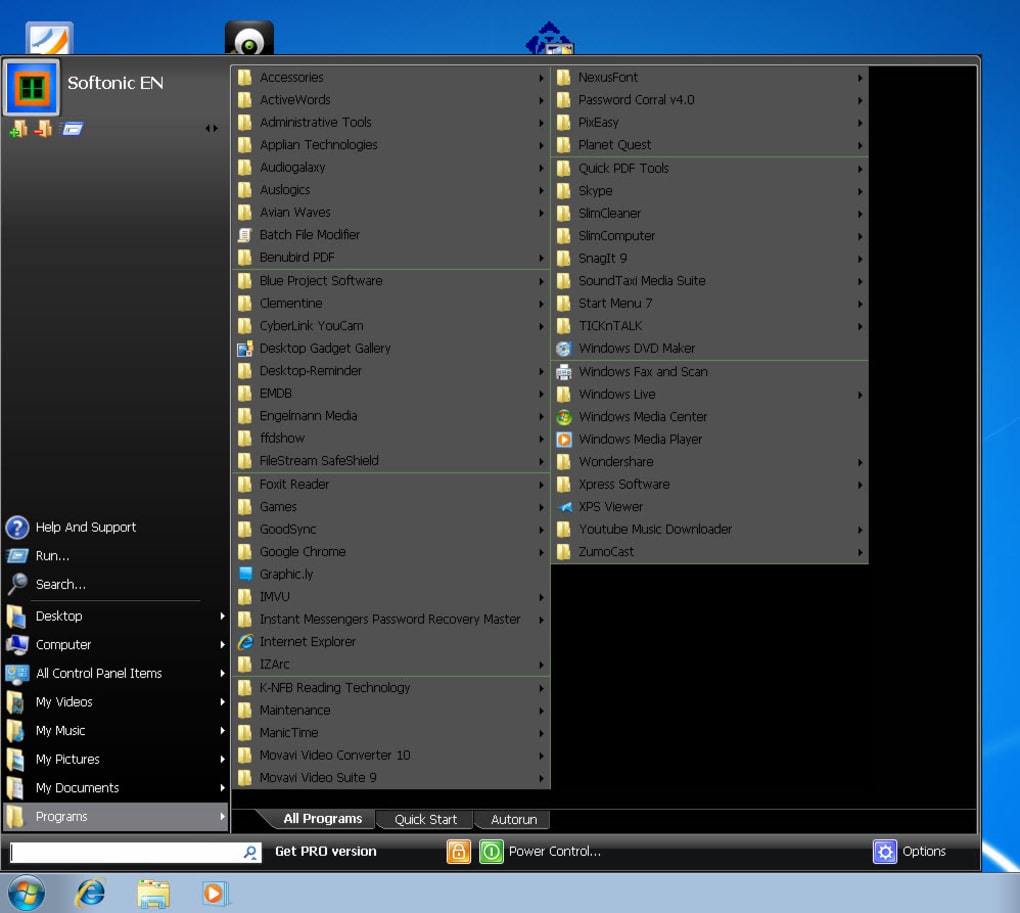
Start Menu 7 is a free, user-friendly alternative to the default Windows 7 Start Menu. Designed with ease of customization and improved organization in mind, it offers a refreshing approach to navigating your Windows 7 system. Unlike the standard Start Menu, which can become cluttered and disorganized over time, Start Menu 7 presents all your programs and shortcuts in a neatly alphabetized list, separated by clear dividers for enhanced visual clarity and effortless navigation. This enhanced organization significantly streamlines the user experience, making it easier to locate the applications and files you need quickly and efficiently.
Enhanced Organization and Customization
The core strength of Start Menu 7 lies in its superior organization and extensive customization options. The alphabetized listing of applications and shortcuts eliminates the frustration of searching through a jumbled mess of icons. The clear dividers further enhance readability and navigation. This structured approach ensures that finding the program you need is a swift and intuitive process, saving you valuable time and improving overall workflow.
Beyond its inherent organization, Start Menu 7 allows for extensive personalization. Users have complete control over the arrangement of their items, allowing them to rearrange applications, shortcuts, and folders to precisely match their individual needs and workflow preferences. This level of control makes Start Menu 7 highly adaptable to various user styles and preferences, ensuring a comfortable and personalized user experience. The flexibility offered enables users to create a Start Menu that is both efficient and aesthetically pleasing.
Easy Configuration and Skin Support
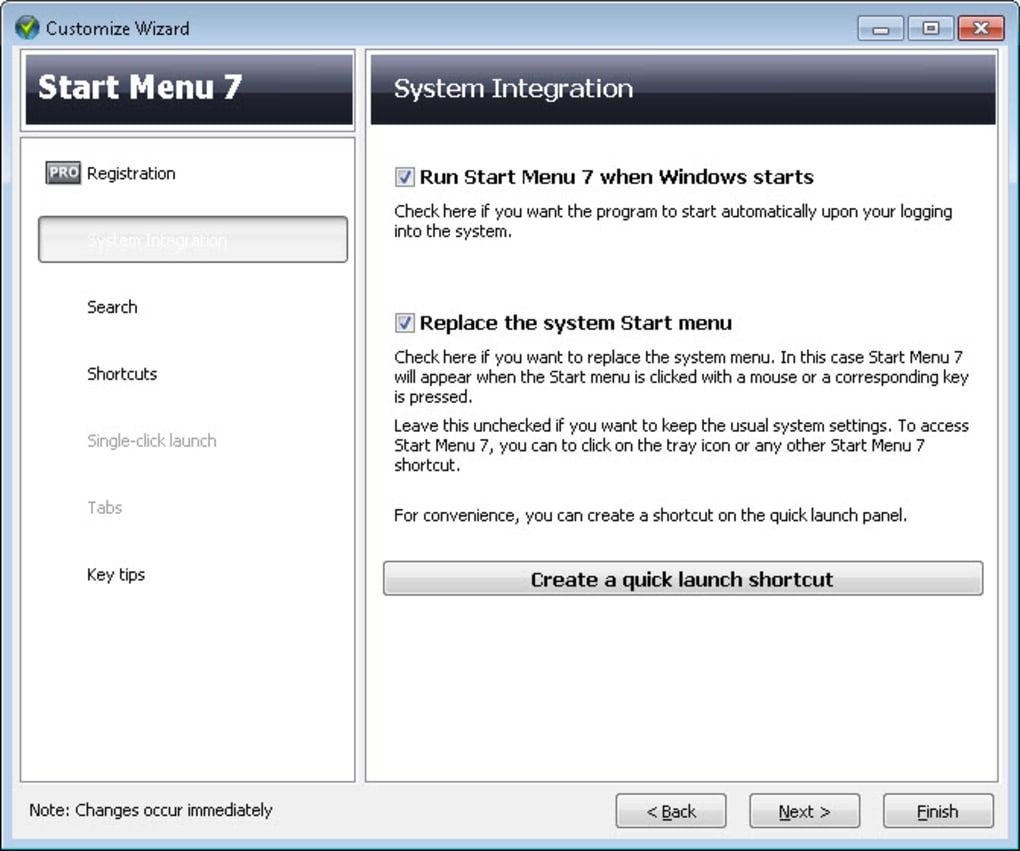
Configuring Start Menu 7 is remarkably straightforward. The intuitive interface allows users to quickly make changes and implement their desired customizations. The program’s simple yet effective design ensures that even users with limited technical expertise can effortlessly customize their Start Menu to their exact liking. This ease of use makes Start Menu 7 accessible to a wide range of computer users, regardless of their technical skills.
Further enhancing its visual appeal and personalization potential, Start Menu 7 offers support for various skins. Users can choose from a selection of pre-designed skins to alter the appearance of their Start Menu, giving them the ability to tailor the aesthetic to their individual preferences. The availability of skins provides a welcome degree of visual customization, enabling users to seamlessly integrate the Start Menu with their overall desktop theme and preferences.
Limitations and Alternative Options
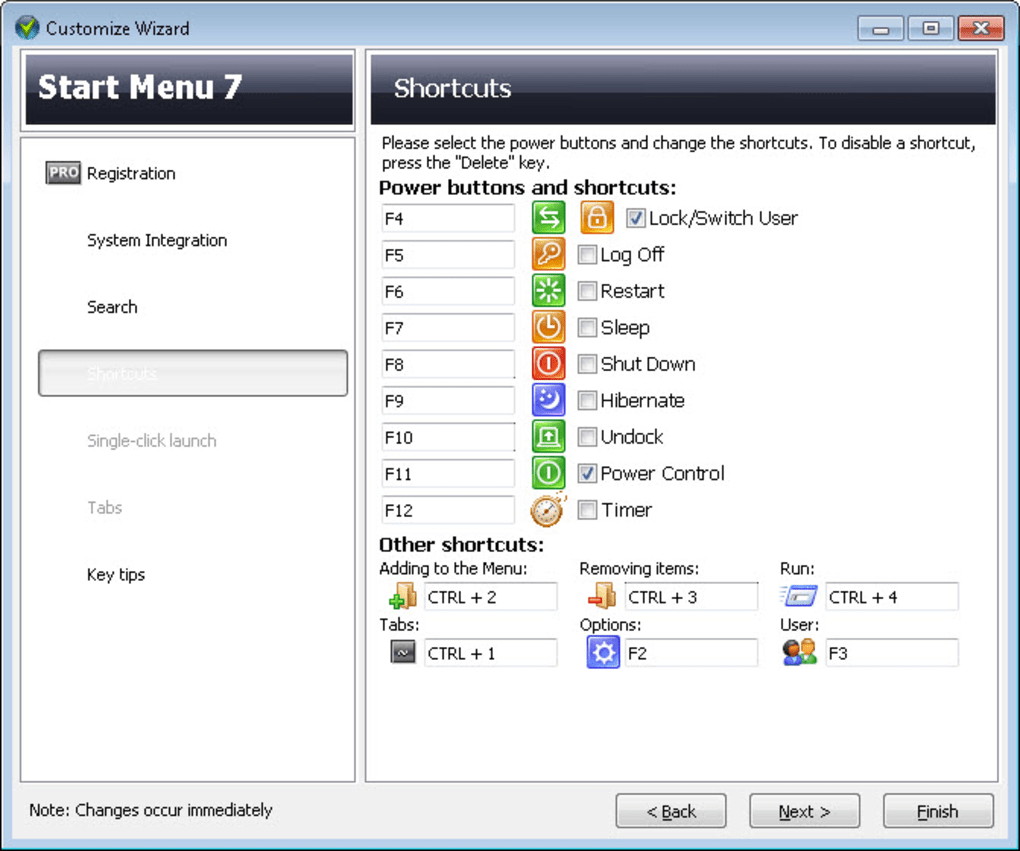
While Start Menu 7 provides numerous advantages in terms of organization and customization, it does have some limitations. One notable restriction is the inability to define new custom tasks for the shortcuts located at the bottom of the menu. This functionality is a feature found in some competitor applications and its absence might be a drawback for users who require this level of advanced customization. While the existing shortcuts provide essential functionality, the lack of custom task creation limits the potential for highly specialized workflow integration.
Several alternative applications provide similar functionality and might offer features that Start Menu 7 lacks. Some popular alternatives include IObit StartMenu8 and Start8, which often include more extensive customization options, such as the ability to integrate elements from the Windows 8 Modern UI. These alternative start menus provide users with various choices, allowing them to select the application best suited to their specific needs and preferences. Users are encouraged to explore these alternatives to find the best fit for their workflow and personal style. The availability of alternative options emphasizes the importance of considering individual needs and preferences when choosing a start menu replacement.
Start Menu 7: A Comprehensive Overview
Start Menu 7 presents a compelling alternative to the standard Windows 7 Start Menu, offering a well-organized and highly customizable interface. Its strengths lie in its streamlined alphabetized arrangement, clear visual separation of items, and user-friendly customization options. The ability to easily rearrange items and apply skins allows for significant personalization, enhancing both efficiency and aesthetic appeal.
However, the limitation of not being able to define custom tasks for shortcuts represents a significant drawback for users needing highly specialized functionality. The lack of this feature may influence the decision-making process of users requiring advanced customization beyond the pre-defined options.
In summary, Start Menu 7 is a viable option for users seeking a cleaner, more organized, and easily customizable start menu experience. It’s a solid choice for those prioritizing neatness and simple customization. However, individuals requiring extensive task customization should explore alternative applications to ensure they find the perfect match for their specific needs and preferences. The balance between its advantages and limitations should guide users in making an informed decision based on their individual requirements.
Detailed Comparison with Alternative Options
To further clarify the position of Start Menu 7 within the landscape of Windows 7 Start Menu replacements, a comparative analysis with prominent alternatives is necessary. This comparison will focus on key features, highlighting the strengths and weaknesses of each option.
IObit StartMenu8
IObit StartMenu8 is a popular alternative offering a comprehensive set of features. It aims to provide a balance between the classic Start Menu experience and the modern interface elements of Windows 8. This hybrid approach appeals to users seeking a familiar layout combined with updated functionality. A key advantage of IObit StartMenu8 is its more extensive customization options compared to Start Menu 7. It allows for greater control over the Start Menu’s appearance and functionality, potentially including the integration of elements from Windows 8’s Modern UI. However, IObit StartMenu8 often comes with a more complex interface that might not be as user-friendly for those seeking a simple and straightforward solution.
The added complexity of IObit StartMenu8 can present a learning curve for users unfamiliar with advanced settings and customization options. While this added flexibility is beneficial for experienced users, it might overwhelm those seeking a more intuitive and straightforward experience. Start Menu 7, with its simpler design, is a better choice for users prioritizing ease of use over an extensive range of customization features.
Start8
Start8, developed by Stardock, is another compelling alternative that focuses on restoring the classic Start Menu experience with added modern touches. This application balances familiarity with improvements in usability and functionality. While Start8 offers excellent customization options similar to IObit StartMenu8, it generally stands out for its smoother integration with Windows 7 and its overall refined user experience. The refined interface and excellent usability make Start8 a strong competitor to both Start Menu 7 and IObit StartMenu8.
Start8’s elegant simplicity and smooth integration are important factors setting it apart. The emphasis on user experience, combined with powerful customization options, results in a highly-refined and versatile Start Menu replacement. However, Start8’s pricing model may present a barrier for some users compared to the free options like Start Menu 7.
Classic Shell
Classic Shell is a more lightweight option primarily focusing on restoring the classic Start Menu from older versions of Windows. It’s designed for users who simply want a familiar and functional Start Menu without complex customization options. While Classic Shell offers a clean and efficient interface, its customization capabilities are significantly less extensive than both Start Menu 7 and the other alternatives mentioned.
The simplicity of Classic Shell makes it an ideal choice for users who prioritize ease of use and functionality over extensive customization. However, users seeking a high degree of customization would find Classic Shell’s limited options restricting. The choice between Classic Shell and Start Menu 7 often depends on whether extensive customization is a priority.
Conclusion
The choice of a Start Menu replacement for Windows 7 ultimately depends on individual needs and preferences. Start Menu 7 excels in its straightforward design and readily accessible customization, offering a practical solution for users valuing simplicity and ease of use. However, its limitations regarding custom task creation should be considered. Alternatives like IObit StartMenu8 and Start8 offer more advanced customization, but at the cost of increased complexity, while Classic Shell prioritizes simplicity over customizability. Carefully weighing the features and limitations of each application will lead to the most suitable choice for any given user.
File Information
- License: “Free”
- Latest update: “April 2, 2024”
- Platform: “Windows”
- OS: “Windows 2003”
- Language: “English”
- Downloads: “47.8K”
- Size: “14.74 MB”


