
Starter is a freeware startup manager for Windows, designed to provide users with comprehensive control over their system’s startup processes. This in-depth guide explores its functionalities, features, and the benefits it offers to enhance system performance and security. We’ll delve into its core capabilities, alternative applications, and user experiences to provide a complete overview of this valuable utility.
Understanding Starter’s Core Functionalities
At its heart, Starter functions as a robust startup manager for the Windows operating system. Its primary role is to provide users with a clear, manageable view of all applications and processes that automatically launch during the system’s boot sequence. This includes not only readily apparent startup items, but also those hidden within registry entries, startup folders, and initialization files. This comprehensive approach ensures users gain complete visibility into what’s running on their system from the very beginning.
Starter allows users to interact with these startup entries in several ways:
-
Temporary Disable: Users can selectively and temporarily disable specific startup items without permanently altering system configurations. This allows for testing and troubleshooting potential performance bottlenecks or conflicts without committing to permanent changes. This functionality is crucial for identifying resource-hungry applications that may be slowing down boot times.
-
Edit Entries: For more advanced users, Starter permits editing existing startup entries. This capability is valuable for adjusting settings within specific applications’ startup routines, allowing for fine-grained control over how they launch and behave. However, it’s important to proceed with caution when editing registry entries, as incorrect modifications can lead to system instability.
-
Create New Entries: The software enables users to create new startup entries, allowing them to add applications or scripts to the system’s startup sequence. This function is helpful for automating tasks or launching frequently used programs automatically upon system startup.
- Permanent Deletion: Finally, Starter provides the option to permanently delete unwanted startup entries. This can help to streamline the boot process, improve system responsiveness, and enhance overall security by removing potentially malicious or unnecessary programs. This feature, however, should be used judiciously, as irreversible deletion of essential system components could have detrimental effects.
Beyond its startup management capabilities, Starter offers secondary functionalities focused on running processes:
-
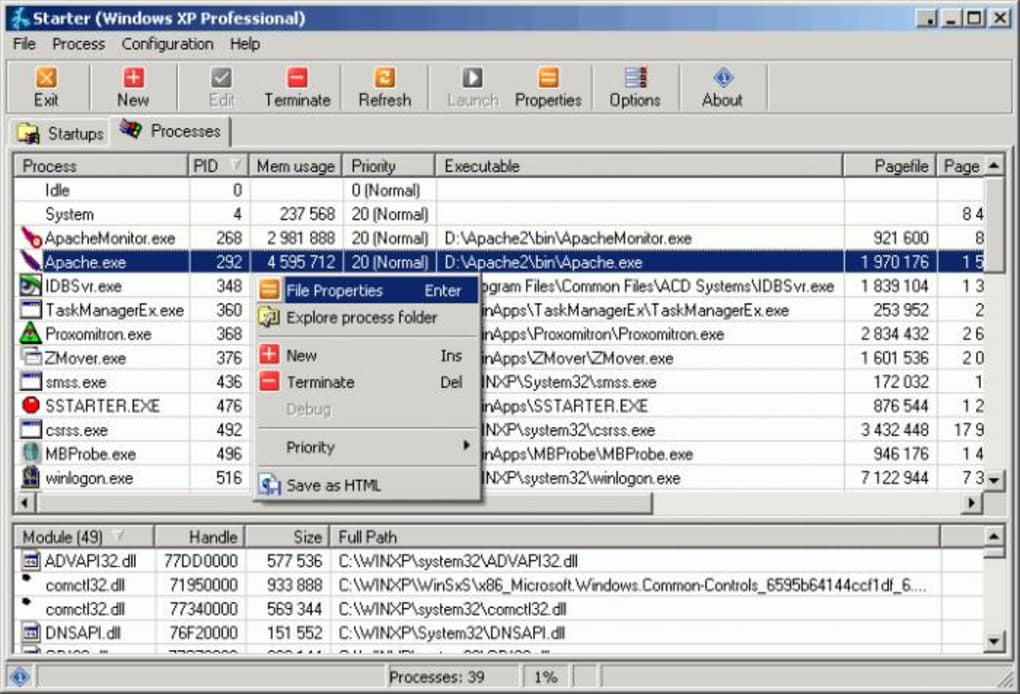
Process Listing and Information: It lists all currently running processes, providing detailed information for each. This detailed information typically includes the used Dynamic Link Libraries (DLLs), memory consumption, thread count, and process priority. This granular level of detail enables users to identify resource-intensive processes and take appropriate action.
-
Process Termination: Starter allows users to terminate selected processes, offering control over running applications. This functionality extends even to Windows NT services, provided the user has sufficient administrative privileges. This is a powerful tool for resolving application freezes or unresponsive programs. However, terminating essential system processes can lead to system instability, so caution is advised.
The software’s user interface is designed for simplicity and ease of use. The various options are intuitively presented, making it accessible to users of all technical skill levels. Its straightforward design contrasts with some more complex system utilities, making it an appealing choice for users who prefer a clean and uncluttered interface.
Starter’s Technical Specifications and Availability
Starter is a freeware application, meaning it’s available for use without any licensing fees. The current version is 5.6.2.9, last updated on February 8, 2010. While this might seem dated, its core functionality remains relevant and useful for managing startup programs on older Windows systems. The application is specifically designed for Windows operating systems, with compatibility varying depending on the Windows version.
The application’s size is relatively small, at 680.34 KB, making it easy to download and install. It supports multiple languages, including English, Czech, German, Greek, Spanish, French, Italian, Polish, Russian, Turkish, Chinese, among others, demonstrating a commitment to international usability. At the time of its release, over 34,000 downloads were recorded.
User Reviews and Community Feedback
While user reviews for Starter are scarce in readily accessible online repositories, its simple functionality and direct approach suggest it would appeal to users seeking a straightforward and effective startup manager. The lack of readily available recent reviews might be attributed to its age and the emergence of more modern alternatives. However, its simplicity and ease of use continue to provide a strong foundation for its appeal to users accustomed to less feature-rich but dependable software. The absence of negative reviews suggests a generally positive user experience, at least for the period in which it was actively used.
Alternative Applications and Comparisons
Numerous alternatives to Starter exist in the market. Many modern system optimization suites incorporate startup management tools as part of a larger package. These suites often offer additional features beyond startup management, such as registry cleaning, disk cleanup, and performance optimization. However, these combined packages often come with a price tag, while Starter remains free.
Compared to more comprehensive suites, Starter’s focus is narrower. It excels at its core function—startup management—but lacks the additional features found in all-in-one optimization utilities. Users who need only startup management capabilities might find Starter perfectly adequate, while users seeking more broad system optimization may prefer a more comprehensive suite. The choice depends on individual needs and preferences.
The absence of recent updates or active development warrants a mention. While the functionality may still be useful for older systems or users who prefer a simple interface, users seeking newer features and compatibility with the latest Windows versions should consider more modern alternatives.
Conclusion: The Place of Starter in Modern Computing
Starter, despite its age, provides a valuable service for users seeking a simple and effective method for managing Windows startup programs. Its strengths lie in its straightforward interface and clear functionality, making it easy to use even for less tech-savvy individuals. While the absence of recent updates and the availability of more feature-rich alternatives limit its applicability in modern computing contexts, it continues to provide a straightforward solution for those who prioritize simplicity and functionality over the comprehensive suite of features offered by many current alternatives. For users seeking a basic, effective, and free solution to manage their Windows startup processes, Starter remains a viable option. However, users seeking compatibility with the latest operating systems and a more comprehensive range of features should explore the updated alternatives currently available.
File Information
- License: “Free”
- Version: “5.6.2.9”
- Latest update: “February 8, 2010”
- Platform: “Windows”
- OS: “Windows 7”
- Language: “English”
- Downloads: “34K”
- Size: “680.34 KB”


