
For many Windows users, the familiar startup sound is a deeply ingrained auditory cue, a sonic handshake initiating each computer session. While Windows offers extensive customization options for visual aspects like wallpapers and themes, the startup sound remains stubbornly fixed, a relic of the past for those seeking a truly personalized digital experience. This is where the Startup Sound Changer steps in, a small but surprisingly potent tool offering a simple yet effective way to break free from the default audio and inject your personality into your computer’s boot sequence.
The Allure of Audio Customization: Beyond the Visual
The pursuit of digital personalization isn’t solely confined to the visual realm. While changing wallpapers and themes significantly alters the visual landscape of a Windows desktop, the auditory experience often remains untouched. The consistent startup sound, a sonic echo of countless previous sessions, can become somewhat monotonous over time. For those who value a completely customized digital environment, this lack of audio control can feel jarring, an inconsistency in an otherwise carefully curated digital space.
Startup Sound Changer directly addresses this oversight, offering a remarkably straightforward solution. It empowers users to replace the default Windows startup sound with their preferred audio file, effectively transforming a mundane element of the boot process into a personalized auditory experience. This seemingly small modification holds significant potential for enhancing the overall user experience, infusing a touch of individuality into the very start of each computing session.
A Simple Yet Effective Tool: Functionality and Ease of Use
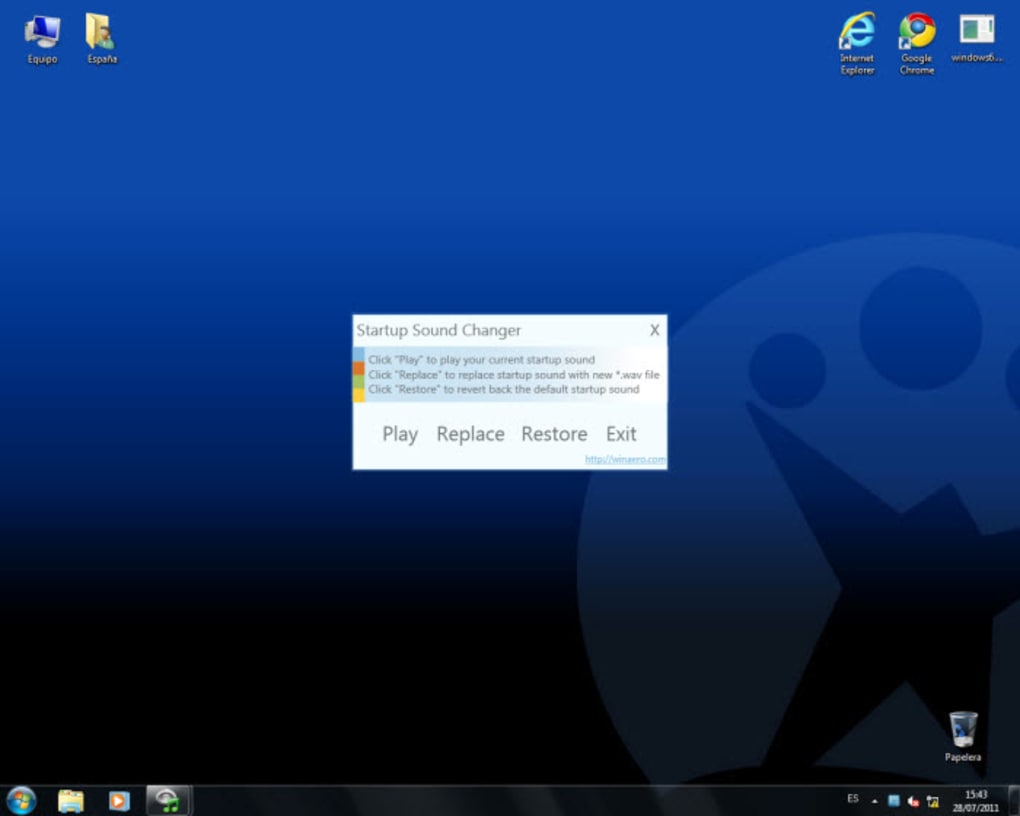
Startup Sound Changer, developed by Winaero.com, lives up to its name with its minimalist yet functional approach. The program boasts a clean, user-friendly interface devoid of unnecessary complexities. The core functionalities are neatly presented, allowing for immediate use even without prior experience with similar software. The primary actions are straightforward: Play, Replace, and Restore.
The “Play” function allows users to preview their currently selected startup sound, ensuring the chosen audio file functions as intended. This simple check prevents unexpected surprises during the boot process. The “Replace” function forms the core of the program’s functionality, enabling users to swap the default sound with a custom audio file. However, it’s essential to note that the application currently supports only WAV files, limiting the available audio formats. The “Restore” function offers a convenient way to revert to the original Windows startup sound, providing a quick escape route should users wish to return to the default setting.
One crucial aspect to consider is the requirement of administrator privileges. Before any changes can be implemented, the user needs to possess administrator rights. This security measure ensures that unauthorized modifications to system settings are prevented. While this may seem like an inconvenience for some users, it reflects a commitment to system security and stability.
Limitations and Potential for Improvement
Despite its straightforward functionality, Startup Sound Changer has its limitations. The most significant drawback is its exclusive support for WAV files. This restriction significantly limits the range of audio options available to users, potentially excluding many popular audio formats. The lack of support for more widespread formats like MP3 could be a significant deterrent for users who prefer to work with their existing audio libraries.

Another drawback is the absence of advanced features. The program’s simplicity, while beneficial for ease of use, also results in a lack of customization options. There’s no built-in volume control, meaning users must rely on system-wide volume adjustments to manage the startup sound’s loudness. The lack of a shortcut for quick access to the program also adds a minor inconvenience; users must locate and launch the executable file each time they need to change the sound.
While the portability aspect is advantageous, eliminating the need for installation, the lack of an easily accessible shortcut creates friction in the user experience, counteracting some of the convenience gained by not needing an installation process. The overall lack of other customization options also limits the program’s appeal to users seeking a wider range of personalization tools.
User Experiences and Feedback: A Mixed Bag
User reviews highlight a mixed bag of experiences with Startup Sound Changer. While some users praise the program’s ease of use and effectiveness in achieving its core function, others have reported negative experiences, including reported instances of system crashes and drive malfunctions. This disparity in feedback underlines the need for caution and thorough testing before using the application. Users should always back up important data before implementing any system-level changes, especially when using third-party tools.
The positive reviews predominantly focus on the simplicity and functionality of the program. Users appreciate the straightforward approach, the ease of use, and the effective change of the startup sound. However, negative reviews express concerns about potential system instability, and these should not be taken lightly. This reinforces the need for users to exercise caution and investigate the legitimacy and potential risks associated with any third-party software before implementation.
Alternatives and Future Prospects
Given the limitations of Startup Sound Changer, users seeking more comprehensive personalization options might want to explore alternative tools. Winaero Tweaker, also developed by Winaero.com, is a more comprehensive suite of system customization utilities that includes the ability to change the startup sound alongside a wide range of other customization options. This offers a viable upgrade for users who need more sophisticated controls and customization features.
The future of Startup Sound Changer remains uncertain. While it effectively addresses a niche personalization need, its limitations might hinder its long-term viability. Addressing the WAV-only format support, integrating a volume control, and adding a desktop shortcut would significantly improve user experience and potentially broaden the program’s appeal. The addition of more advanced features, such as the ability to schedule different startup sounds for different occasions, or incorporating sound effects beyond simply replacing the startup sound altogether could make this a much more versatile program.
Conclusion: A Simple Tool with Potential, But Needs Refinement
Startup Sound Changer offers a straightforward solution for users who wish to break free from the default Windows startup sound. Its simplicity and ease of use are definite strengths, and for those solely seeking this single customization, it may be sufficient. However, its limitations regarding supported file formats and lack of additional features create a somewhat limited user experience. While the program can serve a purpose, the negative user reviews highlighting potential system instability underscore the importance of caution and thorough investigation before using such tools. Ultimately, the program serves as a useful reminder of the ongoing demand for more comprehensive and reliable personalization tools for Windows users seeking full control of their digital environment. As it stands, it’s a functional but limited tool, and users may find greater satisfaction with more comprehensive alternatives such as the Winaero Tweaker.
File Information
- License: “Free”
- Version: “1.0”
- Latest update: “March 9, 2021”
- Platform: “Windows”
- OS: “Windows 8”
- Language: “English”
- Downloads: “395.4K”
- Size: “325.63 KB”


