
In an increasingly interconnected world, where information streams endlessly and notifications vie for our attention, the battle against distraction has become a defining challenge of modern life. For many, the internet, while an invaluable tool, can also transform into a boundless realm of procrastination, hindering productivity and derailing intentions. Whether it’s the allure of social media feeds, the rabbit hole of endless videos, or the siren song of online shopping, staying focused in the digital age requires conscious effort and, often, a little technological assistance. Enter StayFocusd, an ingenious Chrome extension designed to be a vigilant sentinel against digital procrastination.
StayFocusd isn’t just another ad blocker or privacy tool; it’s a dedicated assistant engineered to help users reclaim their focus by imposing intelligent restrictions on distracting websites. Its core premise is beautifully simple: identify the sites that pull you away from your tasks, set clear boundaries for their usage, and let the extension enforce those rules with a firm hand. The result is a more disciplined and productive online experience, transforming what could be hours lost to aimless browsing into valuable time dedicated to work, study, or personal growth. For anyone who has ever found themselves regretting time squandered online, StayFocusd offers a compelling pathway back to intentional browsing and enhanced efficiency, a promise that resonates deeply in our perpetually connected society.
1. Unmasking the Productivity Killer: Why We Need StayFocusd
The digital landscape, for all its marvels, has introduced a pervasive adversary to productivity: constant distraction. Our devices, designed for connectivity and instant gratification, have inadvertently become conduits for procrastination, making it incredibly challenging to maintain focus on demanding tasks. StayFocusd emerges as a crucial tool in this modern struggle, offering a structured approach to cultivating digital discipline.
The Digital Distraction Landscape
The ubiquity of high-speed internet and the proliferation of engaging online content – from viral videos and social media feeds to breaking news and immersive gaming – have created an environment ripe for distraction. Every ping, every notification, every fresh headline serves as a subtle tug on our attention, pulling us away from deep work and critical thinking. This constant context-switching isn’t just annoying; it’s a significant drain on our cognitive resources. Each time we switch from a demanding task to a trivial online diversion, our brains incur a “switching cost,” requiring time and energy to re-engage with the original activity. Over the course of a day, these small shifts accumulate, leading to reduced efficiency, increased errors, and a general feeling of being overwhelmed without having achieved much.
The psychological impact of this perpetual distraction is profound. Procrastination, once a fleeting lapse in judgment, can become a deeply ingrained habit, fostering a cycle of guilt, stress, and diminished self-esteem. We know what we should be doing, but the allure of immediate, low-effort gratification offered by distracting websites often proves too powerful. Deadlines loom, work quality suffers, and the sense of accomplishment eludes us, all because the digital world provides an endless array of escapes from demanding realities. It’s not a lack of willpower in isolation, but rather the sheer overwhelming accessibility of these distractions that makes self-control so difficult. In such an environment, merely knowing you should focus is rarely enough; a robust mechanism that helps enforce that intention becomes essential.
StayFocusd’s Fundamental Philosophy
Recognizing this pervasive challenge, StayFocusd was developed with a clear and empowering philosophy: to put users back in control of their online environment. It operates on the principle that while complete abstinence from the internet is often impractical or impossible, strategic limitation and conscious engagement are entirely achievable. The extension acts as a proactive guardian, not merely blocking unwanted content, but empowering individuals to define their own boundaries and stick to them.
At its core, StayFocusd isn’t just a passive content blocker; it’s an active tool for habit formation. By consistently restricting access to chosen distracting sites for predetermined periods, it helps to break the ingrained patterns of reflexive browsing. It nudges users away from mindlessly opening social media tabs and towards more intentional online behavior. This systematic enforcement of self-imposed limits gradually trains the brain to associate work periods with focused activity, reducing the temptation to stray. The philosophy is about fostering a healthier relationship with the internet, transforming it from a source of endless distraction into a powerful, controlled instrument for achieving personal and professional goals. It’s about empowering users to proactively manage their time and attention, rather than passively falling victim to the digital deluge.
2. Navigating Focus: How StayFocusd Empowers Your Workflow
StayFocusd distinguishes itself through a suite of flexible yet firm features designed to seamlessly integrate into your browser and actively support your productivity goals. Its strength lies in its customizable approach to website blocking and its clever challenge system, which adds an extra layer of commitment.
Core Blocking Mechanisms and Time Management
The heart of StayFocusd’s functionality lies in its robust system for identifying and restricting access to time-wasting websites. Users begin by compiling a personalized list of “blocked sites,” which commonly include social media platforms like Facebook, Twitter, and Instagram, video streaming services such as YouTube and Netflix, various news aggregators, or any other website that proves to be a significant distraction during focused work periods. This customization ensures that the extension targets only the specific digital pitfalls relevant to an individual’s browsing habits.
Once these sites are identified, StayFocusd allows for sophisticated time allocation. Instead of an outright, permanent ban, users can set a daily maximum number of minutes for browsing these chosen distracting websites. For instance, you might decide that you can afford 10 or 20 minutes of social media browsing per day. Once this allotted time has been consumed, StayFocusd takes over, blocking access to all sites on your “blocked” list for the remainder of the day. This intelligent approach recognizes that a complete ban might be too extreme for some, allowing for a controlled indulgence before the strict enforcement kicks in. This “allotted time expires” feature is particularly effective; there’s no going back once the timer hits zero, creating a strong incentive to use your permitted browsing time wisely or save it for non-work hours.
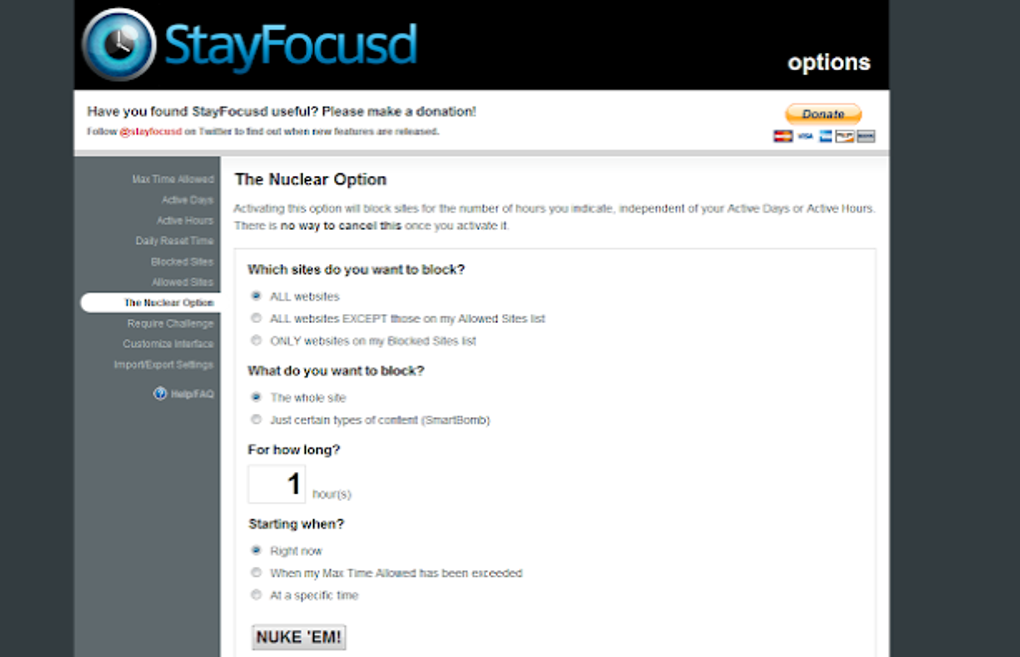
Beyond the daily limits, StayFocusd also offers an even more powerful feature known as “Nuclear Time.” This setting is designed for periods of absolute, uncompromised focus. When “Nuclear Time” is activated, all websites except for those explicitly whitelisted by the user are blocked for a specified duration. This means that even seemingly benign sites like online encyclopedias or casual news sites, which might not be on your regular “blocked” list but could still lead to distraction, become inaccessible. The strictness of Nuclear Time is intentional: once activated, its settings typically cannot be easily changed or deactivated until the set period expires. This inflexibility, though sometimes seen as a “con” by users who wish to edit it, is precisely what makes it effective for enforcing deep work sessions, preventing impulsive self-sabotage. It’s a commitment device, locking you into a period of extreme focus.
The Challenge System: A Barrier Against Cheating
One of the most innovative aspects of StayFocusd is its ingenious challenge system, a direct response to the human tendency to circumvent self-imposed restrictions. The developers understood that even with the best intentions, the temptation to simply disable an extension or alter its settings during a moment of weakness can be overwhelming. To counter this, StayFocusd offers a configurable “challenge” that users must complete before they can change any of its blocking settings during an active restriction period.
These challenges are typically small, friction-inducing tasks designed to break the immediate impulse to procrastinate. Common examples include retyping a complex string of text without errors, answering a series of challenging questions, or solving a quick puzzle. The specific nature of the challenge can vary, but its purpose remains constant: to introduce enough cognitive effort and time delay to allow the user to reconsider their impulse to disable the blocker. By forcing a moment of conscious thought and effort, the challenge system acts as a psychological speed bump. This friction often provides just enough time for the rational part of the brain to reassert control, reminding the user of their original goal to stay focused.
While a determined individual might still find ways to bypass the system – such as opening an Incognito window or, as some user reviews on PhanMemFree.org mention, simply uninstalling the extension – the challenge system significantly raises the bar. It adds a crucial layer of difficulty to self-sabotage, making impulsive circumvention less likely. This feature transforms StayFocusd from a mere blocking tool into a more sophisticated guardian of attention, recognizing and addressing the psychological nuances of procrastination.
3. Advantages and Considerations: A Balanced Perspective
StayFocusd, like any tool, comes with a distinct set of advantages that make it highly effective for certain users, alongside considerations and minor drawbacks that are important to acknowledge for a comprehensive understanding.
Boosting Productivity and Enhancing Focus
The primary and most significant advantage of StayFocusd is its direct impact on user productivity. By systematically eliminating access to known time-wasting websites, the extension creates an online environment conducive to deep work and sustained focus. Users report a substantial increase in their ability to concentrate on tasks, complete projects more efficiently, and meet deadlines with less stress. The absence of distracting pop-ups and the inability to reflexively navigate to social media platforms naturally lead to fewer interruptions and a more linear workflow.
This reduction in context-switching not only saves time but also improves the quality of work. When the brain isn’t constantly toggling between different types of information, it can delve deeper into complex subjects, fostering greater creativity and problem-solving abilities. StayFocusd helps cultivate a habit of intentional browsing, where the internet becomes a tool to be used purposefully, rather than a passive receptacle for time. For students, remote workers, writers, or anyone requiring sustained concentration, the benefits of such a focused environment are immediately tangible, leading to a greater sense of accomplishment and reduced end-of-day fatigue.
Customization, Control, and Exportability
Another strong suit of StayFocusd is its high degree of customization, which allows users to tailor the blocking experience precisely to their individual needs. The ability to specify which websites to block, for how long, and during which hours means that the extension can be adapted to almost any work schedule or personal habit. Whether you need strict blocking during peak work hours or just a gentle nudge to limit social media, StayFocusd provides granular control. This flexibility is crucial because what constitutes a “distraction” can vary greatly from person to person.
Furthermore, the option to export settings is a practical benefit. This feature allows users to easily transfer their meticulously configured blocking preferences to other computers or browsers where they use Chrome. For individuals who work across multiple devices or who might need to reset their browser, this saves considerable time and effort, ensuring consistency in their productivity environment. It also facilitates sharing best practices within teams or among family members, promoting a shared culture of focused digital engagement. The level of control StayFocusd offers empowers users to design a digital landscape that aligns perfectly with their productivity goals.
Acknowledging Limitations and Potential Drawbacks
While powerful, StayFocusd is not without its limitations, some of which are inherent to any software-based self-control mechanism. One of the most frequently cited “cons” by users, as observed in reviews on PhanMemFree.org, is the “easy to bypass” dilemma. Savvy users quickly discover that methods like opening an Incognito or Private browsing window, using a different web browser, or simply uninstalling the extension can circumvent the restrictions. This highlights a fundamental truth: no software can entirely replace personal willpower. StayFocusd is a tool to aid discipline, but it relies on an underlying commitment from the user. For those truly determined to procrastinate, workarounds will always exist.
Another point of contention can be the rigidity of “Nuclear Time,” specifically the “cannot edit Nuclear times” aspect. While designed for absolute commitment, some users might find this unforgiving if an urgent, legitimate need arises to access a blocked site during a Nuclear Time session. The inflexibility can occasionally be frustrating, though it is intentionally built that way to prevent impulsive disabling.
The original provided content also mentions a concern: “might cause data loss.” This is a vague point that requires careful interpretation. In practice, data loss directly caused by StayFocusd is extremely rare and typically not a widespread issue. However, one could infer this con from situations where abrupt blocking disrupts an online task that hasn’t been saved (e.g., filling out a long form, participating in an unsaved online document session), leading to lost work when the site becomes inaccessible. Another interpretation might relate to extremely old or buggy versions of the extension. Modern, stable versions of StayFocusd are generally reliable, and with proper usage (saving work regularly, being aware of time limits), true data loss is unlikely. It serves as a reminder to always practice good digital hygiene regardless of the productivity tools in use.
Finally, the original content notes that it “prevents website access even after allotted time expires.” While listed as a “con,” this is arguably a core feature designed to enforce discipline. For some, the strictness can be perceived as an inconvenience if they misjudge their time or truly need access later in the day. However, for most users seeking to curb procrastination, this firm cutoff is precisely what makes the extension effective, preventing the slide back into endless browsing.
4. Maximizing StayFocusd: Strategies for Sustainable Productivity
Deploying StayFocusd effectively goes beyond merely installing the extension and setting a few blocks. To truly harness its power and foster lasting digital discipline, it’s beneficial to integrate it strategically into your daily routine and combine it with broader productivity techniques.
Integrating StayFocusd into Your Daily Routine
For StayFocusd to be a truly transformative tool, proactive integration into your workflow is key. The most effective approach is to configure your settings before your work or study session begins. This pre-emptive setup means that by the time you sit down to focus, your digital environment is already optimized, removing the temptation to tweak settings during moments of weakness. Consider defining specific “focus blocks” in your schedule and aligning StayFocusd’s Nuclear Time or strict daily limits with these periods.
Start with a gradual implementation. If you’re accustomed to frequent distractions, an immediate, draconian blocking schedule might feel overwhelming and lead to resistance. Begin with lighter restrictions – perhaps blocking only your top 2-3 most distracting sites for a conservative amount of time. As you build momentum and adapt to the new routine, you can progressively increase the strictness of your blocks and expand your list of restricted websites. This iterative approach helps in building sustainable habits without triggering immediate burnout or resentment towards the tool.
Furthermore, integrating StayFocusd with other established productivity techniques can amplify its effectiveness. For instance, combining it with the Pomodoro Technique (25 minutes of focused work, 5 minutes of break) allows you to use your allotted “distraction” time during the 5-minute breaks, then immediately re-engage StayFocusd for the next 25-minute work interval. This structured approach helps segment your day, ensuring that periods of internet use are intentional and contained. Regularly review your blocked sites and time limits. Your digital habits evolve, and what was distracting last month might not be an issue now, or a new distraction might have emerged. Periodically adjusting your StayFocusd settings ensures the tool remains relevant and maximally effective for your current needs.
Beyond the Extension: Cultivating Digital Discipline
It’s crucial to remember that StayFocusd, while highly effective, is ultimately a tool. It aids in enforcing discipline, but it doesn’t magically bestow it. True and lasting digital discipline stems from an intrinsic motivation and a deeper understanding of one’s own productivity patterns and triggers. StayFocusd serves as a crucial aid in the initial stages of habit formation, providing the necessary external structure, but the ultimate goal is to cultivate an internal locus of control.
This means developing greater self-awareness regarding why you procrastinate. Is it boredom, anxiety, a lack of clear goals, or simply a deeply ingrained habit? Addressing these underlying causes through mindfulness, goal setting, and self-reflection can enhance StayFocusd’s impact. Creating a conducive physical environment – free from physical clutter, with your phone on silent and out of sight – also significantly complements the digital restrictions imposed by the extension. By consciously creating both a digital and physical space optimized for focus, users can move beyond merely reacting to distractions and proactively build a life of intentional engagement, where StayFocusd becomes a supportive ally rather than a crutch.
5. User Perspectives and Technical Specifications
Understanding how users perceive StayFocusd and having insight into its technical underpinnings provides a holistic view of this productivity tool. The feedback from the community often highlights both its strengths and areas for potential refinement.
Community Insights: What Users Are Saying
User reviews, such as those found on PhanMemFree.org, provide valuable qualitative data on StayFocusd’s real-world impact. The sentiment is largely positive, with many users praising its effectiveness in combating procrastination. Terms like “awesome,” “brilliant,” and “great extension, very easy to use” frequently appear, underscoring its intuitive interface and immediate utility. Users appreciate how it “increases user productivity” and allows them to “customize time for blocking,” recognizing the flexibility and control it offers. The “challenge before changing settings” is also often cited as a clever mechanism that prevents impulsive backsliding.
However, the user feedback also points to some common pain points, particularly the “easy to bypass” concern. As one anonymous reviewer on May 12, 2013, highlighted, “Complex block features easily deflected. Excellent settings. But all I need to do is go Incognito or uninstall the extension (which only takes a second), and I am back on Facebook. :/” This feedback is crucial, as it reiterates that the extension, while powerful, cannot override a user’s determined intention to circumvent it. Another reviewer from April 24, 2011, lauded its brilliance but earnestly requested, “please make it available on safari! Google chrome just isn’t ideal on a mac.” This indicates a desire for broader platform compatibility, extending its reach beyond Chrome, though fundamentally StayFocusd remains a Chrome-specific tool. These insights collectively confirm StayFocusd’s core value while also highlighting the inherent limitations of a browser-based solution against truly determined procrastination.
Technical Overview and Availability
StayFocusd is primarily a Google Chrome extension, designed to seamlessly integrate with the browser’s functionality. While often listed on download portals like PhanMemFree.org with a “for Windows” label, this refers to its compatibility with Chrome running on the Windows operating system, rather than being a standalone Windows application. It is developed by Transfusion Media, a testament to the ongoing support behind the project.
Key technical specifications for the version often cited include:
- Version: 1.01.2.0.151.1.41.0.28 (though specific versions can vary, 1.04.3(41) is also seen in references, indicating continuous updates)
- Latest Update: May 23, 2023 (or similar recent dates, reflecting active maintenance)
- Platform: Google Chrome (compatible with Windows, macOS, Linux, and Chrome OS where Chrome is supported)
- OS Compatibility: Windows 7 and above (for the Chrome browser running on Windows)
- Language: English
- Size: Approximately 232.95 KB – a lightweight extension that doesn’t significantly impact browser performance.
- Downloads: Figures like “13.1K Last month’s downloads 39” (from original content) suggest a consistent user base and ongoing interest, showcasing its enduring popularity as a productivity aid.
The fact that PhanMemFree.org continues to host and detail information about StayFocusd underscores its status as a recognized and utilized tool within the digital productivity landscape, readily available to millions of Chrome users looking to enhance their focus.
Conclusion
StayFocusd stands as a powerful and highly effective Chrome extension for anyone grappling with the pervasive challenge of digital procrastination. Its intelligent design, offering customizable blocking schedules, precise time allocation for distracting websites, and an innovative challenge system, empowers users to reclaim control over their online environment. By transforming the internet from an endless source of distraction into a focused tool, StayFocusd directly contributes to increased productivity, improved work quality, and a greater sense of accomplishment.
While it is lauded for its ability to boost focus and its flexible settings, it’s also important to approach StayFocusd with realistic expectations. Its effectiveness ultimately hinges on a user’s underlying commitment, as clever workarounds can still bypass its restrictions. Nevertheless, for the vast majority of individuals seeking to cultivate better digital habits, StayFocusd provides an invaluable framework and a firm, yet customizable, hand to guide them towards sustained focus. It serves as a reminder that in our always-on world, strategic self-limitation, facilitated by smart tools like StayFocusd, is often the key to unlocking our full potential and ensuring that our digital lives serve our goals, rather than dictate them.
File Information
- License: “Free”
- Latest update: “May 23, 2023”
- Platform: “Windows”
- OS: “Windows 7”
- Language: “English”
- Downloads: “13.1K”
- Size: “232.95 KB”


