
SteamVR Performance Test is a free application designed to assess the capabilities of your computer system in rendering virtual reality (VR) environments. This comprehensive benchmark tool provides a crucial metric for determining whether your hardware meets the minimum requirements for a smooth and enjoyable VR experience. Developed by Valve, the creators of Steam, this tool offers a standardized method for evaluating VR performance, allowing users to accurately gauge their system’s suitability for VR gaming and applications before investing in expensive hardware upgrades or new VR headsets.
Understanding the Need for VR Performance Benchmarks
The immersive world of virtual reality demands significant processing power. Unlike traditional 2D gaming, VR requires rendering two distinct high-resolution images simultaneously – one for each eye – to create the stereoscopic 3D effect. This process is computationally intensive, requiring a powerful graphics card, a fast processor, and ample system memory to maintain high frame rates (FPS) and low latency. Low frame rates lead to noticeable stuttering and judder, significantly detracting from the immersive experience and potentially causing motion sickness. High latency, the delay between a user’s action and the corresponding response in the VR environment, further exacerbates this issue.
SteamVR Performance Test addresses this need by providing a standardized and repeatable benchmark. It’s important to note that while other benchmarks exist, SteamVR Performance Test offers the advantage of being specifically tailored for the VR environment, simulating the demands placed on a system by actual VR applications and games. This makes its results highly relevant for evaluating VR readiness. By running the test, users can obtain a quantitative measure of their system’s performance, enabling informed decisions about hardware upgrades or software adjustments to optimize their VR experience.
How the SteamVR Performance Test Works
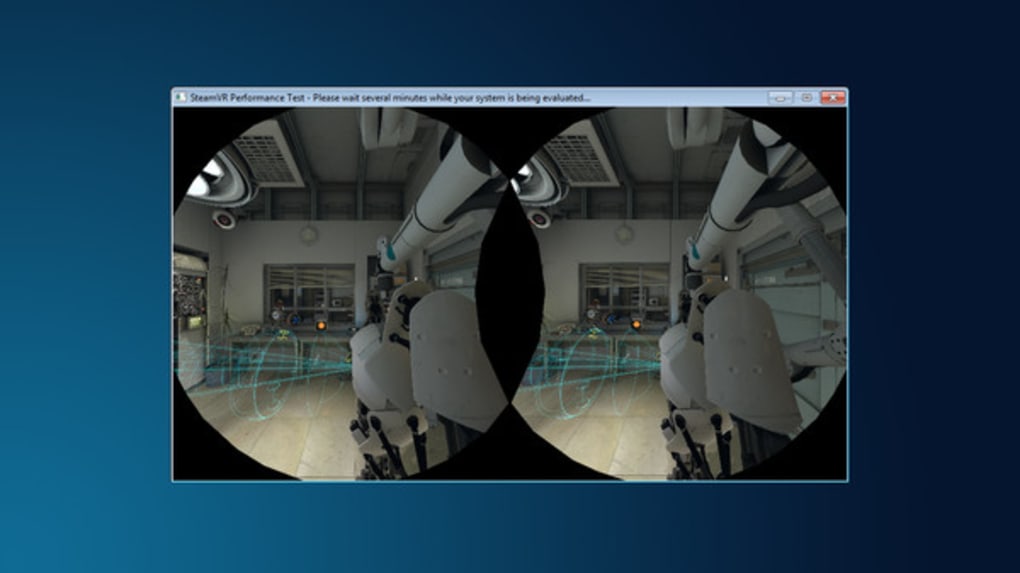
The SteamVR Performance Test utilizes a visually demanding 3D scene that stresses the system’s GPU (graphics processing unit) and CPU (central processing unit) while simulating typical VR usage. The scene is carefully crafted to push the boundaries of rendering capabilities, requiring the system to handle complex geometry, intricate textures, and potentially demanding lighting effects. This controlled environment ensures consistency across different systems, allowing for a more accurate comparison of performance capabilities.
During the test, the application monitors various key performance indicators (KPIs), including:
- Frames per Second (FPS): This measures the number of frames rendered per second. Higher FPS values indicate smoother performance, generally above 90 FPS being considered ideal for a comfortable VR experience.
- Latency: This indicates the delay between a user’s head movement or controller input and the corresponding update in the virtual environment. Lower latency is essential for a responsive and immersive experience, minimizing the chance of motion sickness.
- CPU and GPU Utilization: This data reveals the extent to which your processor and graphics card are being taxed during the benchmark. High utilization, while expected, should not consistently hit 100%, as this could indicate a bottleneck and potentially limit performance.
- Dropped Frames: This metric identifies instances where the system failed to render a frame at the target rate, resulting in visual artifacts and stuttering. High numbers of dropped frames indicate a significant performance problem.
The SteamVR Performance Test presents the results in a clear and concise manner, highlighting the strengths and weaknesses of the system. This information provides valuable insights for troubleshooting and optimization. Understanding these performance metrics is crucial for diagnosing and addressing potential bottlenecks in your VR setup.
Interpreting the Results and Optimizing Performance
Once the SteamVR Performance Test has completed, the results are displayed, offering a numerical score and a qualitative assessment of performance. A high score indicates a system capable of running VR applications smoothly, while a low score suggests potential bottlenecks that require attention. The detailed information provided on FPS, latency, and resource utilization allows users to identify specific areas needing improvement.
Based on the results, users can undertake several optimization strategies:
- GPU Upgrade: If the GPU is identified as the bottleneck, upgrading to a more powerful graphics card is often the most effective solution. Modern high-end GPUs are specifically designed to handle the demands of VR rendering.
- CPU Upgrade: While less common, a CPU bottleneck can also limit VR performance. Upgrading to a faster processor with more cores can significantly improve overall system responsiveness.
- RAM Upgrade: Insufficient system memory can also hinder VR performance. Adding more RAM ensures the system has enough resources to handle the demands of both the operating system and the VR application.
- Driver Updates: Ensuring that your graphics drivers are up-to-date is crucial for optimal performance. Outdated drivers can lead to compatibility issues and reduced performance.
- Software Optimization: Adjusting graphics settings within the VR application can improve performance. Lowering settings like resolution, anti-aliasing, and shadow quality can reduce the computational load on the system, resulting in higher FPS.
- Background Processes: Closing unnecessary background applications can free up system resources, improving performance. Minimize the number of active programs during the VR session.
- Overclocking (Advanced Users): For advanced users, carefully overclocking the CPU or GPU can potentially boost performance, but this requires caution and understanding of the risks involved. Incorrect overclocking can lead to system instability or damage.
SteamVR Performance Test: Beyond the Numbers
While the numerical scores and performance metrics provide a valuable quantitative assessment, it’s important to consider the qualitative aspects of the VR experience. Even with a high score on the SteamVR Performance Test, individual experiences can vary based on factors such as the specific VR headset used, the content being rendered, and user preferences.
The SteamVR Performance Test serves as a vital tool, but it shouldn’t be the sole determinant of VR suitability. It’s crucial to remember that a benchmark is only one piece of the puzzle. Real-world testing with actual VR games and applications offers a more comprehensive evaluation of the overall VR experience. While the benchmark provides a solid foundation for understanding your system’s capabilities, personal preferences and the specific demands of your chosen VR software should also inform your decisions about hardware and software configurations. The ultimate measure of VR performance remains the quality of the immersive experience itself. Therefore, while the SteamVR Performance Test provides an excellent starting point, it’s always recommended to further assess performance through actual gameplay or usage of target VR applications to get a well-rounded perspective on your VR setup’s effectiveness.
File Information
- License: “Full”
- Version: “2016”
- Latest update: “February 6, 2017”
- Platform: “Windows”
- OS: “Windows 7”
- Language: “English”
- Downloads: “4.8K”


