
Stellar Phoenix Excel Repair is a powerful software solution designed to recover data from damaged or corrupted Microsoft Excel files. Whether your Excel workbook won’t open, displays errors, or has experienced data loss, this tool offers a robust and user-friendly approach to restoring your valuable information. This comprehensive guide explores the features, capabilities, and overall effectiveness of Stellar Phoenix Excel Repair, examining its strengths and weaknesses to help you determine if it’s the right solution for your data recovery needs.
Understanding Excel File Corruption and Data Loss
Microsoft Excel files, like any digital document, are susceptible to corruption due to various factors. These can range from unexpected system shutdowns and software crashes to malware infections, physical damage to storage media, and even simple file handling errors. The consequences of such corruption can be severe, resulting in the complete loss of data, rendering workbooks inaccessible, or producing files riddled with errors. The extent of the damage varies, ranging from minor formatting issues to complete data unavailability.
The symptoms of a corrupted Excel file can manifest in several ways:
- Inability to open the file: The most obvious sign is the failure to open the Excel file, often accompanied by error messages.
- Displaying errors: The file may open but display various error messages, indicating data inconsistencies or structural problems.
- Data loss or corruption: Parts of the workbook’s content, including data, formatting, formulas, charts, and images, may be missing or corrupted.
- File size inconsistencies: An unusually large or small file size compared to the expected size can hint at underlying corruption.
Stellar Phoenix Excel Repair addresses these issues by employing sophisticated algorithms to analyze the damaged file, identify corrupted sectors, and reconstruct the data structure to recover as much information as possible.
Key Features and Capabilities of Stellar Phoenix Excel Repair
Stellar Phoenix Excel Repair stands out from other data recovery tools due to its comprehensive feature set and ease of use. It offers several key capabilities that make it an effective solution for Excel file repair:
-
Comprehensive Data Recovery: The software is capable of recovering a broad range of data within an Excel file, including text, numbers, formulas, charts, images, embedded objects, and formatting. It meticulously reconstructs the file’s internal structure, aiming to preserve the original layout and presentation as accurately as possible. Even complex elements such as user-defined charts, conditional formatting, shared formulas, and engineering formulas are targeted for recovery.
-
Support for Multiple File Formats and Excel Versions: Stellar Phoenix Excel Repair provides broad compatibility, supporting various Excel file formats, including both .xls and .xlsx, and a wide range of Microsoft Excel versions, from older versions like 2000 and 2003 to the latest iterations such as 2019 and 2021. This backward compatibility ensures that a wide array of corrupted Excel files can be processed.
-
Batch Processing: The software allows users to repair multiple Excel files simultaneously, significantly streamlining the recovery process for those with numerous damaged workbooks. This batch processing feature saves considerable time and effort compared to processing files individually.
-
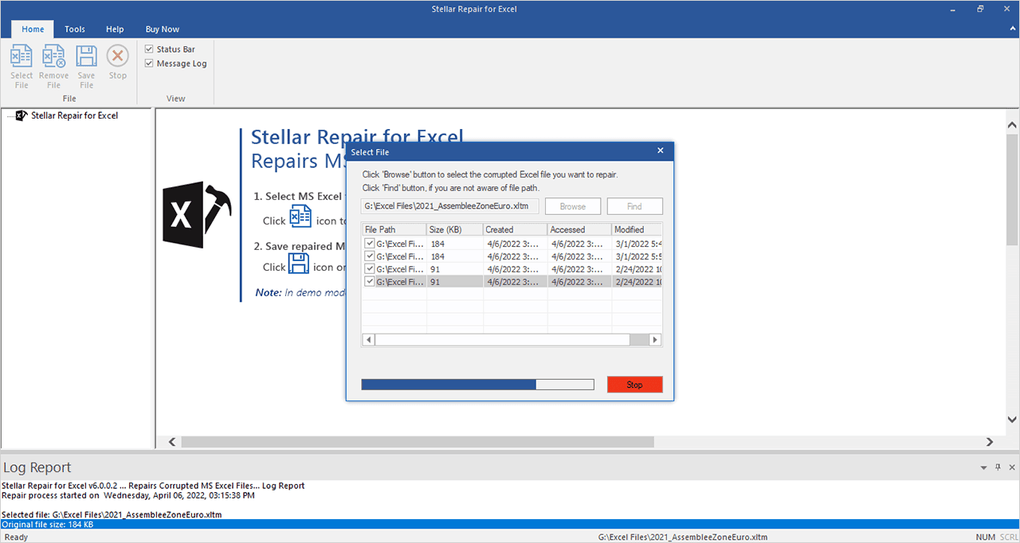
Advanced File Selection Options: Stellar Phoenix Excel Repair provides several methods for selecting files for repair. Users can manually select individual files, choose an entire folder containing numerous Excel files, or utilize the software’s search functionality to locate specific files based on filenames or other criteria. This flexibility ensures convenient and efficient file selection, even within extensive file structures.
-
Real-Time Preview: A unique and valuable feature is the real-time preview capability. Before initiating the full recovery process, users can preview the recoverable data. This allows for verification of the recovered information and assessment of the software’s success in repairing the damaged file. This preview function gives users confidence in the recovery process and the accuracy of the results.
-
User-Friendly Interface: The software prioritizes user-friendliness, providing a clean and intuitive interface that simplifies the complex process of Excel file repair. Even users with limited technical expertise can easily navigate the software, select files, initiate the repair process, and preview the recovered data. The step-by-step guidance minimizes the technical hurdles and ensures accessibility for a wide range of users.
-
Standalone Operation: A significant advantage is that Stellar Phoenix Excel Repair doesn’t require Microsoft Excel to be installed on the system. This makes it a versatile tool that can be used on any Windows machine, regardless of whether Excel is present, providing broader accessibility and utility.
The Stellar Toolkit for File Repair
Stellar Phoenix Excel Repair is part of a larger suite of data recovery tools known as the Stellar Toolkit for File Repair. This toolkit includes software designed to repair various file types, including Microsoft Word documents (.doc, .docx), PowerPoint presentations (.ppt, .pptx), and ZIP archives (.zip). This comprehensive suite offers a centralized solution for repairing various types of corrupted documents and archives, enhancing its overall value.
Pros and Cons of Stellar Phoenix Excel Repair
Like any software, Stellar Phoenix Excel Repair has both advantages and disadvantages:
Pros:
- Highly effective in repairing various types of Excel file corruption.
- User-friendly interface, making it accessible to users with varying levels of technical expertise.
- Comprehensive data recovery capabilities, recovering a wide range of Excel elements.
- Supports batch processing for efficient handling of multiple files.
- Provides advanced file selection options, facilitating convenient file identification.
- Offers real-time preview of recovered data, ensuring data accuracy before saving.
- Broad compatibility with different Excel versions and file formats.
- Does not require Microsoft Excel to be installed.
- Part of a larger toolkit offering repair solutions for various file types.
Cons:
- Performance can be affected on older or less powerful systems. The processing of large or severely damaged Excel files can be computationally intensive.
- Some severely damaged files may not be fully recoverable. While the software aims for comprehensive recovery, the extent of recovery depends on the severity of the corruption.
- Cost: While a trial version is available, the full version requires a purchase.
Alternatives to Stellar Phoenix Excel Repair
While Stellar Phoenix Excel Repair is a robust and widely-used tool, several alternative software programs offer similar functionality. These alternative options may provide different features, performance characteristics, or price points, allowing users to choose a program tailored to their specific needs. Researching and comparing these alternatives can prove beneficial in making an informed decision.
Conclusion
Stellar Phoenix Excel Repair is a valuable tool for anyone who relies heavily on Microsoft Excel and faces the risk of data loss due to file corruption. Its comprehensive features, user-friendly design, and broad compatibility make it a strong contender in the field of Excel file recovery. While performance may vary depending on the system’s capabilities and the extent of the file corruption, the software’s effectiveness in restoring valuable data makes it a worthwhile consideration for both individual users and businesses. The real-time preview feature provides confidence in the recovery process, and the inclusion in the Stellar Toolkit for File Repair further enhances its utility. However, potential users should carefully consider the pros and cons outlined above and compare it to alternative solutions before making a purchase decision.
File Information
- License: “Demo”
- Latest update: “August 13, 2024”
- Platform: “Windows”
- OS: “Windows 10”
- Language: “English”
- Downloads: “10.6K”
- Size: “8.31 MB”


