
In today’s digital age, data is paramount. From cherished family photos and crucial work documents to extensive multimedia libraries and important email archives, our lives are increasingly stored in digital formats. This reliance on digital data, however, comes with an inherent vulnerability: data loss. Whether it’s due to accidental deletion, a corrupted hard drive, a system crash, or even malware attacks, losing valuable files can be a truly distressing experience. The good news is that not all hope is lost. Tools like Stellar Phoenix Windows Data Recovery Free Edition (now commonly known as Stellar Data Recovery Free Edition for Windows) have emerged as saviors, offering a robust and user-friendly solution to retrieve your seemingly lost digital assets.
This comprehensive data recovery software is engineered to address a myriad of data loss scenarios, providing a reliable pathway to restore files from various storage media. What sets the free edition apart is its commitment to accessibility, allowing users to recover up to 1GB of data without any upfront cost. This makes it an invaluable first line of defense for individuals and even small businesses grappling with minor data loss incidents. With its intuitive interface and powerful scanning capabilities, Stellar Data Recovery Free Edition empowers users of all technical proficiencies to navigate the complexities of data retrieval, turning what could be a catastrophic loss into a manageable setback.
Unveiling the Power of Stellar Data Recovery Free Edition
The landscape of data loss is vast and varied. A simple misclick can send an important document to the recycle bin, only to be permanently deleted later. A sudden power outage might corrupt your entire hard drive, rendering entire folders inaccessible. Viruses can encrypt or destroy files, making them unreadable. In such moments of panic, having a dependable recovery tool is crucial. Stellar Data Recovery Free Edition steps into this role, offering a beacon of hope when digital disaster strikes.
At its core, Stellar Data Recovery Free Edition is a sophisticated software designed to scan your storage devices, identify recoverable fragments of lost data, and reconstruct them into usable files. It’s not just about restoring files that were recently deleted; it delves deeper, capable of recovering data from drives that have been formatted, partitioned incorrectly, or even severely corrupted. The “Phoenix” in its historical name aptly symbolizes its ability to resurrect data from the ashes of digital mishaps.
The free edition serves as an excellent entry point for anyone facing data loss. Its 1GB recovery limit is a thoughtful feature, allowing users to test the software’s efficacy and recover essential, smaller files or a good number of documents and photos without committing to a paid version. This limitation, while present, does not diminish the power of its underlying scanning engine. It performs the same thorough scans as its premium counterparts, merely restricting the volume of data that can be saved. For those who need to recover a few critical documents, a handful of precious photos, or a small video, this 1GB allowance is often more than sufficient. It acts as a perfect trial to experience the full potential of Stellar’s recovery capabilities, ensuring users gain confidence in its performance before considering an upgrade for larger-scale recovery projects.
Comprehensive File Restoration Capabilities
One of the most compelling aspects of Stellar Data Recovery Free Edition is its sheer versatility in handling different types of files and various storage media. Data loss isn’t discriminatory; it can affect anything from a simple text file to complex database structures. Stellar is built to tackle this diversity head-on.
Beyond Basic File Types: Multi-Format Support
The software boasts an extensive range of data retrieval capabilities, supporting virtually any file format imaginable. This includes, but is not limited to:
- Documents: Microsoft Office files (Word, Excel, PowerPoint), PDFs, text files, and many more, ensuring that your academic papers, business reports, and personal notes can be brought back.
- Multimedia Files: This is where Stellar truly shines for content creators, photographers, and videographers. It can repair and restore corrupt video files in popular formats such like AVI, MP4, MKV, MOV, AVCHD, and WEBM. For images, it supports a vast array including JPEG, TIFF, HEIC, PNG, GIF, BMP, and professional RAW formats like ARW (Sony), CR2/CRW (Canon), NEF (Nikon), DNG, ORF (Olympus), and many others. This means your visual and audio memories, as well as professional assets, are well within its recovery scope.
- Audio Files: Recover lost music files in MP3, WAV, AAC, and other formats.
- Email Files: A particularly useful feature for business users or anyone who relies on email archives. Stellar Data Recovery Free Edition can resolve the problem of recovering deleted emails from MS Outlook (PST files) and Outlook Express (DBX files), a critical function for maintaining communication records.
- Archives: ZIP, RAR, 7z, and other compressed file formats.
- Databases: Recovery of database files, which is vital for businesses.
This wide-ranging format support ensures that almost any type of data you might lose has a high chance of being recovered. The ability to not just recover but also repair corrupt multimedia files is a significant advantage, often bringing back files that other recovery tools might deem unrecoverable dueost damages to their internal structure.
Furthermore, Stellar Data Recovery Free Edition is adept at recovering data from a diverse array of storage media. This includes internal hard disk drives (HDDs) and solid-state drives (SSDs) within your Windows PC, as well as external storage devices such as USB flash drives, memory cards (SD cards, MicroSD cards, CompactFlash cards), and even optical media like CDs and DVDs. Its versatility ensures that irrespective of where your data was stored, Stellar provides a pathway to its retrieval. This makes it an invaluable asset for recovering holiday photos from a camera’s memory card, retrieving crucial files from a forgotten USB drive, or bringing back an old project from an external backup drive.
Addressing Complex Data Loss Scenarios
Beyond simply undeleting files, Stellar Data Recovery Free Edition exhibits remarkable prowess in tackling more complex and challenging data loss scenarios. This includes situations that would typically require advanced technical expertise or specialized forensic tools.
- Formatted or Corrupted Drives: One of the most common and disheartening data loss events is the accidental or intentional formatting of a drive. Stellar can recover data from formatted partitions or entire drives. Similarly, when a drive becomes corrupted due to file system errors, bad sectors, or other logical issues, making it inaccessible, the software can still delve into the raw data structure to extract files. It supports recovery from NTFS, exFAT, and FAT (FAT16/FAT32) file systems, covering the majority of Windows-based storage. Even when critical parameters of these file systems are unknown or severely damaged, Stellar’s advanced algorithms can still piece together the data.
- Unbootable Systems: A crashed Windows system that refuses to boot can be a nightmare. Stellar Data Recovery Free Edition offers a critical feature: the ability to create bootable USB media. This means users can start their computer from the recovery software itself, bypassing the corrupted operating system, and then proceed to recover their files directly from the non-booting internal drive. This capability is particularly useful for IT professionals and individuals who need to salvage data before attempting a full system reinstallation.
- Encrypted Drives: Data security is paramount, and many users encrypt their drives using technologies like BitLocker. Recovering data from encrypted drives often poses a significant challenge for generic recovery tools. However, Stellar Data Recovery Free Edition is equipped to recover data from BitLocker-encrypted hard drives and SSDs, provided the user has the necessary decryption key or password. This feature extends its utility to corporate environments and individuals with stringent security protocols.
- Raw Recovery Feature: For severely corrupt media where file system information is completely lost or the drive is recognized as “RAW,” the software employs a “Raw Recovery” feature. This powerful scan bypasses the file system structure altogether and searches for files based on their unique signatures. While the original file names and folder structures might not be preserved, raw recovery significantly increases the chances of recovering valuable data from extensively damaged storage devices. This makes it an indispensable tool when conventional recovery methods fail.
These advanced capabilities position Stellar Data Recovery Free Edition as a robust solution not just for casual users, but also for IT professionals and enterprises that deal with complex storage infrastructure and critical data integrity requirements.
A Seamless and Intuitive User Experience
Despite its powerful and sophisticated underlying technology, Stellar Data Recovery Free Edition prides itself on offering an incredibly user-friendly and intuitive experience. The developers have meticulously designed the interface to be straightforward, ensuring that even those without extensive technical expertise can navigate the data recovery process with ease and confidence. This focus on accessibility is a major factor in its popularity.
When you launch the software, you are greeted with a clean and uncluttered main window. The entire recovery journey is guided by a series of logical steps, eliminating guesswork and reducing the potential for errors. This streamlined approach makes data recovery less daunting and more manageable for the average user.
The Step-by-Step Recovery Process
The typical data recovery process with Stellar Data Recovery Free Edition follows a simple, guided workflow:
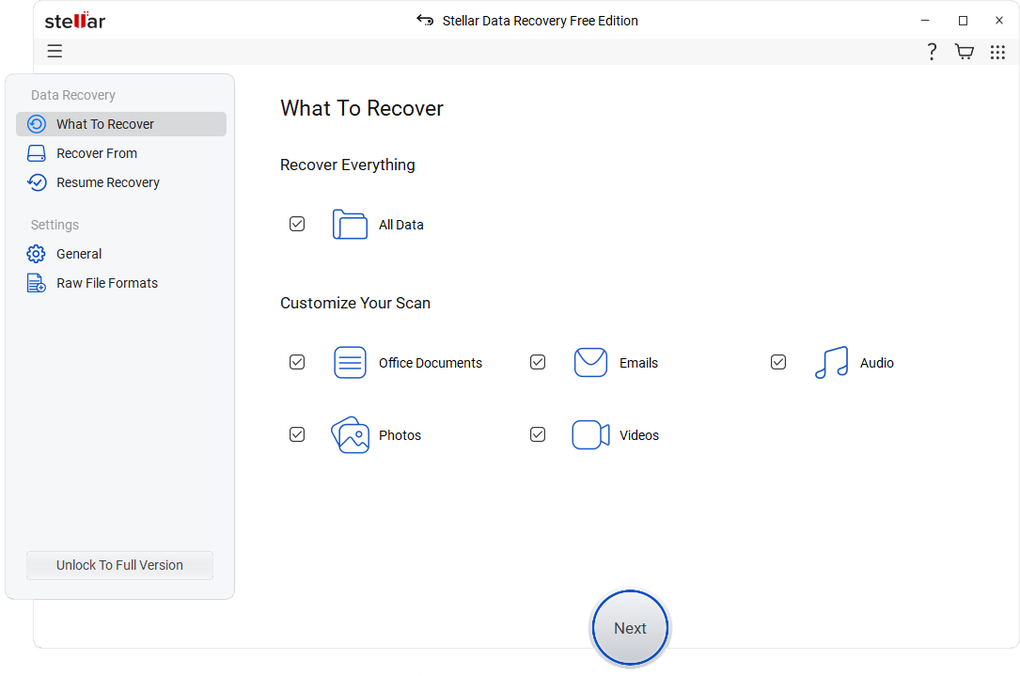
- Select What to Recover: The first step prompts users to select the specific types of files they wish to recover. Options usually include “Everything,” “Documents, Folders & Emails,” “Multimedia Files,” or “Photos.” This selective approach helps narrow down the search, making the scanning process more efficient, especially if you know exactly what you’re looking for. After making your selection, you simply click “Next.”
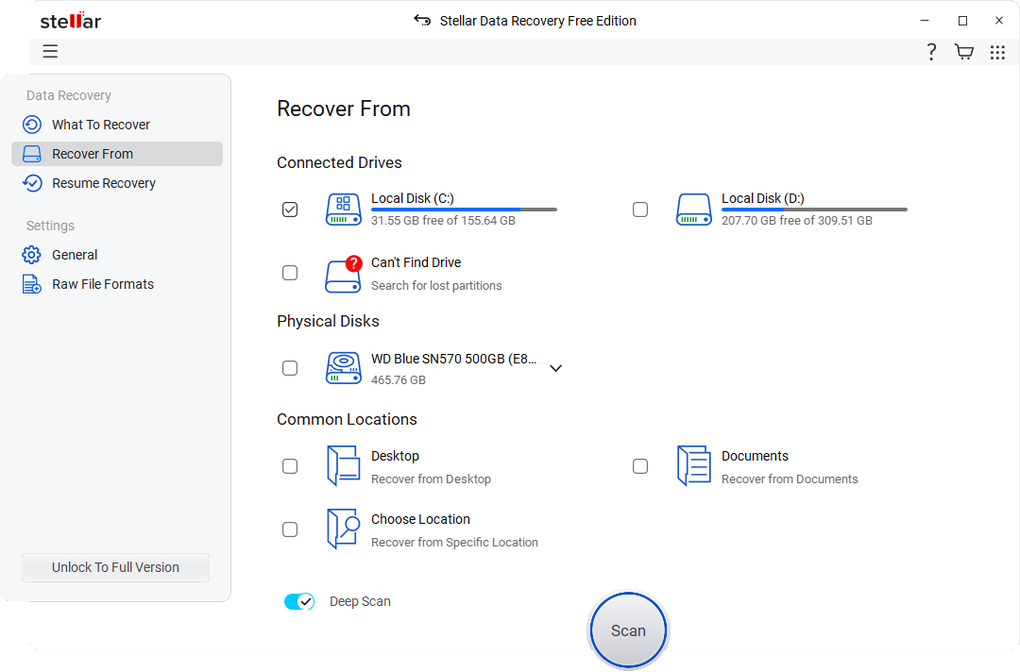
- Select Where to Recover From: In the next stage, you choose the location from which you want to recover data. This could be a specific drive partition (C:, D:), an external hard drive, a USB drive, or even a specific folder if you know the approximate location of the lost files. This precise targeting further optimizes the scan. Again, a click of “Next” moves you forward.
- Choose Scan Type: This is a crucial step where users decide the depth of the recovery scan. Stellar offers two primary scanning modes:
- Quick Scan: This is the faster option, primarily designed to recover recently deleted files or files lost due to minor corruption. It quickly scans the file system for entries that have been marked as deleted but are still physically present on the disk. It’s often sufficient for common data loss scenarios.
- Deep Scan: This is a more thorough and time-consuming process. The Deep Scan delves into every sector of the selected drive, bypassing the file system to reconstruct files based on their unique signatures. It’s ideal for recovering data from severely corrupted, formatted, or RAW drives where the Quick Scan might not yield satisfactory results. While it takes longer, it significantly increases the chances of comprehensive data retrieval, especially for older or more damaged files. After selecting either “Quick” or “Deep” scan, you initiate the scan by clicking “Scan.”
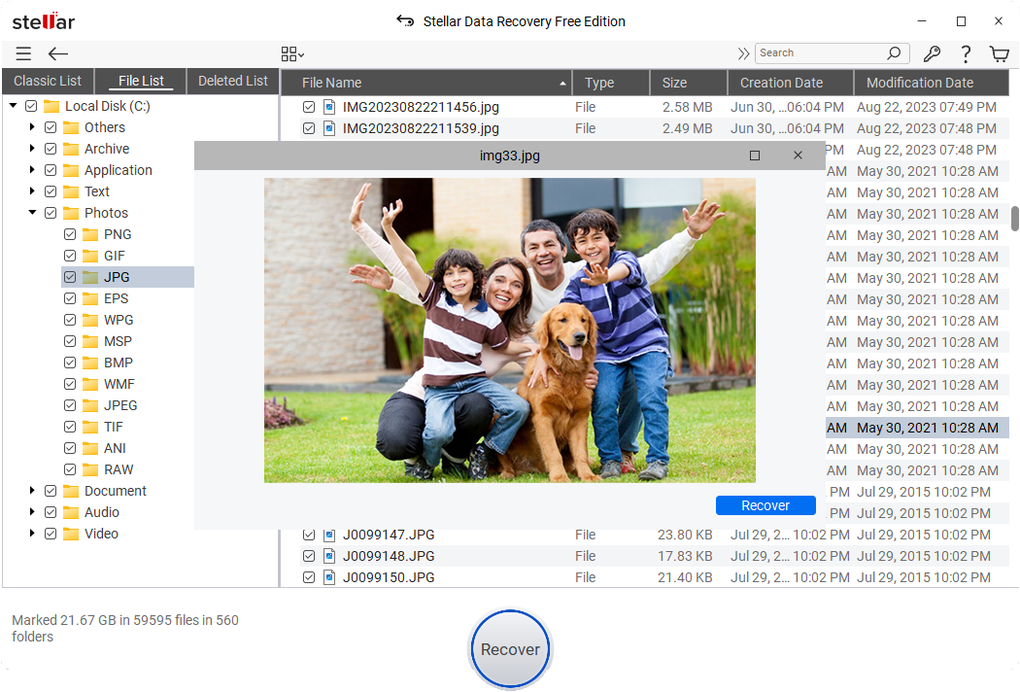
- Preview and Save Recovered Files: Once the scan is complete, Stellar Data Recovery Free Edition presents a list of all recoverable files. This list is often organized in a tree-view structure, mimicking the original folder hierarchy, or by file type, making it easy to browse through the results. A critical feature here is the ability to preview files before recovery. This allows users to verify the integrity and correctness of the recovered files (e.g., viewing an image, opening a document) before committing to saving them. This prevents saving corrupted or unwanted files. After reviewing, users can conveniently select the desired files and store them in a location of their choice, ensuring it’s a different drive than the one being recovered from to prevent overwriting.
One caveat to keep in mind, as previously mentioned, is the 1GB storage cap for the free edition of the software. This limitation means that users with larger data recovery needs, perhaps recovering an entire drive or a vast multimedia collection, may find it necessary to upgrade to the premium plan. However, for evaluating the software’s capabilities and for smaller recovery tasks, the free edition provides a complete and efficient experience within its limits.
Advantages and Limitations of the Free Edition
Stellar Data Recovery Free Edition stands out as a powerful and accessible tool in the crowded field of data recovery software. Its array of features and user-centric design offer compelling advantages, though it also comes with a significant limitation in its free iteration.
Pros:
- Extensive File Format Support: The software can recover virtually any file type, including common documents, specialized multimedia files (photos, videos, audio), email archives (Outlook PST/DBX), and various professional file formats. This comprehensive support ensures a high probability of recovering diverse data.
- Versatile Media Recovery: It is not limited to internal hard drives. Stellar can recover data from a wide range of storage media, including external hard drives, SSDs, USB flash drives, memory cards, and even optical media, making it a flexible solution for various scenarios.
- Handles Complex Data Loss Scenarios: Beyond simple deletion, it excels at recovering data from formatted, corrupted, or otherwise inaccessible drives. Its “Raw Recovery” feature is particularly valuable for severely damaged media.
- Supports Encrypted Configurations: The ability to recover data from BitLocker-encrypted drives (with the correct password/key) is a significant advantage, catering to users with heightened security needs.
- Creates Bootable Media: For systems that won’t boot, the option to create a bootable USB drive allows users to recover data directly from the system drive, which is a critical feature for disaster recovery.
- User-Friendly and Intuitive Interface: The step-by-step recovery process, clear instructions, and file preview options make it easy for users of all technical levels to operate the software effectively.
- Reliable Performance: Users consistently praise its effectiveness in retrieving data that other tools might miss, highlighting its robust scanning engine.
- Free of Cost (for up to 1GB): The most obvious advantage is that it offers powerful data recovery capabilities completely free for up to 1GB of data, allowing users to perform critical recoveries or thoroughly evaluate the software without financial commitment.
Cons:
- 1GB Storage Cap for Free Edition: The primary limitation is the 1GB data recovery limit. While generous for evaluating the software and for small recovery tasks, it can be quickly exhausted if you need to recover large video files, extensive photo libraries, or entire folders of documents. For substantial data loss incidents, an upgrade to a paid version becomes necessary.
- Scanning Time (for Deep Scan): As with any thorough data recovery software, the Deep Scan option can take a significant amount of time, especially on large or heavily corrupted drives. While this is a necessary trade-off for comprehensive recovery, it requires patience.
Who is the Free Edition For?
The Stellar Data Recovery Free Edition is ideal for:
- Individuals who have accidentally deleted a few important documents or photos.
- Users looking to recover a small number of critical files from a corrupted USB drive or memory card.
- Anyone wishing to thoroughly evaluate the software’s capabilities before investing in a premium version.
- Students or casual users with infrequent, small-scale data recovery needs.
In conclusion, Stellar Data Recovery Free Edition for Windows is a highly competent and user-friendly tool for retrieving lost or deleted files. Its extensive file format support, coupled with its ability to handle complex storage situations, make it a versatile choice for both casual users and professionals facing data loss. While the 1GB storage cap in the free edition may necessitate an upgrade for users with more substantial data recovery needs, it remains an incredibly powerful and reliable free tool for initial recovery attempts and a solid demonstration of the full software’s capabilities. For anyone facing the anxiety of lost data, Stellar Data Recovery Free Edition offers a potent first step towards restoration, providing peace of mind and demonstrating why it’s a top choice among free data recovery solutions available on platforms like PhanMemFree.org.
File Information
- License: “Free”
- Latest update: “January 30, 2025”
- Platform: “Windows”
- OS: “Windows 8.1”
- Language: “English”
- Downloads: “3.3K”
- Size: “128.49 MB”


