
Stellar Phoenix Word Repair is a powerful data recovery utility designed to restore corrupted Microsoft Word files (.doc and .docx). This software offers a range of features and repair options to address various levels of file corruption, ensuring the preservation of your valuable documents. Whether you’re a home user dealing with an accidentally damaged file or a professional needing to recover critical business documents, Stellar Phoenix Word Repair provides a robust and user-friendly solution. This guide will delve into its capabilities, functionalities, and overall effectiveness.
Understanding the Problem: Corrupted Word Files
Microsoft Word files, like any digital document, can become corrupted due to several factors. These factors range from simple software glitches and unexpected system shutdowns to more serious issues like hard drive failures or malware infections. The symptoms of a corrupted Word file can vary, but they often include:
- Inability to open the file: The most obvious sign is the inability to open the file in Microsoft Word or receiving an error message.
- Garbled text or missing content: Parts of the document may be unreadable, displaying strange characters or completely missing sections.
- Formatting errors: The document’s layout may be distorted, with text running off the page, incorrect font sizes, or misplaced images.
- File size inconsistencies: A significantly smaller or larger file size than expected can indicate corruption.
These issues can result in significant data loss, impacting productivity and potentially causing irreparable damage to important projects or research. This is where a dedicated file repair tool like Stellar Phoenix Word Repair becomes indispensable.
Stellar Phoenix Word Repair: Features and Functionality
Stellar Phoenix Word Repair distinguishes itself through its multifaceted approach to data recovery. Its core strength lies in its three-tiered repair system, offering varying levels of repair intensity to match the severity of the corruption:
1. Simple Repair: This is the default and starting point for repairing mildly corrupted files. It performs a standard scan of the damaged .doc or .docx file, attempting to restore the document to its original state without compromising the formatting. Images, charts, headers, footers, and other embedded elements are usually preserved. This option is ideal for minor corruptions like those resulting from sudden application closures.
2. Advanced Repair: For more severely damaged .doc files, the Advanced Repair option employs more intensive methods to address complex corruption issues beyond the scope of Simple Repair. This option delves deeper into the file structure, meticulously reconstructing damaged sections. While effective, it is exclusively designed for .doc files and may not be as comprehensive for .docx files.
3. Raw Recovery: This is the last resort for severely corrupted .doc files where both Simple and Advanced Repair fail to fully restore the document. Raw Recovery extracts as much data as possible, presenting the recovered content as raw text or machine-readable format. While formatting and embedded elements are generally lost, this method prioritizes recovering any recoverable textual content, ensuring that no valuable data is completely lost.
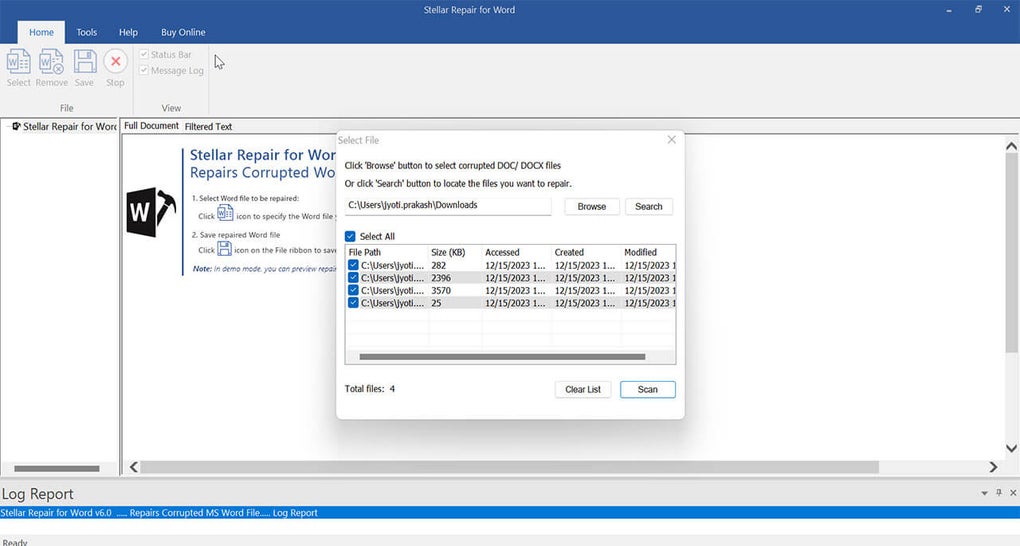
Beyond its tiered repair system, Stellar Phoenix Word Repair offers several additional features:
- File Search: The software includes a built-in search function to locate potentially corrupted Word files, even if their location is unknown or has been forgotten. This is a significant time saver, particularly in scenarios where the user is unsure where the corrupted file resides.
- Preview Functionality: Before initiating the repair process, users can preview the recoverable data in three formats: Full Document (if possible), Filtered Text (cleaned text only), and RAW Text (extracted data without formatting). This preview feature allows users to assess the potential recovery outcome before committing to the full repair.
- Batch Processing: Stellar Phoenix Word Repair offers the ability to process multiple files simultaneously. This batch processing capability is highly efficient, saving significant time when dealing with several corrupted files.
- Log File: The software maintains a detailed log file that tracks the entire repair process, including the repaired file names, start times, completion times, and any encountered issues. This transparency provides users with a clear record of the repair process.
- Broad Compatibility: The software supports a wide range of Microsoft Word versions, from older .doc formats to the latest .docx files, ensuring compatibility with various document types. This wide compatibility minimizes compatibility issues and ensures a broader user base can benefit from the tool. It also supports various Windows operating systems.
User Experience and Interface
Stellar Phoenix Word Repair is designed with user-friendliness in mind. The intuitive interface allows users of all technical skill levels to navigate the software easily. The straightforward steps involved in file selection, repair option choice, and previewing recovered data make the process simple and accessible. The clear visual representation of the repair process further enhances user experience, ensuring transparency throughout the data recovery process.
Advantages and Disadvantages
Advantages:
- Multiple Repair Options: The three-tiered repair system effectively handles various levels of file corruption.
- Wide Compatibility: Supports numerous Word versions and Windows operating systems.
- User-Friendly Interface: Easy to use, even for non-technical users.
- Preview Feature: Allows assessment of recovery potential before committing to repair.
- Efficient Batch Processing: Saves time when handling multiple files.
- Comprehensive Log File: Provides detailed information about the repair process.
Disadvantages:
- Limited Advanced Repair for .docx: The Advanced Repair option is primarily designed for .doc files, limiting its effectiveness for .docx files with severe corruption.
- Raw Recovery Loses Formatting: The Raw Recovery option prioritizes data extraction over formatting preservation. While valuable for recovering content, original formatting is sacrificed.
- Not a Guarantee of Complete Recovery: In cases of extremely severe corruption, complete recovery may not always be possible, even with the most advanced repair options.
Conclusion
Stellar Phoenix Word Repair provides a powerful and accessible solution for recovering corrupted Word documents. Its multi-tiered repair system, combined with its user-friendly interface and additional features, make it a robust tool for individuals and professionals alike. While it’s not a magic bullet for every corrupted file, its effectiveness and ease of use make it a valuable asset in situations where data recovery from damaged Word files is crucial. Understanding the limitations, particularly regarding severe corruption and the differences in repair options between .doc and .docx files, is key to effectively utilizing the software and managing expectations for recovery success.
File Information
- License: “Trial version”
- Latest update: “August 13, 2024”
- Platform: “Windows”
- OS: “Windows 8”
- Language: “English”
- Downloads: “10K”
- Size: “6.33 MB”


