
StellarPlayer is a free, versatile media player application developed by Coldlake Technology (Wuhan) Co., Ltd. It distinguishes itself through its broad format support, smooth playback, and user-friendly interface, making it a compelling option for users seeking a robust yet accessible media player. However, some minor interface inconsistencies detract slightly from the overall user experience. This review delves into the specifics of StellarPlayer’s features, performance, and usability, providing a comprehensive assessment of its strengths and weaknesses.
Extensive Media Format Support: A Core Strength
At the heart of any successful media player lies its ability to handle a wide variety of file formats. StellarPlayer excels in this area, boasting impressive compatibility with numerous video and audio codecs. Its support extends to popular video formats such as MP4, AVI, FLV, WMV, MKV, M4V, MOV, RMVB, and even high-definition formats including 4K, Blu-ray, and HDR (High Dynamic Range) video. This extensive compatibility eliminates the frustration of encountering unsupported files, a common issue with many other media players.
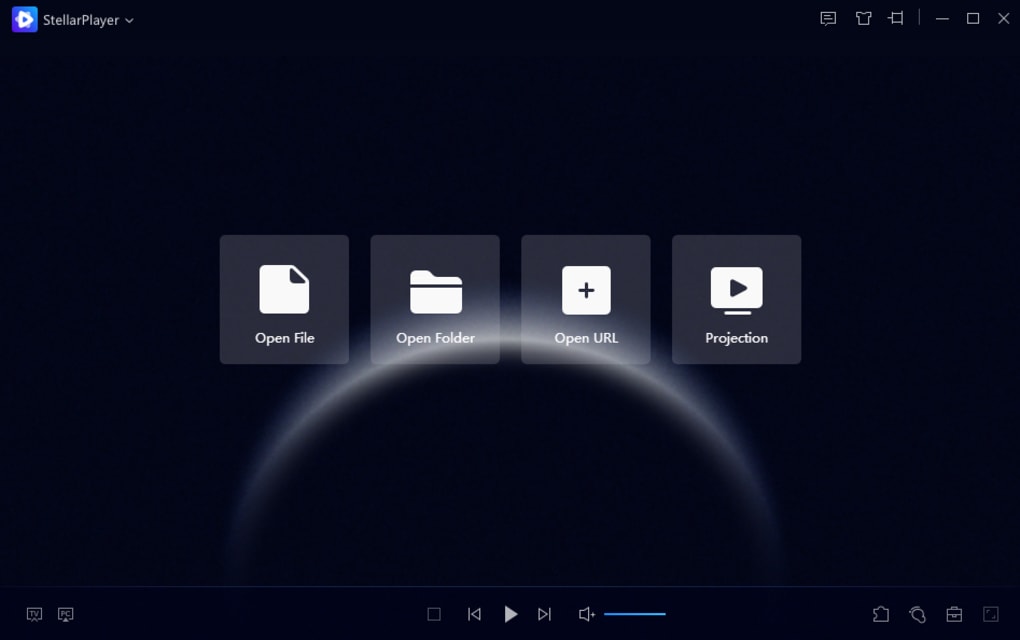
The software’s prowess isn’t limited to video files. StellarPlayer also handles a wide array of audio formats, including MP3, WMA, WAV, FLAC, DAT, AC3, AAC, APE, OGG, and RA, ensuring a comprehensive solution for all your audio playback needs. This broad support makes it a one-stop shop for both audiophiles and videophiles, eliminating the need for multiple players to manage different file types. Furthermore, StellarPlayer supports various streaming protocols, such as HTTP, RTMP, UDP, and FTP, allowing users to seamlessly stream videos directly from online sources by simply pasting the URL into the application. This feature adds considerable flexibility and convenience for those who frequently access online content.
Smooth Playback and Advanced Features: Enhancing the Viewing Experience
Beyond its extensive format support, StellarPlayer shines in its ability to deliver smooth and high-quality playback. The application leverages advanced CPU and GPU tuning technology to ensure optimal performance, preventing lag and maintaining video quality even with demanding high-resolution content. Its efficient decoding algorithms, coupled with support for multiple graphics cards and AI-powered intelligent hardware selection, automatically optimizes playback for the user’s specific hardware configuration. This intelligent optimization minimizes resource consumption, particularly crucial when handling resource-intensive HDR videos.
StellarPlayer integrates a high-speed motion compensation algorithm that can enhance video playback by upscaling the frame rate to 60 frames per second (FPS). This feature significantly improves the smoothness of motion in videos originally shot at lower frame rates, resulting in a more fluid and enjoyable viewing experience. The application also supports audio direct output, providing a more realistic and natural sound profile compared to players lacking this functionality. This audio fidelity further contributes to an immersive viewing or listening experience.
User-Friendly Interface and Convenient Features: Streamlining User Interaction
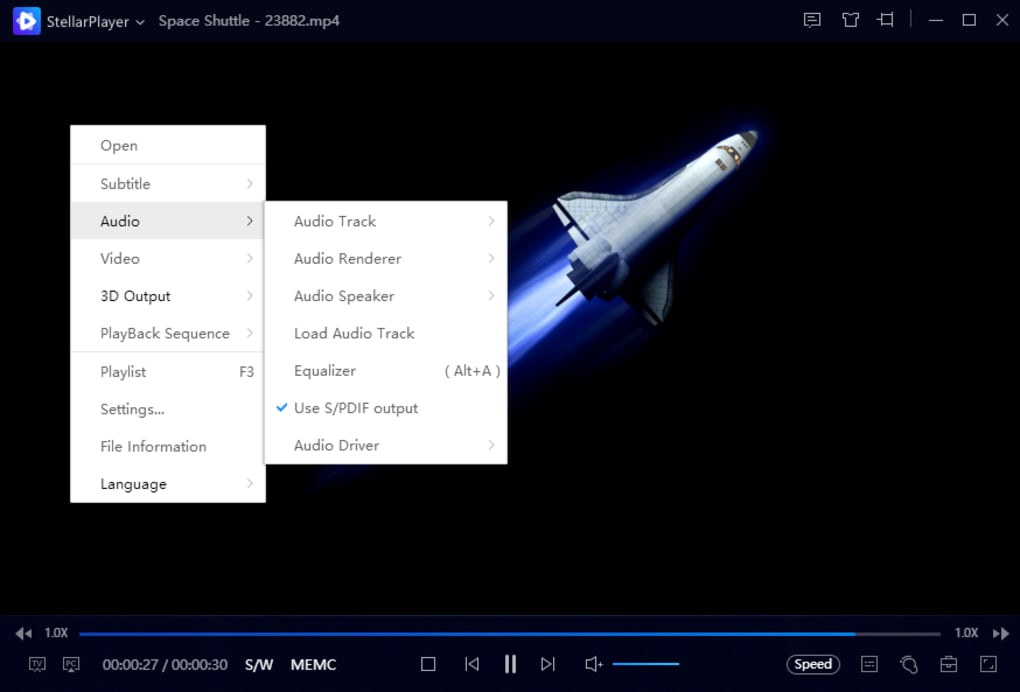
StellarPlayer boasts an intuitive and user-friendly interface, simplifying navigation and access to its various features. The main window is divided into two panes: a left pane containing primary playback controls (Open File, Open Folder, Open URL, and Projection) and a right pane displaying the current playlist. The right-hand playlist panel is easily hidden or customized through the built-in Playlist Management feature, allowing users to organize and manage their video and audio libraries effectively. The ability to create and categorize playlists helps users quickly locate specific files, significantly enhancing organization and accessibility.
The inclusion of a screencasting function, enabled through DLNA projection, allows for wireless casting of videos to other compatible devices or receiving screen projections from other devices. This functionality significantly broadens the application’s reach and allows for easy content sharing and collaborative viewing. StellarPlayer also allows for customization of the player’s skin or theme, enabling users to personalize their experience by adjusting the visual aesthetics of the interface. Additionally, users can adjust various settings, including recording options, screenshot capture, rendering settings, hotkey assignments, and video playback behaviors. Subtitle support is also robust, with compatibility for SRT, ASS, SSA, and SUB subtitle formats. The application also provides options for downloading and syncing subtitles automatically during movie playback.
Limitations and Areas for Improvement: Addressing the Shortcomings
While StellarPlayer presents many strengths, it’s essential to acknowledge some areas where improvement could enhance the user experience. A notable limitation is the inconsistency in the interface language. Although the main menu and many features are presented in English, some labels and controls remain in Chinese. This inconsistency is jarring and can be confusing, especially for users unfamiliar with the Chinese language. The lack of a comprehensive language settings option to rectify this issue is a significant drawback. Further development should focus on achieving complete language consistency throughout the application.

Another area for potential improvement lies in the depth of settings customization. While the available settings are functional, they lack the granular control found in some more advanced media players. The option to fine-tune aspects such as audio equalization, video filters, or advanced playback controls could further enhance the software’s appeal to users seeking more detailed control over their viewing experience. Expanding customization options without increasing the complexity of the user interface would be beneficial.
Conclusion: A Strong Contender in the Free Media Player Market
StellarPlayer presents a compelling case as a free and powerful media player. Its extensive support for various audio and video formats, coupled with its smooth playback, user-friendly interface, and added features such as screencasting and FPS enhancement, makes it a strong contender in the competitive free media player market. While minor interface inconsistencies and limited customization options represent areas for improvement, these drawbacks do not significantly overshadow the application’s considerable strengths. For users seeking a versatile, free media player with a robust feature set, StellarPlayer is a highly recommended choice, particularly for those who value broad format compatibility and smooth, high-quality playback. The developers’ continued work on addressing the existing language inconsistency and expanding the range of customizable settings will further solidify StellarPlayer’s position as a top-tier free media player.
File Information
- License: “Free”
- Version: “20210813203203”
- Latest update: “August 27, 2021”
- Platform: “Windows”
- OS: “Windows 10”
- Language: “English”
- Downloads: “2.2K”
- Size: “91.96 MB”


