
Stick Fighter is a free mobile application designed for creating simple, frame-by-frame animations using classic stick figures. Developed by Eric Metois, this app offers a user-friendly interface that allows even beginners to bring their stick figure creations to life, making it an accessible tool for aspiring animators and casual users alike. This review delves into the app’s features, strengths, and weaknesses, offering a comprehensive assessment of its functionality and user experience.
Easy Animation Creation for Beginners
The core functionality of Stick Fighter centers around its intuitive animation creation process. The app simplifies the complex world of animation by focusing on a straightforward, flipbook-style approach. Users create animations frame by frame, making small adjustments to their stick figure’s position in each subsequent frame to create the illusion of movement. This simple methodology makes it incredibly easy to learn, even for users with no prior animation experience.
To begin animating, users simply tap the “Create New” button and provide a name for their animation project. The app then provides a canvas where users can draw and manipulate their stick figures. This process involves utilizing basic shapes like lines, circles, and curves to construct the stick figures and their actions. The app doesn’t include a wide array of advanced drawing tools, but its simplicity is its strength, making the animation creation process incredibly accessible. Users can easily create basic actions, such as walking, jumping, or fighting, by subtly adjusting the position and orientation of the stick figure elements in each frame.
Stick Figure Combat and Customization
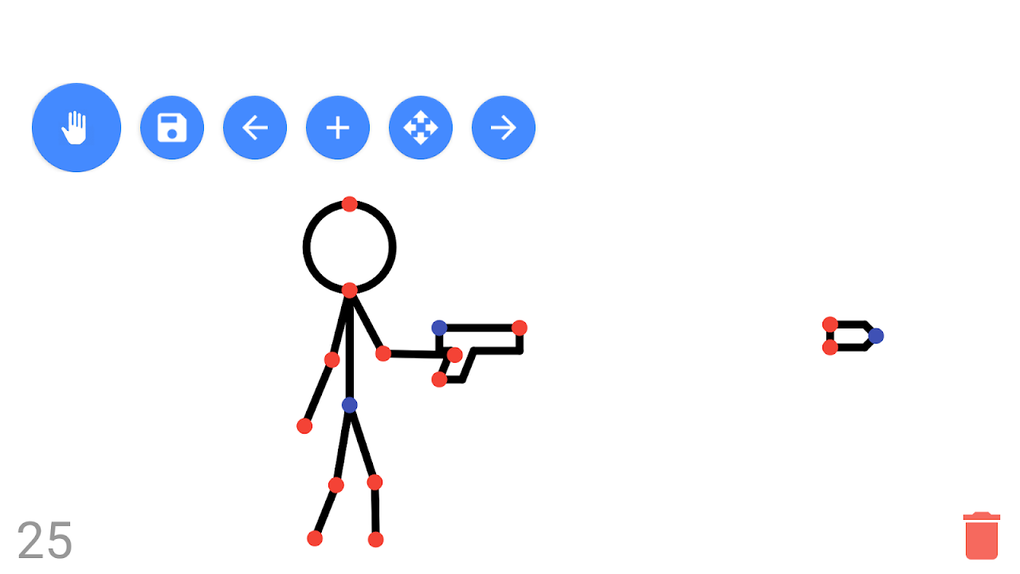
One of the most appealing aspects of Stick Fighter is its focus on creating stick figure combat scenes. Users can equip their stick figures with a range of weapons, including swords, guns, axes, bows, and arrows. This element adds a layer of dynamism and engagement to the animation process, allowing users to create dynamic fight sequences and action-packed scenes. The ability to incorporate weaponry enhances the creative possibilities within the app’s limitations, providing a fun and engaging way to express creativity through stick figure combat.
Limitations and Missing Features
While Stick Fighter excels in its simplicity and ease of use, its lack of advanced features is a noticeable limitation. The app’s drawing tools are basic, offering only lines, circles, and curves, which restrict the level of detail and visual complexity users can achieve. Unlike other animation applications that offer a wider range of shapes, brushes, and color palettes, Stick Fighter’s functionality is quite limited. This minimalist approach, while making the app accessible to beginners, may prove frustrating to users seeking more advanced drawing and animation controls. The absence of more sophisticated tools also restricts the ability to create highly detailed and visually polished animations.
Interface and User Experience
Stick Fighter’s user interface is designed with simplicity in mind. The app’s controls are intuitive and easy to navigate, making the animation creation process accessible even for those unfamiliar with animation software. The app’s straightforward layout ensures that users can easily focus on the core task of creating their animations without being overwhelmed by complex menus and settings. This focus on simplicity is particularly beneficial for users who are new to animation, allowing them to quickly grasp the app’s functionality and start creating animations without a steep learning curve.
Comparison with Other Animation Apps
Compared to more feature-rich animation applications, Stick Fighter occupies a distinct niche. While it lacks the advanced drawing tools and features of professional-grade animation software, it shines in its accessibility and ease of use. Applications like Stickman Battle Animator or Stick Nodes Pro offer more sophisticated features, but they also come with a steeper learning curve. Stick Fighter provides a perfect entry point for users who want to explore the world of animation without the complexity of more advanced tools. Its simplicity makes it an ideal app for casual users and those looking for a quick and easy way to create basic animations.
Conclusion: A Fun and Accessible Animation Tool
Stick Fighter offers a unique and enjoyable experience for anyone interested in creating simple stick figure animations. Its intuitive interface and straightforward approach to animation make it incredibly accessible to beginners, while the ability to create dynamic combat scenes adds an element of fun and engagement. While its limitations in advanced features might disappoint experienced animators, Stick Fighter’s simplicity is its greatest strength. It is a perfect tool for casual users, those new to animation, or anyone looking for a fun and easy way to express their creativity. Its user-friendly nature and ease of use make it an excellent option for quickly creating short, dynamic animations, particularly those focused on stick figure battles and action sequences. For those seeking a more comprehensive and feature-rich animation experience, other, more advanced apps may be better suited, but for casual use and a quick introduction to the world of animation, Stick Fighter provides a simple and effective solution.
File Information
- License: “Free”
- Version: “7.1.1”
- Latest update: “August 30, 2024”
- Platform: “Android”
- OS: “Android 9.0”
- Language: “English”
- Downloads: “15.2K”
- Size: “2.11 MB”
- Download Options: “APK, Google Play”
- Filename: “com-tweber-stickfighter-activities-46-16306139-52bd670b9037c9d0f583221466372b41.apk”


