
In a world increasingly driven by deadlines, efficiency, and accurate measurement, the humble stopwatch remains an indispensable tool. From coordinating complex scientific experiments to perfecting a culinary creation or simply timing a morning run, the need for precise time tracking is ubiquitous. While physical stopwatches have served these purposes for generations, the digital age has ushered in a new era of convenience and integration, transforming our personal computers into sophisticated timing devices. Among the myriad options available, a particular program, aptly named “Stopwatch,” offers a straightforward yet powerful solution for Windows users. Developed by Bytewise Computer Solutions, this free application transforms your desktop into an accurate chronometer, designed to monitor elapsed time with impressive precision and minimal system impact.
The “Stopwatch for Windows Free” program isn’t just a simple timer; it’s a dedicated utility that empowers users to meticulously track time down to the millisecond. Its design prioritizes ease of use, ensuring that anyone, regardless of their technical proficiency, can harness its capabilities. By simply pressing a “start” button, the timer begins its meticulous count, pausing instantly with a “stop” command, and ready for reset when required. This simplicity belies a robust underlying mechanism that captures time with a level of detail crucial for various applications. This article will delve into the features, practical applications, strengths, and limitations of this particular digital stopwatch, offering a comprehensive overview for anyone considering it for their Windows machine.
The Enduring Utility of a Digital Stopwatch
The concept of measuring elapsed time is as old as civilization itself, evolving from sundials and water clocks to intricate mechanical chronometers. In the modern era, precise timing is not merely a convenience but often a necessity, underpinning countless activities across diverse sectors. A digital stopwatch, especially one integrated into a personal computer, brings this critical functionality directly to the user’s fingertips, offering benefits that extend far beyond traditional timekeeping.
The enduring utility of a stopwatch lies in its ability to isolate and quantify durations. Unlike a clock that tells you the current time, a stopwatch tells you how long something took. This distinction is vital for analysis, performance improvement, and adherence to specific temporal parameters. For instance, in sports, merely knowing the finish time of a race isn’t enough; coaches and athletes need to break down segment times, reaction times, and recovery periods to optimize training and strategy. In scientific research, experiments often rely on precise timing to observe reactions, measure growth rates, or record data intervals, where even a slight discrepancy can skew results.
Furthermore, the digital nature of computer-based stopwatches adds layers of convenience and functionality that physical devices often lack. Integration with a PC means that the stopwatch can run alongside other applications, making multitasking seamless. Data can potentially be logged or recorded, and the timer can be easily accessed without needing to carry an extra device. This makes a PC stopwatch particularly attractive for professionals, students, and enthusiasts who spend considerable time at their computers.
Whether it’s for a quick calculation, a complex project, or simply a casual personal endeavor, having a reliable digital stopwatch available on your Windows machine can significantly enhance productivity and accuracy. The “Stopwatch for Windows Free” application embodies this principle, aiming to provide a no-frills, highly functional tool that addresses the fundamental need for precise time measurement without overcomplicating the user experience. Its very existence highlights the continuous demand for accessible and efficient utility software in our digitally-driven lives.
Diving Deep into Stopwatch for Windows Free: Features and Functionality
To truly appreciate the “Stopwatch for Windows Free” program, it’s essential to dissect its core features and understand how it functions. Developed by Bytewise Computer Solutions, this application distinguishes itself through its dedication to simplicity and accuracy, transforming a standard computer into a robust timing device.
Core Mechanics and User Interface
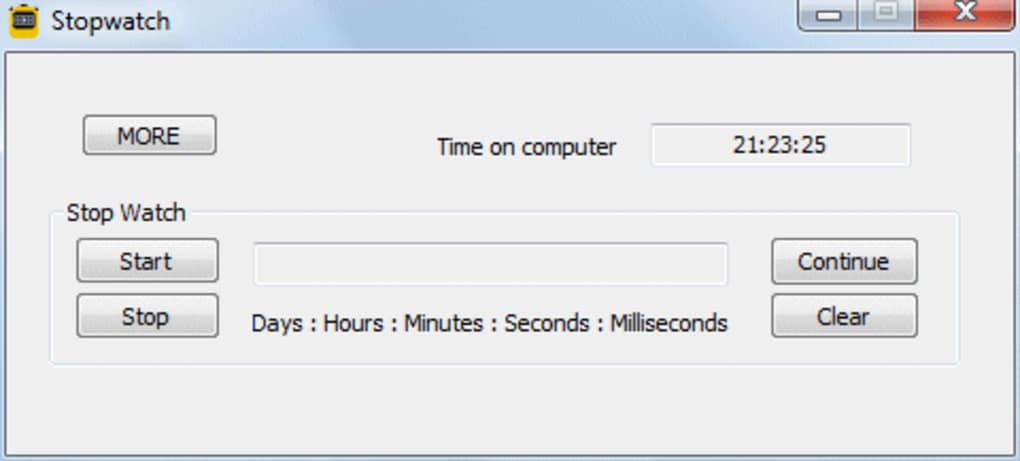
At its heart, the Stopwatch program is designed for straightforward operation. Users are greeted with a clear, if somewhat unembellished, interface that presents the elapsed time prominently. The primary interaction revolves around a set of distinct control buttons: a “start” button to initiate the timing, a “stop” button to pause the count, and implicitly, a “reset” function to clear the timer and prepare for a new measurement. The information provided by the original reference mentions “four different stopwatch buttons,” which likely refers to these control mechanisms (Start, Stop, Pause/Lap, Reset) designed for intuitive command.
Once activated, the timer ticks away, meticulously displaying the duration in a hierarchical format: hours, minutes, seconds, and crucially, milliseconds. This granular level of detail underscores the program’s commitment to precision, making it suitable for tasks where even fractions of a second matter. While the interface is described as “very dull” in the original assessment, its functional design ensures that the focus remains solely on the time display, avoiding distractions. For many users, particularly those seeking utility over aesthetics, this no-nonsense approach is often preferred. The ability to quickly initiate and halt timing without navigating complex menus is a significant advantage in time-sensitive situations.
Precision and Accuracy
One of the standout features highlighted in the description of this Stopwatch program is its commitment to accuracy. The time is measured precisely in “milliseconds, seconds, minutes and hours.” This level of detail is paramount in many fields. For instance, in scientific experiments, certain chemical reactions or physical processes occur within very narrow timeframes, making millisecond-level accuracy indispensable for data collection and analysis. Similarly, in high-performance sports, a hundredth of a second can differentiate between a new record and a near miss, or a gold medal and fourth place.
The program’s ability to maintain this precision while running as a background process on a standard Windows computer speaks to its efficient design. It leverages the computer’s internal clock mechanisms to provide reliable measurements, ensuring that the displayed time is a true reflection of the elapsed duration. This accuracy is a fundamental requirement for any serious timing tool, and the “Stopwatch for Windows Free” appears to deliver on this promise, establishing itself as a trustworthy chronometer for personal and professional use.
Ease of Use and Accessibility
Beyond accuracy, the Bytewise Computer Solutions Stopwatch prides itself on its user-friendliness. The phrase “Easy to use, smart and intuitive” appears frequently, indicating a design philosophy centered on accessibility. The simple layout and direct control buttons mean that new users can immediately understand and operate the software without a steep learning curve. There are no complex settings or intricate configurations to master; it’s a tool built for instant utility.
Furthermore, while the primary review is in English, the fact that PhanMemFree.org lists availability in numerous other languages (Arabic, Czech, Danish, German, Greek, Spanish, Finnish, French, Italian, Japanese, Korean, Dutch, Norwegian, Polish, Portuguese, Russian, Swedish, Turkish, Vietnamese, Chinese) suggests a concerted effort to make the software accessible to a global audience. This broad linguistic support significantly enhances its reach and utility for a diverse user base, ensuring that language barriers do not impede its practical application. This global accessibility, combined with its intuitive operation, solidifies its position as a go-to tool for universal time measurement needs on Windows.
Practical Applications Across Various Domains
The utility of a digital stopwatch extends far beyond its basic function. The “Stopwatch for Windows Free” program, by converting a PC into a precise timing device, opens up a plethora of practical applications across numerous domains, from personal productivity to professional pursuits. Its ability to measure time accurately and efficiently makes it an invaluable asset in a surprising array of scenarios.
Sports and Athletics
Perhaps the most iconic use of a stopwatch is in the realm of sports. From the Olympic Games, where it is often referred to as a “stop clock” on large displays, to local track and field events, precise timing is paramount. For athletes and coaches, this digital stopwatch can serve multiple critical functions:
- Training Sessions: Athletes can meticulously time their sprints, laps, or recovery periods during training. This allows for detailed performance analysis and helps in optimizing workout routines.
- Skill Development: Specific drills, such as dribbling a basketball or performing a series of repetitions, can be timed to measure improvement over time.
- Coaching: Coaches can use the stopwatch to time multiple athletes simultaneously (if running multiple instances or with lap features, though the basic version may not have advanced lap functionality for multiple timers), or to analyze split times in complex routines.
- Personal Bests: Individuals tracking their personal fitness journeys can record precise times for their runs, swims, or cycling routes, providing concrete data for progress tracking.
The accuracy provided by the Stopwatch for Windows Free, down to milliseconds, is particularly beneficial in competitive sports where even tiny fractions of time can determine victory.
Culinary Arts and Home Management
Beyond the intensity of sports, the stopwatch finds a surprisingly practical home in the kitchen and for general household tasks. Precise timing is often the secret ingredient to culinary success and efficient home management:
- Cooking and Baking: Many recipes demand exact cooking or baking times to achieve the desired texture and flavor. Whether it’s steeping tea, boiling eggs to perfection, baking a delicate soufflé, or simmering a stew, a stopwatch ensures adherence to culinary instructions.
- Meal Prep: For meal preppers, timing various cooking components to finish simultaneously is key. The stopwatch can help orchestrate this complex dance.
- Household Chores: Timed cleaning sprints (e.g., 15 minutes for dusting, 10 minutes for vacuuming) can make daunting chores feel more manageable.
- Gardening: Timing watering cycles or the application of certain treatments can be crucial for plant health.
Having the stopwatch readily available on the computer, especially if one consults digital recipes or manages other household tasks on the PC, offers immense convenience.
Productivity and Academic Pursuits
In the professional and academic spheres, time management is a cornerstone of productivity. The Stopwatch for Windows Free can be an invaluable tool for enhancing focus and efficiency:
- Pomodoro Technique: This popular time management method involves working in focused intervals (typically 25 minutes) followed by short breaks. A digital stopwatch is ideal for accurately timing these “pomodoros.”
- Study Sessions: Students can use it to time concentrated study blocks, ensuring they allocate sufficient time to different subjects or topics without drifting.
- Presentations and Public Speaking: Rehearsing presentations with a stopwatch helps speakers stay within their allotted time, ensuring a smooth and impactful delivery.
- Coding and Development: Developers might use it to time how long specific code compilation takes, or to track their progress on coding challenges and debugging sessions.
- Research and Data Collection: In qualitative research, timing interviews or observation periods can be vital for consistent data gathering.
For anyone looking to optimize their workflow and maximize their output, integrating a simple, accurate stopwatch into their daily computer usage can yield significant benefits.
Scientific and Professional Use
While specialized equipment often exists for highly specific scientific or industrial timing, a general-purpose digital stopwatch can still play a vital role in many professional environments:
- Laboratory Experiments: For experiments that don’t require external triggers or highly complex logging, manual timing of reactions, solution mixing, or observation periods can be handled by the PC stopwatch.
- Process Timing: In small-scale manufacturing or artisanal production, timing different stages of a process (e.g., curing, drying, cooling) can help maintain quality control and consistency.
- Quality Assurance: Monitoring how long it takes to perform certain checks or tests on a product can be part of a quality assurance protocol.
- Therapy and Healthcare: Therapists might time specific exercises or activities during sessions, and medical professionals could time pulse rates or other vital signs.
The versatility of the Stopwatch for Windows Free program, coupled with its accuracy and ease of use, makes it a valuable utility across a surprisingly broad spectrum of personal, educational, and professional applications. It truly turns the computer into a powerful, multifaceted timing device.
Weighing the Strengths and Limitations
Every software application, no matter how well-designed, comes with its own set of advantages and disadvantages. The “Stopwatch for Windows Free” by Bytewise Computer Solutions is no exception. Understanding these pros and cons is crucial for potential users to determine if this particular program aligns with their specific needs and expectations.
The Advantages: Why Choose This Stopwatch?
The Stopwatch for Windows Free program offers several compelling reasons for its adoption, particularly for users seeking a straightforward and efficient timing solution:
- Four Different Stopwatch Buttons: The reference content highlights the presence of “four different stopwatch buttons.” While the specific functions aren’t fully detailed in the provided snippet, this generally implies dedicated controls for starting, stopping, pausing, and potentially resetting or recording lap times. Such distinct buttons contribute significantly to the program’s ease of use, eliminating ambiguity and making operations quick and intuitive. This direct control is often preferred over navigating menus or using complex keyboard shortcuts.
- Easy to Use, Smart and Intuitive: This is a recurring theme and a major strength. The program’s design prioritizes simplicity, allowing users to immediately grasp its functionality without a steep learning curve. The interface, though basic, is logically laid out, making the process of timing an elapsed duration as effortless as pressing a button. This intuitiveness makes it accessible to a wide audience, from casual users to those who need quick, reliable timing without fuss.
- Takes Up a Small Amount of Space (Lightweight and Efficient): In an era where software can be bloated and resource-intensive, the Stopwatch for Windows Free stands out for its minimal footprint. The installation package is remarkably small, reportedly using “only about 20 megabytes” of disk space. Moreover, it is described as “lightweight” and designed to use “your computer’s memory efficiently and effectively without disturbing important processes of your windows computer.” This means it can run seamlessly in the background, allowing users to multitask with other applications without experiencing slowdowns or performance issues. This efficiency is a significant advantage for users with older machines or those who simply prefer lean, unobtrusive utilities.
- High Accuracy: The ability to measure time “accurately in milliseconds, seconds, minutes and hours” is a crucial benefit. For tasks requiring precision, such as scientific experiments, competitive sports, or specific production processes, this level of detail is indispensable. The program’s reliability in delivering precise measurements builds confidence in its utility.
- Free of Cost: As its name explicitly states, the program is “Free.” This makes it an incredibly attractive option for budget-conscious users or anyone needing a reliable stopwatch without additional financial investment. The fact that it offers robust functionality at no cost enhances its value proposition significantly.
Areas for Improvement: Addressing the Critiques
While the Stopwatch program excels in its core functionality and resource efficiency, the original assessment also points out several areas where it falls short, limiting its scope and potential appeal for certain users:
- Very Dull Interface: The most immediate aesthetic drawback mentioned is its “very dull interface.” While functionality often trumps aesthetics for utility software, a visually uninspiring design can detract from the overall user experience. In an age of customizable interfaces and sleek designs, the lack of visual appeal or thematic options might make it seem less modern or engaging compared to some alternatives. This could be a minor concern for some, but a significant one for others who prefer a more polished look.
- Not Possible to Hide the Feature: The inability to “hide the feature” suggests that the program, once open, might occupy screen real estate continuously. For users who need an unobtrusive background timer or want to minimize distractions, this could be inconvenient. A dedicated minimize-to-tray option or a compact display mode would enhance its utility for maintaining a clean desktop environment.
- Rather Limited in Its Scope: This critique points to a broader limitation beyond just the interface. While excellent at being a singular stopwatch, the program lacks advanced features found in more comprehensive timing applications. It is precisely a stopwatch and nothing more. It doesn’t appear to include countdown timers, multiple simultaneous timers, advanced lap logging features with data export, or integration with other productivity tools. This narrow scope means users requiring more complex timing functionalities might need to look elsewhere.
- No Alert Sound: This is perhaps the most significant functional drawback mentioned. The absence of an “alert sound” severely limits the program’s practicality for many common use cases. For instance, in cooking, a user might step away from the computer while an item is baking, relying on an audible alert to signal completion. Similarly, for time management techniques like the Pomodoro method, an alert sound is essential to signal the end of a work interval or a break. Without an alert, users must constantly monitor the screen, defeating the purpose of setting a timer and potentially leading to missed deadlines or overcooked meals. The addition of this single feature would “broaden the scope of the software” significantly, as noted in the original review.
In conclusion, the “Stopwatch for Windows Free” by Bytewise Computer Solutions is a highly effective, accurate, and lightweight program for basic elapsed time measurement. Its ease of use and minimal system impact are definite strengths. However, its aesthetic simplicity, lack of hide functionality, limited scope, and crucially, the absence of an alert sound, present notable limitations that potential users should consider. For those needing a simple, free, and precise stopwatch, it is an excellent choice, but for more advanced timing requirements, alternative solutions might be necessary.
Making the Choice: Is This Stopwatch Right for You?
Having explored the functionality, diverse applications, and the inherent strengths and limitations of the “Stopwatch for Windows Free” program, the final question remains: is this the right timing utility for your needs? The answer largely depends on your specific requirements and what you prioritize in a digital stopwatch application.
For users seeking a straightforward, reliable, and absolutely free solution for measuring elapsed time, the Stopwatch for Windows Free by Bytewise Computer Solutions presents a compelling option. Its core appeal lies in its unadulterated focus on its primary function: providing accurate time measurement down to the millisecond. This precision, combined with its intuitive “start” and “stop” button operation, makes it exceptionally easy to pick up and use instantly. Whether you’re a student timing a study session, an athlete logging personal bests, a home cook managing multiple dishes, or a professional tracking project durations, its fundamental capabilities are more than sufficient for most basic timing tasks.
Furthermore, its technical footprint is remarkably light. The program’s minimal consumption of disk space (around 20 megabytes) and efficient use of system memory ensures that it won’t bog down your Windows computer, even older models. This “lightweight” nature means it can run unobtrusively in the background, allowing you to multitask without performance concerns. For those who appreciate lean software that does one job well without unnecessary frills, this stopwatch is a strong contender. The fact that it’s available in numerous languages also broadens its appeal globally, making it accessible to a diverse user base.
However, it’s equally important to acknowledge its limitations. The “very dull interface” might not appeal to users who prefer aesthetically pleasing or customizable applications. More significantly, the “rather limited in its scope” critique points to the absence of advanced features found in other timer software. If your workflow demands countdown timers, the ability to run multiple simultaneous timers, sophisticated lap tracking with data export, or integration with other productivity tools, then this basic stopwatch might prove inadequate.
The most notable drawback, as highlighted by the original source, is the “no alert sound.” This omission significantly impacts its utility for tasks where audible notification of elapsed time is crucial – think cooking where you step away from the screen, or timed breaks in a focused work session. Without an alert, constant visual monitoring of the display is required, which negates some of the convenience a digital timer should offer. If an audible cue is a non-negotiable feature for your timing needs, you would need to consider alternative solutions or use this program in conjunction with a separate alert system.
In conclusion, if your primary need is a simple, accurate, free, and resource-efficient stopwatch for Windows, then the “Stopwatch for Windows Free” is an excellent choice. It delivers on its promise of precision timing with remarkable ease. It’s a reliable workhorse for singular, focused timing tasks. However, if your requirements extend to more complex timing scenarios, demand an engaging user interface, or crucially, necessitate audible alerts, then while this program provides a solid foundation, you might find yourself exploring other, more feature-rich alternatives available on PhanMemFree.org or elsewhere. Ultimately, its value lies in its straightforward functionality for basic, precise elapsed time measurement, making it a valuable addition to any Windows utility arsenal for the right user.
File Information
- License: “Free”
- Latest update: “September 3, 2018”
- Platform: “Windows”
- OS: “Windows 2003”
- Language: “English”
- Downloads: “35.9K”
- Size: “328.19 KB”


