
Stream Recorder is a popular Chrome extension designed to simplify the process of saving live and archived videos delivered in the HLS (m3u8) format. This user-friendly tool allows for the convenient download of audio and video data directly as MP4 files, eliminating the need for cumbersome re-encoding and preserving the original content quality. This comprehensive guide will delve into the functionalities, benefits, and considerations associated with using Stream Recorder.
Seamless HLS to MP4 Conversion
One of the primary advantages of Stream Recorder is its ability to directly convert HLS streams into the widely compatible MP4 format. HLS, or HTTP Live Streaming, is a common protocol used for delivering video content over the internet, particularly for live streaming. However, HLS files (typically ending in .m3u8) are not directly playable on all devices or media players. Stream Recorder elegantly addresses this issue by handling the conversion process internally, within the extension itself. This eliminates the need for external conversion software or online services, offering a faster, more efficient, and often more secure download experience. The conversion occurs seamlessly in the background, presenting the user with a readily accessible MP4 file upon completion.
Direct Video Capture for MP4 Content
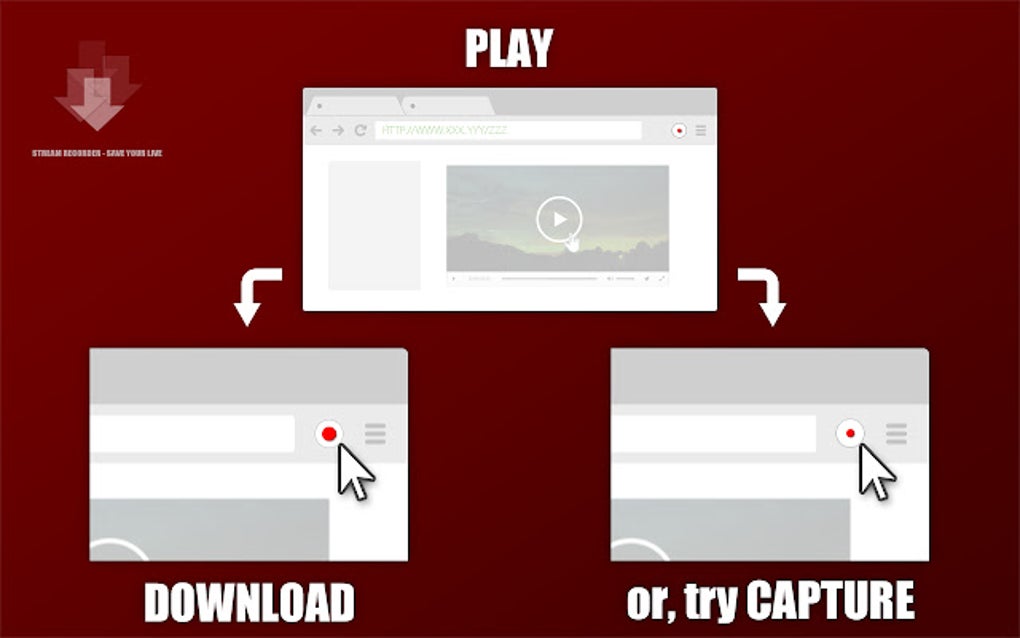
Beyond HLS conversion, Stream Recorder boasts a unique video capture feature. This function allows users to directly record videos that are already in MP4 format. This is beneficial in situations where a video is already available as an MP4 file but lacks a direct download option, or where users prefer to capture a clean, uncompressed copy of the video rather than relying on the site’s potentially compressed version. The capability to both download and directly capture videos gives users unparalleled flexibility depending on the source material.
This functionality streamlines the download process, removing the unnecessary steps of finding a download link and converting the video. It’s a time-saver for those who frequently handle MP4 content and wish to create local copies for offline viewing or archiving purposes.
In-Extension Processing: Security and Efficiency
A critical aspect of Stream Recorder’s design is its reliance on in-extension processing. Unlike many other download tools that rely on external servers for conversion or processing, Stream Recorder handles the entire operation within the Chrome extension itself. This approach enhances both security and efficiency.
Security: By keeping the processing local, sensitive data, such as the video stream, remains within the user’s browser and is not transmitted to a third-party server. This reduces the risk of data interception or unauthorized access. The privacy of the user and the integrity of their downloaded content are greatly protected through this localized functionality.
Efficiency: The lack of reliance on external servers also improves download speed. There’s no need to upload the video to a remote server, wait for the processing to complete, and then download the converted file. The streamlined, in-browser process makes the entire operation significantly quicker and more efficient. This is especially advantageous when dealing with larger video files.
Legal Considerations and Responsible Use
While Stream Recorder provides a powerful and efficient means of downloading video content, it is crucial to be aware of the legal implications of downloading copyrighted material. It is the user’s responsibility to ensure that they have the necessary rights and permissions before downloading any video content. Downloading copyrighted material without authorization is a violation of copyright law and can result in serious legal consequences.
Before using Stream Recorder to download a video, consider the following:
-
Copyright: Is the video protected by copyright? Most videos found online are copyrighted, meaning they are protected by intellectual property laws. Downloading them without permission from the copyright holder is illegal.
-
Terms of Service: Review the terms of service of the website or platform hosting the video. Many websites have specific rules about downloading content. Violating these rules can lead to account suspension or other penalties.
-
Fair Use: In some limited circumstances, the use of copyrighted material might be permitted under the principle of “fair use.” This is a complex legal doctrine and its application depends on several factors, including the purpose and nature of the use, the amount of the material used, and its effect on the market for the original work. Consulting with a legal professional is advised if you are unsure whether your intended use qualifies as fair use.
Stream Recorder should be utilized responsibly and ethically. Respecting copyright law and adhering to the terms of service of online platforms is paramount. The tool should be used to download videos only when the user possesses the right to do so.
User Experience and Accessibility
Stream Recorder is designed for ease of use. Its intuitive interface makes it simple to download and convert HLS videos to MP4 format. The user-friendly design ensures that both novice and experienced users can quickly understand and utilize the extension’s functionalities.
The extension’s availability on the Chrome Web Store further enhances accessibility. This ensures easy installation and access for millions of Chrome users. The free-of-charge nature of the extension makes it a cost-effective solution for anyone seeking a reliable method of downloading and converting HLS videos.
The regular updates and maintenance performed by the developers also demonstrate a commitment to providing users with a stable, dependable, and continuously improved tool. Any issues or bugs are usually addressed promptly through updates, ensuring a smooth user experience.
Conclusion: A Powerful Tool with Ethical Considerations
Stream Recorder offers a convenient and efficient solution for downloading and converting HLS video streams to MP4. Its in-extension processing ensures security and speed, while its direct video capture feature adds versatility. However, it’s imperative to use this tool responsibly and within the bounds of copyright law. Always ensure you have the necessary permissions before downloading any copyrighted material. Used ethically and responsibly, Stream Recorder is a valuable asset for users seeking to manage and archive their video content effectively.
File Information
- License: “Free”
- Version: “2.2.9”
- Latest update: “August 1, 2025”
- Platform: “chrome”
- Language: “English”
- Downloads: “3.4K”


