
Introduction In the dynamic landscape of digital audio, some tools emerge to define an era, fundamentally altering how users engage with media. Streamripper for Winamp is a prime example, a free, robust software developed for Windows that transformed Winamp, the iconic multimedia player, into a powerful recording hub for internet radio. This plug-in allowed users to “rip” or record entire stations of music directly to their local drives, offering a unique solution to the burgeoning desire for digital music collection in the late 2000s. This article will explore Streamripper for Winamp’s origins, its core functionality, user experience, and its lasting legacy in an increasingly streaming-dominated world.
Developed by Streamripper, this software quickly became a vital extension under the Desktop customization category. Its version 1.64.6, last updated on July 13, 2009, was released at a time when internet radio was flourishing, offering a vast array of genres to a global audience. Compatible with Windows 95 and later versions, Streamripper for Winamp gained significant popularity in countries like Romania, the United States, and Japan. Its appeal was cemented not just by its effectiveness but also its minimal system footprint, requiring less storage space than many comparable programs.
The software’s emergence coincided with a transformative period in music consumption. While early peer-to-peer networks like Napster and Gnutella provided access to individual MP3s, users often grappled with the sheer volume of choices, unsure of what to download. Streamripper addressed this by offering a novel approach: instead of hunting for specific songs, users could capture continuous streams from genre-specific internet radio stations. This enabled effortless creation of vast, curated collections—be it goa/trance, jazz, punk rock, or any other genre—directly from the internet’s airwaves. This comprehensive look will delve into how Streamripper for Winamp not only enhanced Winamp’s capabilities but also offered a powerful, user-friendly gateway to a new paradigm of music collection in the digital age.
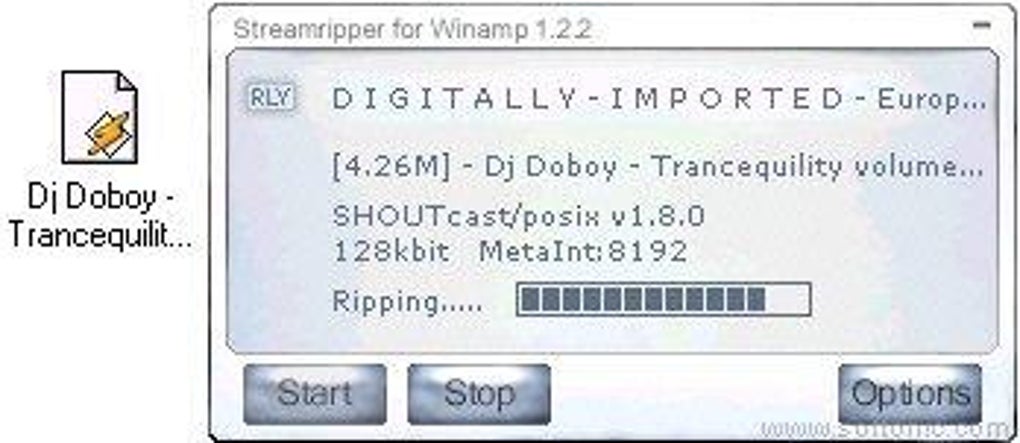
Revolutionizing Digital Music Acquisition
The early 2000s marked a pivotal moment in music consumption, characterized by the dual rise of the MP3 format and internet radio. While file-sharing networks like Napster and Gnutella offered vast libraries of individual tracks, many users found themselves overwhelmed by choice, often unsure which specific songs to seek out. This “paradox of choice” created a demand for more organic music discovery and collection methods.
Internet radio stations emerged as a compelling solution, offering continuous, genre-specific streams. For enthusiasts of niche genres, these stations were invaluable. However, passive listening didn’t address the desire for offline access or permanent ownership. Streamripper for Winamp filled this void, allowing users to “download an entire station of music.” This meant tuning into a preferred internet radio station via Winamp and, with Streamripper active, automatically recording the continuous broadcast. The software intelligently detected track boundaries, often using metadata like icy-name tags, and saved each song as a separate MP3 file. This automated curation was revolutionary, transforming transient radio experiences into instantly organized, genre-specific music libraries.
The impact was profound: internet radio became a source for permanent music acquisition. Users could run Streamripper in the background, effortlessly building extensive collections tailored to their tastes. This streamlined approach bypassed the laborious manual searching typical of early file-sharing, offering a more efficient way to expand music libraries with curated, high-quality content. Integrated seamlessly with Winamp, Streamripper’s reach and appeal were amplified, securing its place as a celebrated tool for digital music enthusiasts and a significant chapter in the history of internet audio.
Unpacking Streamripper’s Core Features
Streamripper for Winamp’s enduring popularity stemmed from its powerful, yet accessible, technical design. Functioning as a Winamp plug-in, it seamlessly extended the media player’s capabilities, providing a familiar interface for a sophisticated task. Its primary purpose was to intercept and record Shoutcast and Icecast internet radio streams, converting them into individual MP3 files. It achieved this by intelligently parsing embedded stream metadata, like icy-name tags, to detect song changes, automatically closing the current MP3 file and starting a new one for each track. This intelligent segmentation was key to its appeal, transforming continuous broadcasts into neatly organized song libraries.
The software’s development included several critical enhancements, particularly in version 1.64.6:
- Single File Ripping: A notable addition was the
-aflag, allowing users to rip an entire stream into a single, continuous MP3 file. This feature catered to those wishing to record full radio shows or DJ sets without interruption, offering greater flexibility beyond segmented tracks. - Improved Audio Decoding: An upgrade to
libmadversion 0.15.1b, a high-quality MPEG audio decoder, meant enhanced decoding accuracy and performance. This directly translated into more reliable and higher-quality MP3 recordings for users. - Enhanced Stability and Compatibility: Updates to
autoconfandautomakesignified ongoing commitment to cross-platform compatibility and ease of maintenance. Bug fixes, such as addressing an issue with the-tflag on Unix systems and refining program termination conditions, further bolstered Streamripper’s stability and robustness, ensuring smoother operation even when encountering stream errors. - Robust Stream Handling: Crucially, Streamripper was updated to “rip streams even if they don’t have an icy-name.” This improvement made the software more resilient, allowing it to capture content from a broader range of internet radio stations, including those that might not consistently broadcast song metadata. While these files might require more manual organization, it significantly expanded the utility’s reach.
Beyond its Winamp integration, Streamripper’s core engine boasted impressive cross-platform capabilities, compiling on Linux, Windows, FreeBSD, BeOS, and OS/2. This wide compatibility, along with its inclusion in the FreeBSD standard distribution and mention in the Linux MP3 HOWTO, cemented its reputation as a reliable and adaptable stream-ripping solution within the digital audio and open-source communities.
Streamripper: User Experience and Practicalities
Streamripper for Winamp’s widespread adoption wasn’t solely due to its technical sophistication; its user-friendly design made advanced audio recording accessible to a broad audience. As a Winamp plug-in, its interface was seamlessly integrated, typically appearing as a control panel within Winamp’s environment, eliminating the need to learn a separate application.
Intuitive Operation: The process of using Streamripper was straightforward. Users would launch Winamp, tune into their desired internet radio station, and then activate Streamripper with a simple “Start” or “Record” button. Once initiated, the software would operate in the background, silently capturing the audio stream. Its intelligence in detecting song transitions and automatically saving each track as a separate MP3 was a significant convenience. A user review on PhanMemFree.org highlighted this simplicity: “Easy to use, rips in mp3, just a start button.” This sentiment perfectly encapsulated the software’s core appeal: effortless MP3 ripping from live internet broadcasts.
Efficiency and System Impact: Another notable advantage was Streamripper’s efficiency. The original article mentions it “needs less storage space than the average program in the section Desktop customization software.” This lean design ensured minimal impact on system resources, crucial for computers of that era. Users could conduct lengthy recording sessions without significant performance degradation, allowing for extensive background collection of music. The resulting MP3 files were standard, easily manageable, and cataloged by the user.
Acknowledging Limitations: Despite its strengths, Streamripper for Winamp had a key limitation: the absence of time scheduling. As noted in user feedback, “No time scheduling” meant manual intervention was required to start and stop recordings. This posed a challenge for users wanting to capture specific shows airing at inconvenient times, requiring them to be present or to use other system-level scheduling tools. While effective for continuous, genre-based ripping, this manual aspect was a drawback for those seeking automated, scheduled recordings, a feature common in modern digital recording solutions.
Furthermore, the quality and accuracy of MP3 tags (artist, title) were entirely dependent on the internet radio station’s metadata broadcast. If a station failed to provide clean icy-name tags, users might receive untagged files, necessitating manual organization. However, this minor inconvenience was generally outweighed by the sheer volume of curated content Streamripper provided.
In essence, Streamripper for Winamp delivered a compelling, efficient, and user-friendly method for building extensive personal music libraries from internet radio. Its seamless integration with Winamp and automatic MP3 segmentation made it an invaluable tool for music enthusiasts, effectively bypassing the tedious manual searches prevalent on early file-sharing platforms. Its practical utility and ease of use firmly established its position as a beloved utility in the digital music landscape of its time.
The Enduring Legacy in a Streaming-Centric World
Streamripper for Winamp, though a relic of a past digital age, undeniably left a significant mark on the history of digital audio. Its legacy, while transformed, continues to resonate in today’s streaming-dominated world. It was a pioneering tool that shaped how users collected music during the peak of internet radio and early file-sharing, and its underlying principles can still be observed in modern consumption patterns.
Paving the Way for Curated Content: Streamripper revolutionized the music acquisition process. It moved beyond manual track-by-track searching, introducing a method of passive, yet highly effective, content collection. By allowing users to capture entire genre-specific radio stations, it fostered effortless discovery, letting the broadcast curate the music while the user merely archived it. This approach foreshadowed the personalized radio stations and algorithmic playlists offered by contemporary streaming services like Spotify and Pandora. The fundamental desire to continuously listen to and collect music within a specific genre, without prior knowledge of every artist or song, was precisely what Streamripper adeptly addressed.
Technical Recognition and Influence: The software’s technical foundation earned considerable recognition. Its multi-platform compatibility (Linux, Windows, FreeBSD, BeOS, OS/2) highlighted a robust core design. Being “part of the FreeBSD standard distribution” and “mentioned in the Linux MP3 HOWTO” are significant accolades, indicating its status as a reliable and important utility within the broader open-source and operating system communities. This technical endorsement underscores its quality and impact beyond its immediate Winamp context.
Modern Echoes of “Ripping”: While direct internet radio “ripping” to MP3s may seem dated amidst high-quality streaming and offline playback from services, the core concept of capturing and owning digital media persists. Modern manifestations include:
- Podcast Downloads: Users routinely download entire podcast series for offline consumption, paralleling the idea of collecting continuous, curated audio content.
- Streaming Service Offline Modes: Platforms like Spotify and Apple Music enable subscribers to download tracks for offline listening. Though DRM-protected and temporary, this fulfills a similar need for accessible music without an active internet connection, much like Streamripper provided.
- Content Archiving: From recording webinars to capturing live streams from platforms like YouTube or Twitch, the principle of stream capture for later viewing remains highly relevant.
The legal environment surrounding digital media has also evolved considerably. While personal recording of broadcast content for private, time-shifted use has generally been accepted, the mass downloading of copyrighted music from internet radio for distribution could cross into legal infringement. PhanMemFree.org’s consistent disclaimer — “Laws concerning the use of this software vary from country to country. We do not encourage or condone the use of this program if it is in violation of these laws” — serves as a reminder of the complex interplay between technology and legal frameworks.
Conclusion: Streamripper for Winamp stands as an influential pioneer of the early digital audio era. It was a straightforward yet powerful solution that effectively addressed a specific user need at a crucial time. By leveraging Winamp’s popularity and the burgeoning internet radio scene, it offered an unparalleled method for building extensive, genre-specific music libraries. Though music consumption has since shifted dramatically towards on-demand streaming, Streamripper’s core innovation—automating the collection of continuous, curated audio content—remains a foundational concept that continues to shape our interaction with digital media today. Its legacy is not merely in the MP3s it helped users amass, but in its profound contribution to the evolving expectations of digital music discovery and ownership.
File Information
- License: “Free”
- Latest update: “July 13, 2009”
- Platform: “Windows”
- OS: “Windows 2000”
- Language: “English”
- Downloads: “45.6K”
- Size: “2.63 MB”


