
StrongVPN is a virtual private network (VPN) service offering secure connections to international servers. This review delves into its features, performance, security aspects, and overall user experience to determine its suitability for various needs.
StrongVPN’s Features and Performance
StrongVPN boasts over 950 servers spanning 35 countries and 59 cities, providing a geographically diverse network for users seeking to access geo-restricted content or enhance their online privacy. The service utilizes robust AES 256-bit encryption, a widely recognized standard for securing data transmission, safeguarding user information from potential interception. This encryption is crucial for protecting sensitive data like passwords, banking information, and personal communications.
Beyond AES 256-bit encryption, StrongVPN supports a range of tunneling protocols, giving users the flexibility to choose the method best suited to their needs and connection conditions. These protocols include WireGuard (known for its speed and security), IKEv2, IPSec, L2TP, OpenVPN, and SSTP. The inclusion of WireGuard, a relatively newer but rapidly gaining popularity protocol, is a significant advantage, offering a balance between speed and strong security. Different protocols offer varying levels of speed and security, allowing users to prioritize according to their preferences.
One significant feature is the unlimited bandwidth offered by StrongVPN. Users can browse, stream, download, and torrent content without restrictions, making it attractive for users with high bandwidth demands. Furthermore, all servers are P2P optimized, ensuring a smooth experience for users engaging in peer-to-peer file sharing. A kill switch is incorporated as a crucial security feature, automatically cutting off internet access if the VPN connection drops unexpectedly, preventing accidental exposure of the user’s real IP address. This is an important safety net that prevents data leaks in case of connection disruptions.
DNS and IP address leak protection are included, though the review notes that while the VPN masks the user’s IP and DNS addresses, specific details about the leak protection mechanisms are lacking. This lack of transparency is a point of concern that could affect the confidence of users, especially those highly concerned about privacy. StrongVPN uses its proprietary DNS, StrongDNS, which, while ensuring privacy, deserves more detailed explanation regarding its security measures and reliability in the official documentation.
Streaming and Torrenting Performance
While StrongVPN can unblock some popular streaming services like Netflix US and Hulu, its performance in this area may not be optimal compared to other leading VPN providers. The number of simultaneous connections allowed (12 devices) is a notable advantage, enabling multiple devices to use the service concurrently, but the potential for decreased speed with a high number of concurrent connections is a factor to consider, particularly impacting streaming and torrenting experiences.
Users who prioritize speed for streaming and torrenting may find the performance adequate in some cases but inconsistent in others. The lack of a structured and detailed privacy policy could raise concerns for users engaging in torrenting, where anonymity is paramount. More clarity on StrongVPN’s logging policies and practices related to torrenting activity is essential to address these concerns.
StrongVPN’s Pricing and Subscription Options
StrongVPN is not a free service. Subscribers can choose between monthly and annual subscription plans. Both plans include the same amount of cloud storage through SugarSync, a secure storage service that encrypts user data. This included storage is a valuable addition for users who need a secure place to store files. However, the absence of a free trial might discourage potential users from trying the service before committing to a paid subscription.
The money-back guarantee is limited to annual subscriptions. Monthly subscribers do not have access to this guarantee, which is a limitation compared to other services offering a refund period for shorter-term plans. This aspect impacts the risk for those seeking short-term VPN protection, as there is no guarantee in case of dissatisfaction.
StrongVPN’s Compatibility and Device Support
StrongVPN demonstrates excellent compatibility across a wide range of devices and operating systems. Users can download and install it on computers (laptops and desktops), routers, smartphones, smart TVs, tablets, and other devices. Support extends to popular operating systems like Amazon Fire TV & Kindle, Android, Apple iOS & Mac, Google Chrome OS, Kodi, Linux, and Microsoft Windows. This extensive compatibility ensures accessibility for most users regardless of their preferred device or platform.
StrongVPN’s User Interface and Usability
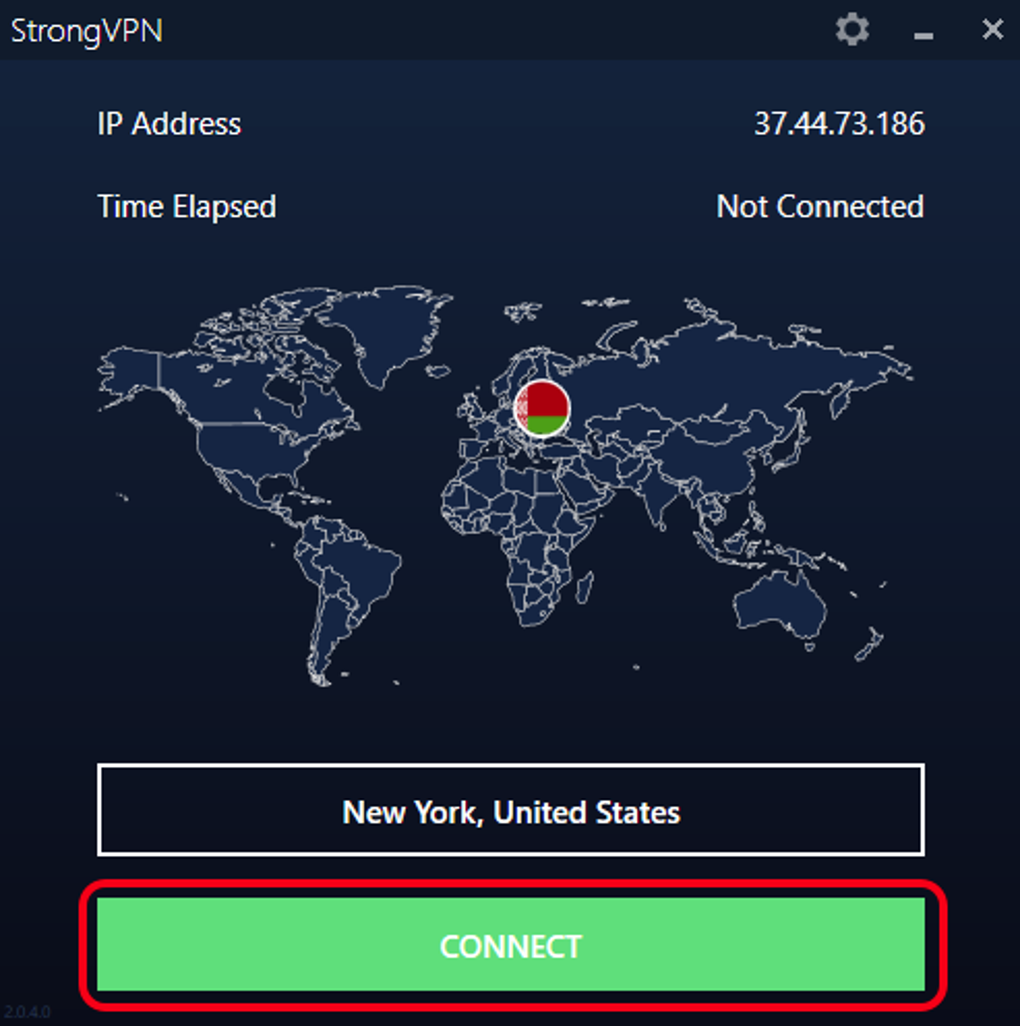
The user interface is described as minimally designed, appearing quite basic in its visual presentation. While the application is considered easy to use, some users might require time to adjust to the simple and straightforward layout. The main screen displays two prominent buttons. One button displays a list of available servers, with the default option set to ‘Best Available’. The server list, however, lacks detailed information. It only provides the country and city of each server along with a flag image. The lack of a “Favorites” feature for organizing frequently used servers is a noticeable omission that could enhance user experience.
A search bar is provided for finding specific server locations by typing keywords. A refresh button is also available. After selecting a server, the user is returned to the main screen, where the selected server’s location is displayed. A ‘Connect’ button initiates the connection process. The connection process is visually represented with the country’s flag and a loading indicator. A ‘Cancel’ button allows the user to terminate the connection attempt. Once connected, a ‘Disconnect’ button replaces the ‘Cancel’ button. The user’s IP address, connection time, and apparent location are shown on the screen, along with a world map indicating the connected server location.
Settings are accessed via a gear button, providing options for language selection, notification settings (desktop taskbar), and auto-launch on startup. The kill switch is also conveniently located in the settings. The ‘Protocol’ tab lists and explains the available tunneling protocols. An ‘Information’ tab provides access to account details.
While the simplicity of the interface might be appreciated by some users, others may find the lack of advanced features and detailed server information somewhat limiting.
StrongVPN’s Customer Support
StrongVPN offers 24/7 customer support through live chat and email, a valuable asset for users needing assistance. The availability of immediate support through live chat addresses issues promptly, while the email option provides a more formal way of communicating, useful for detailed inquiries.
StrongVPN: Pros and Cons
Pros:
- Cross-platform compatibility: Works on a wide array of devices and operating systems.
- Multiple protocols: Offers a selection of tunneling protocols to cater to user preferences.
- Simultaneous connections: Allows up to 12 simultaneous device connections.
- AES 256-bit encryption: Employs strong encryption to protect user data.
- Included cloud storage: Provides secure cloud storage via SugarSync.
- 24/7 customer support: Offers live chat and email support.
- Unlimited bandwidth: No bandwidth caps on usage.
- P2P optimized servers: Servers are optimized for peer-to-peer file sharing.
- Kill switch: Provides an added layer of security by automatically disconnecting internet access if the VPN fails.
Cons:
- US-based: Located in the US, raising concerns about data privacy under US surveillance laws.
- Inconsistent speeds: Speed performance may vary and could be slower than some competitors.
- Lack of detailed privacy policy: The privacy policy lacks detail regarding specific security practices and logging policies.
- Limited money-back guarantee: Money-back guarantee is only available for annual subscriptions.
- Basic user interface: The interface is simple, potentially lacking features some users desire.
Conclusion
StrongVPN provides a functional VPN service with solid encryption and a wide range of device compatibility. Its unlimited bandwidth and support for multiple protocols are attractive features. However, its US-based location and lack of a comprehensive privacy policy may raise concerns for users prioritizing anonymity. The inconsistent speeds, particularly impacting streaming and torrenting, and the limited money-back guarantee also present limitations. While suitable for basic VPN needs, users with high demands for streaming, torrenting, and absolute privacy should carefully weigh its pros and cons before choosing StrongVPN.
File Information
- License: “Trial version”
- Latest update: “May 24, 2023”
- Platform: “Windows”
- OS: “Windows 7”
- Language: “English”
- Downloads: “58.2K”
- Size: “32.75 MB”


