
In the vast and ever-evolving landscape of digital creativity, animation often appears as a formidable art form, requiring specialized skills, powerful software, and a significant time investment. However, for those eager to dip their toes into the captivating world of motion graphics without the steep learning curve, tools like Stykz emerge as invaluable gateways. Stykz, a dedicated animation application, simplifies the complex process of bringing characters to life, focusing squarely on the fundamental principles of movement through the iconic medium of stick figures. It’s a testament to the idea that foundational learning often benefits most from simplicity, allowing aspiring animators to grasp core concepts before tackling more intricate software.
At its core, Stykz is designed to be an accessible platform, particularly for individuals taking their first steps in animation. It distills the essence of frame-by-frame animation into an intuitive interface, making it possible to create dynamic sequences with minimal prior experience. While it intentionally sidesteps the advanced features found in professional animation suites – such as custom drawing tools or integrated background support – this very focus is its strength. By limiting the scope, Stykz allows users to concentrate solely on the principles of timing, spacing, and character posing, which are the bedrock of any compelling animation.
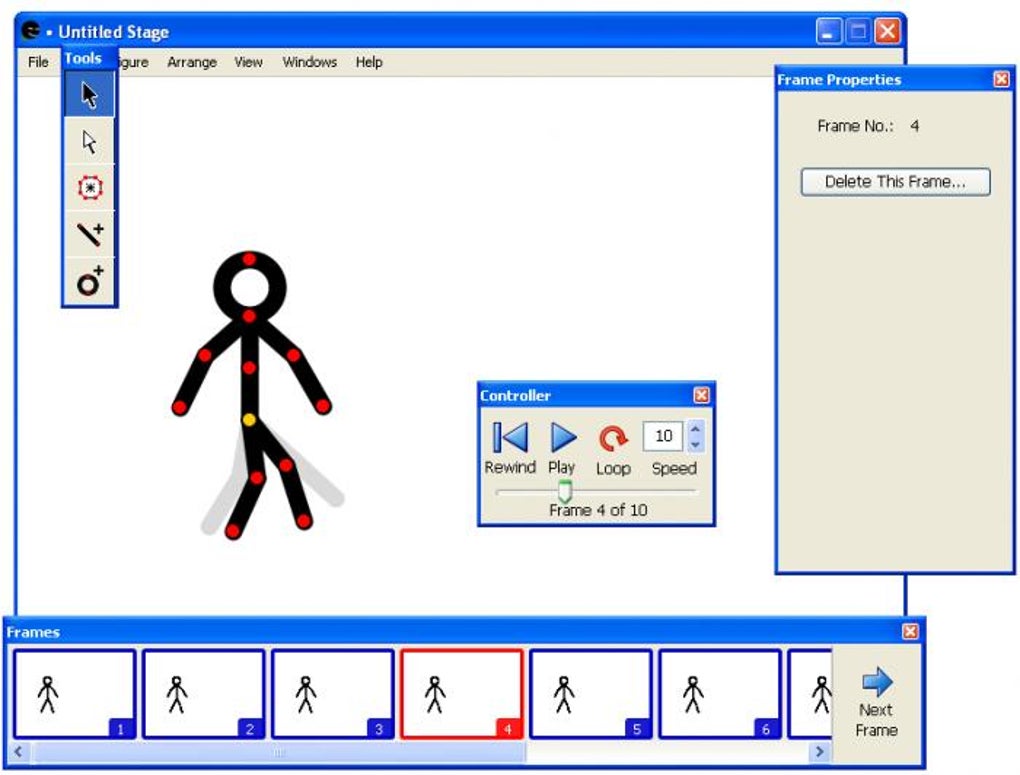
The program’s enduring appeal lies in its straightforward approach: users manipulate pre-defined stick figures and other geometric shapes, adjusting their positions and poses across successive frames. This methodology provides complete control over every minute detail of a character’s movement, fostering a deep understanding of how individual changes contribute to the illusion of fluid motion. For anyone who has ever doodled stick figures in the margins of a notebook, imagining them leaping, fighting, or dancing, Stykz offers the digital canvas to turn those imaginings into tangible, animated stories.
Unlocking the World of Basic Animation
The concept of animation, from the earliest flipbooks to cutting-edge CGI, has always been about creating the illusion of movement from static images. It’s a magical process that breathes life into inanimate objects or characters, telling stories and conveying emotions without uttering a single word. Yet, for many, the journey into animation seems daunting, often associated with complex software, advanced drawing skills, and an encyclopedic knowledge of animation principles. Stykz, however, offers a refreshingly direct pathway, demystifying the art form by focusing on its most fundamental elements.
The Allure of Stick Figures: A Gateway to Creativity
Stick figures are universally understood. They are the most basic representation of the human form, stripped down to essential lines and joints. This simplicity is precisely why they are an excellent starting point for animators. Without the pressure of detailed anatomy, shading, or complex textures, beginners can fully concentrate on motion. How does a stick figure walk? How does it jump? What is the impact of anticipation and follow-through on its actions? These are the questions that Stykz encourages users to explore.
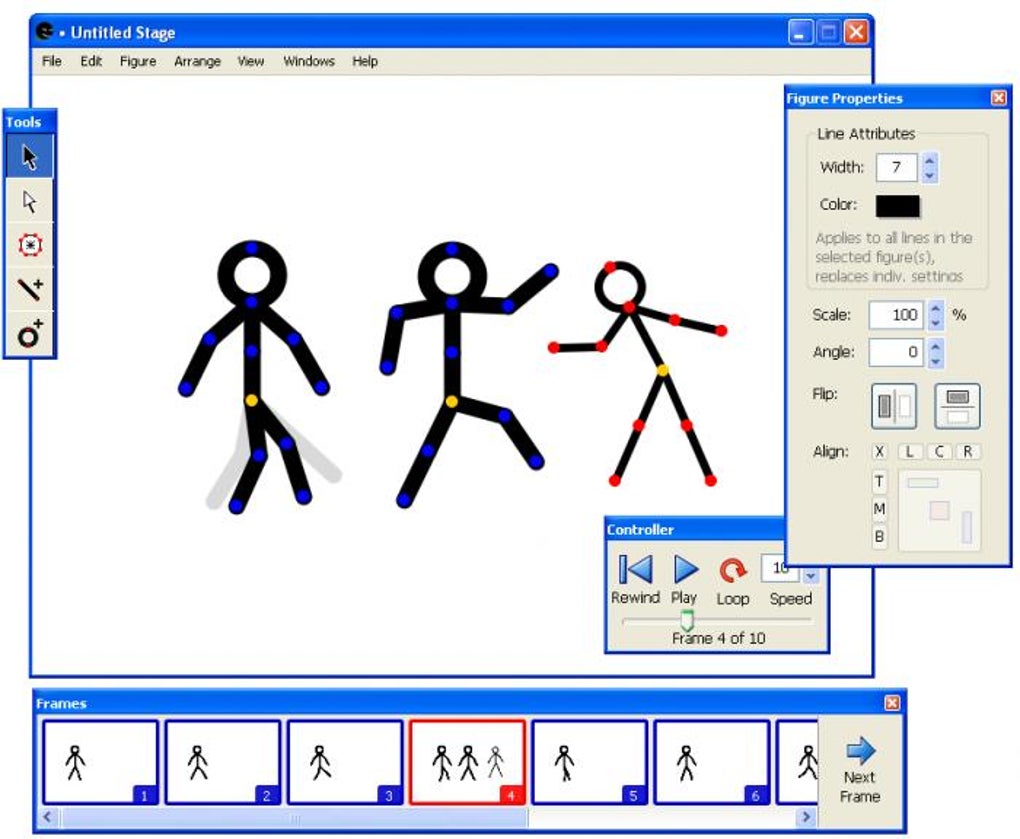
The charm of stick figures also lies in their versatility. They can be heroic, comedic, tragic, or abstract. Their lack of specific features allows the audience to project emotions and narratives onto them, making them powerful storytelling tools despite their minimalist design. Stykz leverages this inherent appeal, providing a framework where users can harness the expressive power of simple lines to craft compelling sequences. It’s about movement, not intricate design, and in doing so, it levels the playing field for anyone with an idea and a desire to see it move.
Stykz: Bridging the Gap for Aspiring Animators
Many aspiring animators find themselves caught between the desire to create and the technical hurdles of professional software. Programs like Adobe Animate or Blender offer incredible power but demand a significant investment in learning time and often financial resources. Stykz positions itself as a crucial bridge, offering a free, accessible, and intuitive environment where these early lessons can be learned. It teaches the discipline of frame-by-frame creation, the importance of consistent spacing for smooth animation, and the iterative process of animating, previewing, and refining.
The program doesn’t just simplify the interface; it simplifies the underlying philosophy. Instead of worrying about layers, effects, or advanced rendering, users are encouraged to think purely about character posing and sequential motion. This focus fosters a deeper appreciation for the ‘magic’ behind animation – the meticulous arrangement of slight changes over time to produce believable movement. For students, hobbyists, or even professionals looking for a quick prototyping tool, Stykz offers a sandbox where creativity can flourish unburdened by overwhelming complexity, allowing the animator to concentrate on the fundamental principles of life and motion.
Stykz in Detail: Features That Drive Simple Animation
While Stykz prides itself on its simplicity, it is not devoid of clever features that empower users to create surprisingly fluid and expressive animations. These functionalities are carefully chosen to support the core mission of enabling basic stick figure animation without unnecessary frills, ensuring that the focus remains on the act of animating itself. Understanding these tools reveals how Stykz manages to provide comprehensive control within its streamlined environment.
Frame-by-Frame Precision: The Heart of Stykz Animation
The bedrock of Stykz is its frame-by-frame animation system. This method, often considered the most traditional form of animation, involves creating a slightly different image for each successive frame of movement. In Stykz, this translates to manually adjusting the stick figure or geometric shapes in each new frame. This hands-on approach offers unparalleled control, allowing animators to dictate every nuance of motion, from the subtle shift of a weight to the dynamic arc of a jump.
The process typically involves:
- Setting the initial pose: Arranging the stick figure in its starting position.
- Inserting a new frame: Creating a blank canvas for the next pose.
- Adjusting the figure: Moving the figure’s body parts incrementally to create the next step in the action.
- Repeating: Iterating this process for the entire sequence.
This meticulous control over individual frames is what gives animation its smoothness and expressiveness. While time-consuming, it is the most effective way for beginners to understand how small changes accumulate to create grand movements. Stykz makes this process manageable by keeping the figures simple and the interface clean, removing distractions that might overwhelm a novice.
Manipulating Figures: Points, Pivots, and Posing
Stykz figures, though simple, are surprisingly flexible. Each stick figure or geometric shape is comprised of a series of interconnected points and lines, effectively forming a digital skeleton. Users interact with these points to articulate the figure, creating various poses and actions. The program offers “a dozen points in each figure to create movement,” allowing for detailed manipulation of limbs, torso, and head.
The process of posing involves:
- Selecting a point: Clicking on a joint or endpoint of a line segment.
- Dragging to reposition: Moving the selected point to a new location.
- Rotating segments: Implicitly, moving one point relative to another will rotate the segment connecting them, mimicking joint movement.
This direct manipulation fosters an intuitive understanding of skeletal animation. Users quickly learn how adjusting a knee joint affects the entire leg’s posture or how pivoting the shoulder impacts arm movement. While user reviews mention a potential lack of “whole character rotation” in earlier versions, this limitation encourages animators to think about movement in terms of individual body parts working in concert, a crucial lesson in character animation. Even without a dedicated whole-character rotation tool, rotating each segment appropriately achieves the desired effect and reinforces the principles of jointed movement.
Visual Guides for Seamless Motion: The Power of Ghosting
One of the most valuable features for achieving smooth animation in Stykz is its “ghosting” or “onion skinning” capability. When a new frame is inserted, the program displays a faint outline of the figure’s position from the previous frame (or multiple previous frames). This visual guide is indispensable for animators, allowing them to:
- Maintain consistency: Ensure that movements follow a logical path and don’t jump erratically.
- Control spacing: Observe the distance between successive poses, which directly impacts the perceived speed and flow of the action. Closer outlines mean slower movement, while wider spacing suggests faster action.
- Anticipate next poses: Plan the next stage of movement more accurately by seeing where the figure was just before.
This “outline of the previous position so that you can create the new movement with higher accuracy” is a hallmark of good animation software, even simple ones. It transforms guesswork into an informed decision, making the animation process less frustrating and the results significantly more polished, even for a beginner.
Integrated Playback and Export Options
What good is an animation tool if you can’t see your creations in motion or share them? Stykz addresses this with an embedded player and robust export capabilities. The built-in player allows users to preview their animation sequences instantly, enabling rapid iteration and refinement. Animators can quickly spot timing issues, jerky movements, or awkward poses and make adjustments without leaving the application. This immediate feedback loop is critical for learning and improving.
Furthermore, Stykz offers the ability to export animations to “several different formats (animated GIF and QuickTime movie among others).” Animated GIFs are ubiquitous on the internet, perfect for sharing short, looping clips on social media or forums. QuickTime movies (typically .MOV files) provide higher quality and can be easily integrated into video editing projects for more complex productions. This flexibility ensures that the creations made in Stykz are not confined to the application itself but can be shared and enjoyed across various platforms, extending the utility and reach of the simple animations created.
Usability and Limitations: A Balanced Perspective
Every software tool, regardless of its complexity, comes with its own set of advantages and constraints. Stykz, by design, prioritizes ease of use and focused functionality over broad capabilities. Understanding this balance is key to appreciating its value and maximizing its potential. While its simplicity is its greatest asset, it also defines its boundaries, which users must navigate or creatively circumvent.
The User Experience: Simple, Intuitive, and Accessible
One of the most frequently lauded aspects of Stykz, as highlighted by user feedback and its overall design philosophy, is its profound ease of use. The interface is remarkably uncluttered, eschewing complex menus and tool palettes in favor of a direct, hands-on approach. This minimalist design ensures that new users are not overwhelmed by an abundance of options but can instead immediately dive into the act of animating.
The learning curve for Stykz is exceptionally gentle. Basic operations, such as adding a new frame, selecting a figure, and manipulating its points, are intuitive and quickly mastered. This accessibility makes it an ideal tool for educational settings, young animators, or anyone looking for a low-barrier entry point into digital animation. It removes the technical intimidation often associated with creative software, empowering users to experiment and learn through doing. The emphasis is on immediate creation and iterative improvement, making the animating experience enjoyable rather than a chore.
Navigating the Workflow: A Step-by-Step Approach
A typical animation workflow in Stykz follows a logical progression, making it easy for users to stay organized:
- Figure Creation/Selection: Users start by either loading a pre-defined stick figure or creating basic geometric shapes. The software provides a default stickman, ready for action.
- Initial Pose: The figure is positioned in its starting stance on the first frame.
- Frame Insertion: A new frame is added to the timeline.
- Pose Adjustment (with Ghosting): Utilizing the faint “ghost” of the previous frame, the figure’s points are adjusted to create the next incremental movement. This is where the core animation work happens.
- Iteration: Steps 3 and 4 are repeated for the entire animation sequence.
- Preview: The embedded player is used frequently to watch the animation, identify areas for improvement, and check timing.
- Refinement: Based on the preview, adjustments are made to individual frames to smooth out movements, correct timing, or enhance expressiveness.
- Export: Once satisfied, the animation is exported to a suitable format for sharing.
This clear, sequential process guides users through animation creation, reinforcing good habits for managing an animated sequence. The simplicity of the tools means less time spent understanding software mechanics and more time spent thinking about the animation itself.
Understanding Stykz’s Boundaries: Where Simplicity Meets Constraint
While Stykz excels in its niche, it’s important to acknowledge its inherent limitations, which are often a direct consequence of its design philosophy to remain simple and focused.
One notable point of discussion, initially highlighted in the original description, was the “main drawback: the Undo tool doesn’t work.” This is a significant issue for any creative software, as mistakes are part of the learning and creation process. However, user reviews offer a crucial update, with one anonymous reviewer stating in December 2010 that “1.0 supports more than a dozen points (you can add your own if you like), and has full undo.” This suggests that the initial review might have been based on an older, pre-release, or very early version, and the developer (Sons of Thunder Software) addressed this critical flaw in subsequent releases. For current or updated versions, a functional undo feature is likely present, greatly enhancing the user experience and mitigating a major pain point. This underscores the importance of referring to the latest software versions and user feedback for accurate information.
Another key limitation is that “You can’t use your own drawings or add a background.” This means animators are confined to the basic stick figures and geometric shapes provided or created within the program. There’s no facility to import custom character designs, draw detailed scenery, or place the stick figures against photographic backdrops directly within Stykz. This requires animators to be creative in how they present their work. Often, users will animate the stick figures against a blank or solid-colored canvas in Stykz and then use external video editing software to composite their animation over custom backgrounds or integrate it into a larger video project. While it adds an extra step, it doesn’t entirely prevent the use of custom visuals; it just shifts that responsibility to a different stage of the production pipeline.
Similarly, the inability to “add backgrounds” might seem restrictive, but it encourages focus on the character’s movement rather than environmental detail. For learning purposes, this can be beneficial, as it prevents new animators from getting bogged down in complex scene composition before they’ve mastered character motion. For those who desire more elaborate settings, the workaround of post-production editing remains a viable option.
Lastly, some users desire features like “rotating the whole character” or being able to “put eyes or mouth on the head.” While direct whole-character rotation might be absent, the ability to rotate individual segments allows for complex posing that simulates full character turns. Adding eyes or mouths typically involves creatively using small geometric shapes (circles, lines) provided by Stykz, rather than dedicated facial feature tools. These constraints, though initially perceived as limitations, often foster ingenious solutions and a deeper understanding of animation principles where every line and point serves a purpose.
Beyond the Basics: Community, Impact, and Legacy
While Stykz is primarily an introductory tool, its simplicity doesn’t diminish its potential impact or its place within the broader ecosystem of animation software. For many, it serves as a stepping stone, igniting a passion for animation that might later lead to more sophisticated tools. Its design fosters a unique learning environment, and its community, however informal, showcases the diverse ways users apply its straightforward capabilities.
Learning the Art of Motion: Educational Value of Stykz
The educational value of Stykz is arguably its most significant contribution. For schools, workshops, or self-learners, it provides an unintimidating platform to explore fundamental animation concepts:
- Timing and Spacing: Crucial elements determining the speed and weight of a movement. Stykz’s frame-by-frame control and ghosting features make these concepts tangible.
- Posing and Keyframes: Understanding how to create strong, clear poses at key moments in an action.
- Arcs: Recognizing that most natural movements follow curved paths.
- Anticipation and Follow-Through: Principles that give movements weight and believability.
By focusing on stick figures, the abstraction allows students to concentrate solely on these principles without getting distracted by complex character design or elaborate scene-building. It’s a pure exercise in conveying motion, making it an excellent pedagogical tool for budding animators of all ages. Many who move on to more advanced software can trace their foundational understanding back to such simple, yet effective, programs.
User Perspectives: A Glimpse into Real-World Application
The user reviews, even those from many years ago, offer valuable insights into Stykz’s real-world application and perceived strengths. Users consistently praise its ease of use and its effectiveness for stick figure animations.
One reviewer, “DarkIce Wizard,” noted in 2017 that “Stykz is good for any user from simple to professional.” This highlights its versatility, suggesting that even experienced animators might find it useful for quick conceptualizations or storyboarding simple movements. The same reviewer specifically praised how “the pivoting works very well,” confirming the effectiveness of its core manipulation tools. The comment about “adding landscapes is easy” might seem contradictory to the “no backgrounds” limitation, but it likely refers to the ability to construct simple landscape elements using Stykz’s basic geometric shapes (e.g., lines for ground, circles for sun, squares for buildings) or implies that the animated stick figures can then be easily integrated into a landscape in a post-production video editor.
Another anonymous review from January 2010 described it as “Really nice,…but. For say the truth I keep it without know anything about it, so I wasn’t waiting for a lot. But now I think it is pretty nice. Truly! Many things that’s possible do with it, about scenery, colorize it etc. Really pretty funny and easy to use.” This user’s initial skepticism giving way to appreciation underscores Stykz’s ability to surprise with its capabilities, even within its defined scope. The ability to “colorize” figures further adds to the expressive potential. The user’s challenge with adding “eyes or mouth” and “putting the little movie… on my blogs” points to areas where external tools or creative workarounds are needed, but also reflects the typical concerns of early digital content creators. The export to GIF and QuickTime likely addressed the blog-sharing issue to some extent.
These reviews collectively paint a picture of Stykz as a tool that delivers on its promise of accessible stick figure animation, capable of supporting both casual exploration and more focused learning.
Stykz in the Broader Animation Ecosystem
In the vast ecosystem of animation software, Stykz occupies a specific niche. It’s not designed to compete with industry giants, nor is it meant to be a comprehensive solution for all animation needs. Instead, it stands alongside other simple tools like “Stickman,” “TISFAT,” or “K Sketch” (mentioned in the “Alternative apps” section on PhanMemFree.org) as a member of the family of lightweight animation programs.
While “Stickman” offers similar stick figure animation, “TISFAT” (This Is Stick Figure Animation Tool) also focuses on stick figures, and “K Sketch” provides a virtual sketch pad for Flash animators (though Flash itself is now deprecated), Stykz maintains its distinct identity through its clear, unadorned interface and direct approach to frame-by-frame control. It is less about advanced features and more about pure, unadulterated animation practice.
Its position as a free, readily available tool for Windows (and Mac, as indicated in the “Other platforms” section) has allowed it to reach a wide audience, serving as an entry point for countless individuals who might otherwise have been intimidated by the complexity and cost of professional software. Stykz demonstrates that powerful learning experiences don’t always require feature-rich, expensive applications, but rather well-designed tools that simplify complexity and encourage creative exploration. It has carved out a small but significant legacy as a fundamental teaching and prototyping tool in the world of digital animation.
Conclusion
Stykz stands as a prime example of effective software design: an application that understands its purpose and executes it with unwavering focus. It doesn’t aspire to be a professional animation suite, nor does it attempt to mimic the intricate functionalities of high-end programs. Instead, Stykz dedicates itself to providing an unburdened, accessible, and intuitive environment for creating stick figure animations.
For anyone who has ever dreamed of bringing their doodles to life, or for students learning the foundational principles of motion, Stykz offers an ideal starting point. Its frame-by-frame control, intelligent ghosting feature, and straightforward manipulation of figures provide a direct pipeline to understanding how static images can coalesce into fluid movement. While its limitations—such as the absence of native custom graphics or background integration—require creative workarounds or complementary external tools, these constraints often foster greater ingenuity and a deeper appreciation for the core mechanics of animation.
Despite its last update being over a decade ago (July 26, 2011, for version 1.0.2), and its developer, Sons of Thunder Software, having moved on, Stykz’s continued presence and positive user feedback on platforms like PhanMemFree.org attest to its enduring value. It remains a reliable, lightweight solution for specific animation tasks, particularly for those on the Windows platform (with a Mac version also available).
In a world increasingly dominated by complex digital tools, Stykz reminds us of the power of simplicity. It’s a digital canvas where the basic building blocks of movement can be explored and mastered, fostering a generation of animators by making the intimidating art form of animation approachable, fun, and profoundly educational. Stykz doesn’t just create stick figure animations; it creates animators.
File Information
- License: “Free”
- Version: “1.0.2”
- Latest update: “July 26, 2011”
- Platform: “Windows”
- OS: “Windows 2003”
- Language: “English”
- Downloads: “255K”
- Size: “9.89 MB”


