
SUPER is a multimedia tool designed to encode and render media files across a wide range of formats. In a digital landscape increasingly dominated by multimedia applications, SUPER aims to provide a streamlined solution for users needing to convert audio and video files for various devices and applications. While initially promising a straightforward user experience, a closer look reveals both strengths and significant weaknesses that impact its overall usability and safety.
Interface and Functionality: A Mixed Bag
SUPER boasts a single-window interface, neatly compartmentalizing audio and video conversion options. The top of the interface features three dropdown menus for selecting output formats, offering a reasonably extensive list of supported formats. This seemingly simple setup allows users to convert movies and music for playback on devices like Apple iPods, Sony PSPs, and 3GP-compatible mobile phones. The inclusion of a wide bit rate range, from 64 to 9792 Kbps, presents an appealing level of customization, allowing users to optimize file size and conversion speed. However, this flexibility is somewhat undermined by the limited codec support.
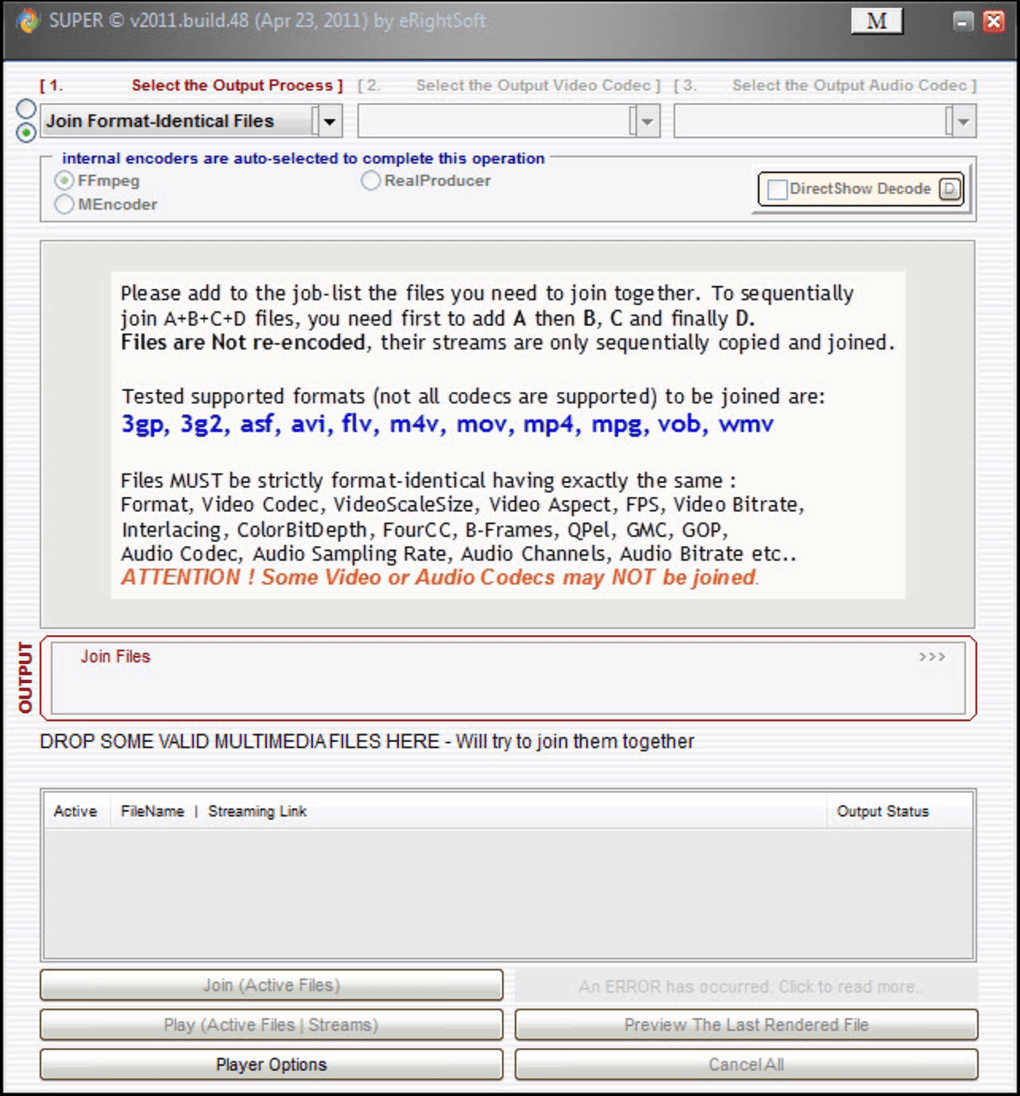
The program’s limitations become apparent when scrutinizing the supported codecs. SUPER only offers two video codec outputs (H.263 and MPEG-4) and three audio codecs (AAC, AMR wideband, and narrowband). This restricted selection significantly hampers its versatility, especially concerning audio conversion. While it allows selection of individual audio tracks based on language, it’s limited to mono audio (single channel) at a fixed sampling frequency of 8000 Hz. This severely restricts the audio quality and compatibility with various devices and applications expecting higher-fidelity audio. The overall impression is that SUPER prioritizes video conversion over audio, providing a less comprehensive experience for users primarily dealing with audio files.
Despite the codec limitations, SUPER integrates recognized encoders like ffmpeg and mencoder. This integration generally ensures a decent conversion process for both audio and video, leveraging established and well-regarded encoding technologies. The interface includes buttons to play converted files, enabling quick quality checks. A “Player Options” button allows adjustments to video parameters such as aspect ratio, saturation, hue, brightness, and contrast, giving users a degree of control over the final output’s visual appeal. A list displays all files being processed, providing visual confirmation of the conversion status and streaming links, which is a beneficial feature for tracking progress and identifying potential issues.

Performance and Resource Utilization: A Trade-off?
While SUPER’s ease of use might appeal to less technically inclined users, its performance characteristics and system resource demands are areas of significant concern, as highlighted by several user reviews. Reports indicate that SUPER can consume substantial CPU resources during conversion, potentially causing system slowdowns or freezes, particularly on older or less powerful machines. This is a substantial drawback, limiting the practical usability for users with limited computing resources. The intensity of resource usage could stem from the encoding process itself or inefficient code within the application. It’s a clear trade-off between ease of use and performance, particularly for users with less robust systems.
The program’s impact on system performance and the potential for resource hogging underscore the importance of considering system specifications before deploying SUPER. Users with lower-end hardware should anticipate noticeable performance impacts and should consider alternative solutions better optimized for resource efficiency.
Update History and Feature Additions: A Focus on Video
The update history reveals a pattern focusing primarily on improvements and additions to video processing capabilities. Reported updates included support for additional video formats like DVCPRO25 and DVCPRO50, and the ability to render sequentially numbered SGI and TGA image files. These additions broaden SUPER’s video processing capabilities, catering to specific professional or niche uses. However, the lack of similar substantial updates addressing the limited audio codec support points to an ongoing disparity in development priorities.
This prioritization of video processing over audio, along with the persistent limitations in audio codec support, further emphasizes the inherent imbalance in the program’s functionality. While catering to specific video needs, it significantly restricts its usefulness as a balanced multimedia conversion tool.
Security Concerns: A Serious Deterrent
Perhaps the most significant concern surrounding SUPER revolves around its security and the potential for bundling unwanted software. Several user reviews explicitly warn of the installation of malware or bloatware during the installation process. The lack of a clear option to decline the installation of such bundled software is a serious red flag. This practice of including potentially malicious software without explicit user consent raises considerable security concerns and severely impacts user trust. The potential for malware installation outweighs any perceived convenience offered by the program’s simple interface and functionality.
The presence of potentially malicious software directly contradicts the expectation of a safe and reliable multimedia tool. This severe security risk negates any potential benefits, making it imperative for users to exercise extreme caution before considering using SUPER.
Alternatives and Recommendations: Safer Choices
Given the limitations, performance issues, and significant security concerns associated with SUPER, exploration of alternative solutions is strongly recommended. Numerous free and commercial multimedia conversion tools offer comparable or superior functionality with better codec support, improved performance, and, most importantly, a demonstrably higher level of security. Users seeking a reliable and safe solution should carefully research and consider other options available. Prioritizing software from reputable developers with established security records will mitigate the risk of malware or bloatware installation.
Before downloading any software, especially freeware, it’s crucial to thoroughly research the developer’s reputation and read user reviews from diverse sources. Consider security ratings and reviews from reputable antivirus services. Be wary of software offering suspiciously extensive functionality without adequate system resource requirements, as this can indicate potential issues. Always prioritize security and choose trusted, well-reviewed alternatives over programs with questionable security records.
In conclusion, while SUPER initially presents itself as a user-friendly multimedia conversion tool, its limitations in audio codec support, potential for excessive resource consumption, and, most seriously, the substantial risk of malware installation make it a risky and ultimately unreliable choice. The lack of attention to critical audio features and the inclusion of potentially harmful software significantly outweigh any advantages in ease of use. For a safe and efficient multimedia conversion experience, consider exploring the many reputable alternatives available.
File Information
- License: “Free”
- Latest update: “May 24, 2023”
- Platform: “Windows”
- OS: “Windows 8.1”
- Language: “English”
- Downloads: “355.6K”
- Size: “117.69 MB”


