
Super Dark Mode for Chrome is a browser extension designed to alleviate eye strain by transforming the bright white backgrounds of many popular websites into a more comfortable dark mode. While its functionality is limited to a specific selection of sites, this extension covers a significant number of frequently visited platforms, including YouTube, Wikipedia, Facebook, and even the Google search page itself. This comprehensive review explores its features, benefits, limitations, and alternatives.
Ease of Use and Functionality
Super Dark Mode’s installation is straightforward and intuitive. After adding the extension to your Chrome browser, you’ll be presented with a neatly organized list of supported websites. For each website, a simple checkbox allows you to toggle the dark mode on or off. This granular control gives users the flexibility to customize their dark mode experience, enabling it only for websites where they find it most beneficial. The interface is clean, avoiding unnecessary complexities, making the extension accessible even to users unfamiliar with browser extensions.
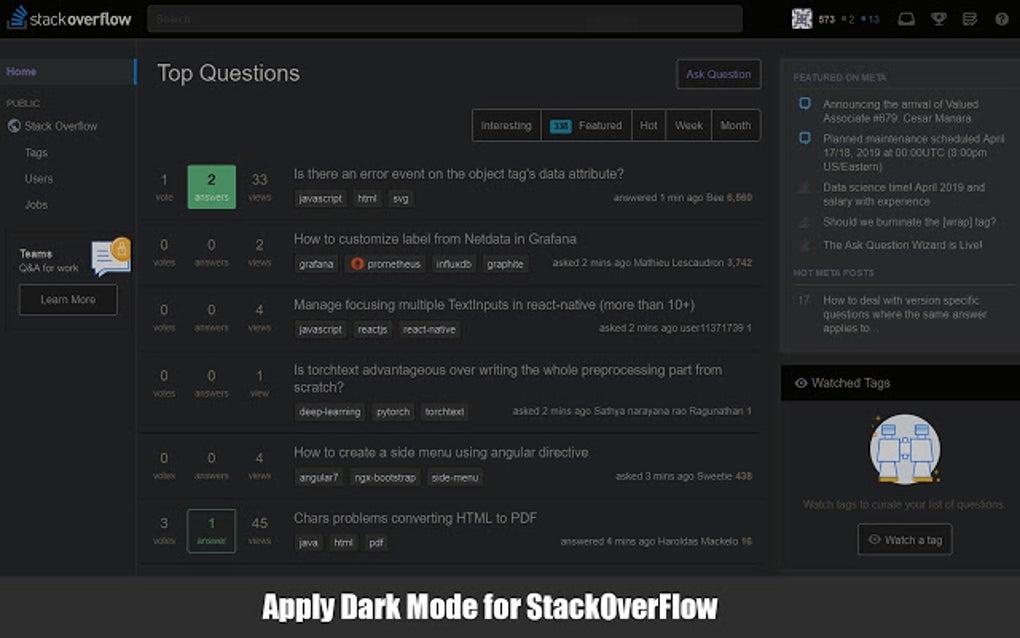
The core function of Super Dark Mode is remarkably simple: it inverts the color scheme of supported websites, changing light backgrounds to dark ones and vice-versa. This seemingly basic feature has a significant impact on user experience, especially during prolonged screen time. The reduction in screen brightness minimizes eye strain and improves readability in low-light conditions. This is particularly valuable for users with photosensitive eyes or those who frequently work or browse the internet in dimly lit environments. The immediate and noticeable improvement in visual comfort is a significant advantage of this extension.
The extension’s design prioritizes simplicity and efficiency. There’s no need for extensive configuration or complicated settings. Once installed, users can immediately begin customizing their browsing experience by activating or deactivating dark mode for their preferred websites with a single click. This user-friendly approach significantly enhances the accessibility and appeal of the extension.
Supported Websites and Limitations
While Super Dark Mode boasts support for many popular websites, its limitations are equally significant. The extension’s functionality is restricted to a predefined list of websites, and it does not offer the ability to add custom websites to this list. This restriction can be frustrating for users who wish to enjoy the benefits of dark mode on sites not currently included in the extension’s support.
This limitation arises from the technical challenges involved in dynamically adapting the dark mode to various website designs and structures. Websites employ a vast range of coding practices and design elements, making it difficult to create a universal dark mode solution that works flawlessly across all platforms. Therefore, Super Dark Mode’s developers have prioritized a targeted approach, focusing their efforts on ensuring compatibility with widely used websites.
However, this targeted approach has its drawbacks. The lack of customizability can restrict the extension’s usefulness to users who frequently visit websites outside the supported list. For these users, alternative extensions offering more comprehensive customization options might prove more effective. The trade-off between ease of use and extensibility is a key consideration for users choosing between different dark mode extensions.
Benefits for Eye Health and User Experience
The primary benefit of Super Dark Mode is its positive impact on eye health. Prolonged exposure to bright screens can lead to eye strain, headaches, and even more serious conditions. By reducing screen brightness, Super Dark Mode helps alleviate these issues, making it particularly beneficial for users who spend extended periods browsing the internet. The dark mode reduces the amount of blue light emitted from the screen, a type of light known to disrupt sleep patterns and contribute to eye fatigue.
Beyond eye health, Super Dark Mode also enhances the overall user experience. The darker interface often improves readability and reduces visual clutter, making it easier to focus on the content. This is particularly useful for users who prefer a minimalist interface and find bright backgrounds distracting or overwhelming. In low-light conditions, dark mode is especially beneficial, reducing the strain on the eyes and making it easier to read text without straining to adjust to the brightness.
The psychological benefits of a dark mode interface should not be underestimated. Many users find darker interfaces more aesthetically pleasing and less visually demanding. The reduction in screen glare and improved contrast can result in a more comfortable and enjoyable browsing experience. This can lead to increased productivity and reduced fatigue, especially for users who spend many hours interacting with digital screens.
Alternatives and Comparisons
While Super Dark Mode provides a convenient and user-friendly dark mode experience for a selection of websites, several alternative extensions offer broader compatibility and additional features. Many extensions, such as Dark Reader, offer customizable settings, allowing users to fine-tune the dark mode’s appearance to their preferences. These alternatives often support a much wider range of websites, including those not included in Super Dark Mode’s supported list.
.jpg)
The choice between Super Dark Mode and these alternative extensions depends on individual needs and priorities. If simplicity and ease of use are paramount, Super Dark Mode’s straightforward interface and targeted functionality might be ideal. However, if broader website compatibility and advanced customization options are desired, exploring alternative extensions is recommended. A thorough comparison of features, supported websites, and user reviews is advisable before settling on a particular extension.
Some alternative extensions provide advanced features, such as customizable color schemes, brightness adjustment, and filtering options to further reduce eye strain. These options offer a greater degree of control over the dark mode experience, allowing users to personalize the settings to perfectly match their individual needs and preferences. While this enhanced customization might add complexity, it offers a superior level of control for users who require a highly tailored dark mode.
Conclusion
Super Dark Mode for Chrome is a simple yet effective browser extension that successfully addresses the need for a dark mode on several popular websites. Its straightforward interface and easy-to-use functionality make it an excellent choice for users seeking a quick and easy way to reduce eye strain and improve their browsing experience. However, its limitations regarding supported websites and the lack of customization options may restrict its usefulness for users who require more comprehensive dark mode functionality. The choice of whether to use Super Dark Mode or an alternative extension ultimately depends on individual priorities and needs. Weighing the benefits of simplicity against the advantages of broader compatibility and advanced features is crucial in making an informed decision.
File Information
- License: “Free”
- Version: “4.0.1.4”
- Latest update: “May 13, 2019”
- Platform: “Windows”
- Language: “English”
- Downloads: “3K”


