
SuperF4 is a lightweight, free utility designed to swiftly terminate unresponsive or frozen applications on your Windows system. It bypasses the often cumbersome process of opening the Task Manager, providing a quick and efficient method for resolving those frustrating moments when a program hangs, leaving you unable to work. This review explores the functionality, benefits, and drawbacks of SuperF4, offering a comprehensive assessment of its effectiveness as a process killer.
Effortless Process Termination: The Core Functionality of SuperF4
The primary function of SuperF4 is the immediate termination of selected applications. Its design philosophy centers around speed and simplicity, offering users two primary methods for killing processes:
1. The Ctrl+Alt+F4 Shortcut: This keyboard shortcut allows for the immediate termination of the currently selected application. This is particularly useful when dealing with a frozen window that prevents interaction with the standard close button or the application menu. The simplicity of this shortcut makes it ideal for situations requiring rapid intervention. A single keystroke combination allows the user to regain control and resume productivity without navigating menus or waiting for system responses.
2. The Windows Key + F4 Shortcut with Mouse Selection: This method provides an alternative approach, combining keyboard and mouse input. Pressing Windows Key + F4 activates a selection mode. The user then simply left-clicks the application window they wish to close. This approach is beneficial when several application windows are open and identifying the problematic one through the Ctrl+Alt+F4 method might be challenging.
Cancellation Mechanism: SuperF4 incorporates a cancellation mechanism to prevent accidental closures. If you initiate the Windows Key + F4 sequence and change your mind, simply pressing the Escape key or right-clicking the mouse will immediately cancel the command, preserving the targeted application. This feature adds a layer of safety, mitigating the risk of unintended process termination.
Beyond the Basics: Addressing Common Windows Pain Points
SuperF4’s value lies in its elegant solution to a persistent problem faced by Windows users. The default method of closing unresponsive applications – navigating to the Task Manager via Ctrl+Alt+Delete – is often slow, especially when the system is already under stress due to the malfunctioning application. SuperF4 drastically reduces this response time, providing near-instantaneous process termination. This enhancement is especially vital in scenarios where immediate action is crucial, such as during crucial work sessions or when multiple applications are competing for system resources.
The software’s efficiency stems from its focused design. Unlike more feature-rich task managers, SuperF4 dedicates its resources solely to process termination. This streamlined approach minimizes system overhead, ensuring that the process killing itself doesn’t become a burden on the system. This efficiency is a key advantage, particularly when dealing with resource-intensive applications or when the system is already exhibiting signs of instability. The application’s small footprint ensures minimal impact on system performance, making it an unobtrusive yet highly effective tool.
The Pros and Cons of SuperF4: A Balanced Perspective
While SuperF4 provides a rapid and effective solution for closing unresponsive programs, it’s crucial to acknowledge both its advantages and potential drawbacks:
Advantages:
- Speed and Efficiency: SuperF4’s primary strength lies in its unparalleled speed. The ability to instantly terminate processes, bypassing the Task Manager interface, makes it a highly efficient tool.
- Simplicity of Use: The intuitive keyboard shortcuts (Ctrl+Alt+F4 and Windows Key + F4) require minimal learning curve and easily integrate into existing workflow.
- Minimal System Impact: The software’s small size and dedicated functionality contribute to minimal system overhead, preserving system resources.
- Cancellation Feature: The ability to cancel the process termination command adds a safety net, preventing accidental closure of important applications.
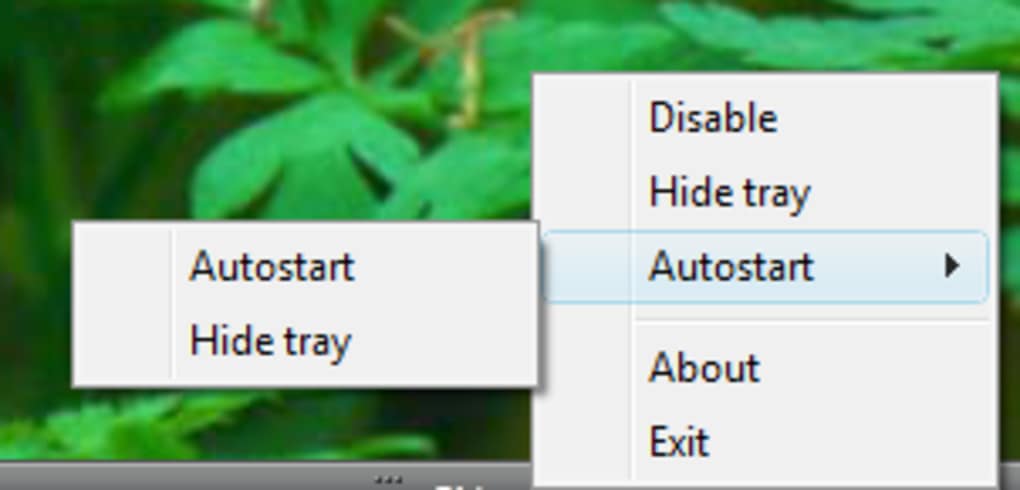
- System Tray Integration (Optional): The ability to toggle the system tray icon provides user control over its visibility.
Disadvantages:
- Lack of Warnings: SuperF4 provides no warning before terminating a process. Once the command is executed, the application is immediately closed without confirmation. This is both a strength (for speed) and a weakness (for safety). Users should exercise caution when utilizing this feature.
- Limited Functionality: Unlike full-fledged task managers, SuperF4 focuses solely on process termination. It lacks the ability to monitor system performance, display detailed process information, or manage other system processes.
- Potential for Data Loss: The immediate termination, without saving options, may lead to data loss in some cases, if the affected application was in the process of saving data.
Alternatives to SuperF4: Exploring the Competitive Landscape
While SuperF4 provides a simple and effective solution, several alternative applications offer similar functionality, some with additional features. These alternatives may be better suited for users who require more sophisticated process management capabilities or who value features like process monitoring and warning prompts before termination.
Some alternative applications include:
- Kill Process: This application provides a straightforward interface for terminating processes. While not employing keyboard shortcuts, it offers a more visual and potentially safer way to select and end processes.
- Process Killer: Another simple process killer, typically with a more basic interface than SuperF4. It might provide a good option for users who only need the core functionality without extra features.
- Task Manager (Windows built-in): Windows’ built-in Task Manager, while less convenient for rapid termination, provides comprehensive system information, performance monitoring, and options for managing other processes, making it a suitable alternative for those who prefer a more detailed approach to process control.
Conclusion: A Powerful Tool for Efficient Problem Solving
SuperF4 effectively addresses the common problem of dealing with frozen Windows applications. Its speed, simplicity, and efficient design make it a valuable tool for users who need a quick and reliable method for terminating unresponsive processes. However, the lack of warning before process termination should be carefully considered. Users must weigh the benefits of speed and ease of use against the potential for data loss due to unplanned termination. The ultimate choice between SuperF4 and alternative applications depends on individual needs and preferences. If speed and immediate termination are paramount, SuperF4’s straightforward approach is unmatched. For users requiring more features and a safer approach, other task managers or process killers might be a more suitable choice. However, for users who prioritize the rapid resolution of frozen applications, SuperF4 remains a highly effective and easy-to-use solution.
File Information
- License: “Free”
- Latest update: “May 24, 2023”
- Platform: “Windows”
- OS: “Windows XP”
- Language: “English”
- Downloads: “18.9K”
- Size: “140.97 KB”


