
In the fast-paced digital landscape, where visual content reigns supreme, the humble GIF (Graphics Interchange Format) continues to hold an important, albeit often understated, position. From expressive reactions in social media to captivating short animations on websites, GIFs are ubiquitous. However, the very nature of these multi-frame images can lead to significant file sizes, posing challenges for web performance, storage, and bandwidth. This is where specialized tools like SuperGIF come into play, offering a robust, automated solution for optimizing GIF images to unprecedented levels. SuperGIF, a product by Boxtopsoft, emerged as a vital utility designed to streamline the digital content creation and distribution process by dramatically reducing GIF file sizes without compromising visual integrity.
At its core, SuperGIF is an automated optimization system meticulously crafted for images in the GIF format. Its most compelling promise is the ability to slash file sizes by up to 80% – a staggering reduction – all while ensuring that the perceived graphic quality remains virtually identical to the original. This incredible efficiency is not merely limited to raw, unoptimized images; SuperGIF proves its mettle even on files that have already undergone prior optimization attempts, frequently achieving further, substantial savings in size. In an era where every kilobyte counts, especially for faster loading times and an improved user experience, SuperGIF offers a powerful solution that remains relevant, even decades after its initial release.
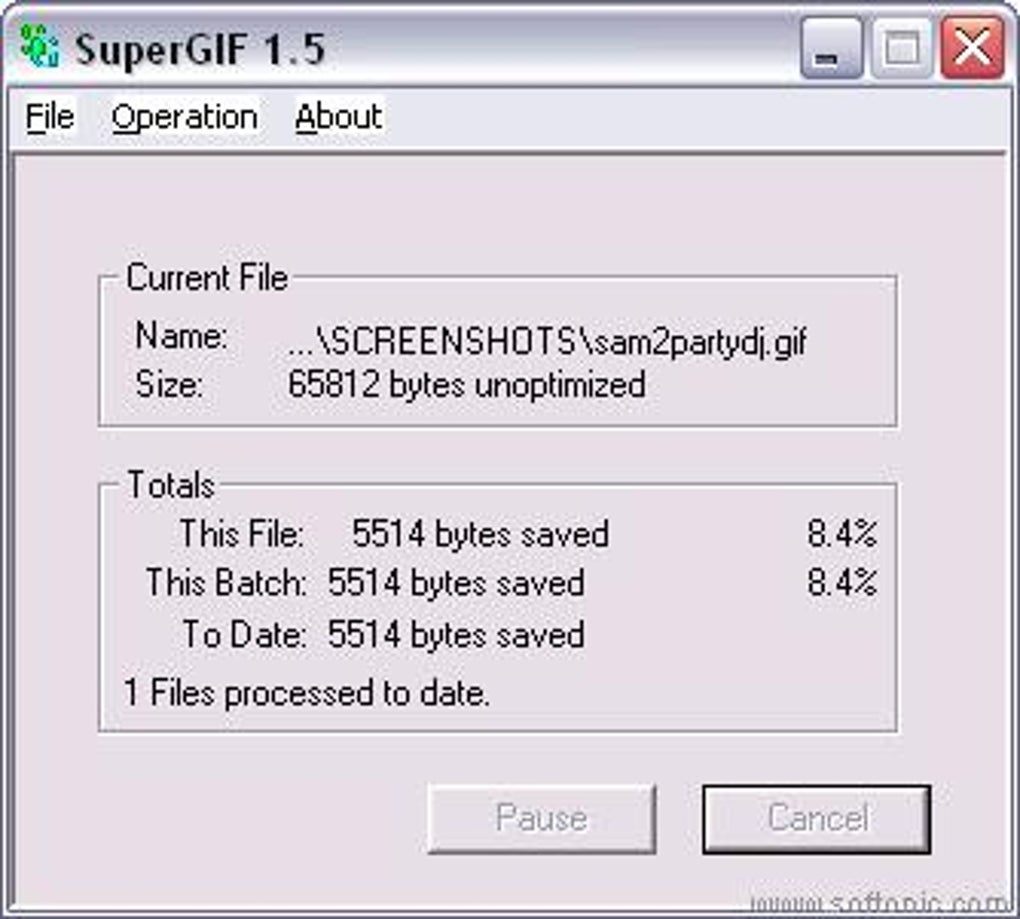
The philosophy behind SuperGIF is a beautiful marriage of potent functionality and extreme simplicity. Its user interface, in stark contrast to the complex algorithms working beneath the surface, is refreshingly straightforward. This ease of use ensures that both seasoned professionals and casual users can harness its power without a steep learning curve. The process is elegantly intuitive: users merely need to select the GIF file or an entire directory containing GIFs they wish to process, or, even more conveniently, drag and drop them directly onto the program’s interface. The optimization initiates automatically, working silently and efficiently in the background, a testament to its “set it and forget it” design. Crucially, SuperGIF prioritizes data safety by diligently saving a backup copy of the original file before any modifications are made, providing peace of mind and allowing users to revert if necessary.
While the full, registered version unlocks SuperGIF’s complete potential, the shareware version offers a glimpse into its capabilities, albeit with a deliberate limitation: it can optimize only a single file at a time. This constraint, typical of shareware models, serves as an incentive for users to experience the software’s effectiveness and then consider purchasing the full license for batch processing and unrestricted use. Despite this, the single-file optimization is often sufficient for many users to appreciate the profound impact SuperGIF can have on their digital assets.
Multimedia: Enhancing Visual Experiences
The realm of multimedia is vast, encompassing everything from audio and video to static images and dynamic animations. Within this expansive category, visual content holds a dominant position, constantly evolving to deliver richer, more immersive experiences. Tools like SuperGIF are indispensable in this environment, acting as silent workhorses that ensure visual content is not only compelling but also efficient. In the context of the digital world, where users expect instantaneous access to information and media, the efficiency of file sizes directly impacts the quality of the user experience.
Photography: The Art of the Optimized Image
Photography, at its heart, is about capturing and presenting visual moments. In the digital age, this extends beyond still images to include short, looping animations, often delivered in the GIF format. SuperGIF plays a critical role in this domain, allowing photographers, web designers, and content creators to present high-quality, impactful GIFs without incurring the penalty of large file sizes. Imagine a portfolio website where high-resolution GIFs are used to showcase motion graphics or sequential art; without optimization, these pages could take ages to load, deterring potential clients or viewers. SuperGIF ensures that the artistic vision is delivered promptly and smoothly.
SuperGIF’s ability to achieve an up to 80% reduction in size without a noticeable loss in graphical quality is a monumental achievement for a tool developed for systems like Windows 95. This is achieved through sophisticated algorithms that analyze the GIF’s color palette, frame redundancy, and transparency settings. For instance, GIFs, by design, are limited to 256 colors. SuperGIF intelligently identifies and removes unused colors from the palette, or merges similar colors where possible, thereby reducing the amount of data required to describe the image. Furthermore, for animated GIFs, it often employs techniques like frame differencing, where instead of storing a complete new frame, it only stores the changes from the previous frame. This clever approach significantly shrinks the overall file size, making GIFs more manageable and web-friendly.
The user experience with SuperGIF is deliberately kept simple, a design choice that contributes significantly to its appeal. Users don’t need to delve into complex settings or understand intricate compression algorithms. The drag-and-drop functionality, coupled with automatic optimization, makes it accessible to anyone. This simplicity is particularly valuable for those who need to process many files regularly but lack the time or expertise for manual optimization. The automatic backup feature is another testament to its user-centric design, preventing accidental data loss and ensuring that the original quality can always be retrieved if needed. This level of automation and safety makes SuperGIF a reliable partner for anyone working with GIF images, from casual users sharing memes to professionals managing extensive web content libraries.
Utilities & Tools: Essential Software for Efficiency
In the vast ecosystem of software, “utilities and tools” represent the backbone of digital efficiency. These applications are designed to perform specific, often crucial, tasks that enhance system performance, manage files, secure data, and generally make computing more productive. SuperGIF perfectly fits into this category, offering a specialized function that optimizes a specific file format, thereby contributing to overall system and web performance. Its focused utility makes it an invaluable asset for anyone dealing with GIF files regularly.
File Compression: The Imperative for Smaller Sizes
File compression is a fundamental utility in the digital world. It addresses the constant tension between rich content and limited resources – be it storage space, bandwidth, or processing power. For image files, compression is particularly vital, as uncompressed images can quickly balloon into multi-megabyte behemoths. SuperGIF’s specialized focus on GIF compression fills a niche that generic file compressors might miss, offering superior optimization tailored to the GIF format’s unique characteristics.
SuperGIF’s effectiveness goes beyond simple general-purpose file compression. It leverages specific knowledge of the GIF format to achieve optimal results. For example, it can analyze individual frames of an animated GIF to identify areas that haven’t changed between frames, storing only the changed pixels. It can also manage transparency, ensuring that transparent areas are efficiently encoded. This granular approach to optimization is what allows SuperGIF to achieve reductions of up to 80% even on files that have already seen some form of compression. This level of optimization means quicker uploads, faster downloads, reduced hosting costs, and a more responsive user experience across websites, applications, and email campaigns.
The shareware model, as implemented by SuperGIF, provided users with a practical way to evaluate the software before committing to a purchase. The limitation of optimizing only one file at a time in the trial version was a smart strategic choice. It allowed users to witness the dramatic size reduction on a single GIF, thereby understanding the potential benefits without being able to abuse the full functionality. For many, seeing a 100KB GIF shrink to 20KB or even less, with no visible degradation, was compelling enough to justify the full license. This model helped establish trust and demonstrated the tangible value SuperGIF offered, making it a viable commercial product in its time.
Internet & Networks: Optimizing for the Digital Highway
The internet and network infrastructure are the arteries of our digital lives, enabling communication, commerce, and entertainment on a global scale. The performance of this infrastructure is heavily dependent on the size and efficiency of the data being transmitted. Large, unoptimized files can clog these digital highways, leading to slow loading times, frustrated users, and inefficient use of bandwidth. SuperGIF, by drastically reducing the size of GIF images, plays a significant role in making internet communication and content delivery more efficient.
The impact of optimized GIFs on web performance cannot be overstated. In the early days of the internet, when dial-up connections were common, every kilobyte mattered immensely. A difference of a few hundred kilobytes could mean the difference between a website loading in seconds versus minutes. Even with the widespread availability of broadband, optimization remains crucial. Mobile data plans have bandwidth limits, and users expect websites to load instantly on their smartphones, regardless of their connection speed. Search engines like Google also factor page load speed into their ranking algorithms, making optimization a critical component of SEO (Search Engine Optimization). SuperGIF helps ensure that GIF-rich content contributes positively to page speed, rather than hindering it.
SuperGIF’s legacy, while rooted in the late 20th century, continues to echo in modern web development practices. The fundamental principle it championed – that visual content must be optimized for performance – is more relevant than ever. While newer image formats and optimization techniques have emerged, the GIF format persists, especially for simple animations and transparent graphics. Therefore, tools that specialize in GIF optimization, whether SuperGIF itself (for legacy systems) or its spiritual successors, remain essential. It speaks to a timeless need: delivering rich visual experiences without taxing network resources.
System Requirements and Technical Specifications
SuperGIF, version 1.5, initially released on August 14, 2003, was designed for the Windows operating system, specifically targeting Windows 95, a testament to its longevity and early entry into the optimization space. Its compact size, a mere 133.68 KB, allowed it to be a lightweight utility that consumed minimal system resources. Despite its age, its core function remains valuable. For users on older Windows systems (Windows 95, 98, ME, 2000, XP), SuperGIF offers a reliable solution. The program is developed by Boxtopsoft, a name associated with focused utility software.
Availability and Language Support
Originally available in English, the description also highlights its availability in Spanish and other languages through various download portals. This global reach underscored the universal need for image optimization across different linguistic and geographical contexts. On PhanMemFree, it was listed as “SuperGIF para Windows” or “SuperGIF para PC” for trial version download, emphasizing its platform specificity.
The PhanMemFree.org Ecosystem
PhanMemFree.org, as a prominent software portal, categorized SuperGIF under “Multimedia” and specifically “Photography” for Windows. This categorization helped users navigate the vast library of software to find specialized tools. The site also provided security status checks, user ratings (4.5 out of 5 from one user for SuperGIF), and listed top downloads in related categories, helping users discover other valuable tools like Adobe Photoshop CC, Canon IJ Scan Utility, and Picasa. Beyond individual applications, PhanMemFree.org offered a comprehensive content structure encompassing various software types and utilities:
- FOR BUSINESS: Addressing commercial software needs.
- ARTÍCULOS & APPS: Providing informative articles and applications.
- Juegos (Games): A vast category including Action, Arcade, Adventure, Racing, Card, Casino, Sports, Educational, Strategy, Family, Tabletop, Music, Word, Quiz, RPG, Puzzle, Simulation, Utilities, and AI games.
- IA (AI): Featuring AI Writing Assistants, AI Audio, AI Chat, AI Image Generator & Editor, AI Video Generator & Editor, AI Productivity, and AI Programming tools.
- Navegadores (Browsers): Covering Web Browsers and Extensions & Tools.
- Seguridad Y Privacidad (Security & Privacy): Including Antispam & Antispyware, Antivirus, Ad Blockers, Encryption, Access Control, Firewalls, Password Management, Keystroke Loggers, and VPNs.
- Productividad (Productivity): Encompassing Agendas & Calendars, Banking & ATMs, Calculators & Converters, Email Clients, Accounting, Finance, Document Management, Personal Finance Management, Project Management, Office Suites, and Remote PC tools.
- Internet Y Redes (Internet & Networks): With File Sharing & P2P, Download Managers, Search Tools, and Wi-Fi utilities.
- Multimedia: Including Audio, Graphic Design, Photography, Recording, Music & Radio, Movies & TV, Video, and Online Videos.
- Desarrollo (Development): Featuring Databases, FTP Clients, Remote Control, Backup & Cloud Storage, Web Development, IDE/Source Editors, Development Kits, Programming Languages, Manuals & Tutorials, Networks, and Servers.
- Educación Y Referencia (Education & Reference): Covering Catalogs, Science, Dictionaries, Teaching & Training, Geography, Languages & Translation, Books, E-books, Medicine, Magazines & Newspapers.
- Estilo De Vida (Lifestyle): With Hobbies, Food & Drink, Shopping, Sports, Exercise, Shopping Lists, Fashion & Style, Health, Health & Fitness, Ticketing Service, Weather, Product Rating & Comparison.
- Personalización (Personalization): Including Screen Lock, Cursors & Fonts, Wallpapers, Screensavers, Themes, Ringtones & Sounds.
- Social Y Comunicaciones (Social & Communications): With Blog, Chat & Instant Messaging, Photo & Video Sharing, Social Networks.
- Utilidades Y Herramientas (Utilities & Tools): Including File Managers, Screenshot, File Compression, Barcode Scanning, Printer & Fax, Measurement, Data Recovery, Clocks & Alarms, Keyboards.
- Viajes Y Navegación (Travel & Navigation): Maps & GPS, Travel Planning, Public Transport.
- Juegos De Roblox (Roblox Games) & Extensiones De Google Chrome (Google Chrome Extensions).
- Cambiar sistema operativo (Change operating system): Providing software for Windows, Android, Mac, iPhone, PWA, Web Apps.
- Cambiar idioma (Change language): Supporting a wide array of languages, including Arabic, German, English, Spanish, French, Indonesian, Italian, Japanese, Korean, Dutch, Polish, Portuguese, Russian, Swedish, Thai, Turkish, Vietnamese, and Chinese.
This extensive categorization by PhanMemFree.org highlights the breadth of software available and positions SuperGIF within a larger context of utilities designed to enhance specific aspects of digital work and leisure.
Conclusion: SuperGIF – A Timeless Tool for Digital Efficiency
SuperGIF, despite its vintage, stands as a testament to effective software design and a targeted solution for a persistent problem. Its capability to reduce GIF image sizes by up to 80% without noticeable quality degradation, combined with an intuitive drag-and-drop interface and automatic backup, made it an invaluable tool for its time and continues to offer lessons for modern developers. For those operating on older Windows environments or with specific needs for legacy GIF optimization, SuperGIF remains a potent choice. Its core principles of efficiency, simplicity, and preservation of quality are timeless, ensuring that the visual impact of GIFs can be delivered quickly and effectively across any digital platform, proving that some software, much like the GIF format itself, can endure and remain relevant through the passage of time. Its contribution to making web content more accessible and faster loading underscores its significance in the history of internet utilities.


