
In the digital age, email remains an indispensable tool for communication, marketing, and fostering customer relationships. However, the efficacy of email campaigns hinges significantly on their ability to resonate personally with recipients. The traditional method of sending mass emails, while efficient in terms of reach, often falls short in engagement due due to its impersonal nature. Such emails typically lack the specific, tailored data that can make a message feel directly addressed to an individual, leading to lower open rates, reduced click-throughs, and ultimately, diminished campaign success. This is precisely the challenge SuperMailer was designed to overcome, transforming the landscape of bulk email delivery into a highly personalized and effective communication channel.
SuperMailer is a robust and sophisticated email client for Windows that goes far beyond the capabilities of standard mail senders. It empowers individuals and businesses alike to craft and dispatch “serial mails” – mass emails that are intricately customized for each recipient. Developed with user-friendliness and powerful features in mind, SuperMailer bridges the gap between mass communication and personal engagement, enabling users to create professional, highly targeted email campaigns with unprecedented ease and efficiency. From small businesses looking to nurture their customer base to larger enterprises managing extensive mailing lists, SuperMailer offers a comprehensive solution for impactful email marketing.
SuperMailer: Revolutionizing Email Marketing Personalization
The core ethos behind SuperMailer lies in its commitment to personalization. In a crowded inbox, an email that feels generic is often overlooked or deleted. SuperMailer fundamentally changes this dynamic by allowing users to infuse every outgoing message with recipient-specific data. This isn’t merely about addressing someone by their first name; it’s about dynamically inserting various pieces of information – from past purchases and subscription dates to unique offer codes or specific product recommendations – directly into the email content. The impact of such tailored communication is profound, fostering a sense of recognition and value in the recipient, thereby significantly increasing engagement and conversion rates.
Imagine being able to send thousands of emails, each one appearing as if it was individually composed for a single person. SuperMailer makes this a reality, addressing the big disadvantage of impersonal mass mail. Before SuperMailer, the choice was often between time-consuming, manual personalization or rapid, generic blasts. This software liberates marketers from that dilemma, offering the best of both worlds: speed and scale combined with a deeply personal touch. By allowing for the dynamic replacement of placeholders with specific recipient data during the sending process, SuperMailer ensures that every email arrives as a bespoke communication, designed to capture attention and drive action. This transformative capability positions SuperMailer not just as an email sender, but as a strategic tool for building stronger, more meaningful connections with an audience.
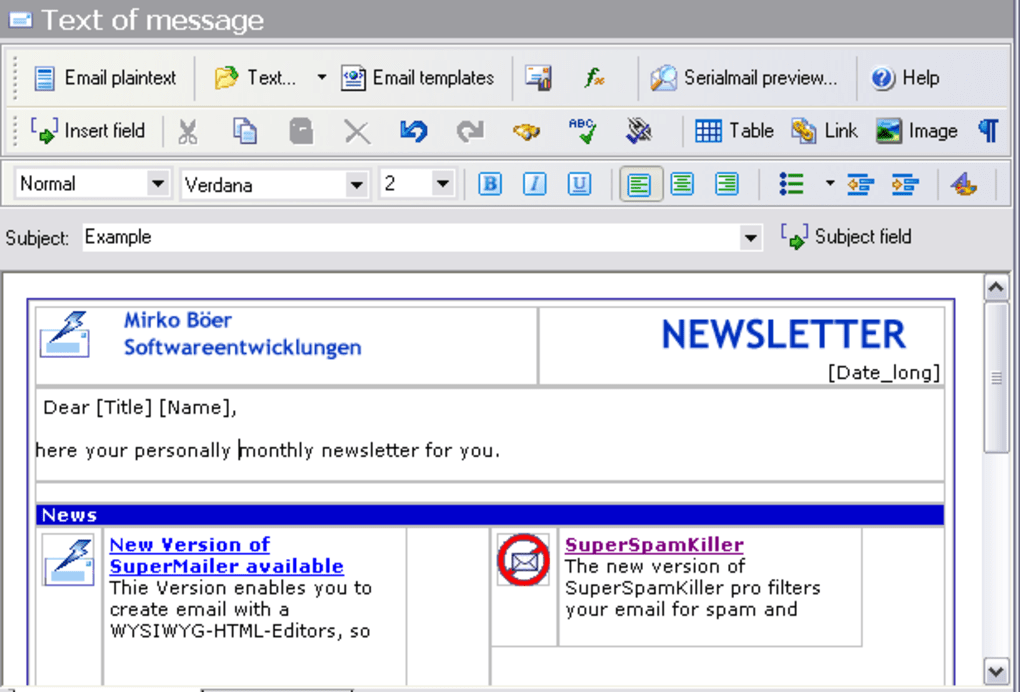
Core Features: Crafting Engaging and Personalized Email Campaigns
SuperMailer’s strength lies in its comprehensive suite of features designed to make email campaign creation both intuitive and powerful. It’s engineered to cater to users who demand both ease of use and advanced customization options, effectively functioning like a specialized word processor for email.
Intuitive Email Creation and Formatting
At the heart of SuperMailer is its user-friendly interface, which mimics the familiar experience of a word processor. This design choice ensures that even users with limited technical expertise can quickly get to grips with crafting professional-looking emails. The software supports the creation of emails in both HTML and plaintext formats, offering flexibility depending on the campaign’s nature and recipient preferences.
The integrated WYSIWYG (What You See Is What You Get) editor for HTML emails is a standout feature. This visual editor allows users to design rich, graphically appealing emails without needing to write a single line of code. You can drag and drop elements, format text, insert images, links, and tables, and preview your email exactly as it will appear in recipients’ inboxes. This eliminates the guesswork and ensures that your brand message is conveyed clearly and attractively. For those who prefer or require plaintext emails, SuperMailer provides a straightforward editor to ensure readability across all email clients. The ability to create both HTML and plaintext versions of an email also allows for multipart/alternative sending, where the recipient’s email client automatically displays the most appropriate version, further enhancing deliverability and user experience.
Advanced Personalization and Dynamic Content
This is where SuperMailer truly shines and differentiates itself from generic email tools. The application allows users to insert “placeholders” into their messages. These placeholders act as dynamic tags that are automatically replaced with recipient-specific data during the sending process. For instance, a placeholder like [Recipient_First_Name] could become “John” for one recipient and “Jane” for another.
The power of placeholders extends far beyond simple names. You can integrate any data point you have for your recipients, such as their customer ID, last purchase date, specific product interests, city, loyalty program status, or even custom messages. This level of personalization makes each email uniquely relevant, significantly boosting open rates, engagement, and conversion. Instead of receiving a generic newsletter, a customer might receive an email recommending products based on their browsing history, or a special offer tied to their loyalty tier.
Furthermore, SuperMailer supports the inclusion of attachments, including “personalized attachments.” This sophisticated feature allows you to attach different files to different recipients based on their data. Imagine sending out individualized invoices, personalized reports, or tailored promotional documents to thousands of clients, all automated through a single campaign. This saves an immense amount of time and effort compared to manual attachment processes, while ensuring that each recipient receives exactly the information pertinent to them. Whether it’s a PDF document, an image, or a specific coupon file, personalized attachments open up a new realm of targeted communication.
Advanced Campaign Management, Tracking, and Automation
Beyond email creation and personalization, SuperMailer equips users with a suite of tools for effective campaign management, performance tracking, and automation, essential for any successful email marketing strategy.
Measuring Success: Analytics and Reporting
A critical aspect of any marketing endeavor is the ability to measure its success, and email campaigns are no exception. SuperMailer’s integrated tracking function provides invaluable insights into your mailing campaign’s performance. It diligently records key metrics, allowing you to understand how your emails are resonating with your audience.
The primary tracking metrics include:
- Opening Statistics: This feature tracks how many recipients open your emails. By understanding your open rates, you can gauge the effectiveness of your subject lines, sender name, and preheader text. A high open rate indicates that your initial hook is compelling and relevant to your audience.
- Click Tracking on Hyperlinks: SuperMailer goes a step further by counting clicks on every hyperlink within your email. This is crucial for understanding what content captures your audience’s interest and drives them to take action. Whether it’s a link to a product page, a blog post, or a sign-up form, click tracking provides direct evidence of engagement and helps you optimize your calls to action.
These tracking functions are indispensable for measuring the ROI of your email marketing efforts. They allow you to identify trends, understand recipient behavior, and make data-driven decisions to refine future campaigns. By analyzing what works and what doesn’t, you can continuously improve your email content, timing, and targeting, leading to more effective and profitable campaigns over time. The ability to measure success empowers users to optimize their strategies, ensuring maximum impact for every email sent.
Seamless Subscription Management with Double Opt-In
Managing newsletter subscriptions and unsubscribes can be a complex and time-consuming task, particularly for growing mailing lists. SuperMailer simplifies this process significantly through its support for free scripts designed to automate subscription management. These scripts are a powerful asset for maintaining a clean and compliant mailing list.
Crucially, the scripts support the recommended “double opt-in” procedure. Double opt-in is an industry best practice and often a legal requirement (e.g., under GDPR and CAN-SPAM Act) that ensures subscribers genuinely wish to receive your emails. When someone signs up for your newsletter, a double opt-in system sends a confirmation email to their address, requiring them to click a link to verify their subscription. This two-step verification process drastically reduces the chances of spam complaints, protects your sender reputation, and ensures you are only communicating with highly engaged individuals.
The automation of subscription and unsubscription management means less manual work for you. When a recipient decides to unsubscribe, the process is handled automatically by the script, removing them from your mailing list efficiently and compliantly. This not only saves administrative effort but also helps in maintaining a healthy list, free of uninterested or invalid addresses, which in turn improves deliverability rates and campaign performance. By adhering to double opt-in and automating list hygiene, SuperMailer helps users build and maintain a high-quality, engaged subscriber base.
Why Choose SuperMailer? Addressing Common Email Marketing Challenges
SuperMailer stands out as a preferred solution for email marketing for several compelling reasons, primarily by effectively addressing the common pain points experienced by individuals and businesses using email for mass communication.
One of the most significant challenges in email marketing is achieving high engagement in an era of inbox overload. Generic emails are easily ignored. SuperMailer tackles this head-on with its advanced personalization capabilities. By allowing every email to be tailored with specific recipient data, it elevates the message from a bulk announcement to a personal communication. This personalization fosters a stronger connection, making recipients feel valued and understood, which is a powerful driver for open rates and click-throughs.
Another hurdle is the complexity of creating visually appealing and professional emails without extensive design or coding skills. SuperMailer’s integrated WYSIWYG editor simplifies this process dramatically. Users can design sophisticated HTML emails with ease, ensuring their brand identity is consistently and attractively presented. This feature democratizes email design, making high-quality campaigns accessible to everyone.
Managing mailing lists, particularly subscriptions and unsubscribes, can be a time-consuming administrative burden and a source of compliance risk. SuperMailer’s free scripts for automated list management, especially its support for double opt-in, streamline this process entirely. This not only saves valuable time but also ensures legal compliance and maintains the quality of the subscriber list, which is crucial for maximizing deliverability and minimizing spam complaints.
Furthermore, understanding the effectiveness of email campaigns is often a guessing game without proper analytics. SuperMailer’s robust tracking functions provide clear, actionable insights into open rates and click-through rates. These metrics empower users to make data-driven decisions, optimize their content and strategies, and ultimately improve the ROI of their email marketing efforts. Without such tracking, businesses operate in the dark, unable to discern what resonates with their audience.
Finally, the ability to send personalized attachments is a game-changer for many businesses. Whether it’s sending individual reports, custom invoices, or specific promotional materials, this feature automates a previously manual and laborious process, saving countless hours and ensuring accuracy.
In essence, SuperMailer offers a comprehensive, all-in-one solution that transforms the arduous task of mass email sending into a highly efficient, personalized, and measurable marketing endeavor. It’s designed to save time, increase engagement, improve compliance, and provide the insights necessary for continuous campaign optimization.
SuperMailer in the Ecosystem: Alternatives and Market Position
The email client and marketing software market is diverse, offering a range of tools from basic mail senders to comprehensive marketing automation platforms. SuperMailer carves out a distinct niche by focusing heavily on personalized mass email sending directly from a desktop application, combined with robust tracking and subscription management.
When looking at alternatives and competitive offerings, it’s useful to understand where SuperMailer positions itself. Tools like Mail Bomber 2.4 are often positioned as free or paid tools primarily for managing mailing lists and sending bulk mail, but they may lack the sophisticated personalization, WYSIWYG editing, and detailed tracking capabilities that SuperMailer offers. MaxBulk Mailer 3.2 is another trial version software aimed at contacting a large number of clients easily, suggesting a similar focus on bulk sending. Gammadyne Mailer 4.3, described as a cost-effective and practical tool to tackle large mailing lists, also appears to be a direct competitor, emphasizing efficiency in handling substantial email volumes. These tools often share the core functionality of sending to many recipients but may differ in the depth of personalization, user interface, or tracking analytics provided.
Other email clients mentioned in the broader “Top downloads E-mail Clients for Windows” list, such as Microsoft Outlook, Mozilla Thunderbird, or Foxmail, are primarily personal or organizational email clients. While they can send emails, their mass mailing and advanced personalization capabilities are limited or non-existent compared to dedicated solutions like SuperMailer. They serve a different purpose – daily email communication – rather than strategic email marketing campaigns.
Moreover, the market includes web-based email marketing services (e.g., Mailchimp, Constant Contact). While these platforms offer extensive features, they are cloud-based and operate on a subscription model, often with pricing tied to the number of subscribers or emails sent. SuperMailer, as a desktop application, offers a one-time purchase model (for the full version) and provides users with direct control over their mailing processes and data on their local machine, which can be a significant advantage for those who prefer local software or have specific data privacy requirements.
SuperMailer’s key differentiators lie in its blend of a powerful desktop application, advanced personalization through placeholders, comprehensive tracking, and automated double opt-in subscription management. It strikes a balance between ease of use (with its word processor-like interface and WYSIWYG editor) and sophisticated features, making it a compelling choice for users who need a reliable, feature-rich solution for personalized mass email campaigns without necessarily committing to a recurring cloud-based service. It caters to those who value a perpetual license and direct control over their email sending infrastructure.
Technical Specifications and Commitment to User Trust
Understanding the technical foundations and the developer’s commitment to security and user experience is crucial for any software. SuperMailer, as detailed on PhanMemFree, provides transparent information regarding its specifications and security posture.
App Specifications
- License: SuperMailer is available as a Trial version. This allows prospective users to thoroughly test its features and determine if it meets their needs before committing to a purchase. This try-before-you-buy model is customer-friendly and indicative of the developer’s confidence in their product.
- Version: The latest version available on PhanMemFree is 14.014.61.0.0781, with a previous version 14.013.1(24) also noted. This indicates ongoing development and updates, ensuring compatibility with newer operating systems and incorporating feature enhancements or bug fixes.
- Latest Update: The software was last updated on May 24, 2023, signaling active maintenance and developer support, which is vital for long-term reliability and security.
- Platform: SuperMailer is specifically designed for Windows.
- OS Compatibility: It supports Windows 2000 and later versions, demonstrating broad compatibility with older and newer Windows operating systems.
- Language: The primary language for the software and its interface is English, with German also listed as an available language, catering to a wider international user base. PhanMemFree also lists availability in numerous other languages for download pages, suggesting global reach and demand.
- Downloads: The software has garnered significant attention, with 11.7K total downloads and 116 downloads in the last month (as per the reference data). This suggests a healthy user base and sustained interest in the application.
- Size: The installer size is 38.82 MB, which is relatively compact for a feature-rich application, ensuring quick download and installation.
- Developer: The software is developed by “Supermailer,” indicating a focused development team dedicated to this product.
Security and Trust on PhanMemFree
PhanMemFree places a strong emphasis on user safety and trust. For SuperMailer, the “Security Status” is a critical indicator. The platform employs a rigorous scanning process for all hosted files:
- Comprehensive Scanning: Every new file uploaded to PhanMemFree undergoes scanning by over 50 of the world’s leading antivirus services. This multi-layered approach ensures a high probability of detecting any potential threats.
- Periodic Reviews: Files are not just scanned once; they are periodically reviewed to confirm or update their security status, ensuring that software that was once clean remains clean, and any new vulnerabilities are identified.
- “Clean” Status: If no possible threat is detected across this extensive network of antivirus services, the software is marked as “Clean.” This status provides users with high confidence that the SuperMailer download from PhanMemFree is safe and free from malware.
- Handling “Warnings” and False Positives: In instances where a software might trigger a “Warning,” PhanMemFree explains that these are often “false positives” – benign programs mistakenly flagged due to overly broad detection signatures. They clarify why such programs are still available and encourage users to report any issues.
- “Report Software” Feature: PhanMemFree empowers its user community through a “Report Software” feature on every catalog page. This allows users to flag any particular issues they encounter, feeding valuable feedback directly to the PhanMemFree team for prompt investigation and resolution. This collaborative approach enhances the overall security and reliability of the platform’s software catalog.
This commitment to transparent security measures ensures that when users download SuperMailer from PhanMemFree.org, they can do so with confidence, knowing that the file has undergone thorough scrutiny and is maintained with user safety as a top priority.
In conclusion, SuperMailer offers a powerful, user-friendly, and secure solution for anyone looking to elevate their email marketing campaigns through deep personalization, comprehensive tracking, and efficient list management. Its desktop-based approach, combined with its rich feature set and a strong commitment to user trust as evidenced by its availability on platforms like PhanMemFree.org, makes it a formidable tool in the modern digital communication landscape.
File Information
- License: “Trial version”
- Latest update: “May 24, 2023”
- Platform: “Windows”
- OS: “Windows 2000”
- Language: “English”
- Downloads: “11.8K”
- Size: “38.82 MB”


