
SuperScan, developed by Foundstone, was once a highly regarded TCP port scanner renowned for its speed and efficiency. While the original download is no longer available on the Phanmemfree platform due to reasons possibly including discontinuation, security concerns, or other undisclosed factors, its legacy remains noteworthy. This review explores SuperScan’s capabilities, strengths, weaknesses, and alternatives available today. The information presented is based on past user experiences and reviews.
SuperScan’s Core Functionality and Features
SuperScan distinguished itself as a fast and powerful tool for scanning TCP ports. This is a critical function for network administrators, security professionals, and anyone managing internet services. The program’s strength lay in its ability to quickly identify open and closed ports on a target IP address or range of addresses. It facilitated the examination of various protocols, including but not limited to HTTPS and FTP, allowing users to assess the security posture of network devices and servers.
One of SuperScan’s most attractive features was its ease of use, despite its powerful capabilities. The interface was straightforward, presenting commands and options clearly through well-organized tabs, eliminating the need for navigating complex menus or cryptic commands. This user-friendly design made it accessible to both seasoned professionals and individuals with less technical expertise. The lack of an installation process further enhanced its ease of use, making it readily deployable on any system that met its minimum requirements. Users did however need administrator privileges to run the program.
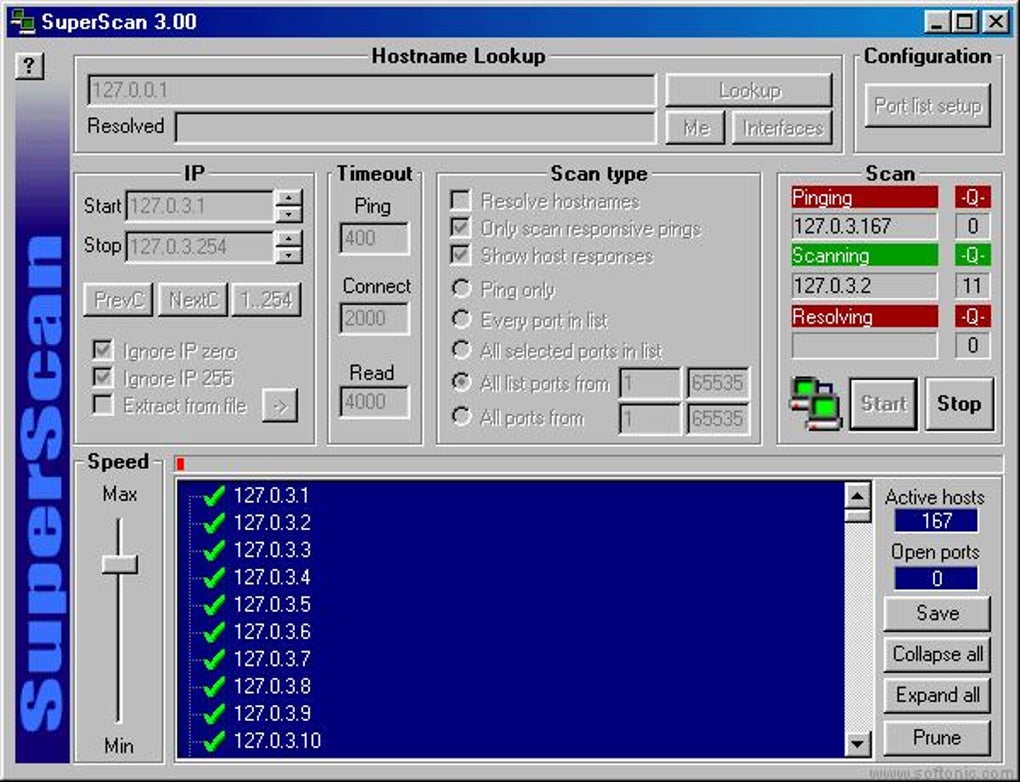
The software’s speed was frequently cited as a key advantage. In an era where network scanning often involved lengthy delays, SuperScan’s rapid scanning ability saved users significant time and effort, enabling quicker identification of vulnerabilities and potential security risks.
Strengths and Weaknesses of SuperScan
While SuperScan excelled in many areas, it also had some drawbacks. The most frequently mentioned limitations included:
- Absence of Help Files: The lack of comprehensive documentation and help files could pose challenges for users unfamiliar with network scanning techniques or requiring assistance with the program’s functionality. This could have been a significant barrier for novice users.
-
Complexity for Beginners: While the interface was considered intuitive by many, the underlying concepts of port scanning and network security could be daunting for beginners. Without adequate support documentation, this could lead to frustration and misuse of the tool.
-
Discontinuation and Security Concerns: The unavailability of the original SuperScan download is a major limitation. The reasons behind its removal, whether discontinuation, discovered vulnerabilities, or other factors, highlight the importance of using updated and regularly maintained security tools.
Alternatives to SuperScan in the Current Landscape
Given the unavailability of SuperScan, several alternatives offer similar functionality and, in many cases, enhanced features and security considerations:
-
Nmap: Nmap (Network Mapper) is a widely used and highly versatile network scanning tool. It offers a broad range of features, including port scanning, service version detection, operating system identification, and network mapping. Nmap’s open-source nature and extensive community support ensure ongoing development and updates, addressing potential security vulnerabilities and introducing new capabilities. It is considered a significantly more powerful and flexible alternative, but it also has a steeper learning curve.
-
PortScan: PortScan is a dedicated port scanner designed for ease of use. While not possessing the advanced features of Nmap, it offers a more user-friendly interface and a simpler approach to basic port scanning tasks. This makes it suitable for users primarily focused on basic network scanning needs.
-
Advanced IP Scanner: This free tool provides comprehensive network scanning capabilities, allowing for the discovery of devices, services, and shared resources within a network. It features a simple and intuitive interface, making it accessible to a broad user base.
-
SolarWinds Network Performance Monitor: This solution goes beyond basic port scanning, offering in-depth network performance monitoring and analysis. It is a more comprehensive and sophisticated tool tailored towards managing larger and more complex network environments. This comes with a higher price point and a more complex learning curve compared to the simpler port scanning tools.
- Other Network Monitoring Tools: Many sophisticated Network Management Systems (NMS) and Security Information and Event Management (SIEM) systems include network scanning capabilities as part of a broader suite of functionalities. These often provide real-time monitoring, detailed reporting, and integration with other security tools. These are typically enterprise-level solutions with substantial costs associated with both licensing and technical expertise.
The Importance of Secure and Updated Network Scanning Tools
The need for network scanning tools remains crucial in the modern digital landscape. However, utilizing outdated or insecure software presents significant risks. Employing updated tools is essential for several reasons:
-
Security Vulnerability Mitigation: Outdated software may contain known vulnerabilities that attackers can exploit to compromise networks. Regularly updated tools incorporate patches and improvements to address these weaknesses.
-
Enhanced Accuracy and Functionality: Newer versions often include improvements in accuracy, speed, and functionality, providing more comprehensive and reliable scanning results.
-
Compliance with Security Standards: Many industries have security standards and compliance regulations that mandate the use of updated and secure network scanning tools. Using outdated software can lead to non-compliance and potential penalties.
-
Protection Against Emerging Threats: The threat landscape is constantly evolving, with new malware and attack techniques emerging regularly. Updated network scanners are equipped to identify these new threats and assist in protecting networks from harm.
Choosing the Right Network Scanner
The selection of a suitable network scanning tool depends on several factors:
-
Technical Expertise: Beginners may benefit from simpler, user-friendly tools, whereas experienced professionals might require more advanced features and flexibility.
-
Network Size and Complexity: Small networks may necessitate basic port scanning tools, whereas large or complex networks might require comprehensive network monitoring and management systems.
-
Specific Requirements: The specific needs of the user will determine the necessary features. Some users may need only basic port scanning, while others require advanced capabilities such as operating system detection, service version identification, or vulnerability analysis.
-
Budget: Free and open-source tools offer excellent alternatives for individuals and small organizations with limited budgets, while enterprise-level solutions provide greater functionality but require higher investments.
SuperScan’s legacy highlights the importance of speed and ease of use in network scanning. However, the current landscape demands more than just speed; it demands security and ongoing updates. The availability of robust and frequently updated alternatives makes switching to a modern solution not only feasible but also crucial for maintaining a secure network environment. Remember to always prioritize security and ensure your chosen tool remains updated to address emerging threats and vulnerabilities.
File Information
- License: “Free”
- Latest update: “August 15, 2023”
- Platform: “Windows”
- OS: “Windows 98 SE”
- Language: “English”
- Downloads: “73.8K”


