
In the dynamic and often complex world of Android device management, a tool known as Superuser once stood as a cornerstone for those adventurous enough to “root” their smartphones and tablets. Rooting an Android device is akin to gaining administrative access on a computer; it unlocks a realm of possibilities that standard users cannot access, offering unparalleled control over the device’s operating system. Superuser was designed to be the gateway to this control, acting as an essential permission manager for these super-privileged applications.
At its core, Superuser was an open-source application specifically engineered to oversee and manage the enhanced access rights that come with a rooted Android device. Imagine an operating system where every app constantly requests deep access to your phone’s core functions. Without a gatekeeper, this could lead to chaos, security vulnerabilities, or simply unwanted behavior. Superuser served as that gatekeeper, presenting users with a clear, concise interface to grant or deny root permissions to individual applications as needed. This allowed users to harness the full potential of their rooted devices while maintaining a semblance of order and security.
While the specific download for Superuser might no longer be readily available from platforms like PhanMemFree (which we’ll discuss later), its historical significance and the principles it embodied remain highly relevant to understanding the evolution of Android device management and the rooting community. It was a utility that empowered users to truly own their devices, moving beyond the restrictions imposed by manufacturers and carriers. For a period, if you had a rooted Android device, having Superuser was almost a prerequisite, a silent guardian of your newly acquired freedoms.
The Core Functionality of Superuser: Managing Root Permissions
.jpg)
The primary purpose of Superuser revolved around its robust ability to manage root permissions on an Android device. To understand its importance, one must first grasp the concept of “root access.” In the Linux-based Android operating system, “root” is the equivalent of the administrator account. By default, Android devices do not grant users root access, restricting them to a more limited, user-level account for security and stability reasons. Rooting bypasses these restrictions, giving the user, and by extension, certain applications, elevated privileges.
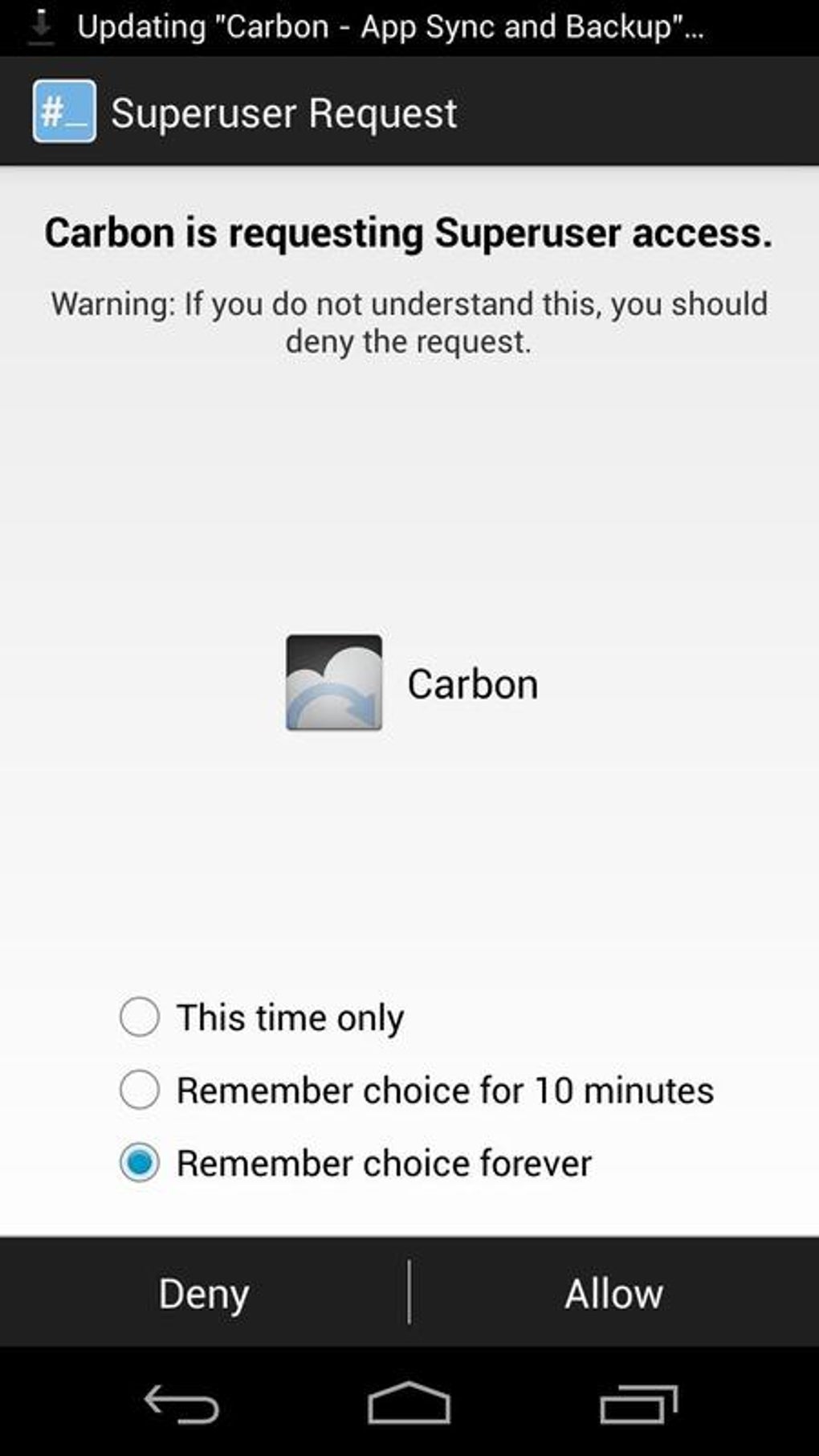
Once a device is rooted, many applications might attempt to leverage these new permissions for various purposes—some benign, like ad blockers or custom recovery tools, and some potentially malicious. This is where Superuser stepped in. It acted as an intermediary, intercepting any application’s request for root access. Instead of blindly granting access, Superuser would pop up a clear, user-friendly prompt, asking the user whether to grant or deny the request. This crucial step put the power firmly in the hands of the device owner, allowing them to make informed decisions about which apps could wield system-level control.
Granting and Revoking Permissions
One of Superuser’s most valuable features was its intuitive system for granting and revoking permissions. When an application that required root access was launched for the first time, Superuser would display a dialog box. This dialog would typically show the name of the application, the command it was attempting to execute with root privileges, and then offer “Grant” or “Deny” options. Users could also choose to remember their decision for that specific app, preventing repetitive prompts for frequently used tools.
.jpg)
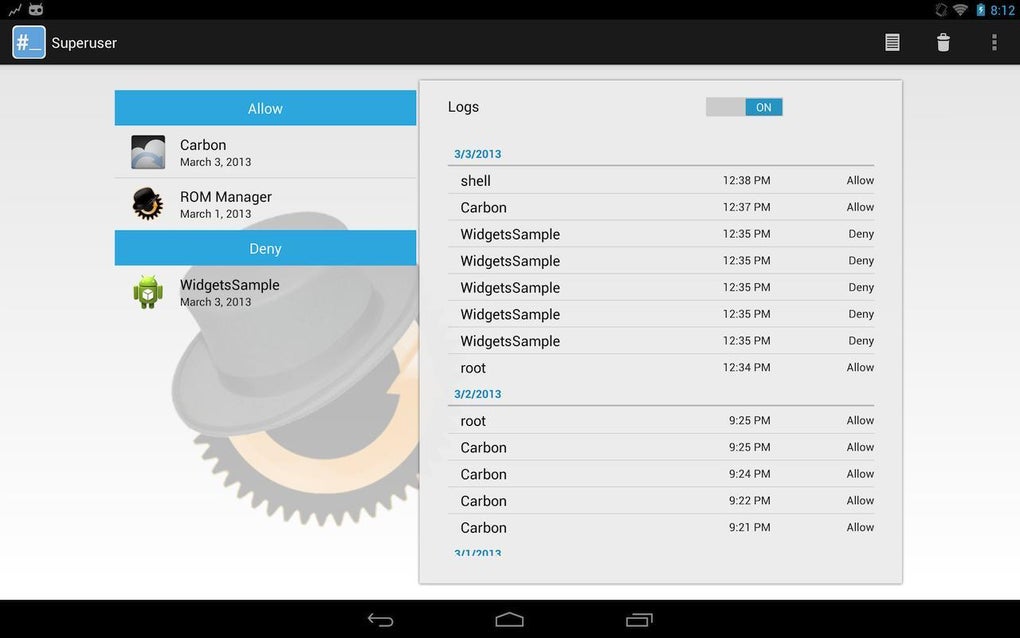
Beyond the initial prompt, Superuser maintained a comprehensive log and list of all applications that had ever requested root access. From this central interface, users could easily review which apps had been granted permissions and, importantly, revoke those permissions at any time. This dynamic control was invaluable. If an app started misbehaving or if a user simply changed their mind about an app’s trustworthiness, revoking its root access was a simple process within Superuser. This feature was crucial for maintaining device security and privacy, as it provided a safety net against potentially rogue applications.
Enhanced Resource Management and Higher Access Rights
The overarching benefit of using Superuser, and indeed of rooting in general, was the ability to achieve enhanced resource management and leverage higher access rights. With root access, applications could perform tasks that were otherwise impossible in a standard Android environment. This included:
- System-level modifications: Altering system files, installing custom ROMs (operating system versions), or flashing custom kernels for improved performance or battery life.
- Bloatware removal: Uninstalling pre-installed carrier or manufacturer applications that consume resources and cannot be removed normally.
- Advanced backup and recovery: Creating full system backups (Nandroid backups) that save not just data but the entire operating system state.
- Firewall management: Implementing granular control over network access for individual apps.
- CPU/GPU overclocking or underclocking: Adjusting processor speeds to optimize for performance or battery efficiency.
- Ad blocking: System-wide ad blocking that works across all apps and browsers.
Superuser’s role was to mediate these powerful operations. While rooting unlocked the potential for these enhancements, Superuser ensured that this power was exercised responsibly and under the explicit direction of the user. It prevented a free-for-all scenario where any app could randomly alter critical system settings, thus providing a layer of stability and security within the newly opened “superuser” realm. Without such a manager, the very act of rooting could lead to an unstable or compromised device.
Key Features and Benefits of Superuser
Superuser distinguished itself through several key features that made it a popular choice among rooted Android users for a significant period. These features focused on user control, simplicity, and security, making the often-complex world of root permissions more manageable for the average user.
Intuitive User Interface
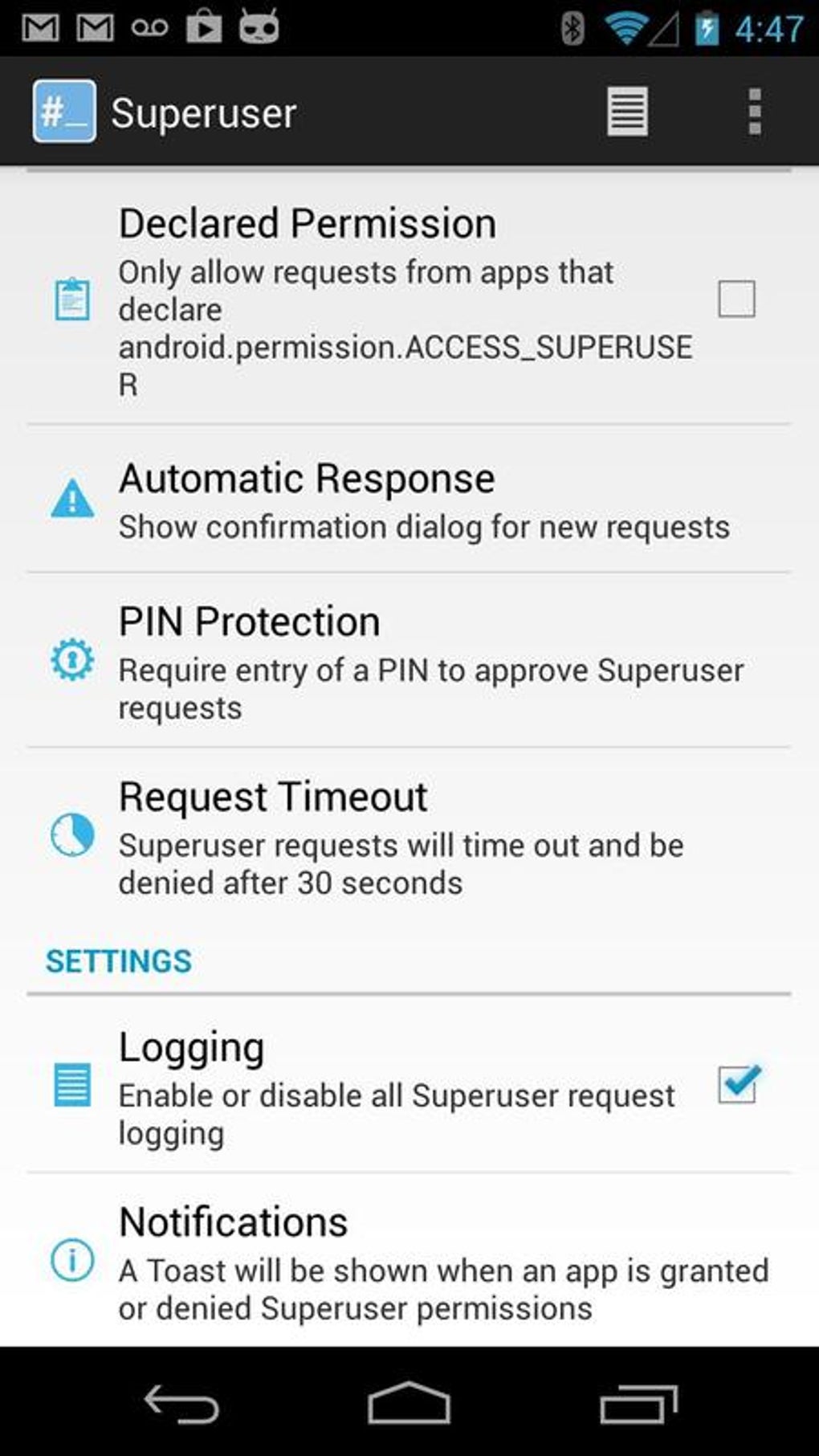
One of the most praised aspects of Superuser was its simple user interface. Unlike some other advanced tools that could be daunting for those new to rooting, Superuser presented its functionality in a clear, uncluttered manner. The main screen typically listed applications that had requested root access, along with their current permission status. Accessing logs, changing settings, or revoking permissions was straightforward, often requiring just a few taps. This ease of use significantly lowered the barrier to entry for managing a rooted device, encouraging more users to explore the benefits of rooting without being overwhelmed by technical jargon or convoluted menus. The philosophy was clear: powerful functionality shouldn’t come at the cost of usability.
.jpg)
Robust Control Over System Functions
Superuser offered robust control over the newly acquired functions that rooting enabled. This wasn’t just about simple “yes” or “no” for root access; it was about providing the user with complete authority. Users could:
- View detailed logs: See precisely when and which applications requested root access, and whether it was granted or denied. This audit trail was invaluable for troubleshooting or identifying suspicious activity.
- Configure default behaviors: Set global policies, such as automatically denying root access to new apps unless explicitly granted, or enabling a timeout feature where permissions would expire after a certain period.
- Manage notifications: Customize how and when Superuser notified the user about permission requests.
This level of granular control meant that users weren’t just reacting to requests but could proactively define how their rooted device behaved. It fostered a sense of mastery over the device, allowing users to fine-tune its operation according to their specific needs and security preferences.
Security Measures: Password Protection
A critical feature for security-conscious users was Superuser’s optional password protection for rights management. While gaining root access itself opens up potential security risks, Superuser provided a mechanism to mitigate some of these by protecting its own interface. By enabling password protection, users could ensure that only they could access Superuser’s settings, grant new permissions, or revoke existing ones.
This was particularly important in scenarios where a device might be shared, lost, or stolen. Without the password, even if someone gained physical access to the device, they wouldn’t be able to grant malicious applications root privileges through Superuser. This added layer of security transformed Superuser from merely a permission manager into a robust guardian of the device’s elevated access rights, safeguarding the powerful capabilities that rooting introduced.
Broad Android Version Compatibility
Superuser was also noteworthy for its broad compatibility, supporting Android software versions as old as 2.2 (Froyo). In the fast-evolving world of Android, where new versions are released annually, maintaining compatibility across a wide range of operating systems can be challenging. Superuser’s ability to function reliably on older versions meant that a vast array of devices, including many legacy smartphones and tablets, could benefit from its root management capabilities. This widespread support contributed significantly to its popularity and adoption within the rooting community, making it accessible to a larger user base regardless of their device’s age or software version.
Understanding the Limitations of Superuser
Despite its numerous advantages and critical role for rooted users, Superuser also came with several inherent limitations and caveats. These “cons” were not necessarily flaws in Superuser itself, but rather consequences of the Android rooting process and the specific nature of such a powerful utility. Understanding these limitations is crucial for anyone considering venturing into the world of rooted Android devices.
Only for Rooted Devices
The most fundamental limitation of Superuser was that it was “only for rooted devices.” This might seem obvious, but it’s a critical distinction. Superuser was not a tool to achieve root access; it was a tool to manage root access after it had already been obtained. For non-rooted devices, installing Superuser would serve no purpose, as there would be no root permissions for it to manage.
This prerequisite meant that users first had to navigate the often-complex and device-specific process of rooting their phone or tablet. Rooting procedures vary widely between manufacturers, models, and Android versions, often involving flashing custom recovery images like TWRP, using exploit-based tools, or following intricate command-line instructions. Superuser only became relevant once this initial, often challenging, step was successfully completed. This effectively made it a niche tool, excluding the vast majority of Android users who prefer to keep their devices in their factory-shipped state.
Not for General Phone Users
Following from the first point, Superuser was emphatically “not for general phone users.” The average smartphone user typically wants a device that works reliably out of the box, with minimal fuss and maximum security. They are generally not interested in delving into system files, flashing custom software, or managing granular app permissions that could potentially destabilize their device.
General users benefit from the security sandbox that standard Android provides, where apps are largely isolated from each other and the core operating system. Rooting bypasses this sandbox, and Superuser’s role was to help manage the implications of that bypass. For someone who just wants to browse the internet, use social media, and take photos, the complexities and potential risks associated with rooting and using Superuser far outweigh any perceived benefits. It was a specialist tool for an enthusiast audience.
Requires Several Software Utilities to be Installed
While Superuser itself was a relatively small and efficient application, its effective deployment often “required several software utilities to be installed.” The process of rooting an Android device typically involves more than just one app. Users often needed:
- Custom Recovery (e.g., TWRP): Essential for flashing root packages (like Superuser or SuperSU’s binaries) and custom ROMs.
- ADB (Android Debug Bridge) and Fastboot: Command-line tools installed on a computer for communicating with the Android device, unlocking the bootloader, and flashing recovery images.
- Device-specific drivers: For the computer to recognize the Android device properly.
- Root packages/binaries: The actual files that provide root access to the system, which Superuser then managed.
Superuser was part of a larger ecosystem of tools and procedures. It wasn’t a standalone solution but a component within a broader, often multi-step process. This added to the complexity and technical barrier for entry, further cementing its status as a tool for the more technically inclined.
Voids Phone Warranty
Perhaps the most significant and widely cited “con” of rooting, and by extension, using tools like Superuser, was that it “voids phone warranty.” Manufacturers and carriers design their devices to operate within specific parameters. Rooting fundamentally alters the operating system, bypassing security mechanisms and potentially introducing instability or enabling actions that could damage hardware. Because of this, most manufacturers consider rooting an unauthorized modification that nullifies any existing warranty.
This meant that if a rooted device developed a hardware fault or any issue unrelated to the rooting process, the owner might be denied warranty service, leaving them responsible for repair costs. This risk was a major deterrent for many potential root users. While some users might attempt to “unroot” their devices before seeking warranty service, this is not always foolproof or even possible depending on the device and the nature of the root. The prospect of losing warranty coverage was a serious consideration that every user of Superuser had to weigh against the benefits of root access.
The Rooting Ecosystem and Superuser’s Place
To fully appreciate Superuser, it’s helpful to understand its context within the broader Android rooting ecosystem. Rooting has been a significant subculture within the Android community since the early days of the platform, driven by a desire for customization, control, and freedom from manufacturer limitations.
What is Rooting?
Rooting, in essence, is the process of allowing users of smartphones, tablets, and other devices running the Android mobile operating system to attain privileged control (known as “root access”) over various Android subsystems. This is often compared to jailbreaking iOS devices or running programs with administrative rights on Windows or macOS. The advantages are numerous: full device customization, improved performance, extended battery life through underclocking, access to specific apps that require root, removal of bloatware, and more. However, it also comes with inherent risks, including potential security vulnerabilities, device instability, and the aforementioned warranty voidance.
The methods for rooting have evolved significantly over the years. Early methods often involved specific software exploits or complex command-line sequences. As Android’s security measures became more sophisticated, so too did the rooting techniques, leading to more robust and often device-specific solutions.
The Evolution of Root Management Tools
In the early days of Android rooting, managing root access was often rudimentary. The challenge wasn’t just getting root, but controlling which apps could use it. This necessity gave rise to tools like Superuser. Superuser was one of the pioneering applications that provided a centralized and user-friendly interface for managing these permissions. Developed by ClockworkMod (a prominent name in the Android modding scene, also known for its custom recovery, CWM), Superuser became a de facto standard for a considerable time.
However, the Android landscape is constantly shifting. As Android versions advanced and security protocols tightened, the methods for achieving and maintaining root access also had to adapt. This led to the emergence of other, sometimes more advanced, root management solutions that offered different approaches or more features.
Alternatives and Evolution in Root Management
The Android rooting community is characterized by constant innovation and adaptation. While Superuser was a foundational tool, the ecosystem continued to evolve, giving rise to powerful alternatives that eventually surpassed or replaced it. Understanding these alternatives provides insight into why Superuser, in its original form, might have become less prominent or even discontinued.
SuperSU Pro and Standard
Perhaps the most direct and widely adopted successor to Superuser was SuperSU, developed by Chainfire. SuperSU quickly gained popularity due to its reliability, efficiency, and robust feature set. It offered a highly effective way to manage root permissions, often considered more stable and universally compatible than its predecessors.
SuperSU came in both a free and a “Pro” version. The free version provided all the essential root management features, including granting/denying permissions, logging, and configuring per-app settings. The Pro version, however, added advanced functionalities such as:
- OTA survival mode: Attempting to maintain root across over-the-air (OTA) updates.
- Full color-coded command content logging: More detailed and easier-to-read logs.
- Per-app logging configuration: Customize logging for individual applications.
- Pin protection: An additional security layer beyond basic password protection.
- Adjusting auto-deny countdown: Finer control over the permission prompt timeout.
SuperSU’s comprehensive nature and active development made it the preferred root manager for many years, effectively establishing itself as the new standard in the rooting community. Many users upgrading from older rooting methods would often switch to SuperSU for its superior performance and features.
Magisk Manager: The Modern Systemless Solution
In more recent years, Magisk Manager (developed by topjohnwu) emerged as the dominant root solution, introducing a revolutionary “systemless” approach to rooting. Unlike traditional rooting methods that modify the /system partition of the Android operating system (which can trigger Google’s SafetyNet checks and prevent certain apps like banking apps or games like Pokémon GO from working), Magisk achieves root by leaving the /system partition untouched.
Magisk modifies the boot image instead, injecting its root components into a ramdisk. This “systemless” root has several profound advantages:
- SafetyNet Bypass: Allows users to pass Google’s SafetyNet integrity checks, enabling the use of apps that detect root.
- Modular Design: Magisk allows for the installation of various modules that can add features, alter system behavior, or theme the UI without permanently modifying system files.
- Easier Unrooting: The systemless nature makes it generally easier to unroot or temporarily hide root for specific applications.
Magisk Manager acts as the central hub for managing Magisk, its modules, and root permissions. Its innovative approach made it the de facto standard for rooting modern Android devices, largely rendering older solutions like Superuser (and even SuperSU in many contexts) obsolete, especially for users who needed to pass SafetyNet. The source content mentioning “Hide Your Rooted Status With This Manager Tool” for Magisk Manager clearly highlights this critical advantage.
Other Root Tools
While SuperSU and Magisk Manager became the titans of root management, other notable tools and alternatives also existed or emerged:
- TWRP Manager (Requires ROOT): While TWRP (Team Win Recovery Project) is primarily a custom recovery solution used to flash root binaries, TWRP Manager was an app that helped manage and update TWRP itself from within Android, often requiring root.
- Superuser X Free Root: Another similar root management application that aimed to provide comparable functionality to Superuser and SuperSU.
- Towelroot: A one-click rooting tool that exploited specific vulnerabilities to gain root access on various devices, popular for its simplicity.
- KingoRoot / Root android without PC: Other one-click rooting solutions designed for ease of use, often leveraging different exploits to achieve root without requiring a computer.
These alternatives, while varying in their approach and popularity, collectively underscored the constant innovation within the Android rooting community to provide users with more control over their devices.
Technical Specifications and Current Availability
The source content provides a snapshot of Superuser’s technical specifications and its status on PhanMemFree.org at a certain point in time, highlighting important details for users.
App Specs at a Glance
- License: Free
- Version: 1.0.3.0
- Latest update: January 22, 2025 (Note: This date seems futuristic relative to the typical lifecycle of such apps and might be a placeholder or a misinterpretation of “expected update” vs. “last actual update” in the original data structure. Given the app’s discontinuation, it’s highly unlikely to have received an update on this date.)
- Platform: Android
- OS: Android 6.0 (Marshmallow)
- Language: English
- Downloads: 59.2K
- Size: 2.94 MB
- Developer: ClockworkMod
These specifications paint a picture of a lightweight, free application developed by a reputable name in the Android modding community. The small file size of 2.94 MB indicates an efficient and focused utility, not burdened by excessive features or bloat. The download count of 59.2K, while not massive compared to mainstream apps, signifies a substantial user base within the niche community of rooted Android users. The fact that it supported Android 6.0 suggests it was relevant for a good stretch of Android’s evolution, given that Froyo (2.2) was also mentioned in its compatibility.
Current Availability Status
Crucially, the provided information states: “This download is no longer available. This could be due to the program being discontinued, having a security issue or for some other reason.” This message from PhanMemFree.org confirms that Superuser, at least in the version referenced, is no longer officially distributed through their platform.
This discontinuation is a common occurrence in the fast-paced tech world, especially for tools in dynamic communities like Android rooting. Several factors could contribute to this:
- Discontinuation by Developer: ClockworkMod, the developer, might have ceased active development of Superuser, possibly shifting focus to other projects or concluding that newer, more advanced tools like Magisk had made it largely redundant.
- Security Issues: While less likely for a widely used open-source tool, a critical security vulnerability could lead to its removal to protect users.
- Obsolescence: As newer Android versions introduce more robust security mechanisms and alternative root methods (like systemless root), older root managers might become incompatible or simply less effective. The ecosystem moved towards Magisk for its superior compatibility with modern Android and its ability to bypass SafetyNet.
- Merger/Absorption: Sometimes, a successful tool’s functionality is absorbed into a larger project or a new, improved version is released under a different name or developer.
Regardless of the exact reason, the unavailability means that users looking for a root manager today would typically be directed towards alternatives like SuperSU (though also less common now) or, more predominantly, Magisk Manager, which represents the current state-of-the-art in Android root management. The legacy of Superuser, however, lives on as a significant chapter in the history of Android customization.
Conclusion
Superuser was more than just an application; it was a symbol of user empowerment in the early and formative years of Android rooting. As an open-source tool developed by ClockworkMod, it provided an indispensable interface for managing the elevated privileges that came with a rooted device. Its simple user interface, robust control over system functions, optional password protection, and broad compatibility with older Android versions made it a staple for enthusiasts seeking to unlock the full potential of their smartphones and tablets.
By allowing users to meticulously grant or revoke root access to individual applications, Superuser introduced a crucial layer of security and control into an otherwise potentially chaotic environment. It ensured that the power of root access was wielded responsibly, transforming the complex act of rooting into a more manageable and safer endeavor for the end-user. From removing bloatware to installing custom ROMs, Superuser was the gatekeeper that facilitated these profound system-level modifications.
However, the rapid evolution of Android and its security mechanisms, coupled with the ingenuity of the developer community, led to the rise of more sophisticated and system-friendly solutions. Tools like SuperSU, and especially Magisk Manager with its revolutionary systemless approach, eventually superseded Superuser, offering improved compatibility with modern Android versions and crucial features like SafetyNet bypass. This natural progression meant that Superuser, in its specific iteration, ultimately became less relevant and, as noted by PhanMemFree.org, is no longer readily available for download.
Despite its current unavailability, the principles championed by Superuser — user control, transparency in permissions, and secure management of elevated access — remain foundational to the Android rooting community. Its legacy continues to influence how users interact with their devices, reminding us of a time when a simple app could open up a world of possibilities for those brave enough to venture beyond the stock Android experience. For many, Superuser was the first crucial step in truly making their Android device their own, shaping the very landscape of mobile customization that we see today.
File Information
- License: “Free”
- Version: “1.0.3.0”
- Latest update: “January 22, 2025”
- Platform: “Android”
- OS: “Android 6.0”
- Language: “English”
- Downloads: “59.2K”
- Size: “2.94 MB”
- Download Options: “APK, Google Play”
- Filename: “Superuser_v1.0.3.0.apk”


