
In the vast and ever-evolving landscape of digital music production, a high-quality synthesizer plugin is an indispensable tool for producers, sound designers, and electronic musicians. Among the myriad options available, Synapse DUNE VST stands out as a consistently praised and widely adopted virtual instrument. Developed by Synapse Audio Software, this formidable VST (Virtual Studio Technology) plugin has earned its reputation as a go-to choice for crafting rich, dynamic, and intricate sounds. From lush pads and cutting leads to driving basses and experimental textures, DUNE VST offers a comprehensive toolkit for sonic exploration and manipulation, allowing users to digitally and electronically sculpt audio to achieve their precise creative visions.
Synapse DUNE VST isn’t just a single static instrument; it represents a lineage of innovation, with each iteration building upon the strengths of its predecessor while introducing groundbreaking features. The series has become synonymous with a blend of analog warmth, digital precision, and intuitive design, making complex sound design accessible without sacrificing depth. For those seeking a versatile and powerful synthesizer to elevate their musical projects, understanding the capabilities and evolution of Synapse DUNE VST is paramount. Its robust architecture, flexible synthesis engines, and high-quality effects processing collectively position it as one of the best synths available in the market, appealing to both seasoned professionals and aspiring producers alike. As a demo version for Windows is readily available, allowing users to experience its power firsthand, it continues to draw new adherents into its sonic fold.
The Evolution of Sound: From DUNE 1 to DUNE 3
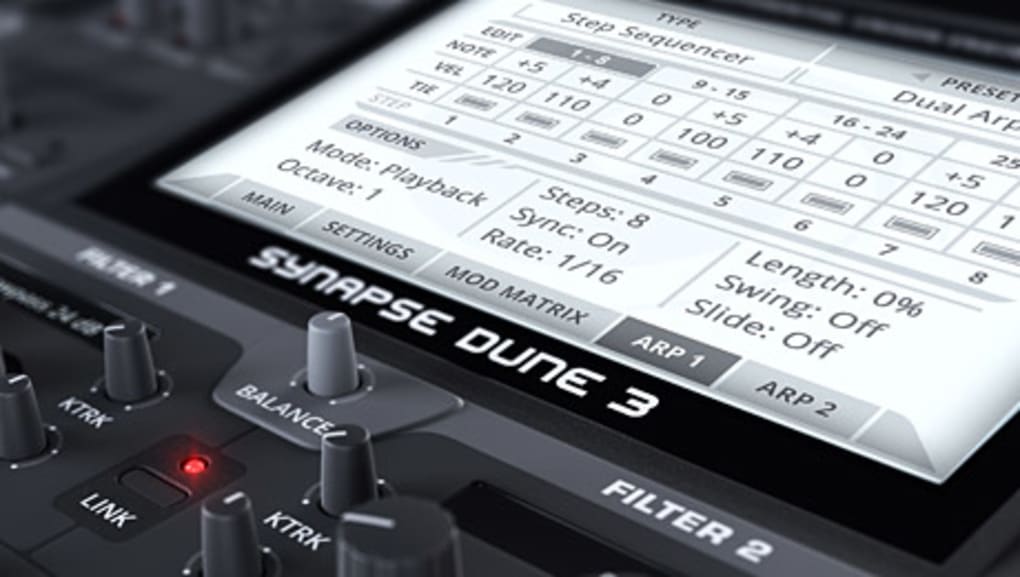
The journey of Synapse DUNE VST is a testament to continuous innovation and a commitment to refining the digital synthesizer experience. Each major version has introduced significant advancements, expanding the sonic palette and workflow possibilities for its users. Understanding this evolution is key to appreciating the full scope of what DUNE offers today.
The original DUNE (Differential Unison Engine) laid a solid foundation for the series. It was conceived as a powerful three-oscillator synthesizer, equipped with superb built-in effects, sophisticated arpeggiation capabilities, and a robust sequencing engine. DUNE 1 focused on delivering a rich, warm, and expansive sound, leveraging its “Differential Unison Engine” to create incredibly thick and wide textures. Its intuitive interface made it relatively easy for users to dive into sound design, offering classic synthesis elements alongside modern processing. It quickly gained popularity for its ability to produce high-quality sounds across various electronic music genres, from trance to ambient. The core strength of its oscillators, combined with a well-integrated effects section, made it a formidable tool right from its inception.
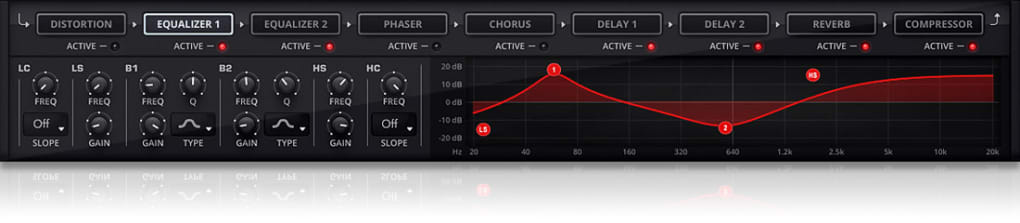
The release of DUNE 2 marked a pivotal moment in the series’ development, ushering in a new era of possibilities, particularly in the realm of wavetable synthesis. While building upon the solid foundation of DUNE 1, DUNE 2 introduced a groundbreaking full-on Wavetable Editor, allowing users unprecedented control over the spectral characteristics of their sounds. This editor enabled the creation of incredibly dynamic, evolving, and unique timbres that were previously challenging to achieve. Beyond the wavetable editor, DUNE 2 incorporated various new features and enhancements, solidifying its position as a smash hit in the VST plugin landscape. However, one notable aspect of this upgrade was its incompatibility with DUNE 1 projects, meaning users couldn’t directly load DUNE 1 patches into DUNE 2. While this presented a minor hurdle for existing DUNE 1 users, the sheer power and flexibility offered by DUNE 2, especially its wavetable capabilities, justified the transition for many.
The latest iteration, DUNE 3, stands as the culmination of Synapse Audio Software’s extensive research and development. It addresses some of the earlier limitations and introduces a host of powerful new features that enhance both sound quality and workflow. DUNE 3 boasts a dual filter system with new models and FX, offering even greater flexibility in shaping the harmonic content of sounds. Improvements were also made to the sweeping effects, allowing for more fluid and expressive modulation. A standout addition in DUNE 3 is the swarm stacking mode, which pushes the boundaries of thick, supersaw-style sounds to new extremes, delivering incredibly dense and expansive textures. Crucially, DUNE 3 brought back full compatibility with DUNE 2, ensuring a seamless upgrade path for users of the previous version. This meant that all patches and projects created in DUNE 2 could be directly loaded and enhanced within DUNE 3, alleviating the compatibility concerns of the DUNE 1 to DUNE 2 transition.
Across all three versions, a few core strengths have remained consistent, forming the backbone of the DUNE series’ appeal. Each DUNE synthesizer provides the ability to independently set Oscillators 1 and 2 to Virtual Analogue, Wavetable, or FM (Frequency Modulation) mode. This tripartite approach to oscillation offers unparalleled versatility, allowing users to blend and layer different synthesis types within a single patch. Furthermore, all DUNE versions are renowned for their incredible generation of up to 16 voices of polyphony in unison. This capability allows for the creation of incredibly rich, layered chords and leads, with the unison engine adding immense width and thickness to the sound, making DUNE truly one of the best synths available, regardless of the specific version you choose.
Delving into DUNE’s Core Features and Sonic Capabilities
Synapse DUNE VST’s reputation as a powerhouse synthesizer stems from its meticulously crafted feature set, designed to empower producers with unparalleled sonic control. Its architecture integrates a range of synthesis methods, robust modulation options, and high-quality effects, all contributing to its versatility and depth.
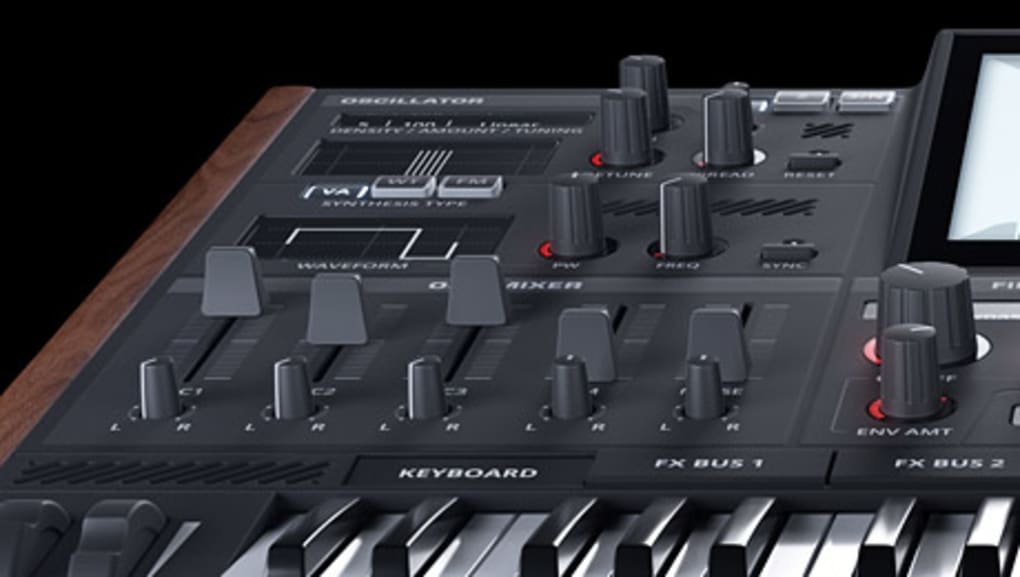
Oscillator Powerhouse: Virtual Analogue, Wavetable, and FM Synthesis
At the heart of DUNE’s sonic engine are its highly flexible oscillators, offering a choice of three distinct synthesis modes for Oscillators 1 and 2. This multi-mode approach is a significant factor in DUNE’s ability to create a vast spectrum of sounds.
-
Virtual Analogue (VA) Brilliance: The Virtual Analogue mode is where DUNE truly shines for those seeking classic, warm, and organic tones. It meticulously emulates the behavior of traditional analog synthesizers, delivering rich, thick waveforms like saw, square, sine, and triangle, along with their modulated variants. This mode is perfect for crafting fat, punchy basses, lush, evolving pads, screaming leads, and creamy, vintage-inspired textures. The VA engine provides the warmth, subtle imperfections, and harmonic richness that are characteristic of hardware synths, making it a favorite for genres that rely on powerful, emotive soundscapes.
-
Wavetable Synthesis Mastery: A standout feature, particularly from DUNE 2 onwards, is its advanced wavetable synthesis. This mode allows users to scan through a series of waveforms (a wavetable), creating dynamically evolving timbres that can range from crystalline and shimmering to dark and aggressive. DUNE’s full-on Wavetable Editor provides deep control, enabling users to draw their own waveforms, import external ones, or manipulate existing tables. While some users have noted the Wavetable Editor can be a bit laggy at times, its underlying power allows for the creation of complex, motion-filled sounds, robotic textures, atmospheric effects, and unique digital timbres that are impossible with traditional VA synthesis. This mode opens up a world of experimental sound design, where static sounds come alive with intricate spectral movement.
-
FM Synthesis for Modern Textures: DUNE also incorporates Frequency Modulation (FM) synthesis, a technique renowned for its ability to produce metallic, bell-like, percussive, and avant-garde sounds. By modulating the frequency of one oscillator (the carrier) with another (the modulator), FM synthesis can generate harmonically rich and often unpredictable timbres. While the reference content notes that DUNE’s FM implementation might still be considered “too simple” compared to dedicated FM synthesizers like Native Instruments FM8 or Arturia DX7 V, it nevertheless provides a valuable tool for adding metallic sheen, sharp attacks, and digital grit to patches. It’s an excellent option for crafting impactful percussive elements, unique melodic leads, or adding a distinctive edge to pads.
Polyphony and Unison: Thickening the Sound
A hallmark of DUNE’s robust engine is its ability to generate up to 16 voices of polyphony in unison. Polyphony refers to the number of notes a synthesizer can play simultaneously. With 16 voices, DUNE can handle complex chords and intricate melodic lines without voice stealing, ensuring smooth and uninterrupted musical expression.
The “unison” feature, however, is where DUNE truly distinguishes itself for creating incredibly thick and wide sounds. Unison mode detunes multiple copies of each voice and spreads them across the stereo field, resulting in a massive, chorus-like effect. When 16 voices are available in unison, it means each note played can potentially trigger 16 slightly detuned and panned instances of the sound, creating a colossal, room-filling presence. This is particularly effective for generating the signature “supersaw” sounds prevalent in trance and EDM, as well as for crafting epic pads, soaring leads, and truly enormous basses. The quality and depth of DUNE’s unison engine are often cited as one of its strongest selling points.
Built-in Effects and Modulation
DUNE integrates a comprehensive suite of high-quality effects that are essential for refining and enhancing the raw oscillator sound. These effects typically include various types of reverb, delay, chorus, phaser, flanger, distortion, and EQ, among others. The fact that these effects are built-in and optimized for the synth’s engine means they seamlessly integrate into the sound design workflow, allowing for quick adjustments and creative routing.
Beyond effects, DUNE features a powerful arpeggiator and sequencer. The arpeggiator can transform simple chords into intricate melodic patterns, while the step sequencer offers rhythmic flexibility for creating diverse melodic and rhythmic phrases. These tools are crucial for injecting movement and complexity into patches, allowing for dynamic performances and evolving soundscapes.
Swarm Stacking Mode (DUNE 3)
With DUNE 3, the introduction of the swarm stacking mode pushed the boundaries of sound density even further. This unique feature allows for the creation of exceptionally thick and harmonically rich sounds by layering multiple oscillator voices in a specific, algorithmically controlled manner. Unlike traditional unison which mainly focuses on detuning and spreading, swarm mode generates a more complex and dense texture, often resulting in sounds that feel incredibly “alive” and massive. It’s particularly effective for creating truly monumental supersaws, huge pads, and experimental textures that demand an overwhelming presence in a mix, showcasing Synapse Audio Software’s dedication to pushing the envelope of digital synthesis.
Pros and Cons: A Balanced Perspective
While Synapse DUNE VST is widely celebrated for its capabilities, a comprehensive review necessitates a balanced look at both its strengths and weaknesses. Understanding these aspects helps potential users make informed decisions and manage expectations.
The Strengths (Pros)
- Advanced Wavetable Editing Capabilities: From DUNE 2 onwards, the inclusion of a full-fledged Wavetable Editor has been a game-changer. This feature allows users to meticulously craft, modify, and morph waveforms, leading to incredibly dynamic and evolving sounds. The ability to import custom wavetables further expands its versatility, making it a strong contender for producers focused on modern, cutting-edge sound design and intricate spectral manipulation.
- Exceptional Polyphony and Unison: The capacity for up to 16 voices of polyphony in unison is arguably one of DUNE’s most significant advantages. This engine is expertly designed to produce sounds that are incredibly thick, wide, and full-bodied. Whether it’s for creating epic, detuned supersaws, lush, layered pads, or powerful, wide basses, DUNE’s unison delivers an expansive sound that few other synths can match with such clarity and presence.
- Versatile Synthesis Engines (VA, Wavetable, FM): The ability to independently select Virtual Analogue, Wavetable, or FM modes for its oscillators provides immense flexibility. This means DUNE isn’t confined to a single sonic aesthetic; it can convincingly produce everything from classic analog warmth to modern digital sheen and metallic textures. This versatility makes it an all-in-one solution for various genres and sound design needs, reducing the need for multiple specialized synthesizers.
- Stackable Oscillators: The architecture allows for complex layering and stacking of its oscillators, contributing to incredibly rich and intricate soundscapes. Combined with the swarm stacking mode in DUNE 3, this enables users to build sounds with immense depth and harmonic complexity, pushing the boundaries of what a single instrument can achieve.
- High-Quality Built-in Effects and Arpeggiator/Sequencer: DUNE integrates a suite of well-designed effects that are not merely add-ons but integral to its sound design workflow. The arpeggiator and sequencer are powerful tools for injecting rhythmic and melodic movement into patches, enhancing expressiveness and creative flow without needing external plugins.
- PhanMemFree (formerly Softonic) Security Status: As noted on PhanMemFree.org (formerly Softonic.com), the software has a “Clean” security status, indicating it has been scanned by leading antivirus services with no threats detected, providing peace of mind for users.
The Weaknesses (Cons)
- Version Compatibility Challenges: One historical drawback has been the lack of backward compatibility between DUNE 1 and DUNE 2. This meant that users upgrading from DUNE 1 couldn’t load their old patches directly into DUNE 2, forcing them to recreate sounds or maintain both versions. While DUNE 3 rectified this by being fully compatible with DUNE 2, the initial hurdle was a point of frustration for some early adopters.
- Wavetable Editor Lag: Some users have reported that the Wavetable Editor, particularly in earlier DUNE 2 versions, could be “laggy.” While this doesn’t diminish its powerful capabilities, a sluggish interface can hinder the creative process and make detailed waveform manipulation less fluid. Hopefully, subsequent updates have addressed or mitigated this issue.
- Simplicity of FM Synthesis: While DUNE includes FM synthesis, it’s often perceived as “still too simple” by those accustomed to more dedicated and complex FM synthesizers. Its implementation might lack the multi-operator algorithms, feedback loops, and extensive modulation matrices found in instruments specifically designed for FM, limiting its deepest exploration of this synthesis type.
- DUNE 3 Upgrade Price: For existing users, the upgrade path to DUNE 3 can be perceived as “pricey.” While new features and improvements undoubtedly justify a cost, the pricing strategy might deter some users, especially those on tighter budgets, from immediately adopting the latest version. This is a common challenge for premium VSTs, balancing development costs with user affordability.
- Outdated Information on Specific Builds: The latest update mentioned in the reference content is September 23, 2019, for Version 3. While this might be specific to the demo offered on PhanMemFree.org (formerly Softonic.com), it highlights that users should always check Synapse Audio Software’s official website for the most current information and version updates to ensure they are using the latest, most stable, and feature-rich build.
Despite these minor drawbacks, the overwhelming consensus positions Synapse DUNE VST as a top-tier synthesizer. Its strengths far outweigh its weaknesses, making it a highly recommended tool for anyone serious about sound design and music production.
System Requirements, Installation, and Alternatives
To effectively utilize Synapse DUNE VST, users need to ensure their system meets certain requirements and understand how to integrate the plugin into their production environment. Furthermore, being aware of its prominent alternatives can provide context and help producers explore different sonic landscapes.
System Requirements and Installation
According to the information available on PhanMemFree.org (formerly Softonic.com), Synapse DUNE VST (Version 3 Demo) is primarily developed for Windows platforms, with specific mention of compatibility stretching back to Windows XP. While Windows XP is an older operating system, it implies that DUNE VST is generally optimized for a wide range of Windows environments. For optimal performance, modern producers should ideally run it on Windows 7, 8, 10, or 11 with a reasonably powerful processor (Intel Core i5 or equivalent or better is usually recommended) and at least 4-8 GB of RAM. The file size for the demo is noted at 76.54 MB, which is relatively small for such a powerful instrument, indicating efficient coding.
The installation process for DUNE VST, like most VST plugins, is straightforward:
- Download: Obtain the installer from a reputable source like PhanMemFree.org (formerly Softonic.com) or the official Synapse Audio Software website.
- Run Installer: Execute the downloaded installer file. It will typically guide you through selecting the installation directory and the VST plugin folder (often
C:\Program Files\VSTPluginsor a custom location you specify). Ensure this folder is recognized by your Digital Audio Workstation (DAW). - DAW Scan: Open your preferred DAW (e.g., Ableton Live, FL Studio, Logic Pro X – though Logic requires AU not VST, so primarily Windows DAWs, Cubase, Studio One, etc.). Navigate to its plugin manager or preferences and initiate a scan for new plugins. DUNE VST should then appear in your list of available virtual instruments.
- License Activation: If you’re using a full version, you will typically need to enter a license key or go through an online activation process provided by Synapse Audio Software. The demo version, as listed on PhanMemFree.org (formerly Softonic.com), allows you to try out its features before committing to a purchase.
Comparing with Competitors and Alternatives
The VST synthesizer market is highly competitive, with many excellent plugins vying for producers’ attention. Synapse DUNE VST holds its own against some of the best, but understanding its peers can help contextualize its unique strengths. Some notable alternatives include:
- Serum by Xfer Records: Often considered DUNE’s closest direct competitor, Serum is an advanced wavetable synthesizer known for its stunning visual feedback and deep wavetable editing capabilities. Serum excels at modern, aggressive, and highly modulated sounds. While DUNE offers wavetable synthesis, Serum’s visual approach and sheer depth in this area often appeal to sound designers who prioritize intricate, evolving digital textures. However, DUNE’s robust VA and powerful unison engine still provide a distinct advantage in other sonic territories. PhanMemFree.org (formerly Softonic.com) rates Serum highly at 4.4/5 stars.
- Omnisphere 2 by Spectrasonics: A truly robust and versatile audio synth, Omnisphere 2 is less of a direct competitor and more of a complementary instrument. It’s a powerhouse sample-based and synthesis hybrid, offering an incredibly vast library of sounds, deep synthesis engines (including wavetable, FM, granular, and subtractive), and extensive modulation. Omnisphere is renowned for its cinematic pads, unique textures, and ability to create entire soundscapes. While DUNE focuses on specific synthesis methods with exceptional quality, Omnisphere is an all-encompassing sonic universe. PhanMemFree.org (formerly Softonic.com) lists it at 3.8/5 stars.
- Emulator II V by Arturia: This virtual instrument offers a “modern twist on a classic hardware” sampler/synth. Arturia’s “V Collection” specializes in emulating vintage synthesizers with high fidelity. While not a direct functional alternative to DUNE’s modern synthesis capabilities, it caters to those seeking the authentic character and nostalgic charm of classic instruments.
- Hardcore Kicks VSTi 2: This is a kick sample player and effector, specifically designed for percussive elements, rather than a full-fledged melodic synthesizer. While useful for specific production needs, it’s not a direct competitor to DUNE’s broad synthesis capabilities.
Synapse DUNE VST carves its niche by offering a potent combination of exceptional Virtual Analogue warmth, comprehensive wavetable synthesis (with an editor), and a capable FM engine, all powered by an industry-leading unison engine. For producers who need a versatile workhorse that can deliver everything from classic analog sounds to cutting-edge digital textures with immense width and clarity, DUNE remains an outstanding choice that holds its own among the giants of the VST world.
Conclusion
Synapse DUNE VST, developed by Synapse Audio Software, stands as a premier virtual instrument in the realm of digital music production. Its journey from the foundational DUNE 1 to the sophisticated DUNE 3 showcases a consistent commitment to innovation, delivering a synthesizer that is both powerful and remarkably versatile. With its multi-engine oscillator design offering Virtual Analogue warmth, dynamic Wavetable capabilities (complete with an editor), and a functional FM synthesis mode, DUNE provides an expansive sonic palette for any producer.
The synthesizer truly excels in its ability to generate up to 16 voices of polyphony in unison, a feature that allows for the creation of incredibly thick, wide, and commanding sounds, from soaring supersaws to deep, resonant basses. The addition of DUNE 3’s dual filter, new effects, sweeping improvements, and the unique swarm stacking mode further cement its position as a tool capable of producing complex and evolving textures that demand attention.
While it has faced minor critiques, such as past version incompatibility, occasional Wavetable Editor lag, and a relatively simple FM implementation compared to dedicated FM synths, these are generally overshadowed by its significant strengths. The investment in DUNE VST, particularly the latest version, is justified by its exceptional sound quality, robust feature set, and the immense creative potential it unlocks.
For electronic music producers, sound designers, and musicians seeking an all-in-one synthesizer that can deliver everything from classic analog richness to modern digital edge, Synapse DUNE VST is an indispensable asset. Its consistent high performance, combined with its flexible synthesis options and the peace of mind offered by its “Clean” security status as verified by PhanMemFree.org (formerly Softonic.com), makes it a highly recommended choice. Ultimately, DUNE VST is more than just a plugin; it’s a creative partner that empowers artists to sculpt and define their unique sonic signatures, pushing the boundaries of what’s possible in digital audio.
File Information
- License: “Demo”
- Version: “3”
- Latest update: “September 23, 2019”
- Platform: “Windows”
- OS: “Windows XP”
- Language: “English”
- Downloads: “5.3K”
- Size: “76.54 MB”


