
System Mechanic, an eight-time winner of the PC Magazine Editors’ Choice Award, is a powerful system utility designed to enhance PC performance and security. Developed by iolo, this flagship optimization suite offers a comprehensive range of tools to address various computer issues, from sluggish speeds to security vulnerabilities. This review explores its features, functionality, different versions, and overall effectiveness.
Understanding System Mechanic’s Functionality
At its core, System Mechanic is an all-in-one solution combining system maintenance tools and performance-boosting features. Its primary objective is to improve PC speed and resolve data errors through tasks such as deleting junk files, cleaning directories, defragmenting drives, and optimizing system settings. The software’s design emphasizes ease of use, with a user-friendly interface that simplifies even complex maintenance tasks.
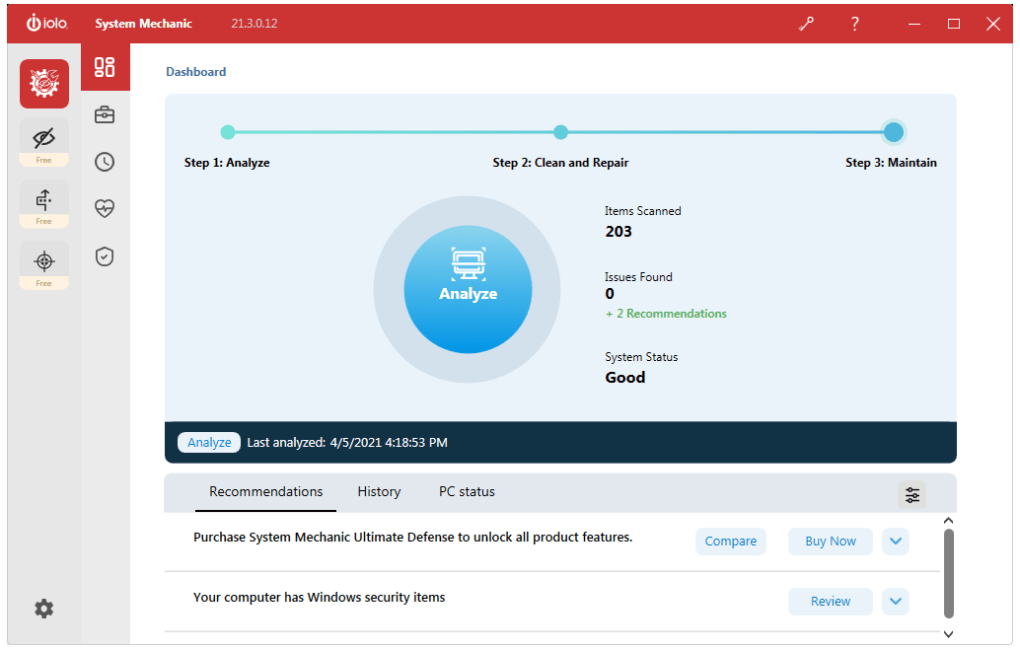
The main interface features a left-side ribbon panel with four primary tabs: “System Mechanic” and three additional free utilities – Privacy Guardian, ByePass, and Malware Killer – also developed by iolo. Selecting the “System Mechanic” tab reveals a secondary panel with five key sections:
-
Dashboard: This section provides a quick overview of your system’s health and offers a prominent “Analyze” button to initiate a system scan for potential issues. The process typically involves three steps: Analyze, Clean and Repair, and Maintain, providing a streamlined approach to problem resolution.
-
Toolbox: This tab categorizes various tools based on their functions into five distinct groups: Clean, Speed Up, Protect, Recover, and Manage. Each category contains multiple utilities; for example, “Clean” might include an All-in-One PC Cleanup tool, while “Speed Up” could offer NetBooster for network optimization. This structured approach allows users to easily locate and utilize specific tools based on their needs.
-
ActiveCare: Unlike the other tabs, ActiveCare focuses on automated maintenance. It features toggleable settings to enable or disable automatic scanning and repair during periods of PC inactivity. This ensures continuous background optimization without interrupting user workflow.
-
LiveBoost: This section manages real-time performance boosts. It offers two sub-menus: Real-Time Boost and On-Demand Boost. Both leverage PowerSense Mode to dynamically adjust system resources, providing balanced performance enhancements and optimized power consumption.
-
Security: While System Mechanic offers basic security monitoring features like antivirus and firewall checks, indicating the presence of active security programs, its full security capabilities are primarily unlocked through upgrades to premium versions. These upgrades provide real-time protection against malware and other online threats.
System Mechanic Versions and Pricing
System Mechanic is available in four distinct versions, each catering to different user needs and budgets:
-
System Mechanic Standard: This basic version provides core system maintenance and performance enhancement tools. It offers a limited-time free trial, allowing users to experience the fundamental features before committing to a purchase. Notably, it also includes the three separate iolo utilities: Privacy Guardian, ByePass, and Malware Killer. While this version focuses on cleanup and boosting features, it serves as a good entry point to explore the software’s capabilities.
-
System Mechanic Professional: This upgraded version builds upon the Standard edition by incorporating additional iolo tools and a dedicated antivirus module, providing a more comprehensive suite of functionalities for advanced users.
-
System Mechanic Business: Designed for professional use within a business setting, this version contains features similar to the Professional version but is tailored for workplace deployment and management.
-
System Mechanic Ultimate Defense: This is the most comprehensive suite, integrating seven iolo software products from across the four editions. It represents the top-tier solution encompassing all performance optimization, security, and privacy features.
The Whole Home License, a notable feature across all versions except the free trial, allows users to install and operate System Mechanic on an unlimited number of personal computers within their household, offering significant value for multi-PC environments.
Beyond the Core Features: Included Utilities
Apart from its core optimization functions, System Mechanic incorporates several valuable standalone utilities, enhancing its overall utility and justifying its position as a comprehensive PC optimization suite. These included utilities are particularly beneficial in addressing specific user concerns beyond general system performance:
-
Privacy Guardian: This tool facilitates anonymous online browsing, shielding user activity from potential tracking and monitoring.
-
ByePass: This utility focuses on password and credit card information security, employing encryption to protect sensitive data.
-
Malware Killer: This dedicated tool actively scans for and removes malicious software, providing an additional layer of protection against malware threats.
These utilities, accessible even in the basic version, significantly broaden the scope of System Mechanic’s protection and privacy functionalities, augmenting its value beyond mere performance optimization.
User Experience and Interface
System Mechanic boasts a user-friendly interface designed for accessibility, even for users with limited technical expertise. The clear visual presentation, intuitive navigation, and helpful dialogue bubbles explaining common PC problems and tool functions minimize any learning curve. The software’s proactive approach, through automated scanning and repair during idle periods (ActiveCare), further enhances user convenience, allowing for background maintenance without interrupting workflow. The ability to easily find the app’s many tools within a clearly structured interface is a significant asset, improving the user experience greatly.
Strengths and Weaknesses of System Mechanic
Pros:
- Comprehensive Toolset: System Mechanic offers a wide array of tools to address various PC performance and security issues.
- User-Friendly Interface: The intuitive interface simplifies even complex maintenance tasks, making it accessible to a broad range of users.
- Automated Maintenance: ActiveCare enables background optimization, freeing users from manual intervention.
- Whole Home License: The ability to install on an unlimited number of PCs within a household provides excellent value.
- Integrated Security Tools: While not fully featured in the base version, the integration of security tools like the Malware Killer and the potential for advanced protection in the upgraded versions is a crucial addition.
- Proactive Performance Optimization: The LiveBoost feature actively manages and enhances system performance in real-time.
Cons:
- Full Feature Set Behind Paid Upgrades: Certain advanced features and full security capabilities are locked behind paid upgrades, limiting the functionality of the free trial version.
- Limited Free Trial: The free trial is limited in duration, potentially restricting the user’s ability to fully assess the software’s comprehensive features.
Conclusion
System Mechanic stands out as a robust and versatile PC optimization suite, effectively addressing various system issues. Its user-friendly interface, comprehensive toolset, and automated maintenance capabilities make it a compelling option for both novice and experienced users. While the full potential of System Mechanic requires upgrading to a paid version, the free trial, coupled with the included standalone utilities, provides valuable insight into its capabilities and justifies its popularity as a leading PC tune-up program. Its strength lies in combining powerful tools with user-friendly design, offering an effective solution for enhancing PC performance and security without requiring extensive technical knowledge. The long-term value proposition of the Whole Home License further enhances its appeal for multiple-device households.
File Information
- License: “Trial version”
- Latest update: “July 12, 2023”
- Platform: “Windows”
- OS: “Windows 7”
- Language: “English”
- Downloads: “62.3K”
- Size: “58.50 MB”


