
In today’s digital age, capturing and sharing information from the web is a daily necessity for professionals, students, researchers, and casual users alike. While basic screenshot functionalities are built into most operating systems, they often fall short when it comes to capturing the entirety of a web page, especially long, scrollable content. This is where specialized tools like FireShot step in, offering a robust and intuitive solution for taking comprehensive webpage screenshots. FireShot, a powerful utility developed by getfireshot.com, provides Windows users with an effortless way to capture full web pages or specific selections, saving them in a variety of convenient formats such as PDF, PNG, or JPEG. It transcends the limitations of standard screen capture, transforming a cumbersome task into a streamlined process, enhancing productivity and communication.
For anyone who frequently needs to document, archive, or share web content, FireShot emerges as an indispensable tool. Its design philosophy centers around ease of use, featuring an intuitive user interface that makes it accessible to individuals with varying levels of technical expertise. Whether you’re compiling research, creating tutorials, reporting bugs, or simply saving interesting articles for offline viewing, FireShot ensures that every pixel of the desired web content is captured with precision and clarity. The ability to save captures in multiple formats further enhances its versatility, allowing users to choose the best output for their specific needs, from high-quality images to universally compatible documents. This introduction sets the stage for a deeper dive into FireShot’s capabilities, its benefits, and why it has become a preferred choice for comprehensive webpage capture on Windows systems.
The Essential Tool for Comprehensive Webpage Capture
The internet is a vast ocean of information, and often, we encounter content that we need to preserve, analyze, or share in its original layout. Traditional screenshot methods, such as the ‘Print Screen’ key, are typically limited to capturing only what is visible on the screen. This constraint becomes a significant hurdle when dealing with lengthy articles, intricate designs, or data-rich reports that extend far beyond the visible viewport. FireShot addresses this fundamental challenge head-on, offering a sophisticated yet simple mechanism to capture entire web pages, irrespective of their length. This capability is not just a convenience; it’s a critical feature that empowers users to work more efficiently and effectively with web-based content.
Imagine a scenario where you need to document an entire product page for a competitive analysis, or perhaps save a legal disclaimer that spans several scrolls. Without FireShot, this would typically involve taking multiple screenshots, meticulously stitching them together in an image editor – a time-consuming and often frustrating endeavor prone to errors and misalignments. FireShot eliminates this manual labor by automatically scrolling through the page and assembling a single, seamless image or PDF document. This automated process ensures accuracy, preserves the original layout and formatting, and saves invaluable time. It’s a testament to how a specialized tool can significantly enhance workflow efficiency, turning a complex task into a one-click operation.
Beyond full-page captures, FireShot also provides the flexibility to capture selected parts of a web page. This feature is equally vital, allowing users to isolate specific elements, sections, or regions of interest without including extraneous content. For example, if you only need a particular chart from a financial report or a specific comment thread from a forum, FireShot allows you to define a precise selection area. This granular control over the capture process ensures that your screenshots are focused, relevant, and free from clutter. This dual capability – capturing both the entire page and specific selections – makes FireShot an incredibly versatile tool adaptable to a wide array of user requirements, from comprehensive archiving to targeted information extraction. The precision and ease with which FireShot handles these tasks underscore its value as an indispensable utility for anyone interacting with web content on a regular basis.
Unlocking Productivity with FireShot’s Versatile Features
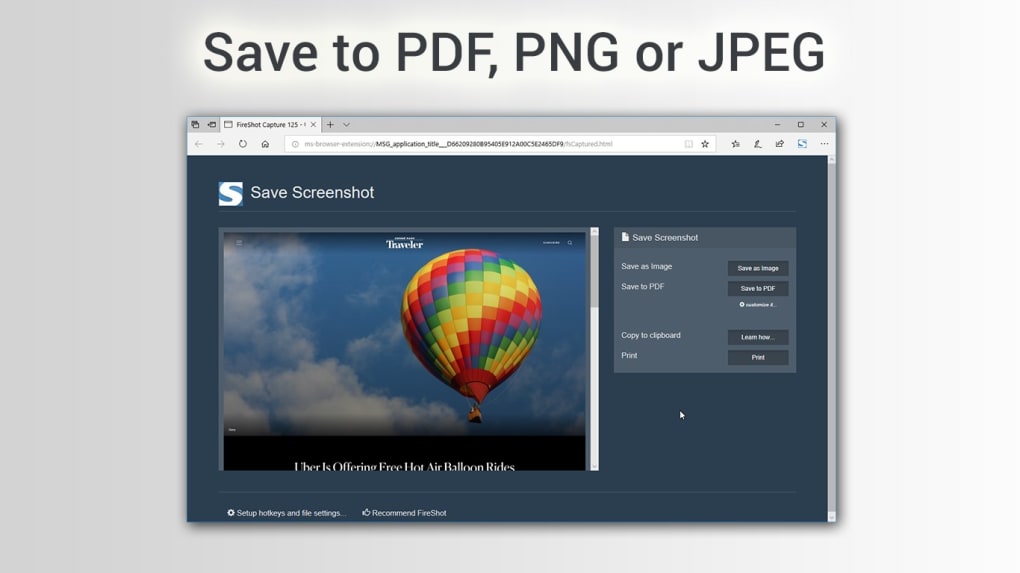
FireShot isn’t just about taking screenshots; it’s about transforming how users interact with and utilize web content for enhanced productivity. Its suite of versatile features extends beyond basic capture, offering functionalities that cater to diverse professional and personal needs. The ability to save screenshots in multiple formats – PDF, PNG, and JPEG – is a cornerstone of this versatility, providing users with strategic choices based on their specific objectives.
Saving as a PDF (Portable Document Format) is particularly advantageous for documentation, archiving, and sharing. When a web page is captured as a PDF, it essentially becomes a static, universally readable document that preserves the original layout, text, and images. This is ideal for legal documents, detailed reports, or long articles where readability and faithful reproduction are paramount. PDFs are also easy to share and can be viewed on virtually any device or operating system without specialized software, ensuring that your captured web content is accessible to a broad audience. For business professionals, educators, or researchers, exporting to PDF means creating professional-grade web archives that are easily searchable and printable.
The PNG (Portable Network Graphics) format, on the other hand, is a lossless image compression format, making it perfect for high-quality image captures. When precision and visual fidelity are critical – for instance, when capturing intricate UI designs, detailed infographics, or high-resolution photographs from a web page – PNG ensures that every pixel is preserved without any loss of quality. This makes it an excellent choice for graphic designers, web developers, or anyone who requires pixel-perfect representations of web elements. PNGs support transparency, which can be useful if FireShot were to offer advanced editing features (though the base description does not explicitly state this, it’s a common benefit of PNGs for potential future integration or user manipulation in other editors).
Finally, the JPEG (Joint Photographic Experts Group) format is widely known for its efficient compression, which results in smaller file sizes. While it uses lossy compression, it’s an excellent choice for general-purpose image sharing, especially when file size is a consideration and minor image degradation is acceptable. JPEGs are widely supported across all platforms and are ideal for quick sharing via email, social media, or embedding into presentations where quick loading times are important. For everyday captures, news articles, or informal sharing, JPEG provides a good balance between quality and file size.
Beyond saving formats, FireShot also facilitates immediate sharing. The provision to send screenshots to others by email online directly from the application streamlines communication workflows. This eliminates the need to manually save the file, open an email client, compose a new message, and attach the file. With FireShot, the entire process of capture, saving, and sharing is consolidated, significantly boosting productivity and ensuring that critical information can be disseminated rapidly and efficiently. This level of integration and ease-of-use ensures that FireShot is not just a capture tool, but an integral part of a modern, efficient digital workflow.
Seamless Integration and User Experience on Windows
One of FireShot’s most compelling attributes is its seamless integration and user-friendly experience, particularly for Windows users. In a digital landscape where software often comes with steep learning curves or complex installation processes, FireShot distinguishes itself through its simplicity and accessibility. It’s designed to be a utility that “just works,” providing powerful functionality without demanding extensive technical knowledge from its users.
The installation process for FireShot on Windows systems is straightforward and hassle-free. As a free application available for download, users can acquire it quickly and begin using it almost immediately. This ease of access is a significant advantage, especially for individuals or organizations looking to implement a reliable screenshot solution without significant IT overhead. Once installed, FireShot typically integrates itself with your system, often appearing as an accessible option within your browser or as a standalone application on your desktop, ready to be invoked whenever a capture is needed.
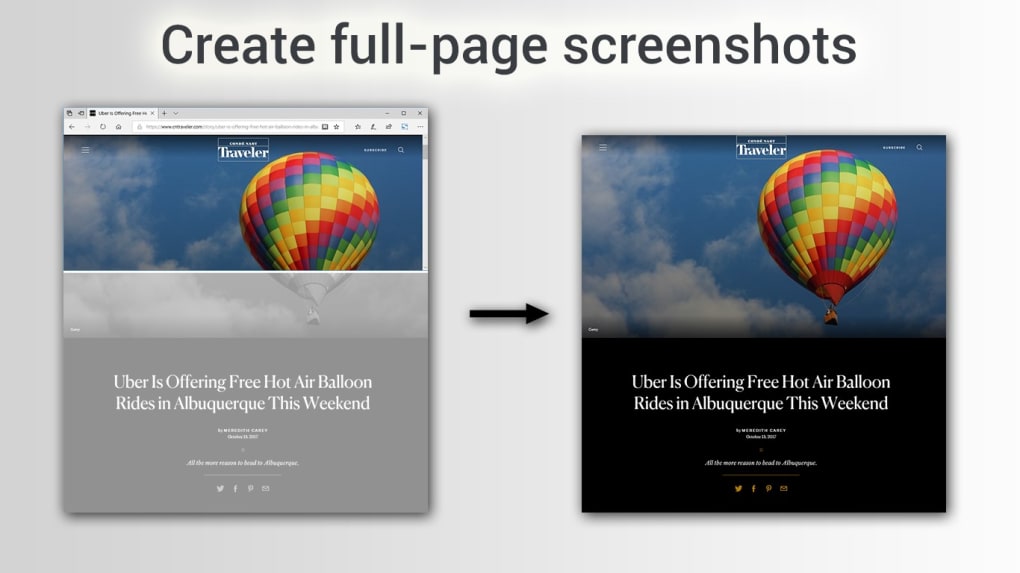
Central to FireShot’s appeal is its intuitive user interface (UI). An intuitive UI means that the design is logical, predictable, and easy to navigate, even for first-time users. The developers at getfireshot.com have clearly prioritized user experience, ensuring that the options for capturing, saving, and sharing are presented in a clear and understandable manner. Users don’t need to delve into complex menus or consult extensive manuals to perform basic tasks. The core functionalities – such as capturing the entire page, selecting a specific region, or choosing an output format – are typically available through clear buttons or easily recognizable icons. This simplicity minimizes the learning curve, allowing users to become proficient with the tool in a matter of minutes.
This focus on user-friendliness extends to its compatibility. FireShot is developed for Windows, supporting various versions (as indicated by “Windows 8” and general “Windows” platform listing). This broad compatibility ensures that a wide range of users, from those on older systems to those running the latest iterations of Windows, can benefit from its capabilities. The “varies-with-device” version information suggests continuous updates and optimization, ensuring that the tool remains current and performs optimally across different hardware configurations and software environments.
Moreover, the availability of FireShot as a free application further underscores its commitment to accessibility. While many advanced screenshot tools come with subscription fees or one-time purchase costs, FireShot provides its core, highly effective functionality without charge. This makes it an excellent option for individual users, small businesses, or educational institutions that require a robust screenshot solution but operate within budget constraints. The combination of easy installation, an intuitive interface, broad Windows compatibility, and a free license makes FireShot an exemplary utility, seamlessly integrating into the daily digital lives of its users and significantly enhancing their ability to manage web-based information.
Why FireShot Stands Out in the Screenshot Landscape
In a crowded market of digital tools, FireShot manages to carve out a significant niche for itself, particularly due to its specialized focus and robust execution. While many operating systems offer rudimentary screenshot capabilities, and various third-party applications exist, FireShot’s dedicated approach to webpage capture sets it apart. Its primary differentiator lies in its unparalleled ability to reliably capture entire, scrollable web pages, a feature that many generic screenshot tools either lack or implement poorly. This capability is not merely a bonus; it’s a foundational strength that addresses a common pain point for countless users.
Consider the alternatives: the ‘Print Screen’ key on Windows will only capture the visible portion of a page. Snipping Tool offers selected region capture but again, only from what’s currently displayed. Browser extensions might exist, but their reliability, security, and update frequency can vary wildly. Many users might resort to manual scrolling and multiple captures, followed by painstaking image stitching. This fragmented approach is not only inefficient but also introduces a higher risk of errors, such as misaligned seams, missing sections, or inconsistent resolutions. FireShot, by automating the entire scrolling and stitching process, delivers a complete and accurate capture every single time, saving users from these cumbersome manual tasks.
Another aspect that makes FireShot stand out is its commitment to security and reliability, as often validated by platforms like PhanMemFree. PhanMemFree, through its rigorous scanning processes, categorizes FireShot as “Clean,” meaning it’s “extremely likely that this software program is clean.” This verification is crucial in an age where users are increasingly wary of downloading and installing third-party software. Knowing that a tool has been vetted for potential threats provides peace of mind, reinforcing FireShot’s position as a trustworthy utility. This security status, coupled with its consistent performance and regular updates (as suggested by the “July 17, 2023” update date), builds confidence in its long-term viability and dependability.
Furthermore, FireShot’s clear and intuitive user interface contributes significantly to its standout status. Some advanced screenshot tools, while powerful, can overwhelm users with an excess of features and complex settings. FireShot strikes an optimal balance, offering robust functionality for capturing entire web pages and saving in multiple formats, all accessible through a design that prioritizes ease of use. This makes it suitable for a broad audience, from casual internet users to demanding professionals, without requiring them to become experts in image manipulation. The direct email sharing functionality also integrates seamlessly into everyday workflows, further enhancing its appeal as a comprehensive and user-centric solution.
In essence, FireShot stands out not just for what it does, but how well it does it. It tackles a specific, common problem – capturing entire web pages – with precision, efficiency, and user-centric design. Its reliability, security assurances, and straightforward approach make it a superior choice compared to less specialized tools, transforming a potentially frustrating task into a smooth and productive experience for Windows users.
Technical Details and Assurance from PhanMemFree
Understanding the technical specifications and security status of any software is crucial before installation, and FireShot offers transparent information in this regard. As a robust utility provided by getfireshot.com, its technical footprint is designed to be efficient and broadly compatible, ensuring a smooth experience for its user base.
FireShot operates under a Free license, making it accessible to anyone without financial barriers. This model significantly contributes to its widespread adoption and allows individuals and businesses alike to leverage its powerful features without incurring costs. The version of the software is indicated as “varies-with-device,” which is common for applications that are frequently updated and optimized for different system configurations, ensuring ongoing performance improvements and bug fixes. The “Latest update” on “July 17, 2023,” highlights an active development cycle, signifying the developers’ commitment to maintaining and enhancing the tool.
The primary Platform for FireShot is Windows, confirming its dedicated design and optimization for this operating system environment. While specific OS requirements might vary with different versions, the general listing for “Windows 8” and the overall “Windows” platform suggests broad compatibility across modern Windows iterations. This ensures that a vast majority of Windows users can benefit from FireShot’s capabilities. The application is available in English, making it accessible to a wide international audience.
Statistics on its popularity and usage reflect a healthy engagement within the user community. With “2.5K last month’s downloads” recorded on platforms like PhanMemFree, it indicates a consistent interest and adoption rate. Such figures, while not absolute indicators of global usage, do point to a steady stream of new users discovering and installing FireShot.
A critical aspect of any software download is its Security Status. PhanMemFree employs a comprehensive scanning process to assess and certify the safety of software hosted on its platform. For FireShot, the security status is declared as “Clean.” This designation means that PhanMemFree’s team has “scanned the file and URLs associated with this software program in more than 50 of the world’s leading antivirus services; no possible threat has been detected.” This rigorous vetting process provides users with a high level of assurance that FireShot is free from malware, viruses, or other malicious components, thereby safeguarding their devices and data.
PhanMemFree’s commitment to user safety extends to a continuous review process. Each time a new file is uploaded, and periodically thereafter, files are reviewed to confirm or update their status. This proactive approach helps to ensure a malware-free catalog of programs and apps. In cases where a program might be flagged as “Warning” (potentially malicious or containing unwanted bundled software), PhanMemFree transparently explains that these flags might be “false positives” and encourages user feedback through a “Report Software” feature. However, FireShot’s “Clean” status means users can proceed with confidence, knowing that the application has met stringent security checks. This technical transparency and the robust security validation by PhanMemFree collectively enhance FireShot’s credibility and reliability, making it a trusted choice for Windows users seeking a dependable webpage screenshot utility.
Conclusion: Elevate Your Webpage Capture Workflow
In conclusion, FireShot stands as a premier solution for anyone in need of robust and reliable webpage screenshot capabilities on Windows systems. It successfully addresses the limitations inherent in standard screen capture methods, offering an expansive feature set designed to enhance productivity and streamline digital workflows. From its core ability to capture entire, scrollable web pages to its precise selection options, FireShot empowers users with unparalleled control over how they extract and preserve web content.
The versatility offered by multiple saving formats—PDF for professional documentation, PNG for high-fidelity images, and JPEG for efficient sharing—ensures that FireShot caters to a broad spectrum of user requirements. Its intuitive user interface, coupled with an easy installation process, makes it accessible to individuals of all technical aptitudes, transforming a potentially complex task into a simple, one-click operation. Furthermore, the explicit “Clean” security status, as rigorously verified by platforms like PhanMemFree, provides a crucial layer of trust and assurance, solidifying FireShot’s reputation as a safe and dependable utility.
Whether you are a student compiling research, a professional documenting web applications, a designer showcasing web layouts, or simply an internet user archiving interesting articles, FireShot offers a powerful, free, and secure tool to elevate your webpage capture workflow. It eliminates the tedious manual effort of stitching multiple screenshots and provides a seamless experience for capturing, saving, and sharing web content. By integrating FireShot into your digital toolkit, you unlock a more efficient, accurate, and professional approach to managing information from the web. Embrace FireShot today to experience a truly comprehensive and hassle-free way to capture the digital world.
File Information
- License: “Free”
- Version: “varies-with-device”
- Latest update: “July 17, 2023”
- Platform: “Windows”
- OS: “Windows 8”
- Language: “English”
- Downloads: “2.5K”


