
Tap Tempo is a straightforward Windows application designed to calculate the beats-per-minute (BPM) of a song. Its simplicity is both its strength and its weakness. While it effectively serves its core function—determining BPM through manual input—it lacks several features that could enhance its usability and accuracy. This review delves into the application’s capabilities, limitations, and overall effectiveness as a tool for musicians and audio enthusiasts.
Functionality and Usage
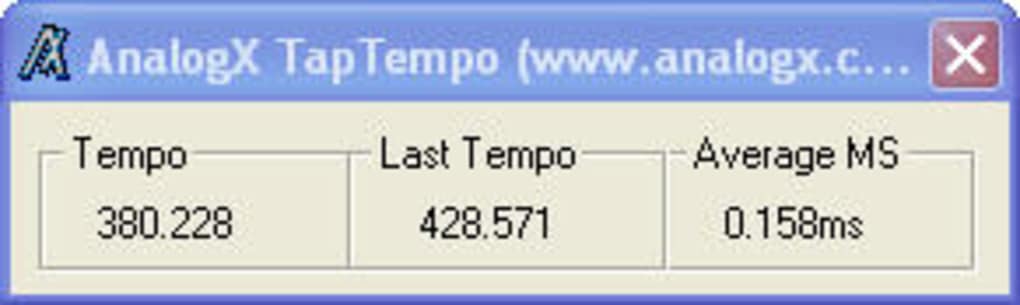
Tap Tempo’s primary function is remarkably simple: to calculate BPM based on the user’s tapping rhythm. The user initiates the song they wish to analyze and then proceeds to tap along with the beat using the spacebar. After a sufficient number of taps (generally 10-20), the application provides a BPM reading. This makes it a handy addition to audio editing software like Audacity or WavePad, which lack integrated BPM detection capabilities. The process is intuitive, requiring minimal technical expertise. Open the application, start your music, and tap. The results are displayed directly in the application’s window. This ease of use is a significant advantage for users who prefer a quick and uncomplicated solution.
However, this simplicity also underscores a key limitation. The accuracy of the BPM calculation entirely depends on the user’s rhythmic precision. Individuals with a strong sense of rhythm will likely obtain accurate results, while those less rhythmically inclined might find the calculated BPM to be less reliable. The absence of a reset function necessitates closing and reopening the application for each new BPM calculation, a minor inconvenience but one that could be easily addressed.

Strengths and Weaknesses
Tap Tempo’s core strength lies in its simplicity and ease of use. It effectively fills a niche for users needing a quick and easy way to determine BPM without complex software. The interface is minimalist and straightforward, requiring no learning curve. This is particularly beneficial for users who are unfamiliar with more advanced audio editing software or those who simply need a quick BPM estimation. Its small size also contributes to its accessibility, requiring minimal system resources. Furthermore, its availability as a free application makes it an attractive option for users on a budget.
However, several limitations detract from its overall effectiveness. The most significant drawback is its reliance on the user’s rhythmic accuracy. The absence of visual aids or alternative input methods, such as importing a waveform, limits its precision and usability for less rhythmically proficient individuals. The lack of a reset button forces users to restart the application for each new measurement, adding unnecessary steps to the process. Moreover, the application’s single-calculation limitation means only one BPM reading can be viewed at a time, making comparison of multiple readings inconvenient. While the program is perfectly functional in this regard, some additional features would significantly enhance the user experience.
Comparison with Alternative Applications
Compared to professional audio editing software like Audacity or Adobe Audition, Tap Tempo lacks the extensive feature set of those more comprehensive programs. Those applications offer more sophisticated BPM detection algorithms, often incorporating visual aids and more accurate measurement techniques. They provide users with a much more comprehensive range of functionalities, including editing, mixing, mastering, and more. Tap Tempo’s function is solely focused on BPM detection, and therefore lacks the multi-faceted capabilities of these professional-grade applications. However, this focused approach also makes it faster and easier to use for its specific purpose, provided the user possesses sufficient rhythmic ability.
Other dedicated BPM detection tools might offer more advanced features such as automatic BPM detection from audio files, visual beat representations, or export options for BPM data. These tools may also provide more sophisticated algorithms for analyzing complex musical rhythms. While Tap Tempo provides a quick solution, those seeking higher accuracy or more advanced features should investigate alternative applications specialized in BPM detection and analysis. The choice between Tap Tempo and a more feature-rich alternative depends on individual needs and technical proficiency.
Target Audience and Use Cases
Tap Tempo’s primary target audience is users requiring a simple and quick method for determining the BPM of a musical piece. This includes DJs who need to quickly match the BPM of different tracks during a mix, musicians composing music, or those working on video projects where synchronization to a particular BPM is crucial. Its simplicity and ease of use make it particularly useful for individuals who are not proficient in using complex audio editing software or who simply need a quick estimation of BPM.
However, its limitations mean it is not ideal for all applications. Professionals requiring highly accurate BPM measurements or those working with complex or irregularly timed music may find its limitations frustrating. Furthermore, users who lack a strong sense of rhythm may find the results to be unreliable. Therefore, while it caters to a niche user base, the application is best suited for casual use where quick and reasonably accurate BPM determination is sufficient.
Technical Aspects and System Requirements
Tap Tempo’s system requirements are minimal. It is designed for Windows operating systems, supporting versions dating back to Windows 2000. This broad compatibility ensures accessibility across a range of older and newer systems. The application’s small file size (338.06 KB) means it has a minimal impact on system resources, making it suitable for use on systems with limited processing power or memory. Its reliance on basic system functionalities keeps the technical requirements incredibly low.
The application’s development history is relatively simple. While its last update was in 2008, this simplicity is what made it so attractive in its time and even now. The application’s continued functionality in modern operating systems highlights its robust programming and design. The lack of recent updates, however, suggests that the development has ceased, leaving the potential for future improvements unrealized. This lack of continued development also highlights the potential need for alternative, more actively maintained software to fulfill similar functionalities.
Conclusion
Tap Tempo offers a simplistic solution for users needing a quick and easy way to calculate the BPM of music. Its ease of use and minimal system requirements are significant advantages. However, its reliance on user rhythm, lack of a reset function, and limited feature set restrict its suitability for professional use or users lacking a strong sense of rhythm. While it effectively fulfills its core function, more feature-rich alternatives might be preferable for users requiring higher accuracy or additional functionalities. For those seeking a basic, no-frills BPM calculator, Tap Tempo provides a quick and effective, if somewhat rudimentary, solution. The future of this tool may be as a historical artifact; it certainly highlights the advancements in audio software and highlights the need for continued updates and feature enhancements to accommodate users’ evolving needs.
File Information
- License: “Free”
- Version: “1.03”
- Latest update: “May 28, 2008”
- Platform: “Windows”
- OS: “Windows 2000”
- Language: “English”
- Downloads: “18K”
- Size: “338.06 KB”


