
In the modern educational landscape, learning management systems (LMS) like Canvas have become indispensable tools for students and educators alike. They serve as central hubs for course materials, assignments, grades, and communication. However, the sheer volume of information and tasks presented within these platforms can sometimes feel overwhelming, making effective organization and task tracking a significant challenge. This is where specialized tools come into play, designed to simplify complexity and enhance productivity. Among these, Tasks for Canvas™ stands out as a powerful and intuitive Google Chrome extension engineered specifically to address the assignment tracking needs of Canvas users.
Developed by Jeff Cheng, Tasks for Canvas™ is a free, highly-rated browser extension (boasting a 4.6-star rating) that transforms the daunting task of managing academic commitments into a clean, simple, and visually engaging experience. It’s more than just a calendar; it’s a proactive assistant that integrates seamlessly into your browsing experience, providing a constant, yet unobtrusive, overview of your academic responsibilities. This detailed article will delve into the myriad features, benefits, and the broader context of why Tasks for Canvas™ has become a trusted program for students aiming for academic excellence and reduced stress.
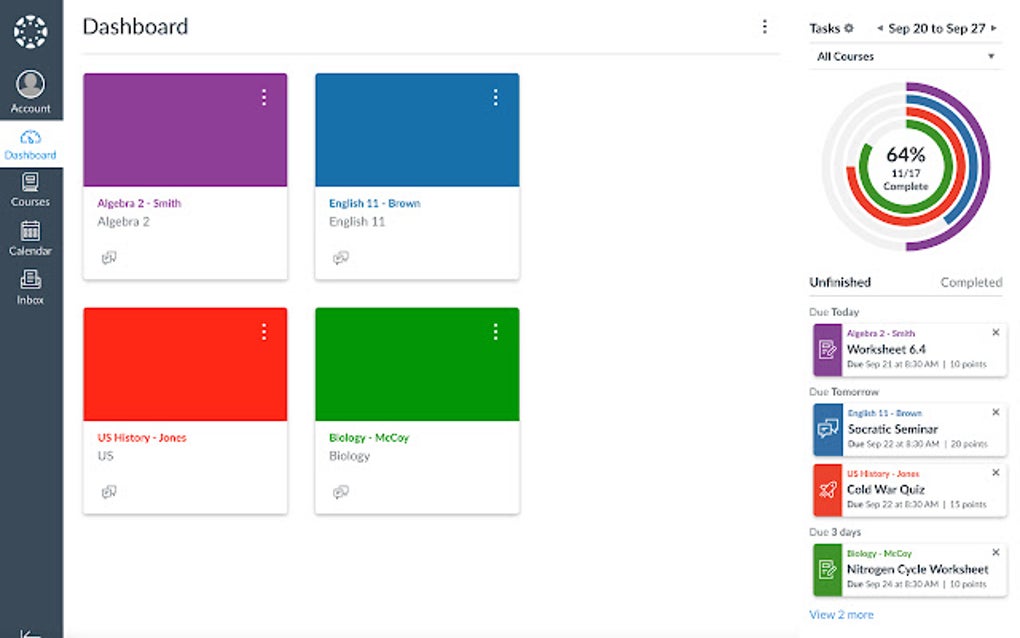
The core problem Tasks for Canvas™ solves is the often-fragmented nature of academic task management. Students might juggle multiple courses, each with its own set of assignments, quizzes, discussions, and projects, all with varying deadlines. While Canvas itself offers assignment lists and calendars, these can sometimes lack the immediate, at-a-glance summary and persistent reminders that many students require to stay on top of their workload. Tasks for Canvas™ bridges this gap by offering a dedicated side panel within your browser, transforming raw data into actionable insights and visual progress indicators.
The Expanding World of Browser Apps and Extensions
The digital ecosystem is constantly evolving, with apps and extensions playing an increasingly vital role in how we interact with information and accomplish tasks online. Browser extensions, in particular, have carved out a niche as lightweight yet powerful tools that augment the core functionality of web browsers. They extend capabilities, automate repetitive processes, provide quick access to information, and, in the case of productivity tools like Tasks for Canvas™, help users manage their digital lives more effectively.
For students, the proliferation of browser extensions means access to a wealth of tools that can assist with research, note-taking, citation management, and, crucially, task organization. Tasks for Canvas™ embodies the best of this trend. It’s not a standalone application that requires a separate download and installation process, nor does it demand significant system resources. Instead, it lives within your Google Chrome browser, ready to spring into action whenever you need it, and subtly working in the background to keep you informed.
The beauty of such an app lies in its targeted utility. Unlike broad-spectrum productivity suites, Tasks for Canvas™ focuses intently on one specific, critical area: Canvas assignment tracking. This specialized approach allows for a deeper integration and a more refined user experience tailored precisely to the needs of its target audience. It understands the nuances of Canvas’s structure and how students typically interact with their courses, offering features that directly address common pain points.
Moreover, the “Trusted Program” badge associated with Tasks for Canvas™ speaks volumes about its reliability and security. In an age where digital privacy and software integrity are paramount concerns, users can download and install this extension with confidence, knowing that it has been vetted for malicious code and adheres to accepted standards for browser extensions. This trust is fundamental to the widespread adoption of any digital tool, especially one that handles sensitive academic information.
Google Chrome: The Ideal Platform for Academic Productivity
When it comes to web browsers, Google Chrome holds a dominant position, largely due to its speed, extensive customization options, and the vast array of extensions available through the Chrome Web Store. For students, Google Chrome often serves as the primary gateway to their online learning environments, making it an ideal platform for productivity-enhancing tools like Tasks for Canvas™. The seamless integration of extensions within Chrome means that your task management system is always just a click away, without needing to open a separate application.
Chrome’s architecture supports a rich ecosystem of extensions, allowing developers like Jeff Cheng to create sophisticated tools that can interact with web pages, display custom interfaces, and store user preferences securely. This robust foundation is what enables Tasks for Canvas™ to provide a side panel overview, integrate a progress bar, and offer customizable settings directly within the browser window. The ease of installation – a “Free Download” button from the Chrome Web Store – further lowers the barrier to entry, making it accessible to anyone using Google Chrome.
The consistent and intuitive user interface of Chrome also contributes to a smoother experience with extensions. Users are generally familiar with managing extensions, accessing their options pages, and utilizing toolbar icons. Tasks for Canvas™ leverages this familiarity, ensuring that its features are easily discoverable and manageable. For example, accessing the extension’s settings page by clicking the gear icon next to its browser icon is a standard Chrome practice, making customization straightforward for even less tech-savvy users.
Furthermore, the cross-platform nature of Google Chrome means that students can benefit from Tasks for Canvas™ whether they are using a Windows PC, a Mac, or a Chromebook. This flexibility ensures that their academic tracking system is consistent, regardless of the device they are using, promoting a more cohesive and less fragmented digital workflow. This universality is a significant advantage in today’s diverse computing environments, where students might switch between devices frequently.
Installation and Customization: Getting Started with Tasks for Canvas™
Getting started with Tasks for Canvas™ is designed to be as straightforward as possible, reflecting its commitment to simplicity and user-friendliness. Available as a “Free Download for Google Chrome” on PhanMemFree.org and the Chrome Web Store, the installation process is typically a matter of a few clicks. Once installed, the extension seamlessly integrates into your browser, typically appearing as an icon in your Chrome toolbar.
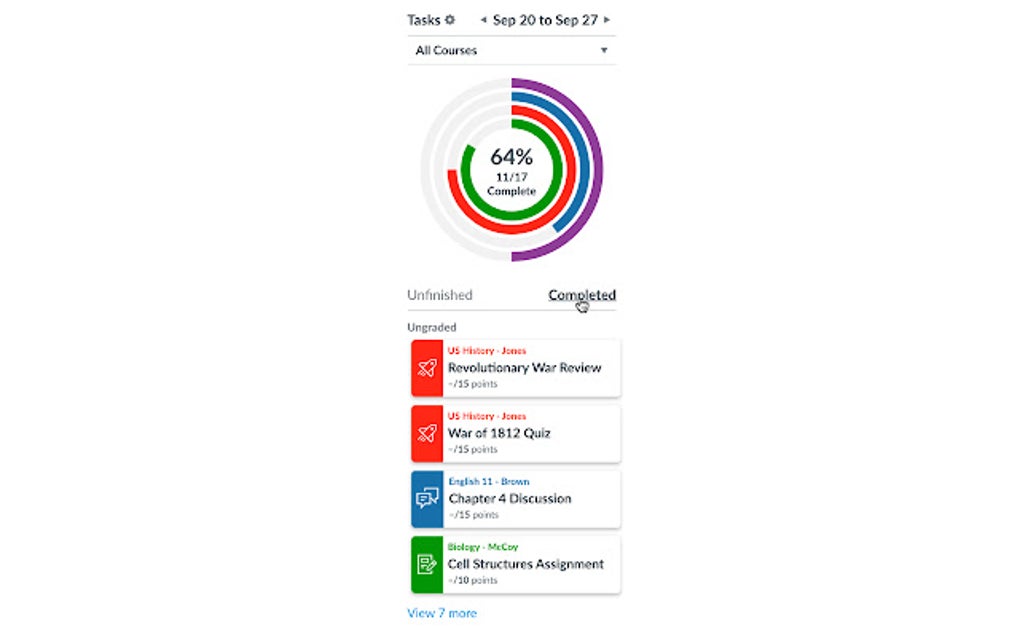
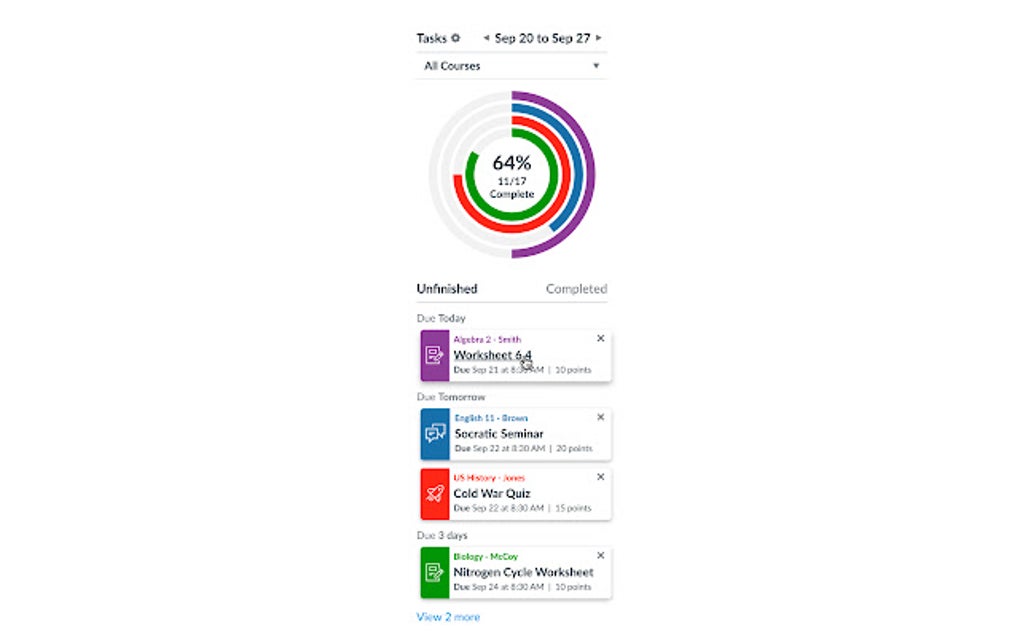
Upon installation, Tasks for Canvas™ immediately begins its work, providing “a clean, simple way for users to track their work.” The extension’s most prominent feature is its side panel, which can be accessed with ease, often by clicking the extension’s icon or a dedicated arrow next to the panel itself. This side panel is where the magic happens, offering “an overview of the assigned tasks.” It’s designed to be non-intrusive, allowing users to quickly glance at their workload without interrupting their primary browsing activity.
Customization is a cornerstone of any truly useful productivity tool, and Tasks for Canvas™ delivers on this front. While its default settings are highly effective, users have the ability to fine-tune the extension to better suit their individual preferences and academic routines. The settings page, accessible either from the side panel or by clicking the gear icon next to the extension’s icon in the web browser, unlocks a range of options.
One of the most crucial customization options is the “Your choice of Canvas API.” Users can “Choose the Canvas API you want to use, such as REST, OAUTH, or DYNAMIC.” This feature, while sounding technical, provides important flexibility.
- REST (Representational State Transfer) API is a common web service architecture, often used for data retrieval. Choosing this might mean a direct, perhaps simpler, connection for fetching assignment data.
- OAUTH (Open Authorization) is an open standard for access delegation, commonly used as a way for Internet users to grant websites or applications access to their information on other websites without giving them the passwords. This often implies a more secure and user-permission-based connection to your Canvas account.
- DYNAMIC could refer to an adaptive or automatically determined API method, potentially switching between options based on what Canvas system is detected or what offers the most optimal performance/security at the time.
This choice empowers users to configure the extension’s connection to their Canvas instance, potentially influencing data retrieval methods, security protocols, or performance. For the average user, the default setting is likely sufficient, but for those with specific technical requirements or preferences, this level of control is a significant advantage. The developer, Jeff Cheng, has designed the extension with both simplicity for the casual user and advanced options for those who want more control.
Beyond Academics: Transferable Skills and Broader Applications
While Tasks for Canvas™ is specifically designed for academic use within the Canvas LMS, the principles it champions – effective task management, organization, and timely completion – are universally applicable. The skills students cultivate by using such a tool extend far for business and professional life. Learning to manage a complex workload, prioritize tasks, and meet deadlines are foundational competencies valued in virtually every career path.
The extension’s features, such as the “daily or weekly assignment count,” teach users to gauge their workload and allocate their time accordingly. This is a direct parallel to project management in a professional setting, where understanding resource allocation and project timelines is critical. The “progress bar” serves not only as a visual motivator but also as a tangible representation of incremental progress, a concept essential for large, long-term projects in any field. Breaking down a large task into smaller, manageable chunks and tracking their completion is a fundamental project management technique.
Furthermore, the “reminder to remind you to complete that task” instills a discipline of proactive task engagement and deadline adherence. In the professional world, missed deadlines can have significant consequences, ranging from financial penalties to reputational damage. By fostering good habits early, Tasks for Canvas™ helps students develop the reliability and accountability that are highly sought after by employers.
The ability to customize settings, including the choice of Canvas API, also touches upon a broader concept of adapting tools to fit specific needs. In professional environments, individuals and teams often need to configure software and systems to optimize their workflows. Understanding how to navigate settings and make informed choices about technical configurations, even at a basic level, is a valuable skill that translates well into various technical and administrative roles.
While Tasks for Canvas™ doesn’t directly cater to businesses, its underlying ethos of simplifying complexity, enhancing oversight, and promoting efficiency is directly transferable. Whether managing client projects, coordinating team tasks, or overseeing personal development goals, the principles of clear task visibility, progress tracking, and timely reminders are paramount. Therefore, students who regularly leverage tools like Tasks for Canvas™ are not just improving their academic performance; they are also quietly honing essential life and career skills that will serve them well long after their academic journey concludes.
Deep Dive into Core Features and User Experience
The true power of Tasks for Canvas™ lies in its thoughtfully designed features, each contributing to a seamless and empowering user experience. The developers at PhanMemFree.org recognize that students need tools that are both functional and intuitive, minimizing the learning curve and maximizing productivity gains.
Clean, Simple Way to Track Your Work: At its heart, the extension prioritizes clarity. The interface is uncluttered, focusing only on the essential information needed to track assignments. This minimalist approach reduces cognitive load, allowing users to quickly grasp their workload without being distracted by unnecessary visual elements. The simplicity extends to its operation, making it accessible to users of all technical proficiencies.
Daily or Weekly Assignment Count: This feature provides an immediate snapshot of the user’s workload. Imagine logging into your browser and instantly seeing “3 assignments due today” or “7 assignments due this week.” This proactive notification helps students prioritize, plan their study sessions, and avoid last-minute rushes. It transforms abstract deadlines into concrete, manageable numbers, fostering a sense of control over their academic schedule.
Side Panel with an Overview of Assigned Tasks: The side panel is the command center of Tasks for Canvas™. Unlike extensions that might open new tabs or require navigating away from your current page, this side panel lives discreetly on the side of your browser window. It offers a persistent view of upcoming tasks, allowing users to quickly reference their assignments while working on research, writing papers, or even browsing other content. This always-on, non-intrusive access is a significant advantage, ensuring task information is always at your fingertips without disrupting your flow. The ability to customize the side panel’s accessibility, by clicking an arrow next to it, further enhances its user-friendliness, allowing it to be present when needed and tucked away when not.
Progress Bar to Show Progress: Visual feedback is a powerful motivator. The inclusion of a “progress bar” transforms the often-abstract concept of academic advancement into a tangible visual. As tasks are completed, the bar fills up, offering a satisfying visual representation of accomplishments. This can be incredibly motivating, especially during long study sessions or when tackling a particularly challenging course load. It also provides a quick visual check on how much work remains, aiding in realistic time estimation and planning.
Reminder to Remind You to Complete That Task: Procrastination is a common challenge for students. Tasks for Canvas™ tackles this head-on with its reminder system. These reminders act as gentle nudges, ensuring that critical deadlines are not overlooked. They empower students to be proactive, starting tasks well in advance and submitting them on time, thereby reducing stress and improving the quality of their work. The ability to receive timely prompts directly within their browsing environment ensures that these reminders are effective and difficult to ignore.
The options page, accessible via the gear icon, provides further control over these features, including the crucial Canvas API selection mentioned earlier. This level of granular control, coupled with an intuitive interface, demonstrates the developer’s commitment to creating a highly functional and adaptable tool. The program is available in multiple languages – including Télécharger Tasks for Canvas™, Unduh Tasks for Canvas™, Tasks for Canvas™ 다운로드, Tasks for Canvas™ をダウンロードする, Tasks for Canvas™ تنزيل, Tasks for Canvas™ herunterladen, Pobierz Tasks for Canvas™, Скачать Tasks for Canvas™, Descargar Tasks for Canvas™, 下载 Tasks for Canvas™, Tải Tasks for Canvas™ về, ดาวน์โหลด Tasks for Canvas™, Scaricare Tasks for Canvas™ – highlighting its global accessibility and appeal.
Technical Specifications and Reliability:
- License: Free
- Version: 1.5.3
- Latest Update: July 11, 2025 (This indicates ongoing development and commitment, though as a future date, it suggests continuous future improvements or a planned major release.)
- Platform: Chrome
- Language: English (with international availability)
- Downloads: 394 (on PhanMemFree.org, indicating a solid user base and adoption)
- Developer: Jeff Cheng
- Rating: 4.6 out of 5 stars (from 1 review on PhanMemFree.org, suggesting high satisfaction)
- Trusted Program: This badge reassures users of the extension’s safety and reliability, a critical factor for any software downloaded from the internet.
The combination of being free, regularly updated (implied by the future update date), and highly rated makes Tasks for Canvas™ an exceptionally attractive option for anyone seeking to enhance their Canvas experience. Its developer, Jeff Cheng, has clearly focused on delivering a high-quality, dependable product that genuinely solves a common student pain point.
Conclusion: Empowering Academic Success with Tasks for Canvas™
In an academic world that increasingly relies on digital platforms like Canvas, tools that empower students to manage their workload efficiently are invaluable. Tasks for Canvas™ for Google Chrome is precisely such a tool. It addresses the core challenge of assignment tracking with an elegant, user-friendly, and highly effective solution. From its intuitive side panel overview and motivating progress bar to its crucial reminder system and customizable API options, every feature is designed with the student’s success in mind.
The extension’s integration into Google Chrome ensures that task management is always at hand, never more than a click away. Its status as a free, trusted program, coupled with positive user feedback and a commitment to ongoing development, solidifies its position as a go-to resource for Canvas users. By simplifying the process of tracking assignments, Tasks for Canvas™ doesn’t just help students meet deadlines; it reduces academic stress, fosters better time management skills, and ultimately contributes to a more organized and successful academic journey.
Whether you’re struggling to keep up with multiple course deadlines or simply looking for a more streamlined way to view your academic commitments, Tasks for Canvas™ offers a powerful yet accessible solution. Its impact extends beyond individual assignments, helping students cultivate transferable skills in organization and self-management that will serve them well throughout their educational careers and into their professional lives. Embrace the simplicity and efficiency of Tasks for Canvas™ – a truly indispensable companion for any Canvas user on Google Chrome.
File Information
- License: “Free”
- Version: “1.5.3”
- Latest update: “July 11, 2025”
- Platform: “chrome”
- Language: “English”
- Downloads: “333”


