
TD Ameritrade, a prominent name in online brokerage, offers a robust desktop application for Windows users seeking seamless access to their investment accounts. This review delves into the features, functionality, pros, and cons of the TD Ameritrade Windows application, assessing its suitability for various user types. We’ll examine its capabilities for both novice and experienced traders, highlighting its strengths and potential weaknesses.
Streamlining Your Investing Experience: Features and Functionality
The TD Ameritrade desktop application mirrors the intuitive design of its mobile counterpart, providing a familiar and user-friendly experience for existing customers. The interface is meticulously organized, presenting information in easily digestible windows that facilitate comparison and analysis of crucial trading factors. This thoughtful design caters to both quick overviews and in-depth market research.
One of the app’s key strengths is its comprehensive data access. Users enjoy unrestricted access to the wealth of research reports available on the TD Ameritrade website, directly within the desktop application. This eliminates the need to switch between platforms, maintaining a streamlined workflow. Account statements, tax documents, and access to the Secure Message Center are also readily available, empowering users to monitor their accounts at any time.
The application extends beyond simple account monitoring; it’s a fully functional trading platform. Users can execute trades across various asset classes, including stocks, futures, and foreign currency, with readily accessible options for each. The inclusion of interactive charts mirrors the functionality found on the web and mobile platforms, providing dynamic visualization of market trends. Real-time event notifications further enhance the trading experience, keeping users informed of significant market developments.
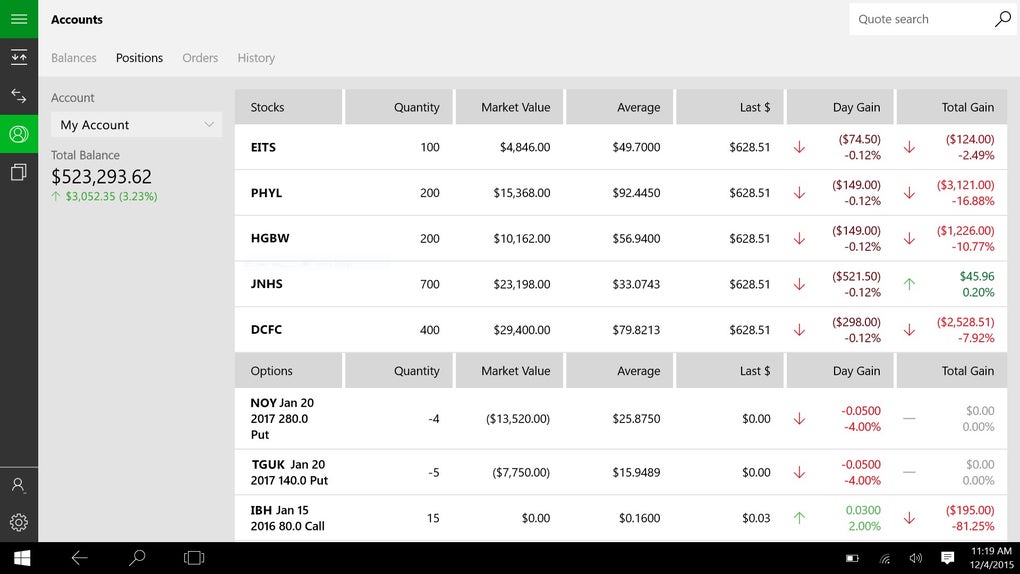
Active traders and portfolio managers will find the application particularly valuable. Its extensive data offering, boasting over 400 different data points, caters to sophisticated trading strategies. Users can selectively choose the data points most relevant to their needs, customizing the display for optimal efficiency. This level of customization ensures the application remains intuitive and uncluttered, even with its vast data capabilities.
Beyond its core trading functionalities, the TD Ameritrade desktop application offers innovative features to further optimize the user experience. The ability to link the desktop app with the mobile app creates a powerful dual-screen setup. This feature allows users to leverage their mobile device as a secondary screen, expanding their workspace, or as a convenient alternative to a mouse, enhancing navigation and control. This adaptability caters to diverse user preferences and workflows.
Empowering Traders: Personalized Workflows and Advanced Features
TD Ameritrade’s desktop application transcends the role of a simple account management tool; it actively empowers traders to refine their workflows and enhance their trading strategies. The app’s extensive customization options allow users to tailor their experience to their specific needs and preferences.
The ability to select and prioritize data points is a significant advantage. Traders can focus on the metrics that are most crucial to their decision-making, filtering out irrelevant information and minimizing visual clutter. This selective approach optimizes screen real estate and facilitates quick identification of key market signals.
The cross-platform syncing capability is another noteworthy feature. Users can seamlessly sync their data and settings across multiple devices, ensuring consistency and continuity in their trading activities regardless of the platform they are using. This feature is invaluable for traders who rely on both desktop and mobile platforms to stay connected to the market.
The application’s interactive charting tools are also crucial for enhancing trading strategies. These tools offer a dynamic visual representation of market trends, allowing users to identify patterns, analyze price movements, and make informed trading decisions. The ability to customize these charts further enhances their utility, allowing users to tailor their visual analysis to their specific trading styles and preferences.
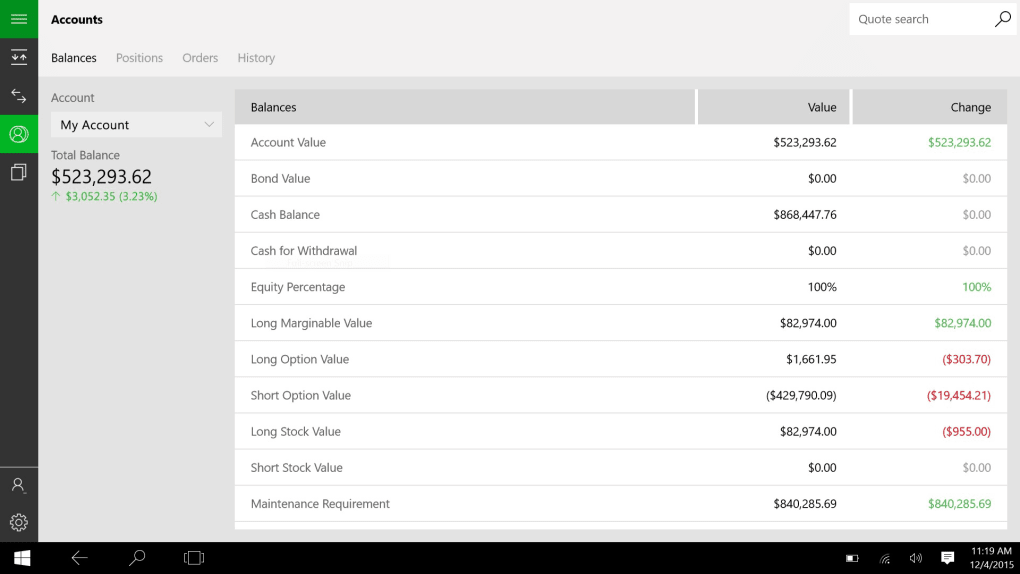
The comprehensive overview of portfolio holdings, account statements, and transaction history provides users with complete transparency and control over their finances. This consolidated view simplifies account management and facilitates informed financial planning.
In essence, TD Ameritrade’s Windows desktop application is designed to empower traders at every level, from novice investors to seasoned professionals. The extensive features, customization options, and cross-platform integration enhance efficiency and contribute to a superior trading experience.
Assessing the Application: Strengths and Weaknesses
The TD Ameritrade desktop application presents several compelling advantages:
Pros:
- Extensive Data Access: Over 400 data points provide in-depth market insights.
- Cross-Platform Syncing: Seamlessly integrates with mobile applications for enhanced workflow.
- Interactive Charting: Dynamic charts allow for comprehensive market analysis.
- Comprehensive Account Overview: Provides a consolidated view of portfolio, statements, and transactions.
- User-Friendly Interface: Intuitive design ensures easy navigation and access to information.
- Research Resources: Direct access to extensive research reports from the TD Ameritrade website.
- Multiple Asset Class Trading: Supports trading in stocks, futures, and foreign currency.
- Real-Time Notifications: Keeps users informed of significant market events.
- Dual-Screen Functionality: Allows for linking with the mobile app for extended workspace or alternative mouse control.
However, the application isn’t without its potential drawbacks:
Cons:
- Steep Learning Curve for Novices: The abundance of features and data points may overwhelm inexperienced traders.
- Resource Intensive: The application may demand significant system resources, potentially impacting performance on older or less powerful machines.
- Advanced User Focus: The depth of features is best suited for knowledgeable traders; beginners might find it overwhelming.
Conclusion: Who is TD Ameritrade’s Desktop App For?
The TD Ameritrade Windows desktop application is a powerful tool ideally suited for experienced traders and portfolio managers who require sophisticated analytical capabilities and extensive data access. Its comprehensive feature set, customizable interface, and cross-platform integration make it a valuable asset for active investors managing complex portfolios across multiple asset classes.
However, novice investors or those seeking a simpler trading platform may find the application’s abundance of features overwhelming. The steep learning curve associated with mastering its advanced functionalities might deter beginners from fully utilizing its potential. While the application offers intuitive design elements, its comprehensive nature requires a degree of familiarity with financial markets and trading terminology.
Ultimately, the suitability of the TD Ameritrade desktop application hinges on the user’s experience level and trading needs. Experienced traders will find it an indispensable tool, while novice investors might find alternative platforms more user-friendly. The application’s strength lies in its depth and power, making it a top choice for those who demand comprehensive analytical tools and seamless cross-platform integration.
File Information
- License: “Free”
- Version: “varies-with-device”
- Latest update: “July 15, 2022”
- Platform: “Windows”
- OS: “Windows 10”
- Language: “English”
- Downloads: “10.4K”


