
GPU-Z, developed by TechPowerUp, is a free, lightweight, and portable utility designed to provide detailed information about your graphics card. This comprehensive guide explores its functionality, benefits, and how it can be a valuable tool for both casual users and serious enthusiasts. Whether you’re troubleshooting performance issues, overclocking your GPU, or simply curious about your hardware’s specifications, GPU-Z offers a simple yet powerful solution.
Understanding the Core Functionality of GPU-Z
At its heart, GPU-Z is a system information tool specifically focused on your graphics card. It goes beyond simply identifying the card model; it delves into a wealth of technical details, providing a comprehensive overview of its capabilities and current status. This information is presented in a clear, user-friendly interface, making it accessible to users of all technical skill levels.
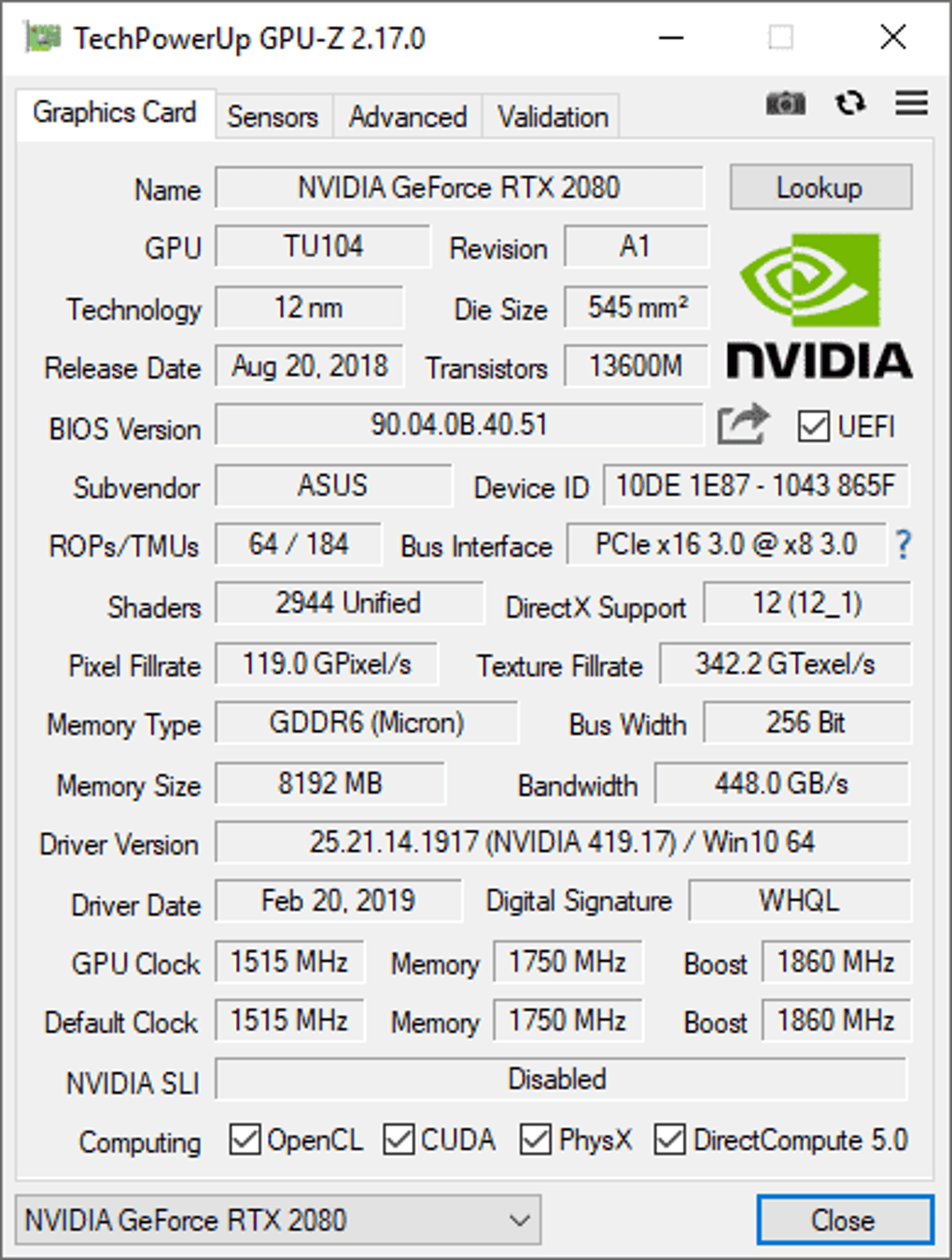
The utility’s primary function is to identify and display detailed information about your graphics processing unit (GPU). This includes but isn’t limited to:
-
GPU Identification: GPU-Z accurately identifies the GPU manufacturer (e.g., NVIDIA, AMD, Intel), the specific GPU model (e.g., NVIDIA GeForce RTX 4090, AMD Radeon RX 7900 XTX), and the revision or sub-model. This ensures accurate identification even with variations within the same model line.
-
Memory Specifications: The tool provides comprehensive details about the graphics card’s memory. This includes the total amount of memory (e.g., 12GB, 16GB, 24GB), the memory type (e.g., GDDR6, GDDR6X, HBM), memory clock speed, and memory bandwidth. This information is crucial for understanding the card’s overall performance potential.
-
BIOS Information: GPU-Z displays the graphics card’s BIOS version, a critical piece of firmware that governs the card’s functionality. Knowing the BIOS version can be essential for troubleshooting problems or updating to the latest firmware for performance improvements or bug fixes. In some cases, the BIOS version can even indicate modifications or overclocking attempts.
-
Driver Information: GPU-Z reveals the version of the graphics driver installed on your system. Outdated or corrupted drivers can lead to performance issues or compatibility problems, so having access to this information is crucial for maintenance and troubleshooting. The tool will help determine whether the drivers are up-to-date and whether they match the capabilities of the GPU.
-
Clock Speeds: Real-time monitoring of core and memory clock speeds provides insight into how the GPU is currently operating. This is particularly useful when monitoring overclocking stability or identifying potential bottlenecks. GPU-Z allows you to see the current clock speed and compare it to the rated speed.
-
Temperatures: GPU-Z displays the GPU’s core temperature, providing a vital indicator of its operating condition. Overheating can damage the GPU, so this monitoring functionality is essential for maintaining the card’s health and preventing premature failure. The utility usually displays both GPU core temperature and memory temperature, offering a complete thermal profile.
-
Power Consumption: Many versions of GPU-Z can display power consumption data. This provides valuable information for understanding the card’s energy efficiency and overall power draw. This is useful for system builders aiming to optimize power consumption and prevent power supply issues.
-
Sensor Data: Beyond core temperature, GPU-Z often includes a range of additional sensors that monitor fan speed, voltage, and other critical aspects of the GPU’s operation. This detailed sensor data offers a comprehensive overview of the card’s health and performance.
-
Overclocking Support (Indirectly): While GPU-Z doesn’t directly perform overclocking, its real-time monitoring capabilities are invaluable during the overclocking process. By monitoring temperatures, clock speeds, and voltages, users can fine-tune overclock settings to maximize performance while maintaining stability and preventing damage.
Beyond the Basics: Advanced Features and Uses
While the core functionality of GPU-Z is straightforward, its capabilities extend well beyond basic system information. Several advanced features enhance its utility for both casual users and experienced enthusiasts.
- Support for a Wide Range of GPUs: GPU-Z boasts extensive compatibility with a vast number of graphics cards from various manufacturers, including NVIDIA, AMD, and Intel. This broad support ensures that users with a wide variety of hardware can benefit from the utility’s information.
-
Portable Application: GPU-Z is designed as a portable application, meaning it requires no installation. This makes it incredibly convenient for use on multiple systems or for troubleshooting issues on machines without administrative privileges. Simply download and run the executable file.
-
Automatic Updates: The software frequently receives updates to ensure compatibility with the latest GPUs and drivers. The built-in update checker ensures you always have access to the most recent information and features.
-
Direct Link to TechPowerUp Database: The application offers a direct link to the TechPowerUp website, where you can find additional information about your GPU, such as user statistics and benchmarks. This allows for comparisons to other users’ systems and provides valuable context to the data.
-
Troubleshooting: GPU-Z can be a critical tool for troubleshooting graphics-related problems. By providing a detailed overview of the GPU and driver information, users can quickly identify potential causes for performance issues or driver conflicts.
-
Overclocking Validation: As mentioned, while not performing overclocking directly, GPU-Z’s ability to monitor vital statistics during overclocking attempts is invaluable for confirming stability and preventing damage. Monitoring temperatures and voltages during stress tests allows for safe overclocking adjustments.
Comparing GPU-Z to Alternative Tools
While GPU-Z is a powerful and widely used utility, it’s essential to understand its position within the landscape of similar system information tools. Several alternatives provide overlapping functionality, each with its strengths and weaknesses:
- CPU-Z: A popular counterpart to GPU-Z, CPU-Z provides detailed information about your CPU, motherboard, and memory. It’s a perfect complement to GPU-Z for a complete system overview.
-
AIDA64: A comprehensive system information tool, AIDA64 goes well beyond GPU and CPU information, providing a deep dive into nearly all aspects of your hardware and software. However, it’s significantly more complex and often requires a paid license.
-
Speccy: A user-friendly tool that provides a concise overview of your system’s hardware components. While not as detailed as GPU-Z or AIDA64, its simplicity makes it ideal for users who need a quick overview without getting bogged down in technical details.
-
MSI Afterburner: While primarily used for overclocking, MSI Afterburner also includes monitoring capabilities similar to those in GPU-Z. Its advanced overclocking features make it a popular choice for enthusiasts, but it’s less focused on simply providing system information.
The choice of which tool to use depends heavily on your needs. GPU-Z’s strength lies in its focus, simplicity, portability, and detailed GPU-specific information. For a broader system overview, AIDA64 is an excellent option, but it requires a license and a steeper learning curve. If a simple, quick overview is sufficient, Speccy is a good choice.
Conclusion: The Value of GPU-Z
TechPowerUp GPU-Z remains a valuable asset for anyone wanting to gain a thorough understanding of their graphics card. Its free availability, portability, and comprehensive information make it an indispensable tool for troubleshooting, overclocking, and general system maintenance. Whether you’re a casual gamer, a system builder, or a dedicated hardware enthusiast, GPU-Z offers a simple yet powerful way to gain valuable insights into your GPU’s capabilities and current operational status. Its user-friendly interface and extensive support make it accessible to users of all technical skill levels, ensuring that everyone can benefit from its robust functionality.
File Information
- License: “Free”
- Latest update: “April 24, 2025”
- Platform: “Windows”
- OS: “Windows 7”
- Language: “English”
- Downloads: “342.9K”
- Size: “11.39 MB”


