
In the annals of gaming history, arcade machines hold a revered place. These colossal cabinets, once the vibrant epicenters of social entertainment, housed some of the most innovative and addictive experiences ever conceived. From the pixelated simplicity of early classics to the visually stunning, technologically advanced titles of the modern era, arcade games have always pushed boundaries. However, the physical nature of these machines means they are susceptible to the ravages of time, wear, and obsolescence. This looming threat to a crucial part of gaming heritage has spurred dedicated communities and developers to find ways to preserve these experiences digitally. Among the vanguard of these preservation efforts for a very specific, yet incredibly important, segment of arcade gaming is TeknoParrot.
TeknoParrot stands as a testament to the passion and ingenuity of the gaming community. Developed by TeknoGods, this free utility program for Windows carves out a unique niche in the emulation landscape. Unlike emulators that focus on decades-old hardware, TeknoParrot targets a more contemporary and often more complex category: PC-based arcade titles. These are games that ran not on custom, purely dedicated arcade boards with proprietary chips, but on specialized industrial PCs, often running customized versions of Windows or Linux, tailored for high-performance gaming. TeknoParrot doesn’t just recreate the game; it endeavors to replicate the very environment these games thrived in, allowing enthusiasts to bring the thrill and fidelity of modern arcade gaming into their homes without the need for cumbersome, expensive, and increasingly rare physical hardware.
The project is more than just a piece of software; it’s a cultural initiative, a digital time capsule designed to ensure that future generations can experience the artistry and engineering marvels of these arcade titles. The TeknoGods team, alongside dedicated contributors, has meticulously crafted a solution that is not only robust but also committed to legality and ethical use. By focusing on emulation rather than illicit distribution, TeknoParrot offers a pathway to legitimately enjoy a vast library of “selected PC-based arcade titles,” fostering a vibrant community dedicated to keeping the arcade spirit alive.
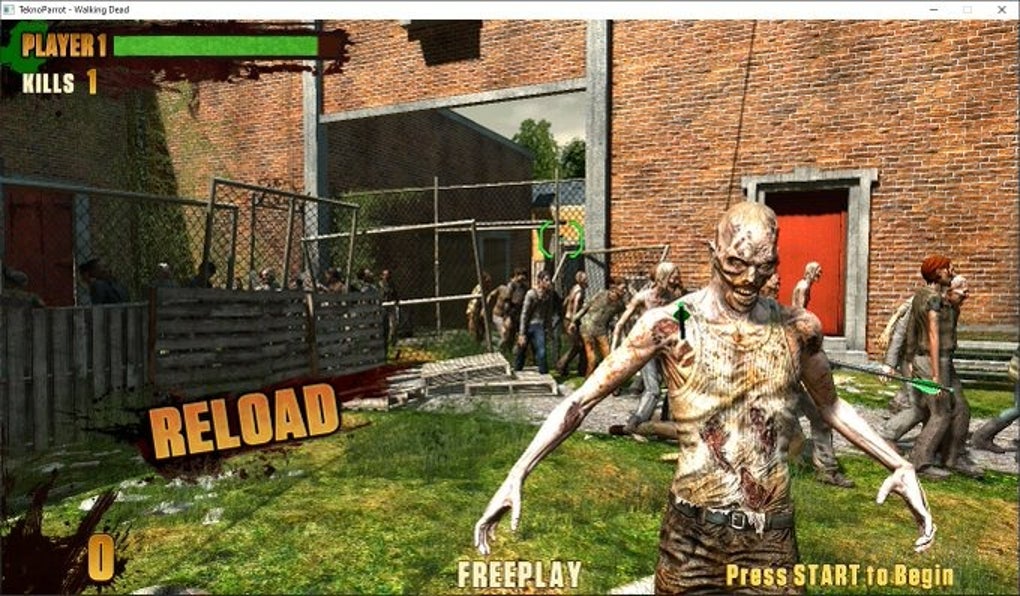
The Essence of TeknoParrot: Bridging Past and Present
TeknoParrot’s core mission is elegantly simple yet technically profound: to allow users to play specific PC-based arcade games on their personal computers. To truly appreciate the significance of this, one must understand the evolution of arcade hardware. For decades, arcade machines were built around highly specialized, proprietary circuit boards, each designed to run one or a handful of games with unparalleled performance for their time. Emulators like MAME (Multiple Arcade Machine Emulator) have done an extraordinary job of preserving these earlier generations. However, as PC technology advanced, so did arcade hardware. Many later arcade systems, particularly from the late 1990s through today, began to leverage off-the-shelf PC components, often combined with custom I/O boards and operating system tweaks. These “PC-based arcade systems” ran games that, while technically rooted in PC architecture, were still designed with the unique input and display characteristics of an arcade cabinet in mind.
This is where TeknoParrot steps in. It’s not merely about running a game executable; it’s about providing the necessary wrapper and environment to make these arcade titles believe they are running on their native hardware, interacting with the specific inputs and outputs they expect. The challenge is considerable, as each game or arcade system might have its own quirks, requiring custom solutions to ensure smooth operation and accurate emulation. The developers at TeknoGods have risen to this challenge, creating a sophisticated utility that acts as an intermediary, translating the game’s hardware calls into instructions that a modern Windows PC can understand and execute.
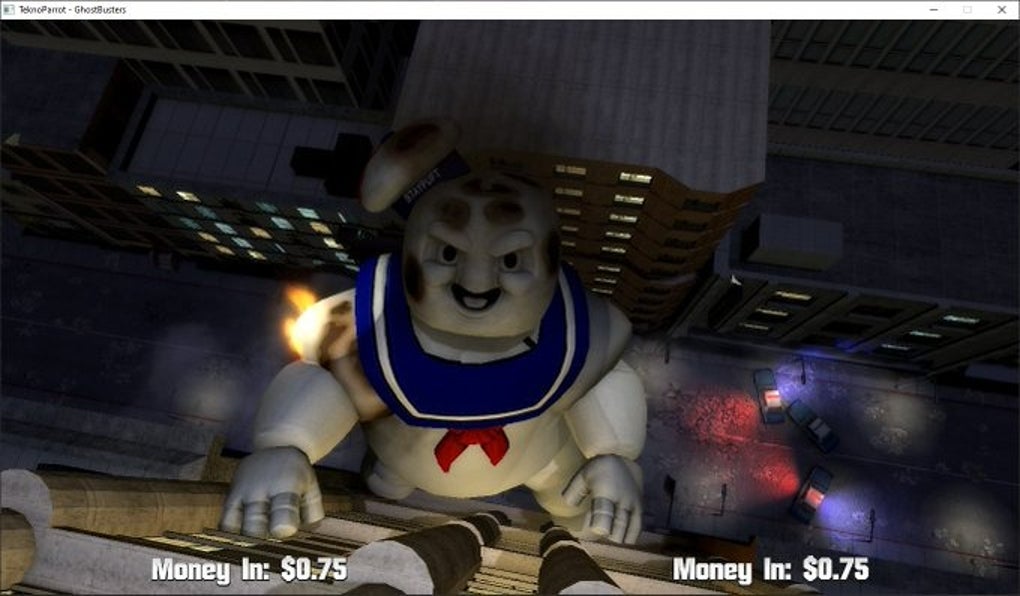
The “selected PC-based arcade titles” aspect is crucial. TeknoParrot isn’t a universal emulator for every PC game ever made; it’s specifically tailored for games that originated on these unique arcade PC platforms. This focus allows for a deeper, more accurate emulation experience for the games it supports, often resulting in performance and fidelity that closely mirrors the original arcade experience. This commitment to specific titles, rather than a broad, generic approach, underscores the dedication to quality and authenticity that defines the TeknoParrot project.
Furthermore, the emphasis on cultural preservation is not merely a marketing slogan; it’s the driving force behind the entire endeavor. Physical arcade machines are increasingly difficult to maintain. Components fail, parts become unobtainable, and the sheer logistics of housing and powering these large units become prohibitive for many. By digitizing these experiences through emulation, TeknoParrot ensures that the unique gameplay mechanics, graphical styles, and soundscapes of these games remain accessible for academic study, historical appreciation, and, most importantly, for continued enjoyment by new generations of gamers. It’s about safeguarding a vibrant form of interactive art from the inevitable decay of its physical medium.
Diving Deep into TeknoParrot’s Features and Functionality
TeknoParrot’s appeal extends far beyond its fundamental ability to run arcade games; it’s the comprehensive feature set designed to recreate the full arcade experience at home that truly sets it apart. The developers have meticulously considered how players interact with these games and provided robust support for a wide array of input devices, a critical factor for arcade authenticity.
Comprehensive Input Device Support
One of TeknoParrot’s most lauded features is its full support for various input devices. Arcade games, especially those from the era TeknoParrot targets, often utilized highly specialized controls:
- Keyboards and Mice: For games that might have adapted from PC platforms or required precise aiming, keyboard and mouse support offers a familiar and accurate control scheme.
- Gamepads: Modern gamepads, with their array of buttons, analog sticks, and triggers, can be configured to mimic traditional arcade joystick and button layouts, making it comfortable for players accustomed to console gaming.
- Steering Wheels: For racing games, an authentic steering wheel peripheral is indispensable. TeknoParrot allows users to map their home racing setups – complete with force feedback – to compatible arcade racers, offering an unparalleled level of immersion that a keyboard or gamepad simply cannot replicate. The sensation of precise turning, feeling the rumble of the road, and battling G-forces (through force feedback) elevates the racing experience to near-cabinet quality.
- Joysticks: For fighting games, shoot ’em ups, and classic arcade titles, dedicated arcade joysticks and buttons are paramount. TeknoParrot’s ability to seamlessly integrate these dedicated controllers means that players can execute complex combos or navigate bullet hells with the same tactile response and precision they would expect in an actual arcade.
This extensive input support is not just about compatibility; it’s about customizability. Users can meticulously configure each input, mapping functions to specific buttons, adjusting sensitivities, and even fine-tuning dead zones. This level of control ensures that every player can tailor the experience to their preferred setup, maximizing comfort and authenticity.
Game Compatibility and Configuration
While TeknoParrot supports “selected PC-based arcade titles,” the breadth of this selection is impressive and continuously growing thanks to the active TeknoGods team and community. These games often range from high-octane racing simulators like Sega’s Out Run 2 SP or Daytona USA 3, to intense light gun shooters such as House of the Dead 4, or even unique experiences that leveraged touch screens or other specialized interfaces. The emulator’s architecture is designed to be flexible, often requiring game-specific profiles or configurations to handle unique hardware interactions, display resolutions, and sound setups.
The configuration process, while sometimes requiring a degree of technical understanding, is made accessible through user-friendly interfaces within the TeknoParrot launcher. Here, users can:
- Add and manage games: Easily detect and launch supported titles.
- Configure graphical settings: Adjust resolution, aspect ratio, and other display options to suit their monitor and preferences, often enhancing the visual fidelity beyond the original arcade output.
- Optimize performance: Fine-tune emulation settings to balance visual quality with smooth frame rates, crucial for fast-paced arcade action.
- Sound emulation: Ensure accurate reproduction of game audio, from iconic soundtracks to critical sound effects.
- Network play (where supported): For certain titles, TeknoParrot can even facilitate network play, allowing users to compete or cooperate with others, mirroring the social aspect of arcade gaming.
The ongoing development ensures that new games are added to the supported list, and existing profiles are refined for better performance and compatibility. This iterative process, fueled by community feedback and developer expertise, makes TeknoParrot a dynamic and evolving platform for arcade preservation.
Setting Up Your Arcade Experience: Installation and Configuration
Embarking on your TeknoParrot journey is designed to be a straightforward process, though some familiarity with managing game files and emulator settings is beneficial. As a free utility for Windows, its accessibility is a key factor in its widespread adoption.
System Requirements and Download
TeknoParrot is developed for Windows, supporting modern versions such as Windows 10 and Windows 11. Given that it emulates PC-based arcade titles that were often state-of-the-art in their time, a reasonably powerful home PC is recommended for optimal performance. Key considerations include:
- Processor: A multi-core processor (Intel i5/Ryzen 5 or equivalent, or better) is generally recommended to handle the computational demands of emulation.
- Graphics Card: A dedicated GPU (NVIDIA GTX/RTX, AMD Radeon RX series or equivalent) is highly advisable, especially for newer arcade titles that pushed graphical boundaries. This ensures smooth frame rates and high-resolution output.
- RAM: 8GB of RAM is a good baseline, with 16GB or more offering additional headroom for larger games and background processes.
- Storage: Sufficient storage space (SSDs are preferred for faster loading) for the TeknoParrot application and, more significantly, for the arcade game files themselves, which can often be quite large.
- Operating System: Windows 10 or Windows 11 (64-bit).
- Other: Up-to-date graphics drivers, DirectX, and Visual C++ Redistributables are typically required for smooth operation of games and the emulator.
Acquiring TeknoParrot is simple: it is available as a free download from reputable sources like PhanMemFree.org. The download package is typically lightweight (around 881.49 KB according to historical data), as it primarily consists of the launcher and core emulation framework; the actual game files are sourced separately by the user.
Installation and First Launch
- Download: Obtain the latest version of TeknoParrot from PhanMemFree.org or the official TeknoGods website.
- Extraction: TeknoParrot usually comes as a compressed archive. Extract its contents to a dedicated folder on your hard drive. It’s often recommended to place it in a simple path, like
C:\TeknoParrot, to avoid potential issues with long file paths or permissions. - Launch: Run the
TeknoParrotUI.exeexecutable. This will open the main user interface. - Initial Setup: On the first launch, the UI might guide you through some initial setup steps, such as configuring global input settings or checking for necessary dependencies.
Adding and Configuring Games
This is where the user truly customizes their arcade experience.
- Acquire Games: This is the most critical step regarding legality. Users are responsible for legally acquiring the ROMs or game files for the PC-based arcade titles they wish to play. This typically involves dumping the games from their own physical arcade boards, if they own them, or sourcing licensed versions where available. TeknoParrot itself does not provide game files.
- Add Game Profile: Within the TeknoParrotUI, navigate to the “Game Settings” or “Add Game” section. Here, you’ll select the specific game you’re trying to add. TeknoParrot has pre-defined profiles for many supported games. You’ll then point the emulator to the main executable or data folder of your legally acquired game files.
- Input Mapping: This is a crucial step for optimal play. For each added game, you can access specific input settings. Map your keyboard, mouse, gamepad, steering wheel, or joystick inputs to the in-game controls (e.g., gas, brake, steering, fire, jump, coin, start). The level of granularity here allows for incredibly precise control, vital for arcade accuracy.
- Video and Audio Settings: Adjust the resolution, aspect ratio, full-screen/windowed mode, and audio output. Many arcade games ran at non-standard resolutions, and TeknoParrot allows scaling to fit modern monitors while maintaining the correct aspect ratio or stretching as desired.
- Test and Play: Once configured, you can launch the game directly from the TeknoParrotUI. If everything is set up correctly, you’ll be transported back to the arcade!
The community around TeknoParrot is vibrant, and many guides and forums exist to help new users with specific game configurations or troubleshooting common issues. This collective knowledge is invaluable for optimizing the arcade experience at home.
The Legal and Ethical Landscape of Arcade Emulation
The realm of game emulation often exists in a grey area concerning intellectual property rights. However, TeknoParrot has been meticulously developed with a strong emphasis on operating within a legal and ethical framework, positioning itself explicitly as a “legal and piracy-free solution.” Understanding this distinction is vital for both developers and users.
Emulation vs. Piracy
It’s crucial to differentiate between the act of emulation and the act of piracy.
- Emulation: The process of allowing one computer system (the host) to imitate another computer system (the guest), enabling the host to run software or use peripherals designed for the guest system. Emulation software itself, like TeknoParrot, is generally considered legal, as it merely provides a framework or a virtual machine. It does not contain any proprietary game code.
- Piracy: The unauthorized copying, distribution, or use of copyrighted material. This specifically pertains to the game files (often referred to as ROMs or ISOs) that an emulator runs.
TeknoParrot’s developers, TeknoGods, have consistently stated that the project is solely an emulator. It provides the software necessary to run the games, but it does not distribute the games themselves. This distinction places the legal responsibility for acquiring game files squarely on the user.
The “Legal and Piracy-Free” Commitment
TeknoParrot’s commitment to being a “legal and piracy-free solution” is multifaceted:
- No Game Files Included: The TeknoParrot software package contains only the emulator’s code, not any copyrighted game data. Users must independently source the game files.
- Encouraging Legal Acquisition: While the emulator cannot enforce how users obtain game files, its ethos encourages legal acquisition. For arcade games, the most robust legal method for personal use is owning the original arcade cabinet and “dumping” the game’s data from its physical media (e.g., hard drives, optical discs, ROM chips). This is akin to making a backup copy of software you legitimately own.
- Focus on Preservation: The project is framed as a “cultural project aimed at preserving arcade gaming history.” This intent aligns with fair use principles in many jurisdictions, particularly when the original hardware is no longer commercially available or supported. The preservation of historical software is a recognized academic and cultural endeavor.
- No Financial Gain from Piracy: The TeknoGods team does not profit from the distribution of copyrighted game content. The emulator itself is free, and its development is driven by passion and community contribution rather than illicit financial gain from pirated content. PhanMemFree, acting as a distributor of the free TeknoParrot software, also adheres to these principles, focusing on providing legitimate software without infringing on copyrights. The general disclaimer found on sites like PhanMemFree.org – “Laws concerning the use of this software vary from country to country. We do not encourage or condone the use of this program if it is in violation of these laws.” – reiterates this critical responsibility on the user.
Ethical Considerations for Users
For users of TeknoParrot, operating ethically means:
- Understanding Copyright Law: Recognize that game developers and publishers hold copyrights to their games. Using an emulator without legally acquired game files can still constitute copyright infringement.
- Supporting Developers: Where modern arcade titles have PC ports or console versions available for purchase, supporting the original developers by buying these official releases is the most ethical course of action.
- Focusing on Preservation: Leverage TeknoParrot primarily for games that are truly abandoned, unavailable, or difficult/impossible to play on their original hardware, contributing to their digital preservation.
By strictly adhering to these principles, TeknoParrot maintains its legitimacy as a powerful tool for cultural preservation, allowing gamers to revisit the golden age of PC-based arcade titles without endorsing or facilitating piracy. It’s a testament to how technology can honor the past responsibly.
Community, Development, and the Future of Arcade Preservation
TeknoParrot is not merely a static piece of software; it is a living project, continuously evolving through the dedicated efforts of the TeknoGods team and a passionate global community of contributors, testers, and enthusiasts. This collaborative model is fundamental to its success and its future as a cornerstone of arcade game preservation.
The TeknoGods Team and Community Contributions
The “solely developed by the TeknoGods team and contributors” statement underscores the project’s grassroots origins and ongoing community-driven nature.
- Core Development: The TeknoGods team comprises skilled programmers and engineers who tackle the complex task of reverse-engineering arcade systems, developing the core emulation framework, and implementing game-specific patches and profiles. Their work requires deep technical knowledge of hardware architecture, software binaries, and graphics APIs.
- Community Testers: A vast network of users contributes by testing new builds, reporting bugs, and providing feedback on game compatibility and performance across various PC configurations. This rigorous testing ensures stability and broadens the range of supported hardware.
- Configuration Specialists: Many users are adept at creating and sharing configuration files for specific games, optimizing input mappings, video settings, and performance tweaks. These contributions significantly ease the setup process for others.
- Documentation and Support: Community members often contribute to wikis, forums, and online guides, helping new users navigate the installation and configuration processes, troubleshoot issues, and discover new compatible titles. Sites like PhanMemFree.org often host user reviews and community discussions, providing a hub for peer-to-peer support.
- Asset Providers: In some cases, community members may legally obtain and share necessary non-copyrighted assets (e.g., custom launchers, utility tools) that enhance the TeknoParrot experience.
This collaborative ecosystem allows for rapid iteration and adaptation, ensuring that TeknoParrot remains responsive to new technical challenges and the evolving needs of its user base. Without the enthusiasm and technical expertise of its community, the project would not have achieved its current level of sophistication and coverage.
The Future of Arcade Preservation
The work of TeknoParrot and similar preservation projects holds immense importance for the future of gaming history.
- Combating Obsolescence: As arcade hardware ages, components fail, and expertise to repair them diminishes. Emulation provides a digital backup, allowing these experiences to persist long after the physical machines have ceased to function.
- Accessibility for Researchers and Enthusiasts: Emulation makes these games accessible to a wider audience, including game historians, academic researchers, and casual enthusiasts who might never have the opportunity to interact with original arcade hardware. This accessibility fosters a deeper understanding and appreciation of arcade gaming’s cultural impact and technological advancements.
- Enhanced Experiences: Modern PCs often surpass the capabilities of original arcade hardware. TeknoParrot can leverage this power to run games at higher resolutions, with improved frame rates, and potentially with custom enhancements (e.g., shader effects) that can breathe new life into classic titles, all while preserving the core gameplay.
- Inspiration for New Developers: By keeping these games alive and playable, TeknoParrot inspires new generations of game developers, who can study the design philosophies, mechanics, and innovative techniques employed in these arcade masterpieces.
- Addressing the “Digital Dark Age”: As more games are born digital, the challenge of preserving them grows. TeknoParrot’s efforts highlight the necessity of active preservation strategies to prevent a “digital dark age” where vast swaths of interactive media are lost forever.
The journey of TeknoParrot is a continuous one. As new arcade systems emerge (even in a diminishing market), and as PC hardware and operating systems evolve, the TeknoGods team and their community will face new challenges. However, armed with their passion for preservation and a robust, community-driven development model, TeknoParrot is well-positioned to continue its vital role in safeguarding the rich and dynamic history of arcade gaming for generations to come. It’s a powerful reminder that while technology relentlessly marches forward, the echoes of its past can be meticulously preserved and joyfully experienced.
File Information
- License: “Free”
- Version: “bootstraper”
- Latest update: “July 5, 2024”
- Platform: “Windows”
- OS: “Windows 11”
- Language: “English”
- Downloads: “644”
- Size: “881.49 KB”


