
Tenorshare 4DDiG is a robust data recovery software designed for both Windows and macOS operating systems. It offers a comprehensive solution for retrieving a wide array of file types from various storage devices, making it a powerful tool for individuals and businesses alike. This review delves into its features, ease of use, performance, and limitations, providing a thorough assessment of its capabilities.
Effortless Data Retrieval: Simplicity Meets Power
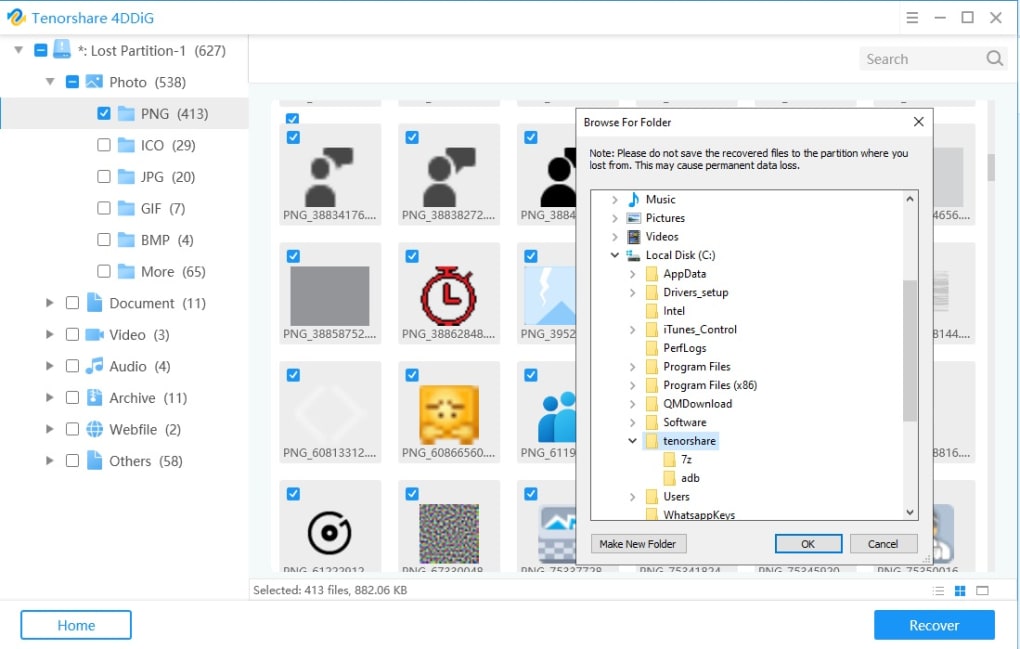
Tenorshare 4DDiG stands out for its user-friendly interface, which simplifies the often complex process of data recovery. Even users with limited technical expertise can navigate the software and successfully recover lost files. The software boasts a three-step process: select the location where data was lost, initiate a scan, and then preview and recover the desired files. This intuitive approach significantly reduces the learning curve associated with data recovery tools, making it accessible to a broader range of users.
The software supports a vast array of file formats, including but not limited to JPG, PNG, DOC, MP4, PDF, MPEG, MP3, ZIP, and WAV. This extensive compatibility ensures that users can recover a wide range of files, from documents and presentations to images, videos, and audio files. The ability to preview files before recovery is a valuable feature, allowing users to confirm the integrity of the recovered data before saving it to a new location. This prevents accidental overwriting of potentially recoverable data. It’s crucial to remember, however, that recovered files should never be saved to the same partition from which they were lost. Doing so risks permanent data loss and renders the recovery process ineffective.
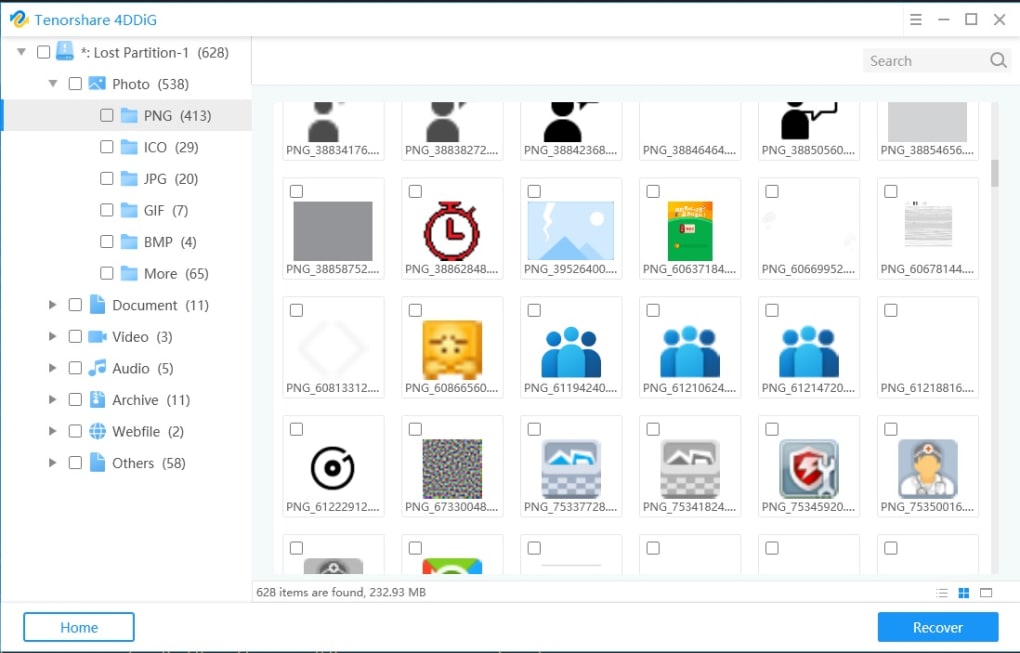
The scanning process, while potentially time-consuming for larger storage devices, is efficient and provides a detailed overview of recoverable files. The software intelligently identifies and displays recoverable files based on their file type and characteristics. The user-friendly preview feature further assists in selection, enabling users to visually assess the condition of the recovered files before saving them.
Versatility and Adaptability: Handling Diverse Data Loss Scenarios
Tenorshare 4DDiG is not limited to a specific type of data loss. Whether files were accidentally deleted, lost due to system crashes, or wiped during a hard drive format, the software offers a viable recovery solution. It excels in handling various data loss scenarios encountered by both novice and experienced computer users. This versatility is a significant advantage, providing a single solution for a wide range of data recovery needs. The software’s robust algorithms effectively scan storage media to identify and recover data across various storage formats, including internal and external hard drives, USB flash drives, SD cards, and digital cameras.
The software’s claim to recover over a thousand file types is a testament to its comprehensive nature. This wide support minimizes the frustration associated with file type incompatibility, a common issue with many data recovery tools. This broad compatibility ensures that users can recover almost any type of file they may have lost, ranging from common document formats to specialized application files. The ability to handle various file sizes, while acknowledging limitations with extremely large files (over 3GB in this instance), further highlights the software’s adaptability.
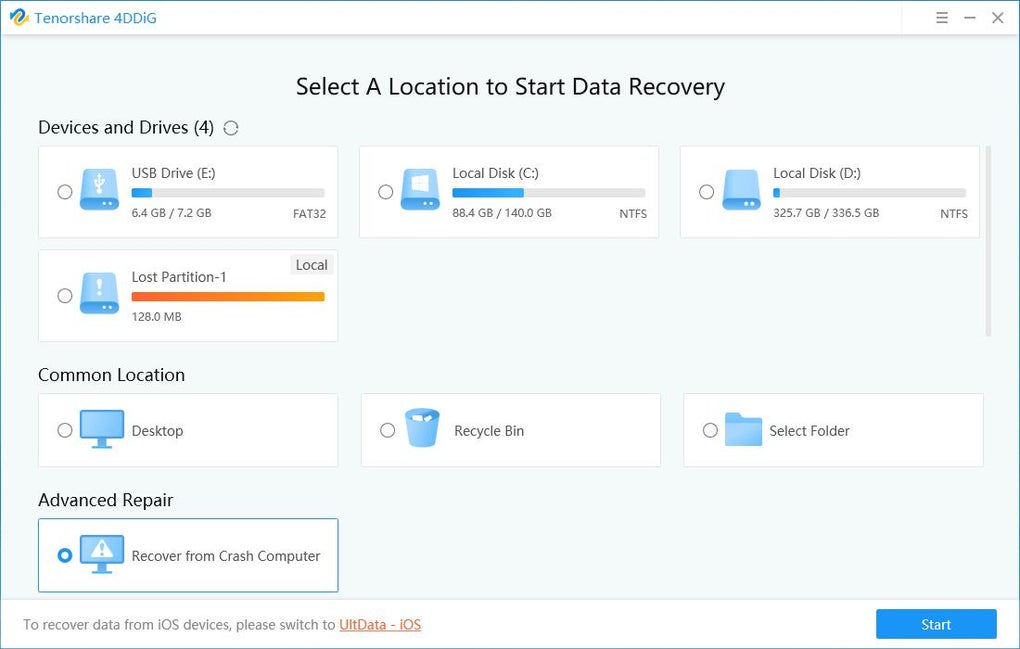
Beyond the core functionality, the software’s design considerations further improve the user experience. The intuitive interface avoids overwhelming users with unnecessary technical details. Instead, it provides a clear path to data recovery, focusing on simplicity without compromising functionality.
Beyond the Basics: Features and Functionality
While the ease of use and wide file format support are significant strengths, Tenorshare 4DDiG also includes other notable features. The software’s ability to handle both accidental and system-related data loss differentiates it from less versatile alternatives. It smoothly integrates with different operating systems and storage devices, minimizing compatibility issues frequently encountered with data recovery tools. The software seamlessly interacts with various storage media, regardless of their formatting or file system.
The freemium model offers a free version with limited features, enabling users to test the software’s capabilities before committing to a purchase. This is a smart strategy that allows potential users to assess the software’s performance and determine if it meets their needs before committing to the paid version. While the free version has limitations, it provides a valuable opportunity to evaluate the software’s core functions and user interface.
Addressing Limitations: Areas for Improvement
Despite its numerous advantages, Tenorshare 4DDiG has some limitations. The inability to selectively scan individual folders can be cumbersome when dealing with large storage devices. A more granular scanning option would significantly improve efficiency, allowing users to target specific areas of their storage media instead of conducting full scans. This could greatly reduce scan times and improve the overall user experience, especially when dealing with extremely large datasets.
The software’s difficulty in recovering files exceeding 3GB is another notable drawback. While the software handles many file sizes effectively, this limitation can be a significant constraint for users who frequently work with large video files or other sizable data sets. Addressing this limitation would greatly enhance the software’s overall usefulness.
The lack of advanced options, such as the ability to customize scan parameters or utilize specific recovery algorithms, limits the control users have over the recovery process. More advanced options would cater to users with a deeper understanding of data recovery techniques, providing a more customized and efficient experience.
Comparison to Competitors: Standing Out from the Crowd
Tenorshare 4DDiG stands as a credible competitor to established data recovery software like Wondershare Recoverit and Recuva. Its straightforward interface and comprehensive file support provide a compelling alternative. While other software may offer specific advanced features, Tenorshare 4DDiG’s focus on user-friendliness and broad compatibility sets it apart. It manages to strike a balance between ease of use and powerful functionality.
The software’s freemium model also provides a competitive edge. The free version, although limited, allows potential users to experience the software’s functionality before committing to a purchase. This significantly reduces the risk for users and provides a valuable testing period. The free version allows users to experience the software’s core features and assess its suitability for their needs before making a financial commitment.
Conclusion: A Reliable and User-Friendly Data Recovery Solution
Tenorshare 4DDiG offers a strong balance between ease of use and comprehensive functionality. Its intuitive interface, broad file format support, and ability to handle various data loss scenarios make it a valuable tool for both novice and experienced computer users. While limitations exist regarding granular scanning options and large file recovery, the software’s overall performance and user-friendly design outweigh these drawbacks. For users seeking a reliable and easy-to-use data recovery solution, Tenorshare 4DDiG represents a strong and versatile choice. The software’s freemium model further enhances its accessibility, making it a worthwhile option for users seeking to recover lost data without a significant financial commitment.
File Information
- License: “Free”
- Latest update: “May 24, 2023”
- Platform: “Windows”
- OS: “Windows 8.1”
- Language: “English”
- Downloads: “23.8K”
- Size: “2.33 MB”


