
Tenorshare Free Any Data Recovery is a free data recovery software designed for Windows operating systems. This comprehensive review explores its features, capabilities, ease of use, and overall effectiveness in retrieving lost or deleted data. We will also compare it to other free and paid alternatives available in the market.
Key Features and Capabilities
Tenorshare Free Any Data Recovery boasts a robust set of features aimed at recovering a wide range of data types from various storage devices. Its core functionality centers around six smart recovery modes:
-
Deleted Recovery: This mode specifically targets files that have been accidentally deleted from your system but haven’t been overwritten yet. It’s a crucial feature for recovering recently lost documents, photos, or videos.
-
Formatted Recovery: If you’ve accidentally formatted a hard drive, SSD, or other storage device, this mode attempts to recover data from the formatted partition. This is often a more complex recovery process, but Tenorshare aims to simplify it.
-
Partition Recovery: This powerful feature allows the recovery of data from lost or damaged partitions. Partition loss can result from various scenarios, including system crashes, malware infections, or accidental deletion of partitions. This mode is essential for those who have experienced such data loss.
-
RAW Recovery: When the file system of a storage device is severely corrupted, making standard recovery methods ineffective, the RAW recovery mode comes into play. It scans the storage device at a low level, searching for file signatures to identify and recover data, even if file system information is lost.
-
Resume Recovery: This convenient feature allows you to pause and resume a data recovery scan without losing any progress. This is particularly useful for larger drives or scans that may take considerable time. It prevents the need to restart the entire process should an interruption occur.
- Wizard Recovery: For users unfamiliar with data recovery processes, the Wizard Recovery mode provides a step-by-step guided approach. It simplifies the recovery process by providing clear instructions and intuitive options, making it accessible even to novice users.
Beyond its recovery modes, Tenorshare Free Any Data Recovery offers several other essential features:
-
Support for over 550 file formats: This software is designed to handle a wide range of file types, including photos (JPEG, PNG, TIFF, etc.), videos (MP4, AVI, MOV, etc.), documents (Word, Excel, PDF, etc.), emails, and more. This broad compatibility is a significant advantage, ensuring a high chance of retrieving diverse lost files.
-
Data recovery from various storage devices: The software supports recovery from internal hard drives, external hard drives, SSDs, USB flash drives, memory cards, and other storage media. This versatility caters to a wide range of user scenarios and data loss situations.
-
Windows platform compatibility: Tenorshare Free Any Data Recovery is designed for various Windows operating systems, including Windows XP, Vista, 7, 8, 8.1, and 10. This ensures compatibility with a wide array of computer systems.
-
File preview: Before initiating the recovery process, users can preview images and listen to audio files to confirm the integrity of the recoverable data. This functionality allows users to selectively recover desired files and avoid unnecessary recovery attempts.
-
Partition table backup: When recovering partition data, the software allows for a backup of the partition table before initiating the recovery. This safeguard ensures that, in case of unexpected errors or issues during the recovery, the original partition table can be restored, minimizing the potential for further data loss.
Ease of Use and User Interface
Tenorshare Free Any Data Recovery aims for user-friendliness. The software features a clean and intuitive interface, making it relatively easy to navigate, even for users with limited technical expertise. The Wizard Recovery mode further simplifies the process by providing clear, step-by-step guidance. While the more advanced recovery modes require some understanding of data recovery concepts, the overall experience is designed to be accessible to a broad range of users.
The software’s clear instructions and visual cues minimize the potential for user errors. Users are guided through the selection of the recovery mode, the target drive or partition, and the file types to be recovered. The preview function allows for a quick confirmation of recoverable data before initiating the final recovery process.
Performance and Effectiveness
The performance of data recovery software can vary based on factors like the size of the storage device being scanned, the extent of data loss, and the nature of the data loss event. In general, Tenorshare Free Any Data Recovery provides reasonably efficient scanning and recovery speeds. However, for significantly large drives, the scanning process can take a considerable amount of time.
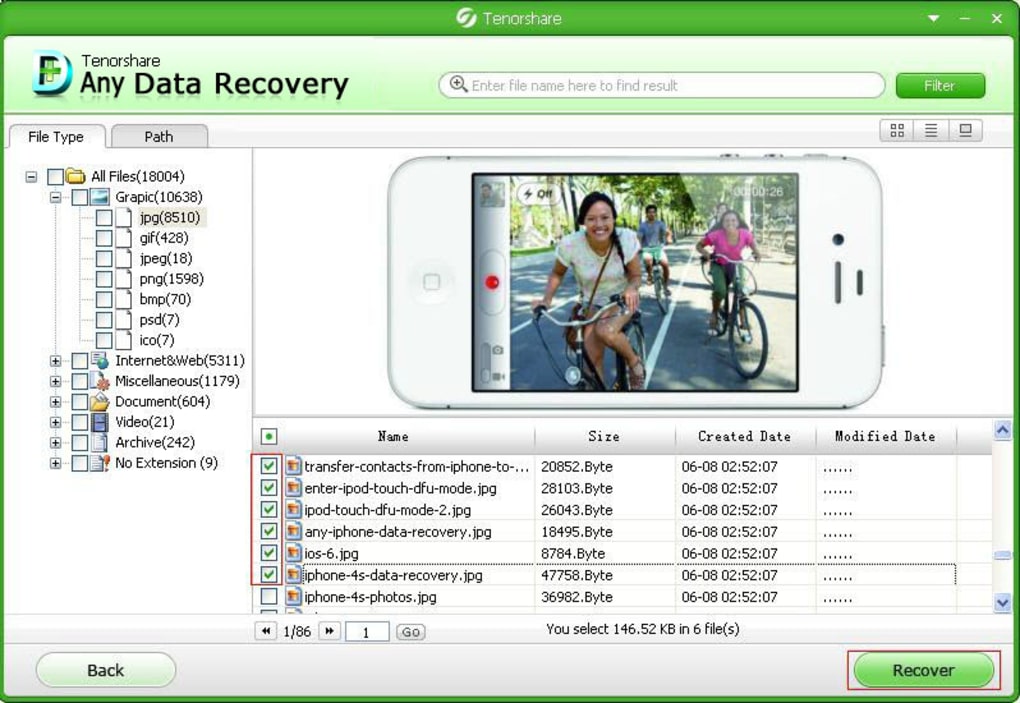
The effectiveness of the software depends heavily on the circumstances of the data loss. If the lost data hasn’t been overwritten, the chances of successful recovery are significantly higher. The software’s ability to handle various data loss scenarios, including accidental deletion, formatting, partition loss, and raw recovery, contributes to its effectiveness. However, it is important to manage expectations. Complete data recovery is not always guaranteed, especially in cases of severe drive damage or extensive data overwriting.
Comparison with Alternatives
Several alternative free and paid data recovery software options exist in the market. Some notable free alternatives include Recuva and PhotoRec. Paid options, such as EaseUS Data Recovery Wizard and R-Studio, often offer more advanced features and potentially higher success rates in complex recovery scenarios.
Compared to Recuva, Tenorshare Free Any Data Recovery offers a broader range of recovery modes and supports a wider array of file formats. PhotoRec, while powerful, has a command-line interface, making it less user-friendly than Tenorshare. Paid solutions like EaseUS and R-Studio typically boast more advanced features, such as more sophisticated scanning algorithms and support for more niche file systems, but come with a price tag.
The choice between free and paid options depends on the user’s needs and technical expertise. Tenorshare Free Any Data Recovery provides a strong free option for many users, but those requiring advanced capabilities or needing a higher assurance of recovery might find paid alternatives more suitable.
Conclusion
Tenorshare Free Any Data Recovery offers a valuable and accessible solution for data recovery on Windows systems. Its user-friendly interface, multiple recovery modes, support for a wide range of file formats, and the file preview feature make it a strong contender in the free data recovery software category. While its effectiveness is subject to the nature of the data loss event, it provides a solid and reliable tool for many common scenarios. The inclusion of features like resume recovery and partition table backup further enhances its usability and reliability. For users needing a free, readily accessible, and relatively easy-to-use data recovery solution, Tenorshare Free Any Data Recovery is a worthy choice. However, users facing particularly complex data loss scenarios might benefit from considering paid options with more advanced features and capabilities.
File Information
- License: “Free”
- Latest update: “May 27, 2020”
- Platform: “Windows”
- OS: “Windows XP”
- Language: “English”
- Downloads: “10.7K”
- Size: “2.79 MB”


