
In the intricate world of software development, ensuring quality and reliability is paramount. As applications grow in complexity, the need for robust and efficient testing methodologies becomes increasingly critical. This is where tools like TestLink step in, offering a structured, collaborative, and comprehensive approach to managing the entire software testing lifecycle. TestLink is an open-source web-based test management system that has earned its reputation as a go-to solution for development teams across the globe. Designed primarily for Windows environments, it empowers users to efficiently create, organize, execute, and report on functional tests, ultimately accelerating the delivery of high-quality software.
At its core, TestLink simplifies the often-daunting task of test management by providing an intuitive platform where development teams can centralize their testing efforts. It moves beyond mere bug tracking, focusing on the proactive management of test cases, test plans, and test execution. By offering a quick and clear overview of test results across various development platforms, TestLink becomes an invaluable asset for project managers, quality assurance (QA) engineers, and developers alike. It fosters transparency, improves traceability, and ensures that every aspect of a software product is meticulously validated before reaching the end-user. This introduction will delve deeper into TestLink’s capabilities, exploring how it revolutionizes test management and contributes significantly to the success of software projects.
The Core of TestLink: Streamlined Test Management
.jpeg)
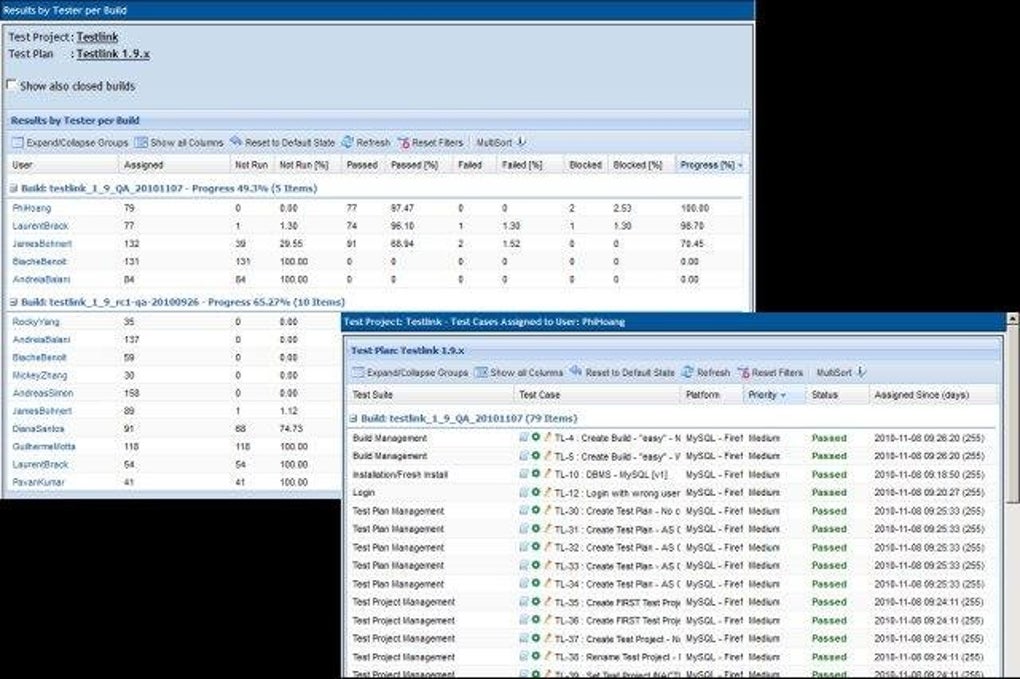
TestLink stands out as a pragmatic solution for test management because it addresses the fundamental challenges faced by testing teams: organization, traceability, execution, and reporting. It provides a structured framework that not only helps in defining what needs to be tested but also tracks the progress and outcomes of these tests with remarkable clarity. The platform is built on principles of user-friendliness and comprehensive functionality, making it accessible to both seasoned QA professionals and those new to formal test management.
Its architecture typically involves a web server (like Apache or Nginx), a PHP interpreter, and a MySQL or PostgreSQL database, making it a highly flexible and deployable solution. This web-based nature means that teams can access TestLink from anywhere, fostering collaboration regardless of geographical distribution. The emphasis on functional testing ensures that the application’s features behave as expected according to specified requirements, which is a cornerstone of effective quality assurance.
Intuitive Project Creation and User Management
One of TestLink’s most compelling features is its straightforward approach to project creation and subsequent user management. Upon accessing the system, users are greeted with an interface designed to facilitate quick documentation and setup. Starting a new project involves a guided process where necessary data, such as project name, description, and key specifications, can be input with ease. This initial setup is crucial as it lays the groundwork for all subsequent testing activities.
Beyond simply creating projects, TestLink provides sophisticated tools for user profile management. This includes the ability to define distinct user roles (e.g., tester, lead tester, project manager, administrator) and assign specific permissions based on these roles. For instance, a tester might have permissions to execute test cases and report defects, while a lead tester could have additional privileges to create and modify test plans. A project manager might have read-only access to reports, and an administrator full control over system configurations and user accounts. This granular control over permissions ensures data integrity, maintains security, and streamlines workflow by preventing unauthorized modifications while enabling necessary access.
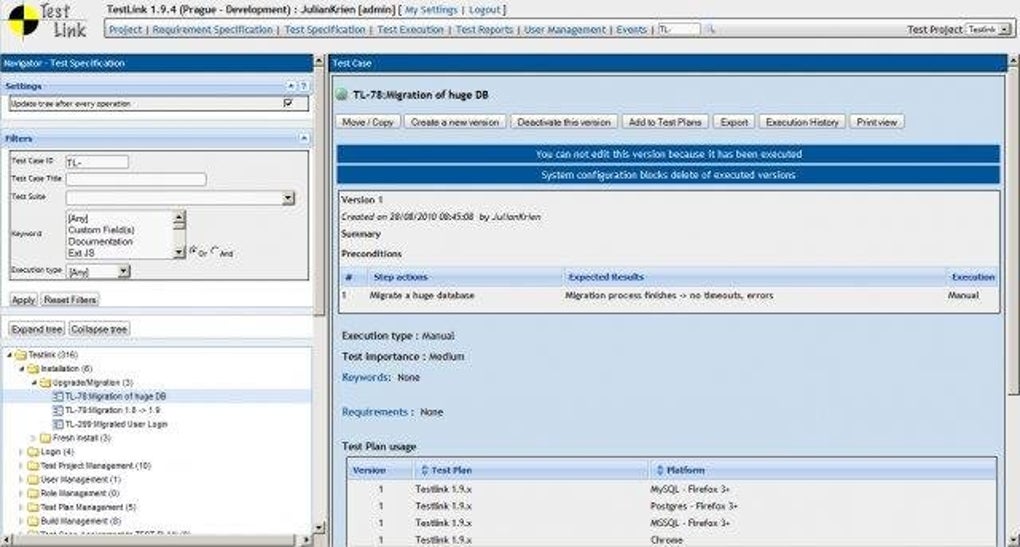
The intuitive interface extends to selecting existing projects, allowing users to effortlessly switch between different ongoing initiatives. This organizational capability is particularly beneficial for organizations managing multiple software products or different versions of the same product simultaneously. The ease of navigation and clear structure significantly reduces the learning curve, enabling teams to adopt TestLink quickly and integrate it into their existing development workflows without substantial overhead. This focus on user experience in project setup and access is foundational to TestLink’s efficiency and widespread adoption.
Comprehensive Test Plan Development
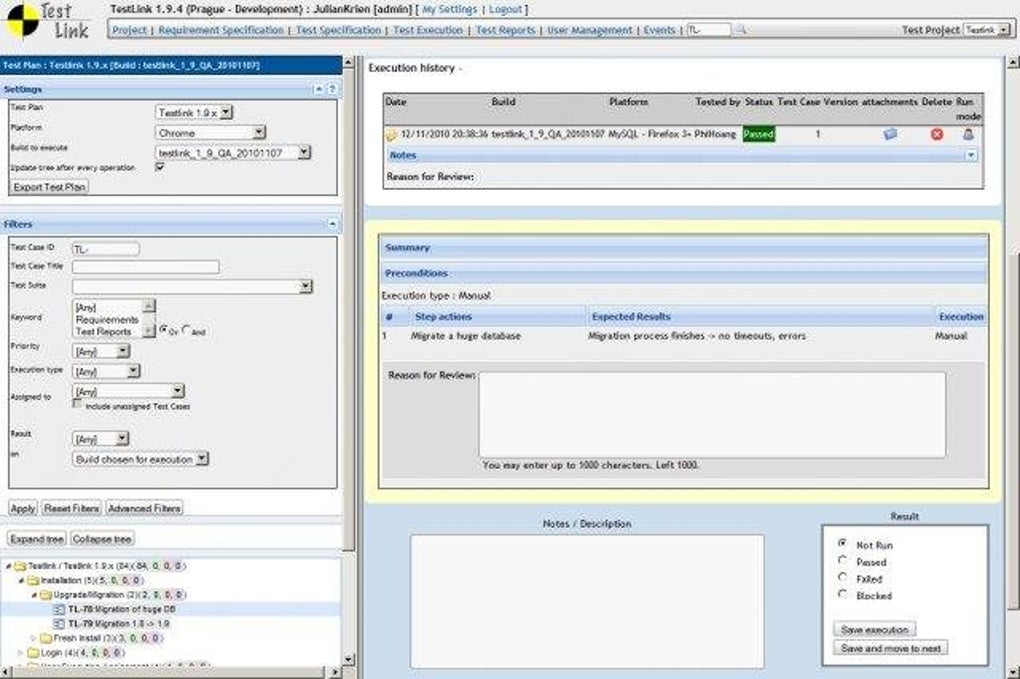
The heart of effective software testing lies in a well-defined test plan, and TestLink excels in providing the tools necessary to develop and manage these plans comprehensively. A test plan in TestLink is more than just a list of tests; it’s a strategic document that outlines the scope, approach, resources, and schedule of testing activities. TestLink allows users to meticulously craft these plans, ensuring thorough documentation and organization of the testing process.
.jpeg)
Users can create detailed test specifications, which include test suites and individual test cases. Each test case can be endowed with specific attributes such as its ID, title, summary, preconditions, steps to execute, and expected results. This level of detail ensures clarity and reproducibility, crucial elements for effective testing. Furthermore, TestLink supports the linking of test cases to requirements, enabling robust traceability. This means that for every functional or non-functional requirement, there can be one or more associated test cases, ensuring that no requirement goes untested. This bidirectional traceability is vital for demonstrating test coverage and understanding the impact of requirement changes on the testing effort.
TestLink also facilitates the grouping of test cases into logical units called test suites, which can then be assembled into specific test plans. For example, a “Login Module Test Plan” might include test suites for valid credentials, invalid credentials, password recovery, and session management. This modular approach allows for flexibility in testing, enabling teams to analyze multiple processes and scenarios. Test plans can be configured with specific builds, assign testers, and set execution priorities, providing a holistic view of the testing scope for any given release or iteration. The ability to manage different versions of test plans and test cases further enhances its utility, especially in agile environments where requirements and functionalities evolve rapidly. By centralizing test plan development, TestLink ensures consistency, reduces redundancy, and provides a single source of truth for all testing-related documentation.
Robust Analysis and Reporting Capabilities
Beyond the creation and execution of tests, TestLink truly shines in its ability to provide robust analysis and reporting features. Understanding the status and progress of testing is critical for informed decision-making and for maintaining project timelines. TestLink offers a variety of mechanisms to visualize test results, track progress, and identify potential issues, thereby empowering project stakeholders with actionable insights.
The platform generates comprehensive test reports that offer a quick overview of test results across various development platforms and testing cycles. These reports can detail the number of executed tests, passed tests, failed tests, blocked tests, and tests not yet run. They can be filtered by test plan, test suite, test case priority, tester, build, and even specific keywords, allowing for highly targeted analysis. This flexibility enables teams to monitor project statuses effectively, verifying satisfactory results and quickly pinpointing areas that require further attention.
TestLink’s reporting capabilities often extend to graphical representations, such as pie charts or bar graphs, illustrating test execution progress and pass/fail rates. These visual aids are invaluable for communicating complex data to non-technical stakeholders, providing an immediate understanding of the project’s quality status. For example, a QA lead can quickly identify if a particular module is experiencing a high failure rate, prompting a deeper investigation into the underlying code or requirements.
Furthermore, TestLink supports the integration with bug tracking systems (like Jira, Bugzilla, Redmine, etc.). When a test case fails, testers can directly create a defect report within TestLink, which then automatically links to the external bug tracking system. This seamless integration ensures that identified issues are immediately logged, tracked, and addressed by the development team, closing the loop in the defect management process. Regular analyses, facilitated by these detailed reports and integrations, help in identifying trends, assessing the overall quality of the software, and making data-driven decisions regarding release readiness. This comprehensive reporting suite makes TestLink an indispensable tool for quality assurance, transforming raw test data into meaningful intelligence.
Key Advantages of TestLink for Software Development
TestLink’s enduring popularity in the software development community is not just due to its features but also its inherent advantages that significantly boost development efficiency and product quality. As an open-source solution, it brings a host of benefits that are particularly attractive to organizations of all sizes, from startups to large enterprises.
One of the most significant advantages is its open-source nature. Being free to download and use eliminates licensing costs, making it an accessible option for budget-conscious teams. However, the benefits extend beyond cost savings. The open-source model fosters a vibrant community of users and developers who contribute to its improvement, provide support, and develop extensions. This community-driven development ensures that TestLink remains updated, relevant, and responsive to the evolving needs of the software testing landscape. Users also benefit from the flexibility to customize and extend the tool to fit their unique workflows, a degree of freedom often unavailable with proprietary solutions.
TestLink greatly enhances efficiency and organization within the testing process. By centralizing all test-related information – from requirements and test cases to execution results and defect reports – it eliminates the chaos often associated with scattered spreadsheets and disparate documents. This centralized approach reduces administrative overhead, minimizes human error, and ensures that everyone on the team is working with the most current information. The structured test plans aid in debugging software by providing clear steps to reproduce issues, thereby accelerating the defect resolution cycle.
Collaboration is another cornerstone advantage of TestLink. Its web-based platform allows multiple users to access and work on projects simultaneously, regardless of their physical location. This is particularly beneficial for distributed teams or organizations that outsource testing. Project managers can assign test cases to specific testers, monitor their progress in real-time, and facilitate communication around test results and defects. This shared environment promotes teamwork, transparency, and a unified approach to quality assurance.
The tool provides strong traceability, linking requirements to test cases and test cases to defects. This crucial feature ensures that every requirement is covered by a test, and every defect can be traced back to its originating test case and requirement. This end-to-end traceability is vital for compliance, auditing, and understanding the impact of changes. It allows teams to demonstrate comprehensively what has been tested and validate that the software meets its specified functional and non-functional requirements.
Lastly, TestLink’s design inherently supports platform compatibility in terms of testing different development environments. While the tool itself is often hosted on Windows (as per the reference, but also runs on Linux), it allows for the management of tests across various target platforms (e.g., web browsers, operating systems, mobile devices). The ability to define test environments within test plans means that teams can track results specific to Chrome on Windows 11 versus Firefox on macOS, providing nuanced insights into cross-platform performance and compatibility. This comprehensive set of advantages makes TestLink an exceptionally valuable tool for modern software development teams committed to delivering high-quality products.
Technical Specifications and System Requirements
To effectively deploy and utilize TestLink, it is crucial to understand its technical specifications and the underlying system requirements. The information provided by PhanMemFree serves as a concise overview, but for a deeper understanding, one must consider the typical environment for such an open-source web application.
According to the data, TestLink for Windows is available as a free license, which is a significant draw, reinforcing its open-source philosophy. The current version highlighted is 1.9.0, with a notable latest update on July 16, 2024. This indicates ongoing maintenance and development, assuring users that the software is kept current and responsive to modern operating system changes and security considerations. While the version number might seem modest compared to frequently updated consumer apps, for a stable test management system, consistent updates are more indicative of reliability and maturity.
The primary platform mentioned is Windows, specifically listing Windows 11 as the compatible OS. This implies that TestLink has been optimized or at least validated for the latest iteration of Microsoft’s operating system. However, given its nature as a web application typically deployed within a WAMP (Windows, Apache, MySQL, PHP) or XAMPP stack, it is highly probable that it functions seamlessly on previous Windows versions like Windows 10, 8, or even 7, provided the necessary server components are installed and configured correctly. For users on other operating systems, TestLink can often be run on Linux or macOS environments by setting up a LAMP (Linux, Apache, MySQL, PHP) or MAMP (macOS, Apache, MySQL, PHP) stack, respectively, as the application’s core is platform-agnostic PHP code.
Regarding its footprint, the software package size is a modest 12.17 MB. This small size suggests a lean application, minimizing download times and storage requirements. This is typically the size of the core application files, excluding the web server, database, and PHP interpreter, which would need to be installed separately. The developer is listed as the “TestLink Development Team,” a clear indicator of its community-driven, open-source origins.
While not explicitly detailed in the snippet, general system requirements for hosting TestLink would typically include:
- Operating System: Windows Server (e.g., 2012, 2016, 2019) for production environments, or any Windows desktop version (7, 10, 11) for local development or small teams.
- Web Server: Apache HTTP Server or Nginx. These are widely used and well-supported.
- Database: MySQL or PostgreSQL. TestLink relies on a relational database to store all its project data, test cases, results, and user information.
- Programming Language: PHP. TestLink is primarily written in PHP, so a compatible PHP runtime environment is essential. Specific PHP versions (e.g., PHP 7.x or 8.x) will be required, with documentation usually specifying the supported range.
- Hardware: A reasonable amount of RAM (e.g., 2GB-4GB minimum for the server) and processor speed are recommended, depending on the number of concurrent users and the scale of test data. Disk space will also be needed for the operating system, server software, database, and TestLink itself, though it’s generally not substantial for the application files.
The download statistics, showing 305 downloads and 21 last month’s downloads, reflect its niche but consistent user base within the programming and IT development communities. While not in the millions like mainstream consumer applications, these numbers indicate a stable and actively utilized tool by professionals who understand its value in structured testing. Understanding these specifications is the first step towards a successful TestLink implementation, ensuring the chosen environment can adequately support its operations and performance.
Installation, Usage, and Community Engagement
Adopting TestLink into a software development workflow involves understanding its installation process, familiarizing oneself with its practical usage, and appreciating the value of its vibrant open-source community. These aspects collectively contribute to the tool’s effectiveness and longevity.
Simplified Installation and Setup for Windows Environments
For Windows users, installing TestLink typically involves setting up a WAMP stack (Windows, Apache, MySQL, PHP) or using an integrated package like XAMPP or WampServer, which bundles these components. The general steps are:
- Download TestLink: Obtain the latest stable version of TestLink from its official website or a trusted source like PhanMemFree.
- Install WAMP/XAMPP: If not already present, install a WAMP or XAMPP package on the Windows machine. This provides the necessary web server, database, and PHP environment.
- Extract TestLink: Unzip the downloaded TestLink package into the web server’s document root (e.g.,
htdocsfor XAMPP orwwwfor WampServer). - Database Setup: Create a new MySQL or PostgreSQL database for TestLink using tools like phpMyAdmin (included with XAMPP) and create a dedicated database user with appropriate privileges.
- Configuration: Access the TestLink installation wizard via a web browser (e.g.,
http://localhost/testlink). This wizard guides the user through database connection settings, administrator account creation, and initial system configurations. - Post-Installation: Review the configuration files for any necessary adjustments and ensure that directory permissions are correctly set for optimal operation.
While specific steps might vary slightly with different versions or server setups, the process is generally well-documented and manageable for anyone with basic server administration knowledge. Once installed, TestLink provides a centralized, web-accessible hub for all testing activities.
Practical Usage: A Workflow Overview
The daily use of TestLink follows a logical flow that mirrors the typical software testing lifecycle:
- Project Initialization: Create a new project, defining its scope and initial settings, and add team members with assigned roles and permissions.
- Requirements Management: Import or define project requirements within TestLink. This forms the basis for creating test cases and ensures traceability.
- Test Specification: Develop detailed test suites and test cases. Each test case includes preconditions, execution steps, and expected results. Link these test cases to the relevant requirements.
- Test Plan Creation: Assemble test cases into specific test plans, associating them with particular builds or release versions. Assign test cases to individual testers.
- Test Execution: Testers log in, access their assigned test cases within a test plan, execute them against the software under test, and mark them as pass, fail, blocked, or not run.
- Defect Reporting: If a test fails, testers can immediately create a defect report within TestLink, which can then be integrated with an external bug tracking system for developer action.
- Reporting and Analysis: Throughout the process, project managers and QA leads can generate various reports to monitor progress, identify bottlenecks, assess test coverage, and verify the overall quality status of the software. Regular analysis helps in making informed decisions about release readiness and identifying areas for process improvement.
This structured workflow ensures that testing is systematic, comprehensive, and well-documented, greatly aiding in debugging and quality assurance.
Community Engagement and Ongoing Support
As an open-source project, TestLink thrives on its community. This active community plays a crucial role in its continued development, support, and evolution:
- Forums and Mailing Lists: Users can find answers to common questions, share best practices, and seek help from experienced users and developers.
- Documentation: Comprehensive official documentation, often supplemented by community-contributed guides and tutorials, helps users navigate the tool effectively.
- Contributions: Developers and experienced users can contribute to the project by submitting bug fixes, new features, or translations, ensuring that TestLink remains robust and responsive to user needs.
- Integrations: The community often develops and shares integrations with other tools (e.g., CI/CD pipelines, various bug trackers) that extend TestLink’s functionality.
The long-term viability of TestLink is directly tied to this community engagement. The “TestLink Development Team” is a testament to this collaborative spirit, signifying a commitment to continuous improvement. For new users, tapping into this resource can significantly smooth the learning curve and help maximize the benefits of this powerful test management system.
In conclusion, TestLink offers a comprehensive, flexible, and cost-effective solution for managing software testing. Its intuitive design, robust feature set for project, test plan, and execution management, coupled with powerful reporting capabilities, make it an indispensable tool for quality assurance. The open-source nature, backed by a dedicated development team and an active community, ensures its continued relevance and adaptability in the ever-evolving landscape of software development. By streamlining the entire testing lifecycle, TestLink empowers teams to deliver high-quality software products with greater confidence and efficiency, ultimately contributing to better end-user experiences.
File Information
- License: “Free”
- Version: “1.9.0”
- Latest update: “July 16, 2024”
- Platform: “Windows”
- OS: “Windows 11”
- Downloads: “334”
- Size: “12.17 MB”


