
Text Grab is a powerful and user-friendly application designed to streamline the process of extracting text from images. Its simple interface and robust functionality make it an ideal tool for individuals and businesses alike, offering a seamless solution for converting visual text into editable digital formats. This comprehensive guide explores the features, benefits, and applications of Text Grab, examining its capabilities within the broader context of text extraction software.
Understanding Text Grab’s Functionality
Text Grab’s primary function is to facilitate the effortless extraction of text from images. This seemingly simple task can be surprisingly laborious using traditional methods. Manually typing out text from images is time-consuming and prone to errors. Optical Character Recognition (OCR) technology, however, automates this process. Text Grab leverages advanced OCR algorithms to accurately identify and extract text from various image formats, including JPEGs, PNGs, and PDFs. The extracted text is then seamlessly copied to the user’s clipboard, ready for immediate pasting into documents, spreadsheets, or any other application.
The beauty of Text Grab lies in its minimalist design. Unlike some OCR applications that are cluttered with settings and options, Text Grab presents a clean, intuitive interface. This streamlined approach ensures that users can quickly and easily extract text without being bogged down by unnecessary complexities. This simplicity extends to its installation and use; the application requires minimal technical expertise to operate effectively.
Beyond basic text extraction, Text Grab offers several additional features that enhance its versatility and usefulness. These features further solidify its position as a leading tool in the field of text extraction software.
Text Grab’s Advantages and Applications
The advantages of using Text Grab are numerous and span various professional and personal contexts. Its ease of use and powerful OCR capabilities contribute significantly to its popularity.
Ease of Use: The application’s intuitive interface requires minimal user interaction. Once installed, users simply launch the application, select the image containing the text, and the program automatically extracts the text, copying it to the clipboard. This straightforward process minimizes the learning curve, allowing users of all technical skill levels to quickly master the application.
Accuracy and Speed: Text Grab’s advanced OCR engine ensures high accuracy in text extraction. The program efficiently processes images, delivering quick results even with complex layouts or challenging image quality. This speed and accuracy significantly reduce the time and effort required for text extraction, enhancing overall productivity.
Versatility in Application: Text Grab’s applications are diverse, ranging from personal use cases to professional settings. Students can easily extract text from scanned documents or images of textbooks, while professionals can digitize handwritten notes or extract data from images of invoices or receipts. The ability to handle various image formats also makes it a valuable tool for various professions. Researchers can use Text Grab to extract data from scanned articles and scientific papers, significantly accelerating the research process. Businesses can leverage Text Grab to automate data entry from invoices and other documents, improving efficiency and reducing the risk of manual errors.
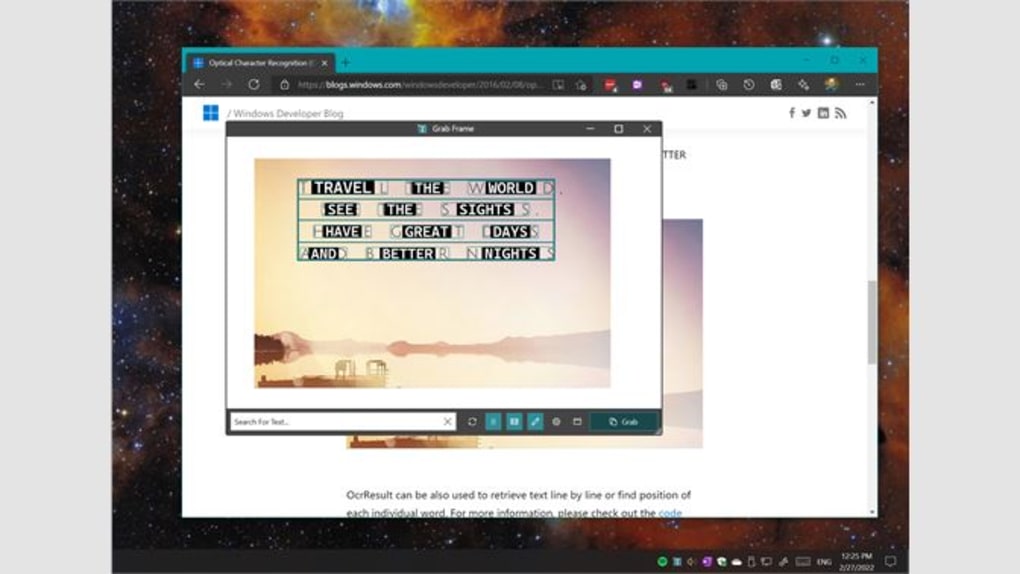
Integration with Other Applications: The extracted text from Text Grab can be seamlessly integrated with other applications. Once the text is copied to the clipboard, it can be pasted directly into word processors, spreadsheets, or other applications where further editing or processing can be performed. This smooth integration enhances workflow and eliminates the need for cumbersome manual data transfer.
Accessibility and Cost-Effectiveness: Text Grab’s availability on various platforms and its cost-effectiveness make it a highly accessible tool. The user-friendly interface makes it accessible to individuals with diverse technological skill levels. Furthermore, its affordability (or free open-source nature) makes it a viable option for both personal and professional use.
Text Grab: A Comparison with Alternative Applications
While Text Grab stands out for its simplicity and efficiency, several alternative text extraction applications exist. However, Text Grab distinguishes itself through a combination of factors that set it apart from its competitors.
Some competing applications offer more advanced features, such as automatic language detection or support for a wider range of file formats. However, these features often come at the cost of increased complexity and a steeper learning curve. Text Grab prioritizes ease of use and speed, making it an ideal choice for users who require a straightforward and efficient solution without needing intricate customization options.
Other applications might focus on specific niches, such as extracting text from scanned documents or processing large batches of images. Text Grab, while versatile, may not offer the same level of specialized functionality as these niche applications. However, its broad appeal and ease of use make it a compelling choice for users seeking a general-purpose text extraction tool. The balance between functionality and simplicity makes it a strong competitor in a crowded market.
Text Grab’s Technical Specifications and Availability
Text Grab is available for various operating systems, ensuring wide accessibility. The application’s technical specifications contribute to its performance and compatibility:
- Platform: Windows (specifically Windows 10 and later versions, potentially compatible with others)
- Language: Primarily English
- Size: Relatively small, ensuring minimal impact on system resources. (approximately 108.13 MB as stated)
- License: The licensing model may vary (full version is mentioned, indicating a potential paid version alongside possibly free or open-source variations).
- Updates: Regular updates ensure the application remains compatible with the latest operating systems and incorporates improvements in OCR accuracy and performance. (Latest update mentioned as July 14, 2025, indicating active maintenance.)
The download process is straightforward, with options to download directly from the developer’s website or through reputable app stores like the Microsoft Store. This ensures a secure and reliable installation process.
In conclusion, Text Grab presents a compelling solution for users seeking an efficient and user-friendly text extraction tool. Its combination of advanced OCR technology, a minimalist interface, and wide availability makes it a valuable asset for various tasks. Whether for personal or professional use, Text Grab simplifies the process of converting image-based text into easily editable digital formats, significantly enhancing productivity and efficiency.
File Information
- License: “Full”
- Version: “4.8.1”
- Latest update: “July 14, 2025”
- Platform: “Windows”
- OS: “Windows 10”
- Language: “English”
- Downloads: “2.5K”
- Size: “108.13 MB”


