
The Theme Store application, specifically designed for ColorOS devices (the operating system primarily used on OPPO smartphones), provides a comprehensive suite of customization options for users seeking to personalize their mobile experience. This in-depth review explores the app’s features, functionality, strengths, and limitations, offering a detailed perspective for potential users.
A Rich Catalog of Customization Options
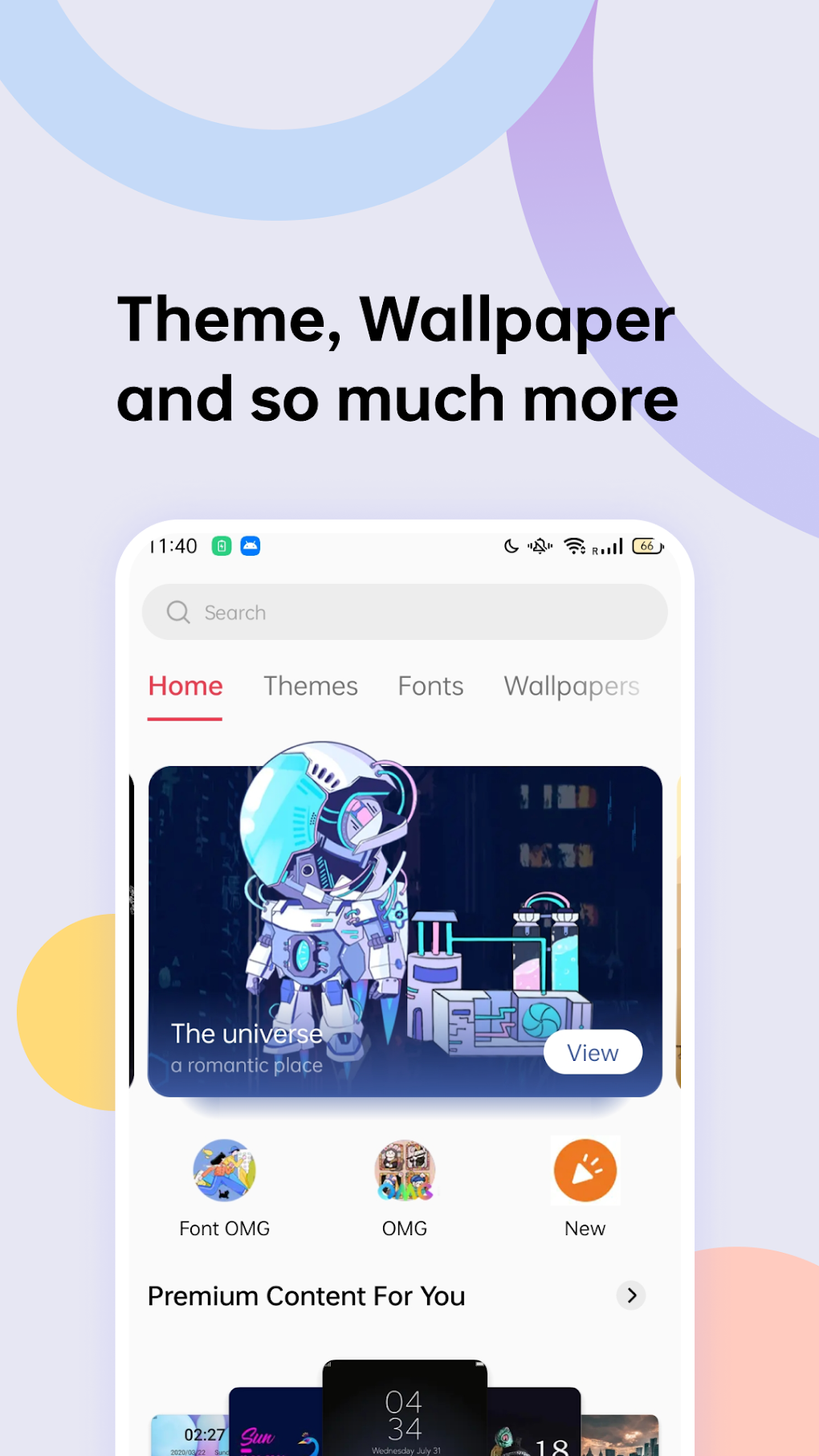
At its core, the Theme Store is a repository of visually appealing and functional customization elements. Unlike many apps that offer a limited selection, this application boasts an extensive catalog of themes, fonts, wallpapers, and even video ringtones. This breadth of options caters to diverse tastes, allowing users to tailor their phone’s appearance to reflect their individual style and preferences. The sheer variety ensures that users are unlikely to find themselves limited in their choices, regardless of their preferred aesthetic. The app presents a clean, uncluttered interface, making navigation intuitive and efficient. Whether you’re searching for vibrant, eye-catching designs or subtle, minimalist aesthetics, the Theme Store aims to provide a solution for every user.
The app’s organization is key to its user-friendliness. Users can easily browse through various categories and filters, allowing for quick and easy discovery of new themes and customization elements. This well-structured presentation contrasts with some personalization apps that overwhelm users with an unorganized and overwhelming collection of options. The intuitive design ensures that even users unfamiliar with such apps can quickly locate the resources they need.
Seamless Integration and Compatibility
A significant advantage of the Theme Store is its seamless integration with the ColorOS operating system. The themes, fonts, and other customizations are designed for compatibility, guaranteeing a smooth user experience without any performance issues or glitches. This ensures that users can enjoy their chosen customizations without compromising the functionality or stability of their device. The app takes care of the technical details, allowing users to focus solely on the aesthetic aspects of personalizing their phone.
The compatibility extends beyond simple functionality. The chosen themes are optimized for the ColorOS interface, ensuring that the overall visual harmony isn’t disrupted. This careful attention to detail demonstrates the app’s commitment to providing a holistic and cohesive personalization experience. The transition between different themes is smooth and immediate, without requiring extensive system restarts or reboots.
User Interface and Experience
The Theme Store’s success lies not only in its content but also in its user-friendly interface. The app is meticulously designed to enhance the user experience, making the process of browsing and selecting customizations enjoyable and efficient. The clean design is a stark contrast to some competitor apps that often present a cluttered and overwhelming display of options.
The browsing experience is intuitive and straightforward. Users can easily filter their search by various categories, such as color, style, and theme type. This targeted approach ensures that users can quickly find exactly what they’re looking for, without getting lost in a sea of irrelevant options. The app also features a preview function, allowing users to visualize how each theme will look on their phone before applying it.
The application’s simple and uncluttered interface is a crucial element in its overall appeal. It eliminates unnecessary distractions, allowing users to focus on the customization process. The user-friendly nature of the app ensures that users can quickly become proficient in using its features, regardless of their technical expertise. This simple design caters to both novice and experienced users of personalization apps.
Limitations and Exclusivity
Despite its considerable strengths, the Theme Store has a significant limitation: its exclusive availability for OPPO devices running on ColorOS. This restriction significantly limits the app’s potential user base. Users owning smartphones from other manufacturers are completely excluded from using this application. This exclusivity is a major drawback, potentially alienating a large segment of the market.
This exclusivity makes the Theme Store a niche app, only relevant to a specific segment of Android users. The development team’s decision to focus solely on OPPO devices may have been a strategic choice, but it undeniably restricts the app’s reach and overall impact. While this targeted approach might make development and support easier, it significantly diminishes the app’s overall accessibility and appeal to a wider audience.
Alternatives and Competition
Given the exclusivity of the Theme Store, users outside the OPPO ecosystem have to look for alternative applications to satisfy their customization needs. The Android market offers a variety of apps offering similar functionalities, although none are directly comparable given the Theme Store’s tight integration with ColorOS. These alternative apps may offer varying degrees of customization, compatibility, and ease of use.
Some alternative apps might focus on specific aspects of personalization, such as wallpapers, icons, or fonts, while others provide a broader range of customization options. Evaluating these alternatives necessitates considering factors such as app size, compatibility, interface design, and the overall selection of themes and customization elements. Each alternative application presents a unique set of advantages and disadvantages, making the choice heavily dependent on individual user preferences and priorities.
Conclusion: A Powerful Tool for OPPO Users
In summary, the Theme Store is a well-designed and highly effective personalization app for OPPO users. Its extensive catalog of themes, fonts, wallpapers, and ringtones offers a wide range of options, and the clean interface ensures a smooth and enjoyable user experience. The seamless integration with ColorOS guarantees optimal performance and compatibility.
However, the app’s exclusive availability for OPPO devices running on ColorOS severely limits its potential user base. This significant limitation overshadows its many positive aspects and makes the Theme Store a niche application rather than a broadly appealing option for Android users. For OPPO users, it’s an excellent choice for personalization; however, for users with other brands of Android phones, exploring alternative customization apps is necessary. The application’s strength and usefulness are undeniable within its targeted ecosystem, but its potential remains largely unrealized due to its exclusive nature.
File Information
- License: “Free”
- Latest update: “January 16, 2024”
- Platform: “Android”
- OS: “Android 13.0”
- Downloads: “471.8K”
- Download Options: “Google Play”


