
ThisIsWin11 is a free, open-source desktop utility designed to provide users with a comprehensive and concise overview of the features and functionalities of Windows 11. Developed by Builtbybel, it serves as a guided tour, replacing the need to sift through numerous online articles to understand the changes and improvements introduced in the Windows 11 operating system compared to its predecessor, Windows 10. ThisIsWin11 presents information in a clear, visually appealing manner, making the learning process significantly more efficient and user-friendly.
A Guided Tour Through Windows 11’s Key Features
The application functions as an interactive wizard, leading users through a series of informative screens accessed by clicking a “next” button. This step-by-step approach makes it easy to follow and retain the information presented. Instead of relying solely on textual descriptions, ThisIsWin11 incorporates numerous screenshots, visually illustrating each feature and its implementation within the Windows 11 environment. This combination of visual and textual information ensures a thorough understanding of the operating system’s capabilities.
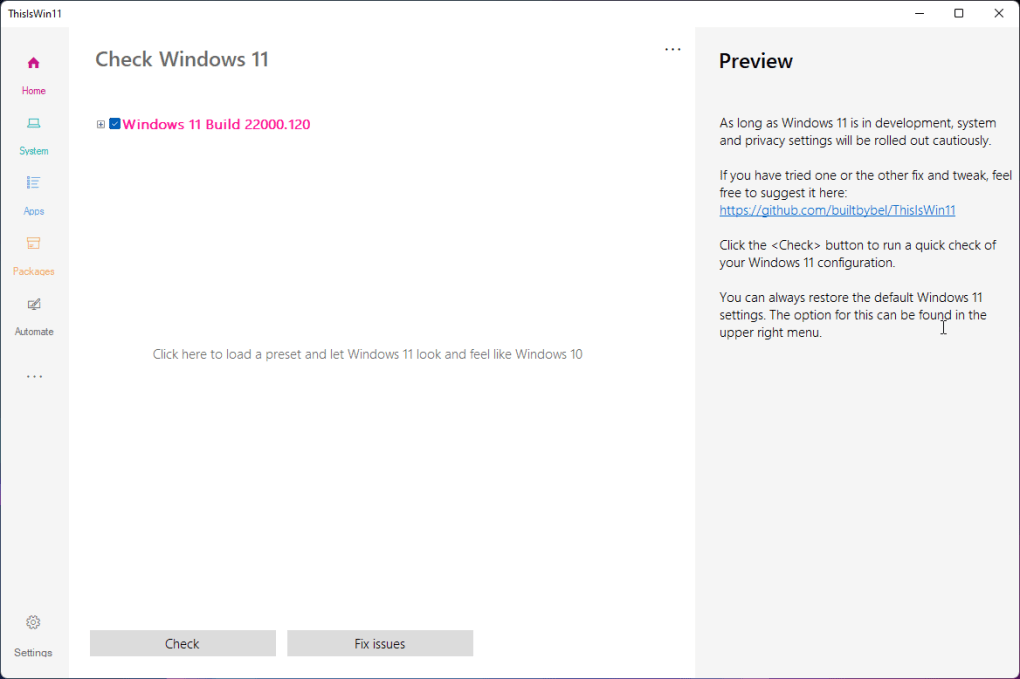
ThisIsWin11 covers over 15 distinct areas of Windows 11, focusing on the most significant changes and enhancements. The scope of the guide encompasses key elements such as:
-
Start Menu: ThisIsWin11 provides a detailed walkthrough of the redesigned Start Menu, highlighting its improved organization, search functionality, and overall user experience. Users will learn how to customize the Start Menu to suit their individual preferences and workflow.
-
Action Center: The application explores the Action Center’s updated interface and functionality, demonstrating how to access and manage notifications, quick settings, and system controls efficiently. Users will gain a deeper understanding of the improved notification management system and its customization options.
-
File Explorer: ThisIsWin11 meticulously details the enhancements and modifications made to File Explorer, showcasing the improved navigation, search capabilities, and overall usability. The guide emphasizes the changes in file management and the efficiency improvements implemented.
-
Microsoft Store: The application provides an in-depth examination of the Microsoft Store’s updated interface and functionality, guiding users through the process of discovering, downloading, and installing applications. This section highlights the improved app discovery and management processes.
-
Privacy Settings: ThisIsWin11 provides a thorough overview of Windows 11’s privacy settings, empowering users to understand and configure their privacy preferences effectively. This section focuses on user control and data security.
-
Redesigned Settings App: The application guides users through the redesigned Settings app, clarifying its improved organization and enhanced user experience. The guide highlights the improved navigation and the more intuitive layout.
-
Windows Updates: ThisIsWin11 explains the process of managing Windows updates, helping users understand the update schedule and how to customize update settings to suit their needs. This section improves user understanding of the update mechanism and control.
-
Layouts and Widgets: The application explores the new layout options and widget functionality, demonstrating how to personalize the desktop environment to enhance productivity and user experience. This section shows users how to customize their workspace.
Beyond these core components, ThisIsWin11 delves into various other facets of Windows 11, ensuring a comprehensive understanding of the operating system’s capabilities. This structured approach ensures a smooth learning curve for users transitioning from older Windows versions or encountering Windows 11 for the first time.
Beyond the Feature Showcase: Additional Utilities and Insights
ThisIsWin11’s functionality extends beyond a simple feature demonstration. The application also offers practical utilities, catering to users seeking more granular control over their Windows 11 environment. These tools provide added value, making the application a versatile resource for managing and optimizing the operating system.
Specifically, ThisIsWin11 empowers users to:
- Remove Default Apps: This function allows users to uninstall default applications that are not needed, freeing up disk space and improving system performance. This feature provides users with better control over the installed software.
-
Remove OneDrive: This utility enables users to remove OneDrive integration if they prefer not to use the cloud storage service, giving users more control over their data storage and management.
-
Restore Windows 10 File Explorer: For users who prefer the familiar interface of the Windows 10 File Explorer, this feature allows them to revert to the older version. This option provides users with flexibility in choosing their preferred interface.
-
Reinstall Built-in Utilities: Should any built-in utilities become corrupted or accidentally removed, ThisIsWin11 provides a straightforward method to reinstall them, ensuring that the system functions optimally. This feature enhances system stability and reliability.
By including these additional utilities, ThisIsWin11 establishes itself as a comprehensive solution, addressing not only the learning aspects but also the practical needs of Windows 11 users. This multifaceted approach positions it as a powerful tool for managing and optimizing the operating system.
Community Perspectives and Informed Decision-Making
ThisIsWin11 doesn’t simply present the features; it also integrates community perspectives. The application incorporates opinions and feedback from various online communities, providing a balanced perspective on Windows 11’s functionalities and user experiences. This aspect adds valuable context, allowing users to gauge the overall reception of specific features and make more informed decisions about their usage.
The integration of community feedback enhances the application’s value, offering more than just a technical overview. This approach promotes informed decision-making by users and helps them understand the broader implications of the software’s design choices. By considering both technical specifications and community reception, ThisIsWin11 aids users in maximizing their experience with the Windows 11 operating system.
Advantages and Limitations of ThisIsWin11
ThisIsWin11 offers several compelling advantages:
Pros:
- Enhanced Understanding of Windows 11: Provides a detailed and comprehensive overview of Windows 11’s features and functionalities.
- Visual Learning: Uses screenshots alongside textual descriptions, facilitating a more effective learning process.
- Community Insights: Incorporates community opinions to provide a balanced perspective on the software.
- Free and Open-Source: Available for free download and use, with the source code publicly accessible.
- Practical Utilities: Offers additional utilities for managing and optimizing Windows 11.
- Efficient Learning: The wizard-style interface makes the learning process quick and easy.
Cons:
- Limited Long-Term Relevance: The application’s primary purpose is to introduce users to Windows 11. Once users are familiar with the OS, its utility diminishes.
- No Updates Post-Release: As an introductory tool, it may not reflect ongoing updates and feature additions to Windows 11.
In conclusion, ThisIsWin11 stands as a valuable tool for users eager to explore and understand the features of Windows 11. Its interactive approach, combined with visual aids and community insights, significantly streamlines the learning process. While its long-term utility might be limited, it serves as an effective and efficient introduction to the operating system.
File Information
- License: “Free”
- Version: “0.70.0”
- Latest update: “September 3, 2021”
- Platform: “Windows”
- OS: “Windows 10”
- Language: “English”
- Downloads: “3.5K”
- Size: “72.46 KB”


