
ThumbsPlus Pro is a Windows-based image management application designed to simplify the organization, viewing, and editing of graphic files, including images, clip art, fonts, and animations. This comprehensive review delves into its features, functionality, user experience, and overall value proposition. While no longer actively updated, its legacy as a powerful thumbnail viewer and image organizer remains relevant for users seeking efficient file management capabilities.
Key Features and Functionality
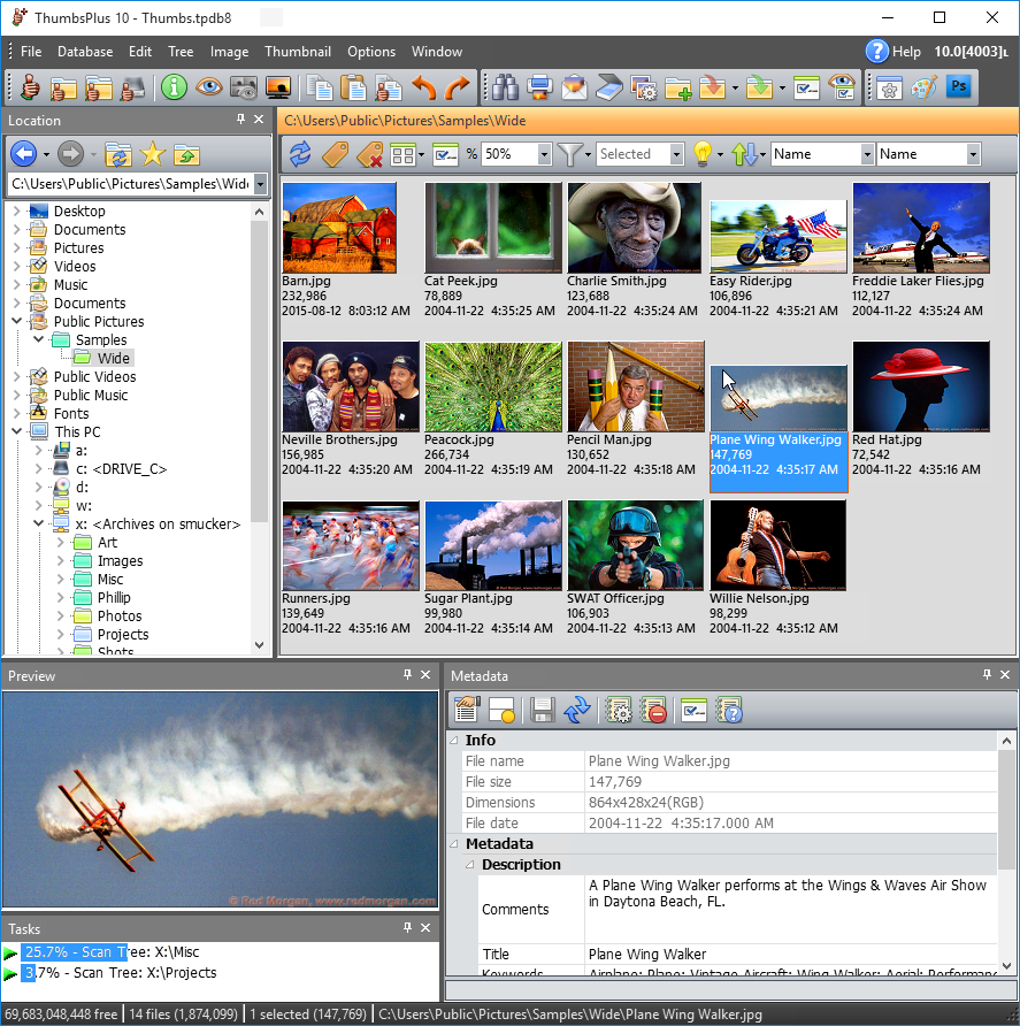
ThumbsPlus Pro’s core strength lies in its thumbnail-based interface. This allows users to quickly browse and identify files within large collections, eliminating the need to open each image individually. Beyond simple browsing, the software offers a robust suite of features designed to streamline image management workflows:
-
Thumbnail Display: The program’s primary feature is its ability to display thumbnails of various image formats, offering a visual overview of the entire collection. This facilitates quick identification and selection of specific files. The thumbnail size is customizable, allowing users to optimize screen real estate based on their needs and screen resolution.
-
File Format Support: ThumbsPlus Pro boasts broad compatibility with a wide array of image formats. This includes common formats like PNG, JPEG, GIF, and TIFF, as well as more specialized formats such as Microsoft Image Composer (MIC), Silicon Graphics (RGB), Seattle Filmworks (SFW), and Minolta RD-175 (MDC). This versatility ensures that users can manage a diverse range of image files within a single application.
-
Image Editing Capabilities: While not a full-fledged image editor like Photoshop, ThumbsPlus Pro integrates basic editing features. These include cropping, basic resizing, and the ability to copy images to the clipboard for use in other applications. This allows for quick, on-the-fly adjustments without the need to switch to a separate editing program for minor modifications.
-
External Editor Integration: Users can seamlessly integrate ThumbsPlus Pro with external image editors. This allows users to open images in their preferred editing software directly from within the ThumbsPlus Pro interface, leveraging the power of specialized applications for more advanced editing tasks without disrupting their workflow.
-
File Management Tools: Beyond viewing and editing, ThumbsPlus Pro simplifies file management tasks. Users can easily drag and drop files between directories, rename files, and delete files directly within the application. The software also allows for the creation of slideshows from selected images, a convenient feature for presentations or casual viewing.
-
DDE Command Support: The program supports Dynamic Data Exchange (DDE) commands, allowing integration with other applications. This advanced feature enables users to control ThumbsPlus Pro remotely from other software, enabling automation and workflow integration. For instance, this allows for the program to be incorporated into larger automated processes or custom workflows.
-
Wallpaper Setting: ThumbsPlus Pro offers the ability to directly set BMP files as Windows wallpaper, adding further convenience to the overall user experience.
User Interface and Experience
ThumbsPlus Pro features a straightforward and intuitive user interface. While the interface may appear somewhat dated compared to modern software, its simplicity is a benefit. The focus on core functionality makes it easy to navigate and use, even for users with limited experience with image management software. The thumbnail-based view is efficient, and the basic editing tools are accessible and straightforward.
System Requirements and Compatibility
ThumbsPlus Pro is designed for Windows operating systems. While the specific system requirements are not explicitly detailed in readily available information, it’s known to be compatible with Windows 95 and earlier versions. However, given the age of the software, optimal performance on modern Windows systems is not guaranteed, and some functionality might be limited depending on the operating system’s version.
Limitations and Alternatives
Despite its useful features, ThumbsPlus Pro has several limitations. The most significant is that it is no longer actively developed or updated. This means that it lacks compatibility with modern image formats or operating systems, and it doesn’t benefit from bug fixes or performance improvements that newer software would receive.
Several modern alternatives offer similar functionality and often surpass ThumbsPlus Pro in terms of features and interface design. These include dedicated image viewers, photo managers, and image editing software. Many of these alternatives offer free or low-cost options, which might be a preferable choice for new users.
Conclusion
ThumbsPlus Pro remains a functional tool for managing image files, particularly for users comfortable with its older interface and who primarily need thumbnail-based browsing and basic editing features. However, its lack of active development and the availability of newer alternatives with enhanced capabilities, modern interfaces, and ongoing support should be considered. For users seeking cutting-edge features, superior performance, and ongoing support, investing in a modern image management application is likely the better choice. ThumbsPlus Pro’s legacy lies in its efficient thumbnail-based organization, but newer software offers improved features and streamlined workflows. The choice depends ultimately on individual needs and preferences, weighing the benefits of its simplified approach against the advantages offered by contemporary software.
ThumbsPlus Pro vs. Modern Alternatives: A Comparison
A direct comparison between ThumbsPlus Pro and modern alternatives requires considering several factors. These include:
- Feature Set: Modern alternatives typically provide more extensive feature sets, including advanced editing capabilities, RAW file support, geotagging integration, online sharing options, and cloud storage integration. ThumbsPlus Pro’s functionality is more limited.
-
User Interface: Modern applications usually feature more visually appealing and intuitive interfaces, benefiting from contemporary design principles. ThumbsPlus Pro’s interface, though straightforward, feels dated in comparison.
-
Platform Compatibility: Modern alternatives usually support a wider range of operating systems (Windows, macOS, iOS, Android) and often offer web-based applications for cross-platform access. ThumbsPlus Pro is Windows-only and lacks cross-platform support.
-
Updates and Support: Modern alternatives receive regular updates, addressing bugs, improving performance, and adding new features. ThumbsPlus Pro, being discontinued, lacks these benefits.
-
Cost: While ThumbsPlus Pro was a trialware application, many modern alternatives offer free versions with limited features or affordable subscription models for full functionality.
By comparing these aspects, users can objectively assess whether ThumbsPlus Pro’s limited yet functional features justify its use over the advantages offered by newer, well-maintained software. The decision hinges on a user’s specific needs and comfort level with older technology versus embracing contemporary applications.
File Information
- License: “Trial version”
- Latest update: “December 9, 2023”
- Platform: “Windows”
- OS: “Windows 8.1”
- Language: “English”
- Downloads: “6.7K”
- Size: “52.39 MB”


